
Jump to section
- Why Login Scraping Breaks the Way Most Tutorials Assume
- Treat the session as a managed resource
- Authentication Mechanics You Cannot Skip
- Fetch the login page first
- Submit the credentials with the captured state
- Persist and verify the session
- Detecting a Dead Session Before It Corrupts Your Output
- Check the session before sending work
- Validate status and body content
- SLA Metrics That Actually Reflect Login Scraping Health
- Three measurements belong on the primary dashboard
- Instrument state transitions, not just requests
- Retries, Backoff, and Alert Thresholds
- Route alerts to the cause
- Cookie Reuse Versus Headless Browsers
- Stateful cookies
- Headless browser sessions
- An Operating Checklist for Login-Based Pipelines
- Monday-morning runbook
You’ve built a scraper that works perfectly on public pages. Then the target URL moves behind a login. The first run appears successful, but the output contains a login shell, an empty table, or a dashboard with no records. The process keeps returning HTTP 200, so your scheduler marks the job healthy while downstream users consume invalid data.
That failure is rarely caused by the first login request alone. Authenticated scraping is a session-management problem before it’s a request-volume problem. The session can expire, a CSRF token can rotate, cookies can lose their scope, or the server can invalidate an idle account without producing an obvious transport error. A reliable pipeline must authenticate, verify, monitor, recover, and govern the session throughout its lifecycle.
Why Login Scraping Breaks the Way Most Tutorials Assume
Most tutorials show one clean sequence: open the login page, submit credentials, save cookies, request protected content, and parse the result. That sequence can work in a local test, but it doesn’t represent what happens during a recurring production run.
A session may become invalid while the scraper is still making requests. The server can redirect to /login, return an authentication error, or serve a normal-looking HTML document containing a logged-out shell. The last case is particularly dangerous because the HTTP layer reports success even though the extraction layer has stopped receiving useful content.
Practical rule: A successful HTTP response isn’t proof of an authenticated response. Validate identity and payload content separately.
Consider a job that requests a protected table after the account has expired. The response status is 200, the parser finds a page element, and the process writes an empty dataset. Unless the pipeline checks for expected selectors, schema fields, record presence, or logged-out markers, the failure can continue unnoticed. The issue isn’t that the scraper needs more requests. It’s that every request depends on valid session state.
Treat the session as a managed resource
A solid design tracks the conditions required for authenticated access:
- Cookie state: The session cookie must still exist, remain within scope, and be accepted by the server.
- Token state: CSRF and related anti-forgery values must match the login flow and may need to be refreshed.
- Account state: Credentials, permissions, and account status must remain valid.
- Client state: The session may depend on consistent browser identity, IP behavior, and request pacing.
The operational guidance for authenticated scraping emphasizes this shift from public crawling toward permission, contract review, and data minimization. Courts have drawn a practical distinction between publicly accessible pages and access behind authentication, and bypassing a login or technical barrier can create CFAA-style or breach-of-contract concerns, as summarized in Apify’s legal guidance. A login wall is a stronger restriction than a robots.txt directive, so authorization needs to be documented before implementation.
The consequence is straightforward. Store session state in account-scoped, protected storage, verify it before every run, and design recovery paths before the first protected request. The script that only handles the happy path is a prototype. The production system handles expiry, invalidation, partial output, and escalation.
Authentication Mechanics You Cannot Skip
Start by inspecting the login flow in the browser’s Network panel. Identify the form action or authentication endpoint, the exact field names, hidden inputs, cookies, redirects, and any request headers the site expects. Don’t guess from the visible labels. The server validates the request it receives, not the wording shown in the interface.
Fetch the login page first
The first request should be a GET to the login page through a persistent session. This collects initial cookies and gives the scraper access to hidden CSRF or anti-forgery fields. A CSRF-protected form often rejects a credential POST unless the token came from the same session that submits it.
Use requests.Session() or an equivalent client so cookies from the initial response remain attached to the login request. The session model described in session-cookie management guidance is the important part, not a particular Python library. The client must preserve state across the entire flow.
Submit the credentials with the captured state
Build the POST payload from the inspected form. Include the username and password fields, hidden values, and any required CSRF token. Keep the session’s cookies intact, and reproduce only the headers that the endpoint requires, such as a consistent User-Agent, Referer, or Origin.
A 200 response doesn’t confirm a successful login. Many applications return the login page again with an error message while keeping the status code unchanged. A redirect to the expected dashboard is stronger evidence, but the scraper should still request a known protected page before it starts extraction.
Persist and verify the session
After a successful authentication, persist the resulting cookie jar in account-scoped storage. Don’t use one shared flat file for unrelated accounts or jobs. Protect the stored session material because it can grant access without requiring a fresh password.
Before the main loop, request a protected endpoint and validate both access and content. Check the final URL, status, expected selectors, and a small set of schema markers. For broader context on controlling identities, permissions, and account access, Technovation LLC’s IAM guide is a useful companion resource.
The same inspection discipline applies when the site relies on browser execution or anti-bot controls. Review anti-bot measures in Playwright before moving to browser automation, and use it to understand whether the obstacle is authentication, rendering, or access protection.
Detecting a Dead Session Before It Corrupts Your Output
Session validation belongs inside the scrape loop, not only in the login function. A cookie can be valid when the job starts and invalid by the time the scraper reaches a later endpoint. The detection order should move from cheap local checks to increasingly expensive response inspection.
Check the session before sending work
First inspect the cookie jar for missing or expired critical cookies. This pre-flight check costs almost nothing and can prevent a predictable failure. If the required state is absent, re-authenticate before requesting a batch of protected pages.
Next inspect redirects. A response chain that ends at /login or /signin is a clear authentication failure. Don’t parse that response as content. Mark the session invalid, refresh authentication, and retry the original request only after the new session passes verification.
Validate status and body content
A 401 or 403 from an endpoint that previously required authentication should trigger the same recovery path. Re-authenticate, then retry once under the fresh session. Repeating the original request with the same invalid cookies only adds noise and can increase the chance of further challenges.
A 200 response requires deeper validation. Compare the body against expected selectors, payload keys, content length ranges, and known logged-out markers such as a login form or “Sign in” link. Body checks should be the final layer because parsing costs more than checking local state, redirects, or status codes.
| Signal | Detection Point | Response |
|---|---|---|
| Missing or expired critical cookie | Before the request | Re-authenticate and verify the protected endpoint |
Redirect to /login or /signin | After following redirects | Mark the session dead, re-authenticate, then retry once |
| HTTP 401 or 403 | Response status | Refresh authentication, record the event, and retry once |
| 200 response with logged-out shell or missing schema | Body validation | Discard the response, re-authenticate, and quarantine affected output |
Log each event with a structured tag such as cookie_missing, auth_redirect, auth_status, or payload_invalid. That makes it possible to see whether the dominant problem is expiry, permission loss, login-flow drift, or parser failure. If the protected content is delivered through asynchronous requests, Playwright request interception can help identify which authenticated call contains the data.
SLA Metrics That Actually Reflect Login Scraping Health
A login-based pipeline can be technically reachable and operationally broken. A basic uptime check may see a responsive server while the scraper receives a login page, an empty application shell, or a valid document with no records. Monitoring must measure authenticated usefulness, not only transport availability.
Three measurements belong on the primary dashboard
Authenticated request success rate measures protected requests that return an authenticated, schema-valid result against all protected requests. Count a response as successful only after redirect, status, and payload checks pass. A logged-out HTML page with status 200 must not enter the success numerator.
Session freshness measures how recently each session completed a successful re-authentication. Track the last successful login or session refresh per account, including the distribution across active sessions. A growing age can reveal that a pipeline is surviving only because old cookies haven’t failed yet.
Data integrity rate measures whether protected responses contain the expected structure. For JSON, validate required keys and types. For HTML, verify authenticated selectors and reject login templates. This metric catches silent partial failures that ordinary uptime misses.
The metric names and thresholds should reflect the application’s actual operating agreement. For broader guidance on defining and tracking service objectives, see this SLA monitoring resource for DevOps teams.
Instrument state transitions, not just requests
Attach a session_id label to request logs and metrics, while avoiding the storage of raw cookies or credentials. Emit counters for authentication success, authentication failure, re-authentication, protected-request rejection, and payload validation failure. Record cookie expiry metadata where available, but keep the session store encrypted and access-controlled.
A useful dashboard places three panels in one row:
- Authenticated success rate, split by target and account.
- Session freshness, showing active sessions and aging sessions.
- Data integrity rate, showing schema-valid protected responses.
Add a lower panel for re-authentication failures and a log view filtered by session ID. An on-call engineer should be able to determine whether the problem is credentials, session expiry, access permissions, or extraction logic without opening the source code.
Retries, Backoff, and Alert Thresholds
Retry logic must separate temporary transport failures from invalid authentication state. A timeout may clear on its own. Repeating an authenticated request with an expired session will only waste capacity and can obscure the underlying incident.
For ordinary transient failures, cap retries at three attempts and apply exponential backoff with jitter. Use 1 second, 4 seconds, and 12 seconds, each varied by plus or minus 25 percent, according to the operating policy for this pipeline. Jitter keeps workers from sending their retries at the same moment after a shared interruption.
Authentication-class failures require a different path:
- 401 responses require re-authentication.
- 403 responses require investigation of permissions, account state, or access controls.
- Redirects to login require a fresh session.
- Logged-out 200 responses require payload rejection and session recovery.
After re-authentication, retry the original request once. If the new session fails protected-page verification, stop the job or quarantine the account. Continuing would turn an authentication incident into questionable output.
Route alerts to the cause
The operating policy defines these alert levels:
- Warning: authenticated success rate below 98% for 5 minutes.
- Page: authenticated success rate below 95% for 10 minutes.
- Critical: three consecutive re-authentication attempts fail.
Tie each threshold to the metric definition and target scope. A global percentage can hide a single failing account, so alert labels should identify the site, account, job, and session group.
A Prometheus-style rule can express the page condition:
authenticated_success_rate < 0.95 for 10m
The query depends on the names and aggregation rules used for your counters. Send repeated credential-renewal failures to the identity or account-management team. Send parser and transport failures to the scraping team. This routing prevents engineers from restarting workers when the login form or account policy has changed.
A four-minute outage may trigger the warning layer without firing the page condition if recovery occurs before the evaluation window ends. Keep the incident visible through the session-failure counter and job-level status. Alert windows support escalation, while run-level audit records preserve what happened.
Cookie Reuse Versus Headless Browsers
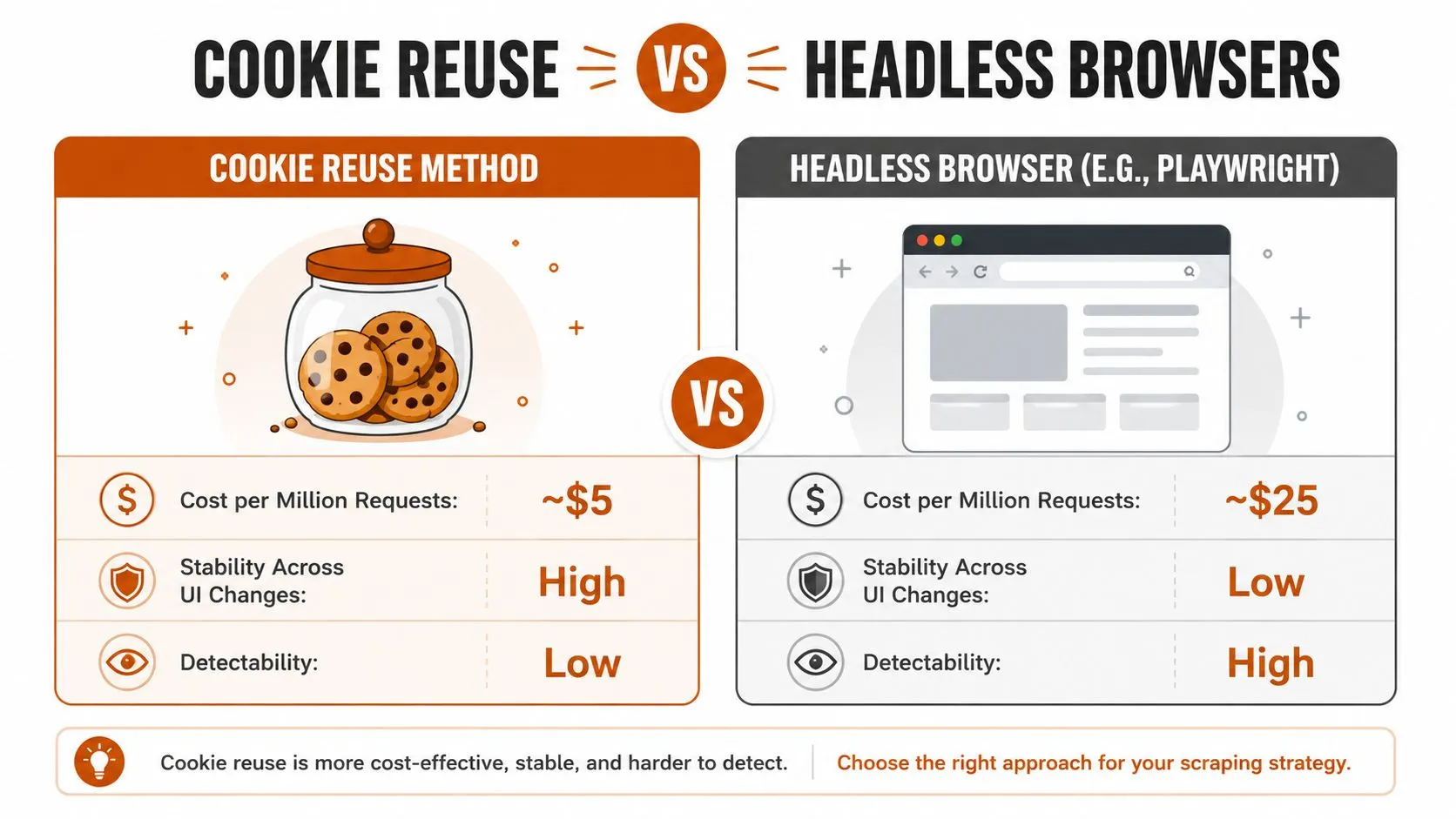
“Just use Playwright” is often the first recommendation for login scraping. It’s also frequently the wrong default. If the protected data comes from a stable JSON endpoint and the login can be completed through ordinary HTTP requests, reusing authenticated cookies is simpler, lighter, and easier to operate.
Stateful cookies
Cookie reuse uses a session client to authenticate once, retain the server-issued state, and replay it on later protected requests. It avoids browser startup overhead and works well for high-volume API-like extraction. The trade-off is fragility when the login flow changes, token names move, or the application adds JavaScript-dependent checks.
Cookie reuse is a strong fit when:
- The protected endpoint returns stable JSON.
- The login is a conventional form or token flow.
- The server doesn’t require browser execution to issue the session.
- The extraction volume makes browser orchestration unnecessarily expensive.
Keep each account’s cookies isolated, encrypt them at rest, and refresh them when the server invalidates the session. The guide to handling cookies in Playwright with Python is also relevant when browser-generated state must later be transferred into another part of the pipeline.
Headless browser sessions
Playwright or Selenium becomes appropriate when JavaScript renders the login form, the protected data appears only after client-side requests, or the site’s authentication flow depends on browser state that an HTTP client can’t reproduce. Browser automation follows the application’s actual interface, which can make it more tolerant of markup changes than a handcrafted form submission.
It also introduces more operational surface area. Browser processes consume more resources, browser versions need maintenance, and the automation has a larger fingerprinting surface. Strict session controls may require a manual MFA step, saved browser state, stable identity characteristics, and explicit logout detection. The safe approach is to complete MFA legitimately and reuse valid authenticated state, not to bypass the challenge.
A hybrid design often works best. Use Playwright for human-assisted login and session creation, save the authenticated browser state, then use a lighter client for protected API calls where the site permits that pattern. Reopen the browser only when state expires or the application requires browser execution.
An Operating Checklist for Login-Based Pipelines
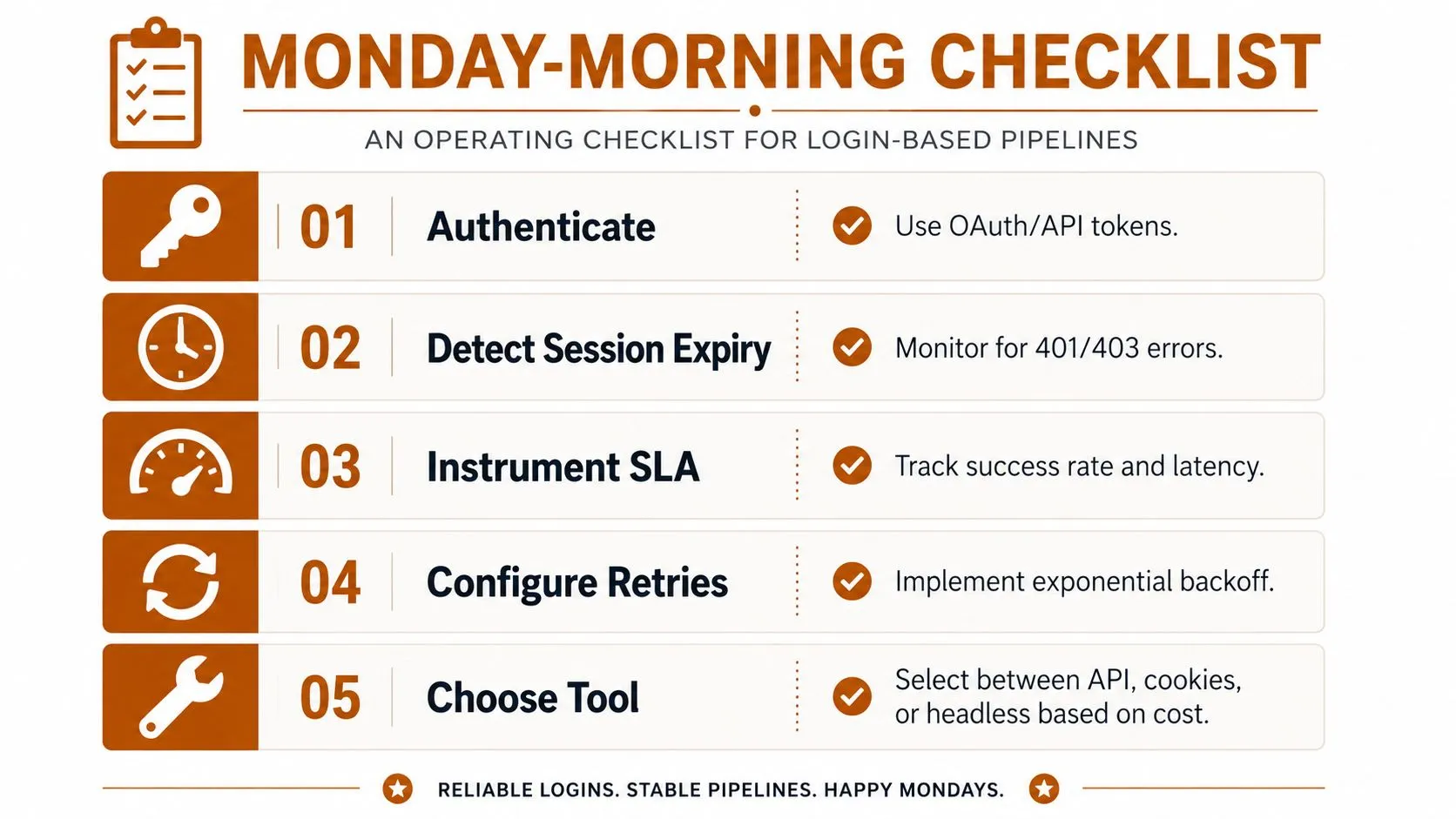
Copy this checklist into the runbook your team uses for recurring jobs. Each item targets a failure that otherwise appears late, after invalid data has already reached a consumer.
Monday-morning runbook
- Confirm authorization: Review the site’s terms, account permissions, contract, and data scope before running authenticated collection. Public accessibility and authorized account use aren’t interchangeable.
- Map the login flow: Record the login URL, field names, redirects, hidden inputs, CSRF behavior, cookies, and protected verification endpoint. This prevents credential POSTs from failing after token or form changes.
- Select the least complex tool: Use an available API or approved export first. Use cookie-based HTTP sessions for stable protected endpoints, and use Playwright when JavaScript or browser state is required.
- Protect session material: Encrypt cookies, storage state, and tokens. Scope each account to its job, restrict access, and never place live authentication state in source control.
- Verify before extraction: Request a known protected page and validate URL, status, authenticated markers, and schema before processing the target batch.
- Detect all expiry signals: Check missing cookies before requests, login redirects after responses, 401 and 403 statuses, and logged-out or schema-invalid bodies.
- Define recovery behavior: Re-authenticate after an authentication failure, retry the original request once with the fresh state, and quarantine the output if verification still fails.
- Instrument the service: Track authenticated success rate, session freshness, data integrity, auth transitions, cookie expiry metadata, and job-level output status.
- Configure retry tiers: Apply bounded exponential backoff with jitter to transient failures. Don’t retry authentication failures against a dead session.
- Assign alert ownership: Send credential and account-policy failures to the identity owner. Send parser, transport, and site-change failures to the scraping owner.
- Review session hygiene: Check stale accounts, expired state, unusual re-authentication patterns, and unnecessary permissions during a recurring operational review.
The checklist should evolve with the target. A changed login form, new MFA requirement, altered schema, or modified account policy is a production change, not a minor maintenance detail. Teams that need to interpret recurring extraction data can also use an overview of advanced analytics to connect data-quality signals with operational decisions.
Long-term reliability requires ownership after deployment. The maintenance practices in this guide to maintaining web scrapers apply especially strongly to authenticated jobs because session state, permissions, and access policy can fail independently of page structure. Login scraping becomes dependable when governance, observability, and recovery are treated as part of the product.
WebscrapingHQ provides managed web data operations and custom extraction pipelines with monitoring, retries, alerting, and ongoing tuning for changing sites, including workflows that require authenticated sessions. Visit WebscrapingHQ to discuss a login-based pipeline with defined schemas, delivery schedules, and operational ownership.
Want this done for you?
Send us the URLs. We'll quote it in 24 hours.
Paste the URL(s) you want scraped. We'll reply within 24 hours with a feasibility check and a ballpark quote.