Jump to section
- Where to find ASINs on Amazon pages
- ASINs in product detail page URLs
- ASINs in listing markup and page HTML
- ASINs in visible product details blocks
- How to extract ASINs from listings and detail pages
- Extract ASINs from search and category results
- Extract ASINs from product detail pages
- Validate format and remove duplicates
- Build a Python workflow with Playwright for ASIN collection
- Set up Playwright and collect ASINs from result pages
- Parse ASINs from product URLs and detail page elements
- Structure output for downstream systems
- Handle Amazon-specific scraping issues and workflow takeaways
- Common collection issues on Amazon pages
- When to build in-house vs. use a managed workflow
- Conclusion: A simple, reliable ASIN scraping workflow
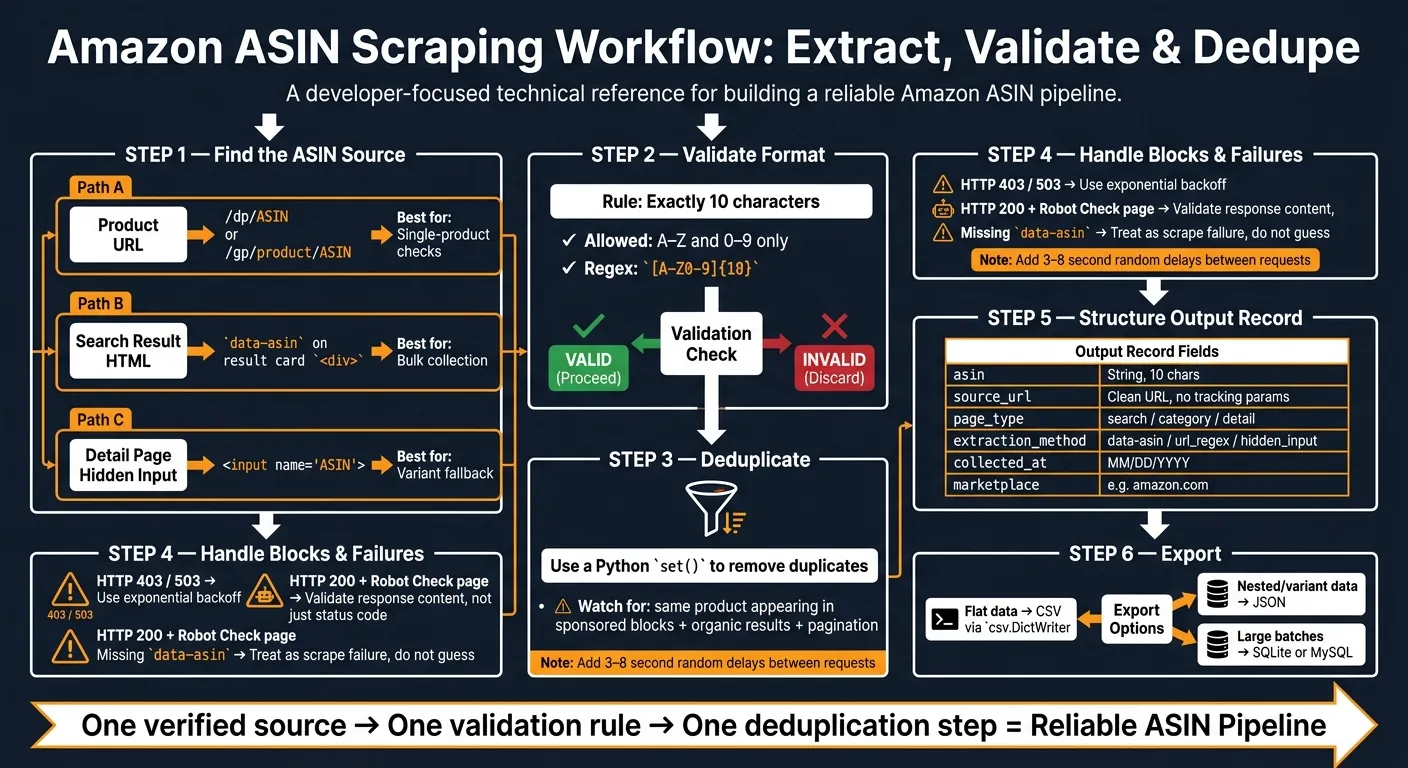
If I need Amazon ASINs at scale, I keep the process simple: pull from the URL, check data-asin on result cards, fall back to the hidden ASIN input, then validate, dedupe, and log the source. That is the core workflow.
Here’s the short version:
-
An ASIN is a 10-character product ID like
B01B3SL1UA -
The fastest places to get it are:
-
product URLs such as
/dp/ASIN -
search-result HTML with
data-asin -
product-page fields like
input[name="ASIN"]
-
-
For bulk jobs, result pages are usually the best starting point
-
For detail pages, I’d check the URL first, then the hidden input, then the product details area
-
Before export, I’d:
-
confirm the ASIN matches
A-Zand0-9 -
keep only values with exactly 10 characters
-
remove duplicates with a
set() -
store the crawl date in MM/DD/YYYY format
-
-
Playwright fits this job when Amazon loads content with JavaScript or when plain requests miss product blocks
-
Common failure signs include 403, 503, and Robot Check pages that still return 200 , which often requires specialized techniques to bypass Cloudflare and other anti-bot measures
-
Volume matters: a small script may work for low-volume pulls, but higher-volume jobs often mean more time spent on maintaining web scrapers to handle retries, selectors, and blocks
A few points stand out from the article:
-
URLs are usually the first check
-
data-asinis the main bulk source -
detail-page tables are best used as a check
-
variant products can show different ASINs depending on where I pull the value
-
clean output matters more than extra fields if the goal is matching, tracking, or later scraping
| Source | Best use | Main issue |
|---|---|---|
URL (/dp/ or /gp/product/) | Single-product checks | Can miss the shown variant in some cases |
data-asin on result cards | Bulk collection from search/category pages | Some cards may be empty or skipped |
Hidden ASIN input | Detail-page fallback | Not always present |
| Product details table | Verification | May show parent ASIN, not child ASIN |
My takeaway: the article is about building a clean, repeatable ASIN pipeline, not just grabbing IDs off a page. If I were setting this up, I’d focus on source order, format checks, deduping, and block detection first.
The rest of the article walks through that process with Python and Playwright in a way that is easy to follow.
Where to find ASINs on Amazon pages
Check the target page before you scrape anything. Amazon usually exposes ASINs in three spots: the product URL, the search results HTML, and the visible product details block. That gives you a backup plan if one source doesn’t show up.
The simplest move is to start with the URL. If that fails, pull from the HTML. After that, use the page details block to confirm what you found.
ASINs in product detail page URLs
The fastest way to get an ASIN for one product is straight from the browser address bar. Amazon uses two common URL formats: /dp/ASIN and /gp/product/ASIN. The ASIN comes right after that path segment [6][7][8].
So if the URL is amazon.com/dp/B09X7CRKRX, the ASIN is B09X7CRKRX.
Use this regex to match both formats: (?:\/dp\/|\/gp\/product\/)([A-Z0-9]{10}) [8]. It also works on result-card title links, which is handy if you already have a batch of product URLs. In that case, URL extraction is often the quickest way to build a clean ASIN list.
ASINs in listing markup and page HTML
If URLs are missing, messy, or not worth trusting, pull ASINs from the page HTML instead. On search results and category pages, Amazon often includes the ASIN in the markup before you even open the product page.
Each result card has a root <div> with a data-asin attribute. If you target div[data-component-type="s-search-result"], you can grab that value right away [3][2].
This method is often better than parsing URLs because it lets you collect a lot of ASINs from one results page without opening every product. If a result card doesn’t include data-asin, grab the title-link href and run the regex above on that URL [2].
ASINs in visible product details blocks
Use the detail-page table as a check, not as your main source, especially for products with many variants. On product pages, Amazon shows the ASIN in a “Product Information” or “Product Details” table. You’ll usually find it below the bullet points and product description [6][7].
That section helps confirm the ASIN you already pulled from the URL or markup.
For variant products, there’s a catch: the URL usually points to the child ASIN, while the product details table may show the parent ASIN [2][7]. If you need variant-level accuracy, trust the URL first and use the table as a cross-check later.
| Extraction Point | Where to Look | Use When |
|---|---|---|
| Product URL | /dp/ or /gp/product/ | Fast single-product extraction |
data-asin | Search result card root | Bulk collection |
| Product details table | Below bullets on detail pages | Variant verification |
How to extract ASINs from listings and detail pages
Once you find ASINs on the page, pull them in the same fixed order every time. That keeps your scraper predictable and makes debugging a lot less messy.
Extract ASINs from search and category results
For search and category pages, read the data-asin value from each product card. Skip empty values, and keep only one ASIN per card. In practice, that usually means targeting div[data-asin] or div.s-result-item[data-asin] so you only pull valid data-asin values [3][1].
When you move through result pages, paginate with the Next button or &page=N. Stop when no new product cards show up [9][1][2].
Extract ASINs from product detail pages
On product detail pages, don’t depend on a single source. Use a clear fallback path instead.
1. Read the ASIN from the current page URL first [3][2].
2. Check the hidden input field next.
If the URL value doesn’t match the current variant shown on the page, look for <input type="hidden" name="ASIN" value="..."> in the DOM. This field is often the best source for the current variant ASIN [3][5][1].
3. Use #detailBullets_feature_div or the Product Information table only as a fallback.
These can return the parent ASIN instead of the child [2][7].
Log the page URL, the extraction source, and the crawl date in MM/DD/YYYY format [9][5]. If values don’t line up later, that record gives you a clean paper trail.
Validate format and remove duplicates
Before an ASIN leaves your scraper, check that it’s exactly 10 alphanumeric characters. That one small check helps catch short, long, or malformed values [3][1].
A few cleanup steps matter here:
-
Keep a
seenset to remove duplicates across sponsored blocks and pagination [9]. -
Strip leading and trailing whitespace from each extracted value before sending it to a downstream catalog or tracking system [10].
Use this normalized output in the Playwright workflow below.
Build a Python workflow with Playwright for ASIN collection
Once you know where the ASIN shows up on Amazon pages, the next step is to turn that into a workflow you can run again and again with Playwright.
Set up Playwright and collect ASINs from result pages
Start with the setup. Install Playwright with pip install playwright, then run playwright install to download the Chromium browser binary.
From there, use Playwright to open search result pages, wait for product cards to load, and pull ASINs from each card. In plain terms, the script opens a URL like https://www.amazon.com/s?k=laptops, waits until the result grid appears, and then checks each product card for an ASIN before moving to the next page.
import asyncio
import csv
import re
from datetime import datetime

from playwright.async_api import async_playwright

ASIN_RE = re.compile(r'/(?:dp|gp/product)/([A-Z0-9]{10})')

def clean_asin(value):
    if value and re.fullmatch(r"[A-Z0-9]{10}", value):
        return value
    return None

async def scrape_asins(search_url: str):
    seen = set()
    results = []

    async with async_playwright() as p:
        browser = await p.chromium.launch(headless=True)
        page = await browser.new_page()
        await page.set_extra_http_headers({
            "User-Agent": "Mozilla/5.0 (Windows NT 10.0; Win64; x64) AppleWebKit/537.36 Chrome/124.0 Safari/537.36"
        })
        await page.goto(search_url)

        while True:
            await page.wait_for_selector(
                'div[data-component-type="s-search-result"]', timeout=15000
            )
            cards = await page.query_selector_all(
                'div[data-component-type="s-search-result"]'
            )

            for card in cards:
                asin = await card.get_attribute("data-asin")
                method = "data-asin" if clean_asin(asin) else None

                if not method:
                    asin = await card.get_attribute("data-csa-c-asin")
                    if clean_asin(asin):
                        method = "data-csa-c-asin"

                if not method:
                    link = await card.query_selector("h2 a")
                    if link:
                        href = await link.get_attribute("href")
                        if href:
                            match = ASIN_RE.search(href)
                            if match:
                                asin = match.group(1)
                                method = "url_regex"

                asin = clean_asin(asin)
                if asin and asin not in seen:
                    seen.add(asin)
                    results.append({
                        "asin": asin,
                        "source_url": f"https://www.amazon.com/dp/{asin}",
                        "page_type": "search",
                        "extraction_method": method,
                        "collected_at": datetime.now().strftime("%m/%d/%Y"),
                        "marketplace": "amazon.com"
                    })

            next_btn = await page.query_selector("a.s-pagination-next")
            if not next_btn:
                break
            await next_btn.click()
            await page.wait_for_selector(
                'div[data-component-type="s-search-result"]', timeout=15000
            )
            await asyncio.sleep(2)

        await browser.close()

    with open("asins.csv", "w", newline="") as f:
        writer = csv.DictWriter(f, fieldnames=results[0].keys())
        writer.writeheader()
        writer.writerows(results)

    return results
A couple of things make this script useful in practice:
-
It checks more than one ASIN location:
data-asin,data-csa-c-asin, and then the product link URL. -
It de-duplicates records with a
seenset, which keeps the output clean when the same item appears more than once across pages. -
It writes each result with a fixed record shape, so the CSV is ready for later processing.
Parse ASINs from product URLs and detail page elements
Use the search-results loop for bulk collection. Then use a detail-page helper when you need to confirm one product or fill in a missing ASIN.
On a product detail page, the fastest move is to read the final URL and parse the ASIN with a regex. If that comes up empty, check the hidden ASIN input field instead. That fallback matters because product pages don’t always behave the same way.
async def extract_asin_from_detail(page, url: str) -> dict:
    await page.goto(url)
    await page.wait_for_selector('input[name="ASIN"], #detailBullets_feature_div', timeout=15000)

    current_url = page.url
    match = ASIN_RE.search(current_url)
    if match:
        return {"asin": match.group(1), "extraction_method": "url_regex"}

    hidden = await page.query_selector('input[name="ASIN"]')
    if hidden:
        asin = await hidden.get_attribute("value")
        if clean_asin(asin):
            return {"asin": asin, "extraction_method": "hidden_input"}

    return {"asin": None, "extraction_method": "failed"}
Store the canonical product URL in this format: https://www.amazon.com/dp/ASIN.
That gives you one clean link per item, without tracking parameters or extra path noise. It also makes matching and deduping much easier later.
Use the detail-page helper when a product page needs to confirm or enrich an ASIN you first picked up from search results.
Structure output for downstream systems
It helps to stick with one schema for every record. That way, whether the ASIN came from search, category, or detail pages, the output still looks the same.
| Field | Type | Purpose |
|---|---|---|
asin | String (10 char) | Unique product identifier |
source_url | String (clean) | Direct link, no tracking params |
page_type | String | search, category, or detail |
extraction_method | String | data-asin, url_regex, data-csa-c-asin, or hidden_input |
collected_at | String (MM/DD/YYYY) | Crawl date for audit trails |
marketplace | String | e.g., amazon.com |
Normalize each record before export. For flat records, export to CSV with csv.DictWriter, which works well for analytics and catalog pipelines. For nested variation data like dimensionToAsinMap or colorToAsinMap, use JSON instead.
If you’re dealing with bigger batches, move the records into SQLite or MySQL. That gives you a simple way to key rows by ASIN and avoid duplicate entries over time.
Only add fields like title, price, availability, and brand when the next system in the pipeline actually needs them.
Handle Amazon-specific scraping issues and workflow takeaways
Common collection issues on Amazon pages
Once you know where the ASINs come from, the next problem is reliability. Amazon pages change a lot, and automated collection can get blocked. The main trouble spots are IP rate limiting, CAPTCHA checks, browser fingerprinting, and layout shifts [12][14].
Blocked requests often come back as HTTP 503 or HTTP 403 [3][6]. But that’s not the whole story. Amazon can also return HTTP 200 and still serve a Robot Check page instead of product data. So don’t trust status codes alone. Check every response for block signals like “Sorry”, “captcha,” or “automated access” [4][3][6].
If Amazon loads results dynamically, use Playwright. And if data-asin doesn’t appear in a search result container, treat that as a scrape failure instead of guessing your way through it [3][12][2].
Location matters too. Amazon may show different prices or stock status based on where the request seems to come from. For amazon.com, use U.S. residential IPs to keep results more consistent [12][14].
A few habits go a long way here:
-
Add random delays of 3 to 8 seconds between requests [12][13]
-
Validate each response for expected selectors before parsing [3][6]
-
Use exponential backoff for 429 and 503 responses [6][4][15]
Those failure points shape the build decision. In some cases, a small in-house script is enough. In others, the upkeep starts to snowball.
When to build in-house vs. use a managed workflow
The right path mostly comes down to volume and how much maintenance you can handle. Building in-house makes sense for one-off pulls under 50 products or if you’re learning how the process works. Managed workflows fit better when you need recurring pipelines, support for many marketplaces, or production jobs above 5,000 ASINs per month [12][11].
| Factor | In-House Build | Managed Workflow |
|---|---|---|
| Setup effort | High - proxy config, browser automation, and retry logic [12] | Low - single API call, minutes to integrate [12] |
| Maintenance | 4–8 hours/month for selector and WAF updates [4][11] | Zero - handled by provider [12] |
| Scalability | Limited by proxy pool and server compute | Built-in, handles large volumes |
| Data format | Raw HTML, requires custom parsing | Structured JSON, stable schema |
Conclusion: A simple, reliable ASIN scraping workflow
A reliable workflow is simple: extract, validate, dedupe. That’s the thread running through this guide. Start with URL extraction, use data-asin on search results, fall back to the hidden input when needed, validate the format, and deduplicate with a Python set().
In plain terms, a steady ASIN pipeline starts with one verified source, one validation rule, and one deduplication step.
Want this done for you?
Send us the URLs. We'll quote it in 24 hours.
Paste the URL(s) you want scraped. We'll reply within 24 hours with a feasibility check and a ballpark quote.