Jump to section
- Choose the right seller input and page entry point
- Storefront URL, seller profile URL, and seller ID
- Starting from product offer pages to find sellers
- Build the scraper with Playwright or Puppeteer
- Python with Playwright: load seller pages and export a JSON or CSV record
- JavaScript with Puppeteer: scrape seller fields in an async workflow
- Extract seller fields with stable selectors and clean the output
- Selector patterns for seller name, ratings, reviews, and storefront links
- Product listing extraction, pagination, and data normalization
- Keep the scraper reliable and decide when to use a managed service
- Reliability safeguards for ongoing Amazon seller monitoring
- Conclusion: the shortest path to a usable Amazon seller scraper
If I want usable Amazon seller data, I start with the seller ID, the right page type, and a browser-based scraper. That gets me the seller name, storefront URL, rating, review count, product listings, fulfillment type, and price data without checking pages by hand.
Here’s the short version:
-
I use seller storefront pages for catalog data
-
I use seller profile pages for ratings and feedback
-
I use product offer pages to find sellers for a given ASIN
-
I use Playwright or Puppeteer because Amazon pages often load with JavaScript
-
I pull fields from visible text, links, and ARIA labels
-
I clean the output by turning ratings into floats, review counts into integers, and prices into $0.00 format
-
I add delays, retries, validation, and crawl-to-crawl checks so bad records do not pile up
In plain English: if you know the seller, start from the seller page. If you only know the product, start from the offer page, get the seller ID, and build from there.
Quick comparison
| Starting point | Best use | Main data I can get first |
|---|---|---|
| Storefront URL | Seller catalog scraping | Listings, titles, brands, categories, prices |
| Seller profile URL | Seller feedback checks | Rating, review count, seller details |
| Seller ID | Data joining | Link profile, storefront, and offer-page records |
| Product offer page / ASIN | Find current sellers on a product | Seller name, seller ID, price, fulfillment type |
I also keep one rule in mind: the scraper is only as good as its selectors. If I use weak selectors or skip cleanup, the data can drift fast.
Below, I’d walk through the setup, field extraction, pagination, and the checks I’d put in place for repeat monitoring.
Choose the right seller input and page entry point
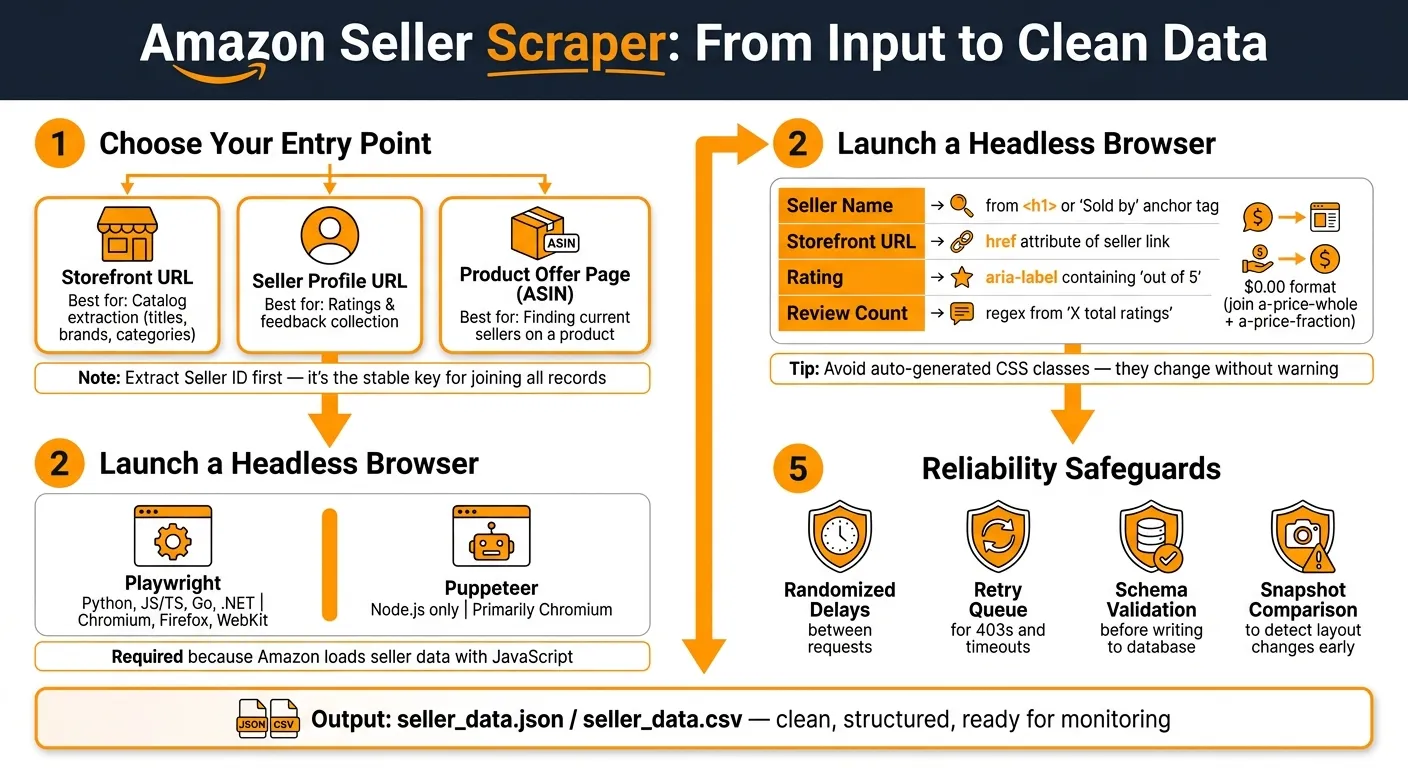
Once you’ve mapped the page types, the next step is picking the entry point that fits the data you already have. That choice shapes which seller fields you can pull and how much follow-up crawling you’ll need. In plain English, it decides whether your scraper starts with a known seller or finds one through a product page.
Storefront URL, seller profile URL, and seller ID
Each input type does a different job, so picking the right one early can save time.
| Input Type | Best For | Example Use Case |
|---|---|---|
| Storefront URL | Catalog extraction | Scraping all titles, brands, and categories a competitor lists |
| Seller Profile URL | Ratings and feedback collection | Pulling ratings, review counts, fulfillment methods, and return policies |
| Seller ID | Joining storefront, profile, and offer data | Linking storefront data to profile data under one record |
Extract the seller ID first. It’s the stable key for joining storefront, profile, and offer-page data without duplicates.
For recurring monitoring, use storefront URLs and seller IDs. If you need to find sellers tied to a specific ASIN, start from product pages instead.
When the seller is unknown, product pages are often the fastest place to begin.
Starting from product offer pages to find sellers
If all you know is the product, start there and work backward to the seller.
The workflow is simple: load the product page, pull the seller name and seller ID from the Buy Box or offer section, then visit the storefront and profile pages to build the full record. This is an ASIN-based approach. It shows who is selling one specific product right now.
This entry point is especially useful for MAP compliance monitoring because it helps you identify which resellers are offering a specific ASIN right now [1]. Once you have the seller IDs from those product pages, you can switch to storefront crawls for recurring monitoring.
Build the scraper with Playwright or Puppeteer

Amazon seller pages often load parts of the page with JavaScript. That means a static HTML parser can miss seller details you care about. A headless browser fixes that problem by loading the rendered page, waiting for the seller block to appear, and then pulling structured data from the DOM.
In plain English: load the page as a browser would, wait for the seller section, and read the fields from there.
Choosing between Playwright and Puppeteer mostly depends on the language you want to use and which browsers you need to support:
| Feature | Playwright | Puppeteer |
|---|---|---|
| Language support | Python, JavaScript/TypeScript, Go, .NET | Primarily Node.js (JavaScript/TypeScript) |
| Browser support | Chromium, Firefox, WebKit | Primarily Chromium |
| Selector workflow | Locator API with built-in auto-waiting | Typically uses explicit waitForSelector calls |
| Async handling | Native async/await across supported languages | Native async/await in Node.js |
| Dynamic content | Well suited for JavaScript-rendered pages | Well suited for JavaScript-rendered pages |
Python with Playwright: load seller pages and export a JSON or CSV record
Start by pulling the seller name, rating, review count, and storefront URL. The flow is the same in both tools: load the page, wait for the seller info container, grab the fields, and export them.
import asyncio
import json
import csv
from playwright.async_api import async_playwright

SELLER_URL = "https://www.amazon.com/sp?seller=SELLER_ID_HERE"
SELLER_CONTAINER_SELECTOR = "PUT_A_STABLE_SELLER_INFO_CONTAINER_SELECTOR_HERE"
NAME_SELECTOR = "PUT_NAME_SELECTOR_HERE"
RATING_SELECTOR = "PUT_RATING_SELECTOR_HERE"
REVIEW_COUNT_SELECTOR = "PUT_REVIEW_COUNT_SELECTOR_HERE"
STOREFRONT_SELECTOR = "PUT_STOREFRONT_SELECTOR_HERE"

async def scrape_seller(url: str) -> dict:
    async with async_playwright() as p:
        browser = await p.chromium.launch(headless=True)
        page = await browser.new_page()

        await page.goto(url, wait_until="domcontentloaded", timeout=30000)
        await page.wait_for_selector(SELLER_CONTAINER_SELECTOR, timeout=15000)

        async def get_text(selector):
            locator = page.locator(selector)
            return await locator.inner_text() if await locator.count() else None

        async def get_href(selector):
            locator = page.locator(selector)
            href = await locator.get_attribute("href") if await locator.count() else None
            if href and href.startswith("/"):
                return f"https://www.amazon.com{href}"
            return href

        seller = {
            "name": await get_text(NAME_SELECTOR),
            "rating": await get_text(RATING_SELECTOR),
            "review_count": await get_text(REVIEW_COUNT_SELECTOR),
            "storefront_url": await get_href(STOREFRONT_SELECTOR),
        }

        await browser.close()
        return seller

async def main():
    data = await scrape_seller(SELLER_URL)

    with open("seller_data.json", "w") as f:
        json.dump(data, f, indent=2)

    with open("seller_data.csv", "w", newline="") as f:
        writer = csv.DictWriter(f, fieldnames=data.keys())
        writer.writeheader()
        writer.writerow(data)

    print(json.dumps(data, indent=2))

asyncio.run(main())
After that, swap the placeholders for stable Amazon-specific selectors. That step matters a lot. If your selectors are shaky, the scraper will feel fine one day and fall apart the next.
JavaScript with Puppeteer: scrape seller fields in an async workflow
The flow here is the same: load the page, wait for the seller info container, pull the fields, and export them.
const puppeteer = require("puppeteer");
const fs = require("fs");

const SELLER_URL = "https://www.amazon.com/sp?seller=SELLER_ID_HERE";
const SELLER_CONTAINER_SELECTOR = "PUT_A_STABLE_SELLER_INFO_CONTAINER_SELECTOR_HERE";
const NAME_SELECTOR = "PUT_NAME_SELECTOR_HERE";
const RATING_SELECTOR = "PUT_RATING_SELECTOR_HERE";
const REVIEW_COUNT_SELECTOR = "PUT_REVIEW_COUNT_SELECTOR_HERE";
const STOREFRONT_SELECTOR = "PUT_STOREFRONT_SELECTOR_HERE";

async function scrapeSeller(url) {
  const browser = await puppeteer.launch({ headless: true });
  const page = await browser.newPage();

  await page.goto(url, { waitUntil: "domcontentloaded", timeout: 30000 });
  await page.waitForSelector(SELLER_CONTAINER_SELECTOR, { timeout: 15000 });

  const seller = await page.evaluate((selectors) => {
    const getText = (selector) =>
      document.querySelector(selector)?.innerText?.trim() || null;

    const getHref = (selector) => {
      const el = document.querySelector(selector);
      const href = el?.getAttribute("href") || null;
      if (href && href.startsWith("/")) {
        return `https://www.amazon.com${href}`;
      }
      return href;
    };

    return {
      name: getText(selectors.NAME_SELECTOR),
      rating: getText(selectors.RATING_SELECTOR),
      review_count: getText(selectors.REVIEW_COUNT_SELECTOR),
      storefront_url: getHref(selectors.STOREFRONT_SELECTOR),
    };
  }, {
    NAME_SELECTOR,
    RATING_SELECTOR,
    REVIEW_COUNT_SELECTOR,
    STOREFRONT_SELECTOR,
  });

  await browser.close();
  return seller;
}

async function main() {
  const data = await scrapeSeller(SELLER_URL);

  fs.writeFileSync("seller_data.json", JSON.stringify(data, null, 2));

  const headers = Object.keys(data).join(",");
  const values = Object.values(data).map((v) => `"${v}"`).join(",");
  fs.writeFileSync("seller_data.csv", `${headers}\n${values}`);

  console.log(JSON.stringify(data, null, 2));
}

main();
The next section covers the selector patterns and cleanup steps that make these fields more dependable.
Extract seller fields with stable selectors and clean the output
Once the page is loaded, pull seller fields from visible text using web scraping for beginners techniques, href values, and ARIA labels. Skip auto-generated CSS classes. They tend to change, and that can break your scraper for no good reason.
Selector patterns for seller name, ratings, reviews, and storefront links
The seller name usually appears in the <h1> on the seller profile page. On a product offer page, you’ll often find it as the anchor text in the “Sold by” link.
For ratings, go after the aria-label or plain text near the stars instead of the star images themselves. Amazon often puts a string like "4.8 out of 5 stars" there, and that’s easy to parse with a simple regex. Review counts tend to sit nearby as text such as "1,500 total ratings". Strip out non-numeric characters, then cast the result to an integer.
| Seller Field | Page Source | Extraction Target |
|---|---|---|
| Seller Name | Seller profile header / “Sold by” link | Text content of <h1> or anchor tag |
| Storefront URL | Product page “Sold by” section | href attribute of the seller link |
| Rating Text | Feedback section / star icons | aria-label or text containing “out of 5” |
| Review Count | Feedback summary | Regex from “X total ratings” |
Normalize the storefront href into an absolute URL before saving it.
Product listing extraction, pagination, and data normalization
Use the storefront URL to pull the seller’s product grid. Each card is usually wrapped in a container with the s-result-item class. From each card, extract the product fields you need for your export.
Price needs a little extra care. Amazon often splits it across two elements: a-price-whole for the dollar amount and a-price-fraction for the cents. Join them as whole + "." + fraction so you end up with a clean decimal like 29.99.
After you have the storefront URL, paginate through the seller catalog with a page query parameter, such as ?page=2. Increment that value in a loop. Stop when the product grid is empty or when the next-page link no longer shows up.
Before writing data to disk, run a normalization pass. Convert ratings to floats, review counts to integers, and prices to two-decimal USD values. Clean the output early so you don’t end up fixing parsing issues later.
Keep the scraper reliable and decide when to use a managed service
Reliability safeguards for ongoing Amazon seller monitoring
After extraction and normalization, the next job is keeping the crawler steady while Amazon changes around it. That’s where many production scrapers break. Rate limits hit. The DOM shifts. Bad records slip through. To keep Amazon seller monitoring stable, use four safeguards.
-
Randomized delays: Add randomized delays between requests, and use explicit waits for seller elements instead of fixed sleep timers.
-
Retry queue: Send 403s and timeouts into a retry queue, then rerun them through another proxy or with rotated headers.
-
Schema validation: Before any record reaches your database, flag empty names, invalid storefront URLs, and zero-item crawls.
-
Snapshot comparison: Compare each crawl with the previous snapshot so you can spot layout changes before they pollute the dataset.
This kind of setup acts like a smoke alarm. It won’t stop every problem, but it helps you catch trouble early instead of finding out after the data is already wrong.
Conclusion: the shortest path to a usable Amazon seller scraper
Once the scraper is stable, the last call is simple: maintain the stack yourself or hand off the hard parts.
If maintenance starts eating more time than engineering, move browser operations, proxy rotation, CAPTCHA handling, and change monitoring to a managed service. That trade-off is what decides whether you keep the stack in-house or shift to a managed workflow.
Want this done for you?
Send us the URLs. We'll quote it in 24 hours.
Paste the URL(s) you want scraped. We'll reply within 24 hours with a feasibility check and a ballpark quote.