
Jump to section
- Tools and Technologies for Building a Bet365 Odds Scraper
- Choosing the Right Programming Language
- Understanding Bet365’s Website Structure
- Required Libraries and Tools
- Step-by-Step Guide to Scraping Bet365 Odds
- Setting Up the Development Environment
- Navigating Dynamic Content
- Extracting and Structuring Odds Data
- Best Practices for Ethical and Effective Web Scraping
- Rate Limiting and Avoiding Server Overload
- Implementing Anti-Ban Measures
- Monitoring Changes in Website Structure
- Conclusion
Bet365 odds scraping involves automating the collection of betting data such as match odds, over/under lines, and point spreads using tools like Selenium or Playwright. This process is challenging due to Bet365’s dynamic JavaScript-based structure and anti-scraping measures. Here’s what you need to know:
-
Tools: Python libraries (e.g., Selenium, BeautifulSoup, Pandas), or JavaScript tools (e.g., Puppeteer, Playwright) are commonly used.
-
Challenges: Bet365 doesn’t allow direct URLs to specific markets, requiring navigation through menus. Anti-bot defenses and frequent layout updates add complexity.
-
Ethical Concerns: Bet365’s terms prohibit automated scraping. Legal compliance and server-friendly practices like rate limiting are essential.
-
Best Practices: Use headless browsers, implement delays, and monitor site changes. Network interception can simplify data extraction.
Key Takeaway: Scraping Bet365 requires advanced technical skills, careful planning, and adherence to ethical guidelines. Tools like Playwright or Selenium are indispensable for navigating its dynamic content.
Tools and Technologies for Building a Bet365 Odds Scraper
Choosing the Right Programming Language
When it comes to building a scraper for Bet365, Python is often the go-to choice. It offers a wide range of libraries like Selenium, Playwright, and BeautifulSoup that make web scraping more manageable . Additionally, tools like Pandas and NumPy simplify the handling of numerical data, which is crucial when processing betting odds.
On the other hand, JavaScript (Node.js) is a strong contender, especially for developers familiar with JavaScript-heavy environments. Tools like Puppeteer and Playwright, designed specifically for these environments, shine here. Puppeteer, developed by Google, boasts an impressive 89,600 stars on GitHub, while Microsoft’s Playwright has gained 69,000 stars, indicating a strong developer following. Choosing between Python and JavaScript often depends on your expertise and whether you need Python’s robust data processing capabilities or JavaScript’s seamless browser integration.
Once you’ve settled on a programming language, the next step is understanding Bet365’s unique website structure.
Understanding Bet365’s Website Structure
Bet365’s architecture presents unique challenges that require careful navigation. Unlike some websites, it doesn’t allow direct URLs to specific markets. For example, you can’t bookmark a link to “NBA Player Props” or “Premier League Over/Under” markets. As developer cvidan explains:
Using Selenium we navigate there [to specific markets] in Firefox from the home page… as far as I can tell there isn’t a way to link directly to a market.
This means your scraper needs to mimic human behavior, navigating through menus like Sport > League > Market to reach the desired data.
Adding to the complexity, Bet365 frequently updates its layout. For instance, a redesign of the “Player Shots On Target” page in 2024 required developers to revise their element selectors and scraping logic. Timing is also crucial, as specific markets often appear just days before an event begins. Frequent changes and advanced bot detection measures make tools like undetected-chromedriver essential for avoiding issues like endless loading screens or blocked access.
Required Libraries and Tools
With a clear understanding of Bet365’s structure, the next step is selecting the right tools for the job.
Playwright stands out for its auto-waiting capabilities, which streamline interactions with dynamic content. It supports multiple browsers, including Chromium, Firefox, and WebKit, and allows for running multiple isolated browser contexts to save resources. As Dilip Bajaj explains:
Playwright is newer, faster, and has wider browser support right out of the box. Selenium is a more mature option with a deeper documentation base. They both function well, but for dynamic content scraping, Playwright is usually the go-to choice.
Puppeteer, designed for Chromium-based browsers, excels in environments that rely heavily on JavaScript, making it a favorite among Node.js developers. Selenium, despite being an older tool with 31,500 GitHub stars, remains dependable for navigating complex user interfaces and supports all major browsers. After dynamic content is rendered, BeautifulSoup can step in to parse the HTML and extract critical data like odds, team names, and timestamps. To ensure JavaScript content has fully loaded, Playwright’s wait_for_selector() method is invaluable, and running browsers in headless mode can improve speed and reduce resource usage.
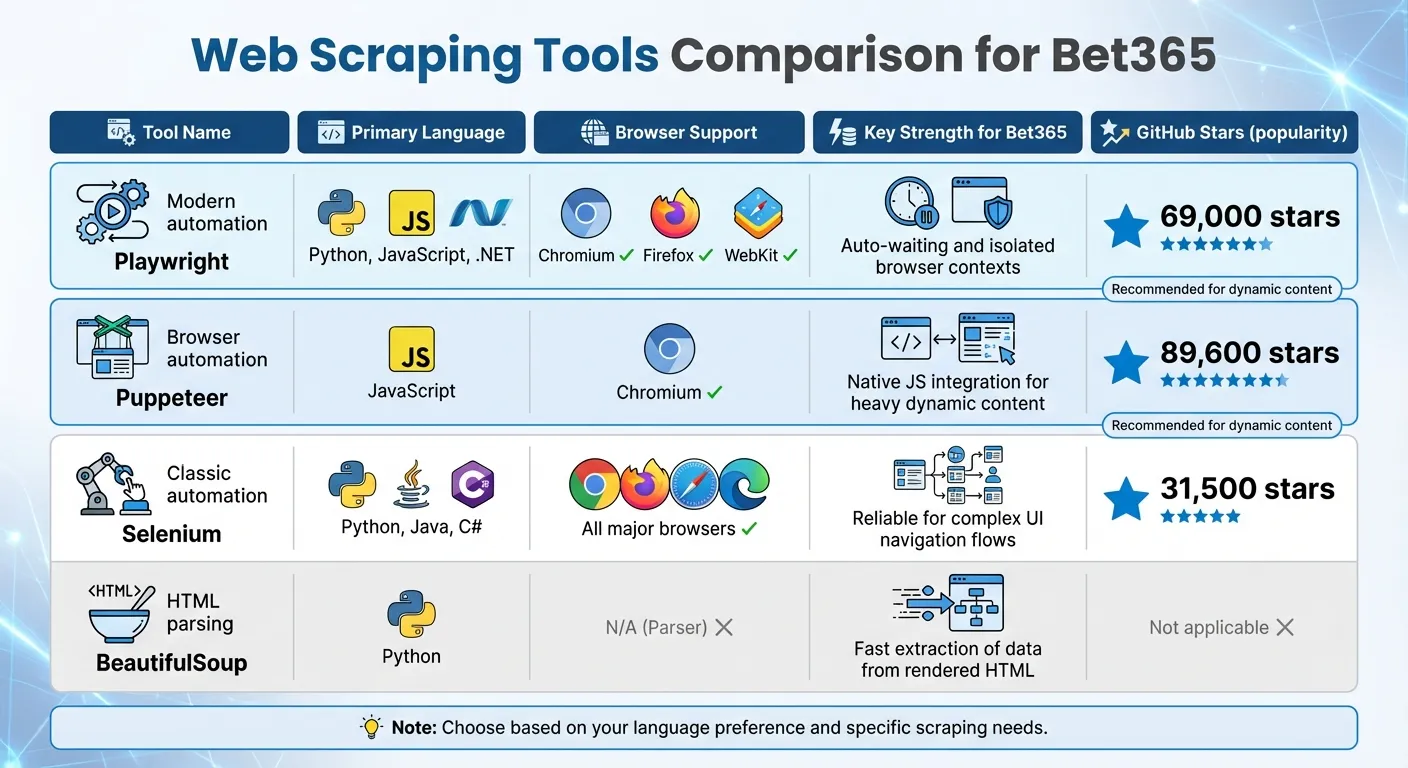
Here’s a quick comparison of these tools:
| Tool | Primary Language | Browser Support | Key Strength for Bet365 |
|---|---|---|---|
| Playwright | Python, JS, .NET | Chromium, Firefox, WebKit | Auto-waiting and isolated browser contexts |
| Puppeteer | JavaScript | Chromium | Native JS integration for heavy dynamic content |
| Selenium | Python, Java, C# | All major browsers | Reliable for complex UI navigation flows |
| BeautifulSoup | Python | N/A (Parser) | Fast extraction of data from rendered HTML |
These tools form the backbone of any Bet365 scraper, setting the stage for implementing more advanced scraping techniques.
Step-by-Step Guide to Scraping Bet365 Odds
Setting Up the Development Environment
The first step is preparing your environment. Python is a solid choice for this task due to its extensive documentation and libraries suited for web scraping. However, if you prefer JavaScript, Node.js paired with Puppeteer is another reliable option.
Start by creating an isolated environment to avoid dependency conflicts. If you’re using Python, tools like venv or Miniforge will do the job. For Node.js, NVM is a great way to manage dependencies. Once that’s set, install your automation framework. Selenium is a popular choice for traditional web navigation, while Playwright is better suited for handling JavaScript-heavy pages with improved speed.
Next, ensure your ChromeDriver or Geckodriver matches your browser version exactly to avoid common web scraping errors like “WebDriverException.” Then, install necessary libraries for parsing and data handling. For example:
-
beautifulsoup4for HTML parsing -
pandasfor data structuring and exporting
If you’re concerned about browser detection, stealth plugins like playwright-stealth can help bypass fingerprinting and detection mechanisms.
With everything set up, you’re ready to handle Bet365’s dynamic content.
Navigating Dynamic Content
Bet365’s interface relies heavily on dynamic elements, which means you’ll need to mimic human-like interactions. Since direct links to markets aren’t available, automate navigation through clicks, starting from the homepage and drilling down into specific sports and markets.
Wait conditions are crucial here, as Bet365 uses AJAX to load data. Employ tools like Playwright’s wait_for_selector() or Selenium’s WebDriverWait to ensure all odds data is fully rendered before extraction begins.
For faster and more reliable results, consider network interception instead of scraping rendered HTML. Playwright’s Network API, for instance, can intercept AJAX calls (such as requests to /ajax/products/json) and pull structured data directly from server responses. This method avoids the need to parse the DOM entirely.
If the page uses infinite scrolling, inject JavaScript using evaluate() to simulate user actions and load additional content. Focus on stable attributes like data-testid or specific text-based locators, as class names often change and can break your scripts.
Once the content is fully loaded, you can move on to extracting and organizing the odds data.
Extracting and Structuring Odds Data
After successfully loading the dynamic content, it’s time to extract the odds data. Use BeautifulSoup to locate elements containing key information, such as team names, odds, and timestamps. If you’re working with Selenium, replace outdated methods like find_element_by_class_name with the newer By class (e.g., find_element(By.CLASS_NAME, "name")) to avoid compatibility issues.
Organize your extracted data using Pandas DataFrames. This makes it easier to clean, analyze, and export the data into formats like CSV, JSON, or Excel. If you’re scraping frequently, aim to refresh the odds data every second and reload the browser every 20 minutes to maintain stability.
For even higher efficiency, you can bypass the browser entirely by intercepting WebSocket traffic using tools like mitmproxy. This approach captures data directly from network requests, skipping the need to render the UI.
It’s important to note that Bet365’s Terms & Conditions include the following:
The use of automated systems or software to copy and/or extract […] odds […] (known as ‘screen scraping’) is strictly prohibited.
To reduce risks, implement safeguards like rate limiting and use sleep timers to avoid overwhelming their servers or triggering IP bans.
Best Practices for Ethical and Effective Web Scraping
Rate Limiting and Avoiding Server Overload
To prevent overwhelming Bet365’s servers, it’s crucial to set proper request intervals. A practical approach is using a token bucket system, where tokens replenish at a steady rate and requests are made only when a token is available. Start with 2–5 requests per second per proxy and adjust based on server responses. For example, using distributed token buckets at a rate of 3 requests per second has been shown to reduce errors significantly.
In one test involving 12 live NFL games, running 50 parallel workers without rate limiting led to a 30% failure rate due to 429 and 403 errors. However, by implementing distributed token buckets at 3 requests per second, errors dropped to under 5%, while data freshness improved by 70%.
When encountering a 429 error, avoid retrying immediately. Instead, apply exponential backoff with jitter. Start with a base delay of 200–500 milliseconds and increase the delay exponentially, adding random jitter to prevent synchronized retries. Additionally, tailor your polling frequency to the game state - poll less during pre-game periods and increase polling during high-stakes moments, like the final minutes of a match.
Once you’ve optimized rate limiting, focus on anti-ban strategies to ensure uninterrupted scraping sessions.
Implementing Anti-Ban Measures
Modern anti-bot systems use advanced techniques like machine learning fingerprinting and TLS ClientHello analysis to detect scrapers - even when proxies are employed. To minimize detection risks, maintain consistent browser fingerprints (such as User-Agent, header order, and TLS version) for each proxy session. Rapidly changing fingerprints while rotating IPs can raise suspicion.
Using residential proxies helps maintain session stickiness and reduces the likelihood of fingerprint scoring. Make sure your proxy list includes essential details like host, port, type, username, and password. Save session states, such as cookies and localStorage, to an external file (e.g., auth.json) to reuse authenticated sessions and limit login attempts. Additionally, simulate real user behavior by enabling slow motion in browser automation and mimicking actions like scrolling.
Handle HTTP status codes carefully. For example, a 429 error should trigger immediate throttling and a cooldown period for the proxy, while a 403 error often signals a fingerprint block, requiring a full session reset. To minimize unnecessary requests, use conditional headers like ETag or If-Modified-Since to fetch data only when odds have changed, reducing server strain.
For long-term success, keep refining your methods as Bet365 enhances its defenses.
Monitoring Changes in Website Structure
Bet365 frequently updates its website layout and obfuscates its JavaScript code, making continuous monitoring essential. Stay ahead of these changes by updating deobfuscation strings as new patterns emerge. For instance, watch for new obfuscated start strings like (function(){ var _0x123a= to trigger workflows for deobfuscation.
Monitor key endpoints, such as /Api/1/Blob, for shifts in URL patterns or response structures. To adapt to state-based changes, configure your scraper to reload the browser every 20 minutes and refresh the session as needed.
Enhance stealth by using tools like puppeteer-extra-plugin-stealth and removing automation flags such as navigator.webdriver to evade bot detection. Regularly audit intercepted files - both original and deobfuscated - to track changes in the site’s code structure. Clearing the cache between tests ensures you’re working with the most up-to-date version of the site.
Conclusion
Creating a bet365 odds scraper involves leveraging modern automation tools, staying on top of regular updates, and adhering to strict ethical guidelines. Bet365 presents unique challenges for scraping due to its dynamic design and strong anti-bot defenses. Static tools like BeautifulSoup simply don’t cut it; instead, automation frameworks like Selenium or Puppeteer are necessary to handle its JavaScript-heavy content.
To build a durable and efficient scraper, implement rate limiting and closely monitor structural changes on the site. Use these tools responsibly, respect server resources, and ensure your actions comply with platform policies. Tackling these challenges thoughtfully will help you maintain a scraper that is effective, adaptable, and compliant with the outlined techniques.
Want this done for you?
Send us the URLs. We'll quote it in 24 hours.
Paste the URL(s) you want scraped. We'll reply within 24 hours with a feasibility check and a ballpark quote.