Jump to section
- Key Steps:
- Setting Up the Scraping Environment
- Installing Required Tools and Libraries
- Getting and Configuring API Access
- Testing the Setup
- How to Scrape Tokopedia Data
- Scraping Search Results
- Extracting Product Details
- Handling Anti-Bot Measures
- Using Proxies and Custom Configurations
- Proxies vs. Headless Browsers
- Storing and Exporting Scraped Data
- Saving Data in JSON or CSV Format
- Converting Currency and Batch Processing
- Scaling Scraping with Web Scraping HQ
- Benefits of Using Web Scraping HQ
- Pricing Plans and Custom Solutions
- Integrating Web Scraping HQ Data into a Workflow
- Conclusion
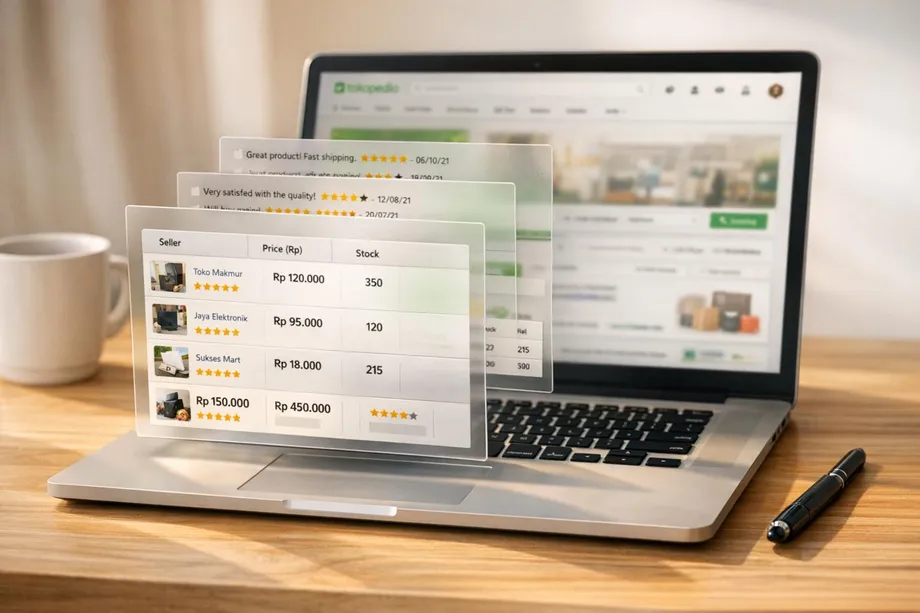
Scraping Tokopedia data can provide valuable insights into product pricing, market trends, and competitor strategies. Tokopedia, Indonesia’s largest e-commerce platform, uses JavaScript-rendered pages, making it necessary to handle dynamic content and anti-bot measures effectively. Here’s a quick summary of the process:
-
Data Available: Product details, pricing, reviews, seller info, logistics, and media.
-
Challenges: JavaScript-heavy structure, Cloudflare protection, rate limits (1–5 requests per minute).
-
Tools Needed: Python, libraries like
crawlbase,BeautifulSoup,requests, andpandas. -
Legal Considerations: Public data scraping is generally allowed under U.S. law, but ensure compliance with Tokopedia’s terms and avoid extracting personal data.
Key Steps:
-
Set Up Tools: Follow a web scraping for beginners guide to install Python libraries and get a Crawlbase JS Token for handling JavaScript-rendered content.
-
Scrape Search Results: Use specific CSS selectors to extract product names, prices, and store info.
-
Extract Product Details: Dive deeper into product pages for descriptions, ratings, and media URLs.
-
Handle Anti-Bot Systems: Use residential proxies, rotate User-Agent strings, and implement delays to avoid bans.
-
Export Data: Save results in CSV or JSON formats for analysis.
For large-scale projects, managed services like Web Scraping HQ can simplify the process by automating tasks like proxy rotation and compliance checks.
Compliance Tip: Focus only on publicly available data, respect rate limits, and avoid violating terms of service.
Setting Up the Scraping Environment
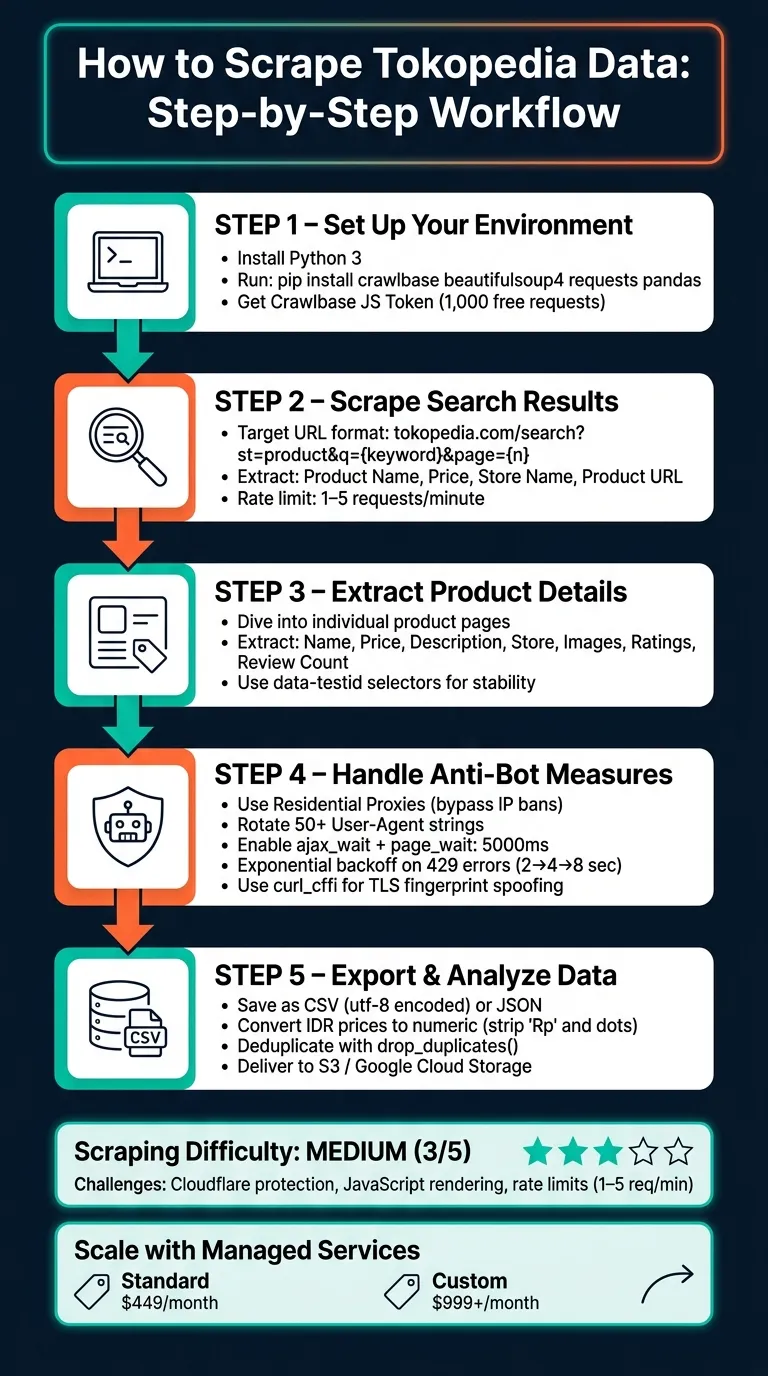
Before diving into coding, it’s essential to have all your tools ready. Tokopedia’s scraping difficulty is rated as medium (3/5) as of May 2026, primarily due to Cloudflare protection and rate limiting. Basic Python requests often fall short since they can’t handle JavaScript execution or mimic browser TLS fingerprints. That’s why this guide opts for a more robust approach.
Installing Required Tools and Libraries
Start by verifying that Python 3 is installed. You can do this by running:
python --versionOnce confirmed, install the necessary libraries using this pip command:
pip install crawlbase beautifulsoup4 requests pandasHere’s how each library contributes to the scraping process:
| Library | Purpose |
|---|---|
| crawlbase | Manages JavaScript rendering and bypasses anti-bot protections |
| beautifulsoup4 | Parses HTML and extracts specific data using CSS selectors |
| requests | Handles HTTP requests, useful for interacting with dynamic endpoints |
| pandas | Organizes scraped data and exports it into formats like CSV or JSON |
For writing and testing your scraper, tools like Visual Studio Code, PyCharm, or Jupyter Notebook are highly recommended.
The next step involves securing API access to handle Tokopedia’s dynamic content.
Getting and Configuring API Access
Head over to the Crawlbase website and create a free account. You’ll be granted 1,000 free requests to experiment with your setup. After signing up, log in to your dashboard and copy your JavaScript (JS) Token.
This token is crucial for scraping dynamic, JavaScript-heavy content. Avoid using the Normal Token, as it’s designed for static HTML-only sites.
| Token Type | Rendering | Anti-Bot Features | Suitable For |
|---|---|---|---|
| Normal Token | None | Basic IP rotation | Static HTML websites |
| JS Token | Full browser-like | Advanced handling | Dynamic, JavaScript-heavy sites |
Once you have your JS Token, initialize the Crawlbase API in your script:
from crawlbase import CrawlingAPI

crawling_api = CrawlingAPI({ 'token': 'YOUR_JS_TOKEN' })
To ensure Tokopedia’s JavaScript content is fully loaded before scraping, configure your request options. Set ajax_wait to 'true' and page_wait to at least '5000' (5 seconds).
Testing the Setup
Run the script below to verify that your environment is correctly configured:
from crawlbase import CrawlingAPI

crawling_api = CrawlingAPI({ 'token': 'YOUR_JS_TOKEN' })

def test_setup(url):
    response = crawling_api.get(url)
    if response['headers']['pc_status'] == '200':
        print("Environment configured correctly!")
        return response['body'].decode('utf-8')
    else:
        print(f"Setup failed. Status: {response['headers']['pc_status']}")
        return None

test_setup('https://www.tokopedia.com/')
If the pc_status returns ‘200’, it confirms that your setup is functioning as expected.
How to Scrape Tokopedia Data
With your JS Token ready, you can start collecting data from Tokopedia. This guide explains two main tasks: scraping search results and extracting detailed product information.
Scraping Search Results
Tokopedia search URLs follow a consistent format. For instance, searching for “laptop” uses the URL: https://www.tokopedia.com/search?st=product&q=laptop. You can paginate by appending &page=2, &page=3, and so on [1].
Here are the key CSS selectors for extracting data from search result cards:
| Data Point | CSS Selector |
|---|---|
| Product Name | span.OWkG6oHwAppMn1hIBsC3pQ== |
| Price | div.ELhJqP-Bfiud3i5eBR8NWg== |
| Store Name | span.X6c-fdwuofj6zGvLKVUaNQ== |
Below is an example script to scrape the first page of search results:
from crawlbase import CrawlingAPI
from bs4 import BeautifulSoup

crawling_api = CrawlingAPI({'token': 'YOUR_JS_TOKEN'})

def scrape_search_results(keyword, page=1):
    url = f"https://www.tokopedia.com/search?st=product&q={keyword}&page={page}"
    options = {'ajax_wait': 'true', 'page_wait': '5000'}
    response = crawling_api.get(url, options)

    if response['headers']['pc_status'] != '200':
        print(f"Failed to retrieve page {page}")
        return []

    soup = BeautifulSoup(response['body'].decode('utf-8'), 'html.parser')
    products = []

    for card in soup.select('div[data-testid="divSRPContentProducts"] > div'):
        name = card.select_one('span.OWkG6oHwAppMn1hIBsC3pQ==')
        price = card.select_one('div.ELhJqP-Bfiud3i5eBR8NWg==')
        store = card.select_one('span.X6c-fdwuofj6zGvLKVUaNQ==')
        link = card.select_one('a[href]')

        products.append({
            'name': name.text.strip() if name else None,
            'price': price.text.strip() if price else None,
            'store': store.text.strip() if store else None,
            'url': link['href'] if link else None
        })

    return products

results = scrape_search_results('laptop', page=1)
for product in results:
    print(product)
To scrape multiple pages, wrap this function in a loop and increment the page parameter until you collect enough data. This approach enables efficient scraping across numerous pages.
Extracting Product Details
Once you’ve gathered basic search results, you can dive deeper to extract more detailed product information. The data-testid attributes in Tokopedia’s HTML offer stable selectors compared to CSS class names.
Here are the key selectors for a product detail page:
| Data Point | CSS Selector |
|---|---|
| Product Name | h1[data-testid="lblPDPDetailProductName"] |
| Price | div[data-testid="lblPDPDetailProductPrice"] |
| Description | div[data-testid="lblPDPDescriptionProduk"] |
| Store Name | a[data-testid="llbPDPFooterShopName"] |
| Image URLs | button[data-testid="PDPImageThumbnail"] img |
The following script extracts details from a single product URL:
def scrape_product_details(product_url):
    options = {'ajax_wait': 'true', 'page_wait': '5000'}
    response = crawling_api.get(product_url, options)

    if response['headers']['pc_status'] != '200':
        print("Failed to retrieve product page")
        return {}

    soup = BeautifulSoup(response['body'].decode('utf-8'), 'html.parser')

    name = soup.select_one('h1[data-testid="lblPDPDetailProductName"]')
    price = soup.select_one('div[data-testid="lblPDPDetailProductPrice"]')
    description = soup.select_one('div[data-testid="lblPDPDescriptionProduk"]')
    store = soup.select_one('a[data-testid="llbPDPFooterShopName"]')
    images = [img['src'] for img in soup.select('button[data-testid="PDPImageThumbnail"] img') if img.get('src')]

    return {
        'name': name.text.strip() if name else None,
        'price': price.text.strip() if price else None,
        'description': description.text.strip() if description else None,
        'store': store.text.strip() if store else None,
        'images': images
    }

details = scrape_product_details('https://www.tokopedia.com/example-store/example-product')
print(details)
For additional data like ratings and reviews, HTML scraping alone may not suffice. Tokopedia often loads this information via GraphQL endpoints (gql.tokopedia.com/graphql), which return structured JSON data. By inspecting network activity in your browser’s DevTools (under the Fetch/XHR tab), you can identify these calls. The stats object in the response typically includes fields like reviewCount and rating.
Handling Anti-Bot Measures
Tokopedia employs a combination of Cloudflare and server-side rate limiting to deter automated traffic. As of May 14, 2026, scraping Tokopedia is rated as “Medium” difficulty (3 out of 5). The platform enforces strict limits, typically allowing only 1–5 requests per minute from a single IP before triggering rate limits or temporary bans. Cloudflare adds another layer of defense with JavaScript challenges, TLS fingerprinting, and behavioral analysis to detect and block bots. To navigate these barriers, using residential proxies along with tailored configurations is highly effective.
Using Proxies and Custom Configurations
A dependable way to keep your scraper functional is by leveraging residential proxies, which route requests through real home networks, making the traffic appear like that of ordinary users. Unlike datacenter proxies (which cost around $1–$5/GB), residential proxies are better equipped to bypass Tokopedia’s advanced fingerprinting and blocking mechanisms.
When setting up your API, ensure that it includes options for handling JavaScript rendering. For example, enable sufficient wait times (e.g., ajax_wait set to true and page_wait at 5000ms) to ensure pages load fully.
If you encounter a 429 error, implement exponential backoff by waiting progressively longer intervals (e.g., 2, 4, 8 seconds) before retrying. Rotate through at least 50 genuine browser User-Agent strings for each request. Additionally, use curl_cffi to simulates Chrome’s TLS handshake, which can help bypass Cloudflare’s checks. Establishing a session by first visiting Tokopedia’s homepage can also reduce the likelihood of triggering Cloudflare’s challenge loop, as this creates a valid cookie chain.
Proxies vs. Headless Browsers
Proxies and headless browsers serve distinct purposes, and knowing when to use each is essential. Proxies focus on overcoming IP-based restrictions, while headless browsers like Playwright or Selenium are designed to handle JavaScript-heavy pages and interactive challenges. The table below outlines their differences (based on):
| Feature | Residential Proxies | Headless Browsers (Playwright/Selenium) |
|---|---|---|
| Primary Benefit | Bypasses IP reputation and rate limits | Handles complex JavaScript challenges and interactions |
| Speed | Fast with minimal overhead | Slower; higher CPU and memory consumption |
| Detection Risk | Low – mimics real home users | Medium – headless signatures can be detected |
| Cost | Moderate (around $5–$15/GB) | Higher due to infrastructure requirements |
| Best For | High-volume data extraction and price tracking | Tasks requiring full browser emulation, like interacting with dynamic content |
For most scraping tasks on Tokopedia, combining residential proxies with a Crawlbase JS Token strikes a good balance between speed, cost, and efficiency. However, headless browsers are better suited for tasks that require interacting with the page, such as clicking buttons, scrolling through lazy-loaded content, or handling more advanced interactive challenges.
Storing and Exporting Scraped Data
Once your scraper reliably collects data, the next step is to organize and format it into a structured dataset. A clean export process ensures that raw data becomes usable for analysis. Building on secure data extraction, this section explains how to store and format your results effectively, using cara scrape Tokopedia as an example.
Saving Data in JSON or CSV Format
Start by collecting each scraped product as a Python dictionary. Then, compile these dictionaries into a pandas DataFrame for cleaning and exporting. Consistency in your schema is key - every product should include the same fields (even if some values are None) so that rows align correctly in the DataFrame.
Here are some important fields to capture:
| Field | Source Key | Purpose |
|---|---|---|
| Product ID | product_id / data-productid | Helps avoid duplicates |
| Product Name | name / prd_link-product-name | Useful for text analysis |
| Price (IDR) | price → text_idr | Tracks price trends |
| Rating | stats → rating | Filters for quality |
| Review Count | stats → reviewCount | Measures popularity |
| Seller Location | shop → city | Assists in logistics planning |
Once your data is organized, export it using either CSV or JSON formats. For CSV, use the following pandas command to preserve Indonesian characters:
df.to_csv('tokopedia_products.csv', index=False, encoding='utf-8')For JSON, which works well for hierarchical or web-integrated data, use:
json.dump(data, json_file, indent=4)After exporting, prepare your data for analysis by converting text-based fields, such as prices, into numeric formats.
Converting Currency and Batch Processing
To analyze pricing data, you’ll need to standardize numerical fields. Tokopedia displays prices in Indonesian Rupiah (IDR), formatted like “Rp178.000” (Rp178,000). Clean these strings by removing the “Rp” prefix and dots, then convert them into integers:
df['price_idr'] = df['price_idr'].str.replace('Rp', '').str.replace('.', '').astype(int)
df['price_usd'] = df['price_idr'] / 15500
This adds a price_usd column by converting Rupiah values into U.S. Dollars based on the current exchange rate. Additional steps, such as replacing missing sales values with 0, removing terms like terjual and ribu, and deduplicating rows with drop_duplicates(), further refine your dataset for analysis.
When scraping multiple URLs, respect rate limits by adding delays of 2 to 5 seconds between requests using time.sleep(). Always save raw results as a JSON backup before cleaning or exporting to CSV. This ensures you won’t lose data if an error occurs during the cleaning process, saving you from having to re-scrape everything.
Scaling Scraping with Web Scraping HQ
Extracting large-scale data from Tokopedia manually is a daunting task. As scraping projects grow in size, the operational hurdles - like managing proxies, handling rate limits and scraping errors, and streamlining data pipelines - can quickly become overwhelming. That’s where a managed solution like Web Scraping HQ steps in to simplify and automate the process.
Benefits of Using Web Scraping HQ
Web Scraping HQ takes the headache out of scaling Tokopedia data extraction. It automates critical tasks, reducing the need for constant manual intervention while ensuring smooth operations even as complexity increases.
Here’s what makes it stand out:
-
Managed scalability: Automatically handles tasks like bypassing Cloudflare, rotating residential IPs, and managing TLS fingerprinting - allowing you to focus on insights rather than infrastructure.
-
Compliance and quality assurance: Delivers data that’s legally compliant and accurate, with built-in quality checks that eliminate the need for manual preprocessing.
-
Structured delivery: Provides clean, ready-to-use data in formats like JSON or CSV, perfect for integrating directly into analytics tools or robotic process automation workflows.
With Tokopedia ranked as the #251 most scraped website globally as of May 2026, and boasting over 90 million active users and 350 million monthly visits, the sheer scale of data makes a managed solution essential for businesses looking to gain a competitive edge.
Pricing Plans and Custom Solutions
Web Scraping HQ offers two tailored pricing plans to suit different operational needs:
| Plan | Price | Best For | Key Features |
|---|---|---|---|
| Standard | $449/month | Businesses needing structured, reliable data | JSON/CSV output, automated QA, compliance assurance, dedicated support |
| Custom | $999+/month | Enterprises with high-volume requirements | Custom data schema, double-layer QA, scalable to millions of rows, priority support, 24-hour turnaround |
The Standard plan is ideal for businesses that need consistent, structured data within 5 business days. For enterprises tracking pricing across thousands of Tokopedia listings daily, the Custom plan offers faster turnarounds (24 hours) and advanced features like custom data schemas and priority support.
Both plans ensure seamless integration into your analytics workflow, saving time and effort while delivering actionable insights.
Integrating Web Scraping HQ Data into a Workflow
Once your data is delivered, integrating it into your analytics pipeline is straightforward. Here’s a Python example to get you started:
import pandas as pd

# Load the delivered dataset
df = pd.read_csv('webscrapinghq_tokopedia_products.csv', encoding='utf-8')

# Convert the price column to numeric for analysis and convert from IDR to USD
df['price_idr'] = pd.to_numeric(df['price_idr'], errors='coerce')
df['price_usd'] = (df['price_idr'] / 15500).round(2)

# Filter products with a rating of 4.5 or higher
top_rated = df[df['rating'] >= 4.5].sort_values('review_count', ascending=False)

print(top_rated[['name', 'price_usd', 'rating', 'seller_city']].head(10))
For even more convenience, Web Scraping HQ supports direct data delivery to Amazon S3 or Google Cloud Storage, keeping your workflow fully automated and eliminating the need for manual downloads.
Conclusion
Scraping Tokopedia comes with its own set of challenges - like handling JavaScript-heavy content, bypassing Cloudflare’s anti-bot defenses, and dealing with rate limits that kick in after just 1–5 requests per minute from a single IP. To tackle these issues, tools such as curl_cffi for TLS fingerprinting and residential proxies for rotating IPs are essential components for any serious scraping project on the platform.
For those looking to simplify the process, services like Web Scraping HQ provides reliable web scraping services. Plans start at $449/month, offering structured and compliance-checked data in JSON or CSV. For enterprise needs, custom schemas with a 24-hour turnaround are available for $999+/month. These options ensure consistent and reliable data delivery, which is critical for effective analysis and long-term success.
Whether you’re building your own scraper or opting for a managed service, the core principles remain the same: respect rate limits, rotate IPs, and ensure your data is well-structured before analysis. Following these fundamentals is key to creating a scraper that’s not just a one-time tool but a dependable, long-term solution.
Want this done for you?
Send us the URLs. We'll quote it in 24 hours.
Paste the URL(s) you want scraped. We'll reply within 24 hours with a feasibility check and a ballpark quote.