Jump to section
- Key Points:
- Compliance Tips:
- Understanding Vimeo Data Sources
- Key Vimeo Pages for Data Extraction
- Why Page Structure Matters
- Setting Up a Vimeo Scraper
- Initial Requirements
- Configuring the Scraper
- Running the Vimeo Scraper Workflow
- Step-by-Step Workflow
- Validating Extracted Data
- Exporting and Using Scraped Data
- Export Formats and Organization
- Automating Data Exports
- Compliance and Data Quality
- Following Vimeo’s Policies
- Quality Assurance Practices
- What Web Scraping HQ Offers for Vimeo Data
Scraping data from Vimeo involves using automated tools to extract information like video titles, descriptions, tags, view counts, and creator profiles from public pages. This process can save time and support tasks like market research, content analysis, and AI dataset creation. However, Vimeo’s Terms of Service prohibit scraping without authorization, so it’s crucial to follow their policies and target only publicly accessible data.
Key Points:
-
Vimeo uses JavaScript-based pages, requiring tools like Playwright or Puppeteer to retrieve dynamic content.
-
Data is often stored in JSON objects (
window._vimeoConfig), making it more reliable to extract than HTML elements. -
Proxies (residential or mobile) are essential to bypass Vimeo’s anti-bot defenses.
-
Scrapers must simulate human behavior to avoid detection, such as introducing random delays and mimicking scrolling actions.
-
Export formats like JSON or CSV make data easier to analyze and integrate into workflows.
Compliance Tips:
-
Avoid scraping private or password-protected content.
-
Respect rate limits and monitor for common web scraping errors like HTTP 429 or 403.
-
Use Vimeo’s official APIs for a compliant and faster alternative.
By following these steps and ensuring compliance, you can efficiently collect structured data while minimizing risks.
Understanding Vimeo Data Sources

To effectively scrape data from Vimeo, it’s essential to know where Vimeo stores its data and how different page types present information. Vimeo operates as a JavaScript-based Single Page Application (SPA), meaning much of its metadata isn’t directly visible in the plain HTML. Instead, this information is embedded as JSON within script tags, such as window._vimeoConfig or window.vimeo.clip_page_config [1]. Recognizing this structure is key to designing a scraper that works efficiently with Vimeo’s setup. The table below highlights the main Vimeo page types and the data they typically provide.
Key Vimeo Pages for Data Extraction
Pinpointing the right page types is critical for extracting actionable data. Each page type offers specific fields that cater to different research or analysis needs. Here’s an overview of the main data sources and their typical uses:
| Page Type | Key Data Fields | Common Use Case |
|---|---|---|
| Video Page | Title, description, view/like/comment counts, upload date, duration, tags, resolution, codec, bitrate, thumbnail URL | Content benchmarking, technical QA, SEO analysis |
| Channel / Profile | Creator name, bio, location, social media links, profile image, verification status, video list | Talent scouting, creator research |
| Search Results / Categories | Video titles, direct URLs, author names, Staff Pick status | Market research, niche content discovery |
| Albums / Showcases | Grouped video metadata, collection titles | Project monitoring, thematic content tracking |
| Vimeo On Demand | Rental/purchase prices, distributor info, genre, regional availability | Price monitoring, competitive strategy |
For example, a well-designed Vimeo Scraper can pull over 50 data fields from a single video page. These fields can include advanced technical details like frames per second (FPS), codec specifications (e.g., AVC/H.264), and DRM status flags [6]. Among all the page types, video pages and channel profiles are often the most valuable for a wide range of use cases.
Why Page Structure Matters
Since Vimeo uses React to dynamically render pages, a simple HTTP request won’t fetch all the data you need. To retrieve complete information, your scraper must execute JavaScript and simulate user actions like scrolling to load lazy content.
Targeting the embedded JSON objects directly is a more reliable strategy than relying on HTML elements. CSS selectors tied to specific UI elements can break whenever Vimeo updates its front-end design. In contrast, the JSON configuration objects, such as those embedded in window variables, tend to remain stable over time [1]. This approach not only ensures consistency but also improves the reliability of your scraper.
“Internal APIs are not intended for third-party use and may be modified or changed at any time without notice.” - Vimeo Help Center
Setting Up a Vimeo Scraper
Getting the setup right from the start is key to avoiding headaches later. Vimeo’s anti-bot defenses, like Akamai Bot Manager and Cloudflare, are advanced enough to block basic scraping attempts almost instantly. A well-prepared Vimeo Scraper takes these protections into account, ensuring a smoother process as you move on to defining scraping parameters.
Initial Requirements
Before diving into the configuration of a Vimeo Scraper, you’ll need three essentials: target URLs, a scraping tool, and proxies.
-
Target URLs: These could be individual video pages, channel profiles, search results, or showcase collections. Your choice will shape your scraping strategy.
-
Scraping Tool: Options vary depending on your technical expertise. Python with Playwright is a great choice for handling JavaScript-heavy pages, while no-code platforms provide a more user-friendly, point-and-click solution. For cloud-based workflows, tools like Apify offer pre-built scraper “Actors” that can be triggered via API.
-
Proxies: These are non-negotiable. Data center IPs are flagged quickly on Vimeo, so residential or mobile proxies are essential. They mimic regular user behavior, significantly improving success rates.
Configuring the Scraper
Once you have your URLs, tools, and proxies ready, the next step is to fine-tune your scraper for efficient data collection. This involves deciding what data you need, how deep to crawl, and the format for exporting the results.
The table below highlights key use cases and the corresponding data fields you should prioritize:
| Use Case | Recommended Fields |
|---|---|
| Content research | Title, Description, Upload Date, Tags, Duration |
| Performance analysis | View Count, Like Count, Comment Count, Staff Pick Status |
| Technical auditing | Resolution, FPS, Codec, Bitrate, DRM Status |
| Creator profiling | Creator Name, Profile URL, Bio, Location, Social Links |
-
Crawl Depth: Use a
videoMaxparameter to limit how many videos the scraper collects in a single run. This keeps jobs manageable and costs under control. -
Output Format: For flexibility, export data in JSON if you plan to integrate it with other tools, or use CSV for spreadsheet-based analysis.
To avoid detection, configure your scraper to mimic human behavior. Introduce random delays between requests and vary scrolling speeds. Behavioral detection systems can quickly flag uniform patterns. If you’re using tools like Playwright or Puppeteer, add a stealth plugin to obscure browser fingerprints and regularly rotate User-Agent strings. These small tweaks can make a big difference in keeping your Vimeo Scraper running smoothly.
Running the Vimeo Scraper Workflow
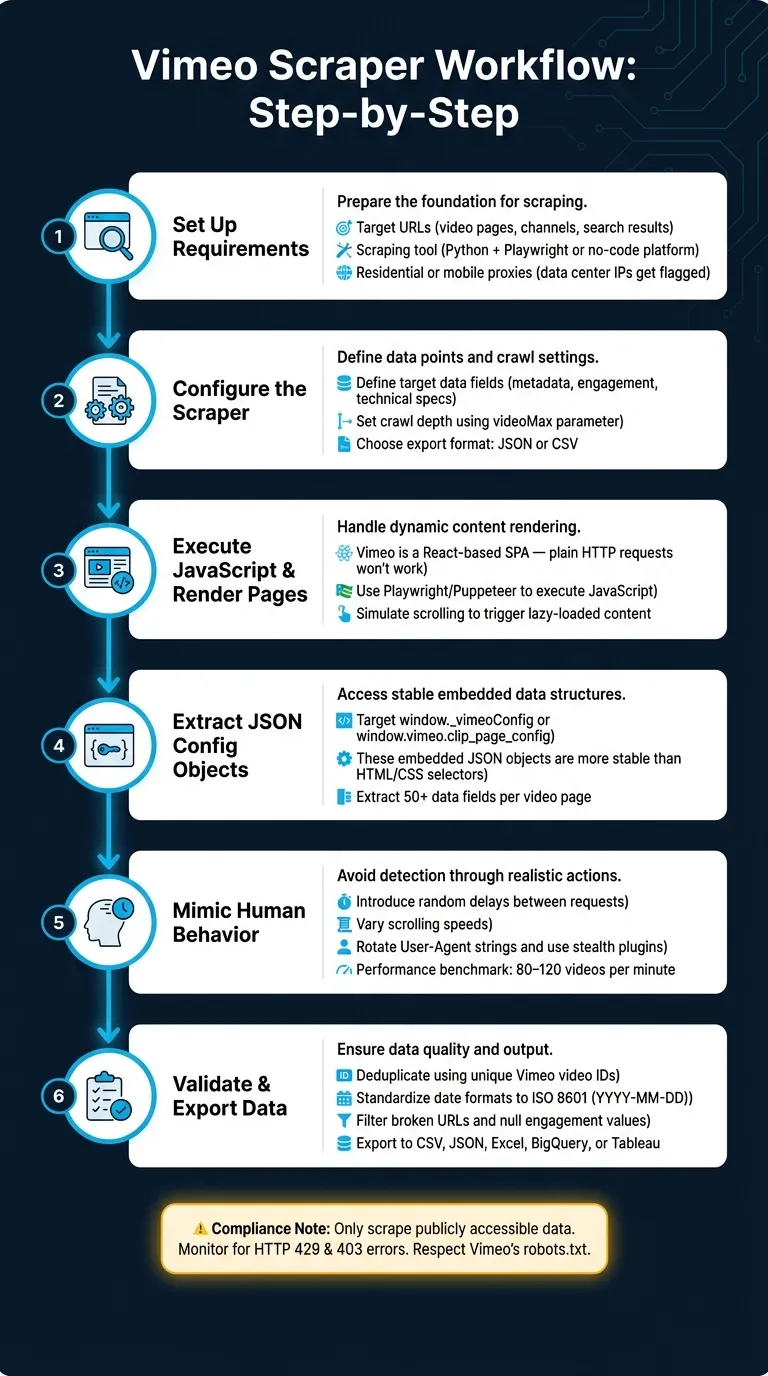
With your Vimeo Scraper configured, it’s time to dive into the actual data extraction process. Each step is essential to ensure smooth scraping and accurate results.
Step-by-Step Workflow
Since Vimeo operates as a single-page application (SPA), the scraper must execute JavaScript to load video grids and metadata properly. Once the page renders, focus on extracting data from the global configuration objects (window._vimeoConfig or window.vimeo.clip_page_config) found in the script tags. These JSON objects provide structured and reliable data, making them much easier to work with than raw HTML elements.
“Look for the global config object in the page’s source code; it often contains clean, structured JSON data that is easier to extract than HTML elements.” - Automatio
During the scraping process, make sure to pause after each scroll. This delay allows React-based components to fully render the next batch of video cards. For channel pages or search results, automate interactions with the “Load More” button or track the page parameter in the URL to avoid skipping any content. A well-optimized workflow can extract between 80 and 120 videos per minute. Once the data is collected, move on to validating its accuracy and structure.
Validating Extracted Data
After extraction, it’s crucial to clean and validate the raw data to ensure it’s structured and usable. Here are the key validation steps:
| Validation Method | Purpose |
|---|---|
| Unique ID Indexing | Organizes videos by their Vimeo ID, removing duplicate entries. |
| Link Filtering | Identifies and excludes broken or invalid URLs from the dataset. |
| Engagement Check | Ensures public stats (likes, comments) are enabled to avoid null values. |
| Format Consistency | Converts epoch timestamps (e.g., 1712053062) into ISO 8601 format (YYYY-MM-DD). |
Exporting and Using Scraped Data
Once your data is validated, the next step is exporting it in a format that’s ready for immediate use. This is where a powerful Vimeo Scraper comes into play, ensuring a smooth transition from raw data extraction to actionable insights.
Export Formats and Organization
You can export the data in formats like CSV or JSON for easy integration with analytics tools. If you prefer direct reporting, Excel (.xlsx) is another option. Additionally, the scraper supports direct integration with platforms like BigQuery, Looker Studio, or Tableau, enabling real-time dashboards and tracking historical trends.
To keep things organized, structure your exported data into three main categories:
-
Core Metadata: Includes titles, video IDs, and descriptions - ideal for content audits or refining SEO strategies.
-
Engagement Metrics: Covers views, likes, and comments - perfect for competitive benchmarking or trend analysis.
-
Technical Specs: Focuses on resolution, FPS, codec, and bitrate - useful for video quality audits or encoding checks.
Here’s a quick overview:
| Data Category | Key Fields | Business Use |
|---|---|---|
| Core Metadata | Titles, Video IDs, Descriptions | Content audits, SEO strategy |
| Engagement | Views, Likes, Comments, Collections | Competitive benchmarking, trend analysis |
| Technical Specs | Resolution, Codec, FPS, Bitrate, DRM Status | Encoding audits, video QA |
| Creator Info | Name, Bio, Location, Social Links | Talent scouting, influencer recruitment |
This structured approach simplifies downstream processes, whether you’re benchmarking competitors or auditing the encoding quality of a creator’s video catalog.
Automating Data Exports
With the Vimeo Scraper fully configured, you can automate exports in multiple formats simultaneously. For teams that need frequent updates, automation can refresh data as often as every 15 minutes. This allows for seamless syncing to BI dashboards without any manual effort. If you’re managing recruitment or outreach workflows, webhooks can instantly push newly scraped creator profiles into your CRM as soon as they’re detected.
“The business value comes from the dataset you build, not from the fact that you requested a page.” - Brand Vision
It’s important to note that manual exports are only available to paid accounts and are limited to owned videos. A well-optimized Vimeo Scraper, however, goes beyond these limitations, delivering detailed metrics and technical insights that aren’t included in native exports. With properly organized exports, you’re ready to dive into the next phase: ensuring compliance and maintaining data quality. A robust Vimeo Scraper is the key to turning Vimeo data into actionable analytics.
Compliance and Data Quality
Building an effective Vimeo Scraper involves more than just efficient data collection - it requires strict attention to compliance and data quality. The way you gather and handle data is just as important as what you plan to do with it.
Following Vimeo’s Policies
Vimeo explicitly prohibits unauthorized scraping:
“Unauthorized scraping is a violation of Vimeo’s Terms of Service. We take action against unauthorized scraping, such as blocking accounts associated with scraping and initiating legal proceedings, when appropriate.” - Vimeo Help Center
For those looking to work within Vimeo’s guidelines, the platform suggests using its official APIs. These APIs not only comply with Vimeo’s rules but also offer a faster and simpler way to access data. When setting up your Vimeo Scraper, it’s critical to ensure that it only collects publicly available content - avoiding anything behind logins, paywalls, or private settings.
Additionally, compliance with broader privacy laws like GDPR and CCPA is non-negotiable, especially when dealing with personally identifiable information (PII) such as names or email addresses. Violations can lead to steep penalties, with GDPR fines reaching up to $277 million. To stay compliant, consider stripping or encrypting PII if it’s not essential to your analysis.
Always review Vimeo’s robots.txt file and respect any “Disallow” directives. A responsible Vimeo Scraper should also monitor for HTTP 429 (Too Many Requests) or 403 (Forbidden) responses - both of which signal the need to slow down or stop scraping altogether.
Once compliance is addressed, the next step is ensuring the accuracy and reliability of the data collected.
Quality Assurance Practices
Compliance is only half the battle; the other half is maintaining the quality of the data. A strong quality assurance (QA) process is essential, combining deduplication, standardization, and error monitoring into a seamless workflow.
Begin by indexing each record using its unique Vimeo video ID to remove duplicates before they can distort your analysis. Next, standardize data formats - ensure dates follow a consistent structure, normalize numerical fields like view counts, and identify any null or malformed values using regular expressions. These steps can help your Vimeo Scraper achieve over 95% successful video detection across tested profiles and channels.
| QA Practice | Purpose | How to Apply |
|---|---|---|
| Deduplication | Removes repeat records | Filter by unique Video ID |
| Standardization | Ensures consistent formatting | Reformat dates and numbers via scripts |
| Error Logging | Catches silent failures | Log HTTP errors without halting the run |
| Field Filtering | Reduces data noise | Request only the fields your project needs |
“Ethical scraping isn’t a checkbox - it’s an ongoing commitment.” - Nicolas Rios, CEO, Abstract API
Your Vimeo Scraper should also be designed to handle errors gracefully. For instance, if a specific element fails to load, the scraper should log the issue and move on rather than crashing the entire process. Regularly updating your scraper to account for changes in Vimeo’s layout or structure will help ensure uninterrupted data collection.
What Web Scraping HQ Offers for Vimeo Data
Web Scraping HQ offers reliable web scraping services with two plans tailored to meet different needs: a Standard plan at $449/month and a Custom plan starting at $999/month. These plans are designed to address the challenges of maintaining a robust scraping setup. Both include features like automated quality assurance, legal compliance safeguards, JSON/CSV outputs, and expert consultation. The Custom plan goes a step further with enterprise-level SLAs, tailored schemas, priority support, and a 24-hour turnaround for urgent issues.
With these offerings, Web Scraping HQ doesn’t just provide raw data. It delivers pre-validated, ready-to-use datasets that integrate seamlessly into your workflows, saving time and reducing headaches.
Want this done for you?
Send us the URLs. We'll quote it in 24 hours.
Paste the URL(s) you want scraped. We'll reply within 24 hours with a feasibility check and a ballpark quote.