Jump to section
- Quick comparison
- Set Up a Python Binance Scraper Environment
- Install Dependencies and Create the Project Structure
- Configure Public Access and Safe Secrets Handling
- Build Core Scrapers for Symbols, Prices, Order Books, and Candles
- Scrape Trading Pairs and Live Market Stats
- Scrape Order Book Snapshots and Historical Candles
- Use WebSocket Streams for Real-Time Binance Data
- Handle Pagination, Rate Limits, and Dynamic Content
- Paginate Historical Data Without Gaps
- Throttle Requests and Recover from Errors
- Work with Dynamic Pages and Reduce Anti-Bot Friction
- Store, Export, and Use Binance Data in Analytics Workflows
- Export Clean Data for Analytics and Reporting
- Turn Raw Data into Business-Ready Metrics
- Conclusion: From DIY Binance Scraper to Reliable Data Operations
If I want Binance market data, I should use the API first, not browser scraping. That is the main point. Binance gives me public access to symbol lists, prices, order books, and candle data through REST and WebSockets, and that covers most data jobs without a private key.
Here’s the short version:
-
I use REST for snapshots and history
-
I use WebSockets for live prices and order book updates
-
I use browser tools only for UI-only pages like announcements
-
I page through candles in 1,000-row batches
-
I watch rate-limit weight, not just request count
-
I save large datasets in Parquet, and small flat exports in CSV or JSON
-
I track both event time and ingest time
-
I check for gaps, duplicates, and schema changes while preparing for common web scraping errors
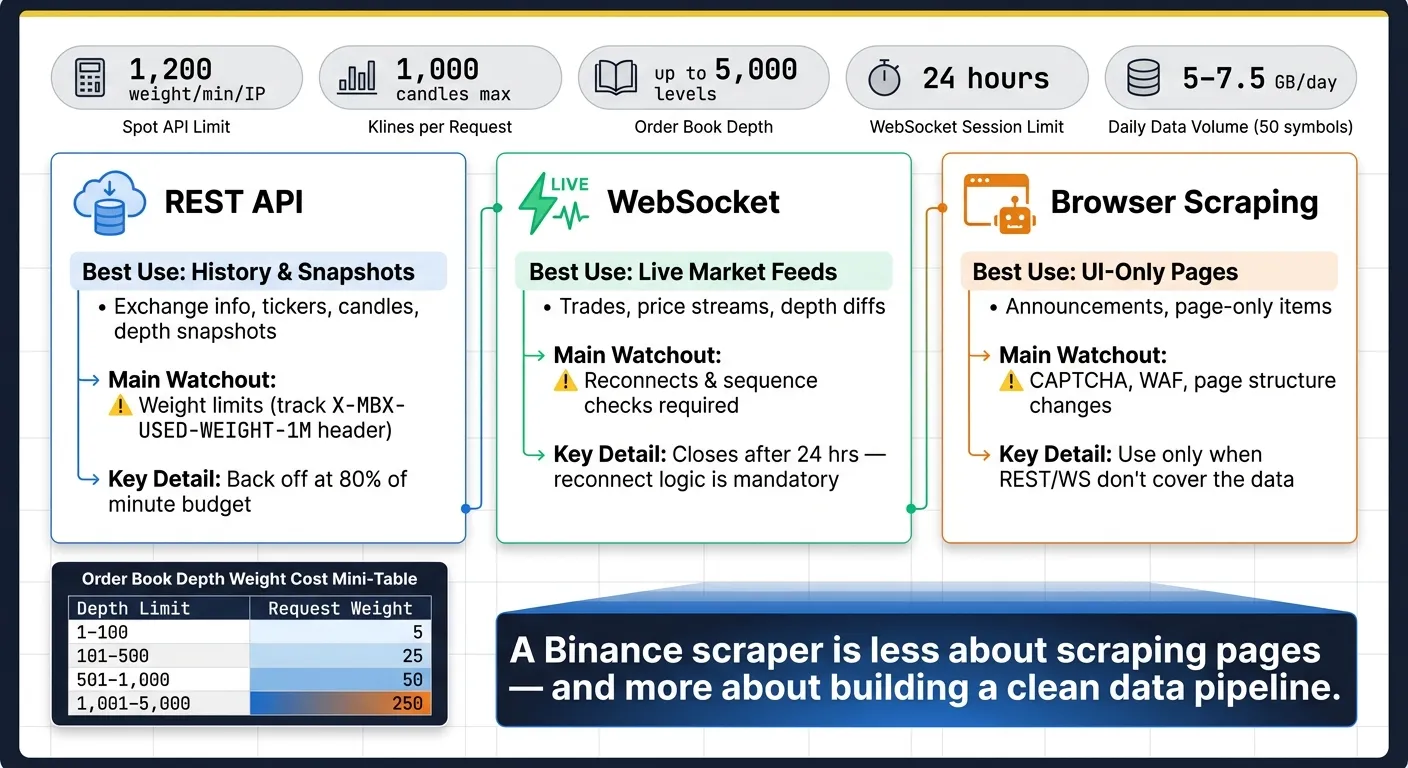
A few numbers matter right away:
-
Spot API limit: 1,200 weight per minute per IP
-
Klines limit: 1,000 candles per request
-
Order book depth: up to 5,000 levels
-
WebSocket sessions: Binance may close them after 24 hours
-
A 50-symbol pipeline can produce about 5 GB to 7.5 GB per day
Quick comparison
| Method | Best use | What I get | Main watchout |
|---|---|---|---|
| REST API | History and snapshots | Exchange info, tickers, candles, depth snapshots | Weight limits |
| WebSocket | Live market feeds | Trades, price streams, depth diffs | Reconnects and sequence checks |
| Browser scraping | UI-only pages | Announcements, page-only items | CAPTCHA, WAF, page changes |
The big takeaway is simple: a Binance scraper is less about “scraping” pages and more about building a clean data pipeline. I need type conversion, gap-free pagination, backoff for 429 and 5XX errors, and storage that can handle high-volume market data without making analysis a mess.
Set Up a Python Binance Scraper Environment
Install Dependencies and Create the Project Structure
Start by creating an isolated environment so this project doesn’t mix packages with anything else on your machine. Inside a new folder, run python -m venv venv. Then activate it with source venv/bin/activate on macOS/Linux or venv\Scripts\activate on Windows.
Once that’s done, install everything in one shot:
pip install requests httpx websocket-client pandas python-dotenvEach package has a clear job:
-
requestsfor simple REST calls -
httpxfor async work or heavier pipelines -
websocket-clientfor WebSocket streams -
pandasfor cleanup and export -
python-dotenvfor secret handling
It’s also smart to set up a clean folder layout from the start. That saves you from the usual mess later.
| Directory | Purpose | Key Files |
|---|---|---|
binance_scraper/ | Main source code | scraper.py, utils.py |
data/ | Raw and processed output | prices.csv, order_book.json |
config/ | Settings and secrets | .env, config.py |
logs/ | Execution and error tracking | scraper.log |
Order book scraping can produce large daily files fast. To keep things under control, split data/ into subfolders like spot/, futures/, and klines/.
Configure Public Access and Safe Secrets Handling
Most public Binance data doesn’t need auth. Still, it’s smart to set up secret handling now, especially if you plan to add private endpoints later.
Create a .env file inside config/:
BINANCE_API_KEY=your_actual_key_here
BINANCE_SECRET_KEY=your_actual_secret_here
Then load those values with python-dotenv:
from dotenv import load_dotenv
import os

load_dotenv("config/.env")
api_key = os.getenv("BINANCE_API_KEY")
api_secret = os.getenv("BINANCE_SECRET_KEY")
Add .env, logs/, and data/ to .gitignore. That helps protect secrets and keeps bulky output files out of version control.
Also create a requirements.txt file so anyone on your team can recreate the same setup without guesswork.
With that in place, you’re ready to connect to Binance and start pulling live and historical market data.
Build Core Scrapers for Symbols, Prices, Order Books, and Candles
Scrape Trading Pairs and Live Market Stats
Start with the basic market data endpoints. Use GET /api/v3/exchangeInfo to pull symbols and filters, GET /api/v3/ticker/price for the latest price, and GET /api/v3/ticker/24hr for 24-hour market stats [8].
One detail matters here: the 24-hour ticker endpoint has a request weight of 2–80 based on how many symbols you ask for [8]. That makes a full batch request the smart move. Pull the whole set in one call instead of looping through symbols one by one.
Binance also returns most numeric fields as strings. If you skip type conversion during ingestion, your analysis can get messy fast. Convert those values to float or Decimal before you analyze or export them [9][5].
Here’s a small pattern that fetches all 24-hour tickers and writes them to CSV:
import requests
import pandas as pd
from datetime import datetime, timezone

def fetch_24hr_tickers():
    url = "https://api.binance.com/api/v3/ticker/24hr"
    response = requests.get(url, timeout=10)
    response.raise_for_status()
    data = response.json()

    df = pd.DataFrame(data)
    numeric_cols = [
        "lastPrice", "priceChangePercent", "volume", "highPrice", "lowPrice",
        "priceChange", "weightedAvgPrice", "openPrice", "quoteVolume",
        "bidPrice", "bidQty", "askPrice", "askQty"
    ]
    df[numeric_cols] = df[numeric_cols].astype(float)

    timestamp = datetime.now(timezone.utc).strftime("%Y-%m-%d_%H-%M-%S")
    df.to_csv(f"data/spot/tickers_{timestamp}.csv", index=False)
    return df
Once you have symbol-level snapshots, the next step is depth data and candle history.
Scrape Order Book Snapshots and Historical Candles
The GET /api/v3/depth endpoint gives you bid and ask levels for a symbol. The limit parameter goes as high as 5,000 levels [8]. But there’s a tradeoff: request weight climbs with depth. A limit of 1–100 costs 5, 101–500 costs 25, 501–1,000 costs 50, and 1,001–5,000 costs 250 [8].
So don’t grab 5,000 levels just because you can. Use the smallest depth that matches your use case.
def fetch_order_book(symbol: str, limit: int = 100) -> dict:
    url = "https://api.binance.com/api/v3/depth"
    params = {"symbol": symbol, "limit": limit}
    response = requests.get(url, params=params, timeout=10)
    response.raise_for_status()
    book = response.json()

    # Convert string prices/quantities to float
    book["bids"] = [[float(p), float(q)] for p, q in book["bids"]]
    book["asks"] = [[float(p), float(q)] for p, q in book["asks"]]
    return book
For candles, use GET /api/v3/klines. You must send a symbol and an interval, such as 1m, 1h, or 1d. Each response returns up to 1,000 candles [8].
If you want a full history with no holes, fetch in a loop with startTime and endTime. After each batch, set the next startTime to the last candle’s closeTime plus one millisecond [8]. That tiny + 1ms step is easy to miss, but it keeps your pagination clean.
Binance timestamps are in UTC milliseconds, so convert them to UTC datetimes as part of normalization.
def fetch_klines(symbol: str, interval: str, start_ms: int, end_ms: int) -> pd.DataFrame:
    url = "https://api.binance.com/api/v3/klines"
    all_candles = []
    current_start = start_ms

    while current_start < end_ms:
        params = {
            "symbol": symbol,
            "interval": interval,
            "startTime": current_start,
            "endTime": end_ms,
            "limit": 1000,
        }
        resp = requests.get(url, params=params, timeout=10)
        resp.raise_for_status()
        candles = resp.json()
        if not candles:
            break
        all_candles.extend(candles)
        current_start = candles[-1][6] + 1  # closeTime + 1ms

    cols = [
        "open_time", "open", "high", "low", "close", "volume",
        "close_time", "quote_volume", "trade_count",
        "taker_buy_base", "taker_buy_quote", "ignore"
    ]
    df = pd.DataFrame(all_candles, columns=cols)
    df["open_time"] = pd.to_datetime(df["open_time"], unit="ms", utc=True)
    df["close_time"] = pd.to_datetime(df["close_time"], unit="ms", utc=True)
    for col in ["open", "high", "low", "close", "volume"]:
        df[col] = df[col].astype(float)
    return df
If you’re storing long candle histories, compressed columnar formats are a better fit for analysis and export.
Use WebSocket Streams for Real-Time Binance Data
For live prices and order-book diffs, use WebSockets. After the connection is open, WebSocket messages do not consume request weight [7]. That said, the stream code still needs reconnect handling, heartbeats, and sequence checks. Without those pieces, things fall apart at the worst time.
import json
import time
from datetime import datetime, timezone

import websocket

def on_message(ws, message):
    data = json.loads(message)
    date_str = datetime.now(timezone.utc).strftime("%Y-%m-%d")
    with open(f"data/spot/stream_{date_str}.jsonl", "a", encoding="utf-8") as f:
        f.write(json.dumps(data) + "\n")

def on_error(ws, error):
    print(f"WebSocket error: {error}")

def start_stream(stream: str):
    url = f"wss://stream.binance.com:9443/ws/{stream}"
    while True:
        ws = websocket.WebSocketApp(url, on_message=on_message, on_error=on_error)
        ws.run_forever(ping_interval=20, ping_timeout=10)
        print("Connection closed  -  reconnecting...")
        time.sleep(5)

start_stream("btcusdt@depth")
Binance closes WebSocket connections after 24 hours [3][6]. Treat reconnect logic as part of the core design, not a cleanup task for later. You also need to reply to ping frames within 1 minute to avoid getting disconnected early [3].
To keep a local order book in sync, combine the REST depth snapshot with diff streams. The order matters. Start the stream first, then fetch the REST snapshot so you can apply the buffered diffs without gaps.
Here’s the handoff logic:
-
Buffer diff events as they arrive.
-
Drop any buffered event whose final update ID,
u, is less than the snapshot’slastUpdateId. -
Apply the first event that satisfies
U <= lastUpdateId + 1 <= u[10][3].
If you skip that sequence check, your local book can drift out of sync without much warning.
Handle Pagination, Rate Limits, and Dynamic Content
Paginate Historical Data Without Gaps
Once your core scrapers are working, the next job is reliability. That usually comes down to three things: gap-free pagination, steady pacing, and fallback handling.
Binance limits klines requests to 1,000 candles per call [11][12]. To paginate safely, move startTime forward with the last candle’s close time + 1 ms. Then sort every batch by open_time before you save it. That extra check makes it easier to spot out-of-order rows before they slip into your dataset.
As you write batches to disk, compare each batch’s open_time values against what you already have stored. Also check that each candle moves forward by exactly one interval. If you find a duplicate or a missing time window, re-fetch that range instead of skipping past it. It takes a bit more work up front, but it saves you from messy data later.
Throttle Requests and Recover from Errors
Binance uses a weight-based rate limit instead of a plain request-count limit. The standard Spot API limit is 1,200 request weights per minute per IP [13][14]. Track the X-MBX-USED-WEIGHT-1M header on every response, and slow down before you hit the wall. A good rule is to back off when usage reaches 80% of the minute budget [7].
If you get a 429, stop all requests at once and wait for the time listed in Retry-After. Keep pushing, and Binance can answer with an automated 418 ban that lasts anywhere from 2 minutes to 3 days [13][14].
For transient 5XX responses, treat the batch as incomplete. Wait a short time, then retry with exponential backoff plus jitter. If timeouts start stacking up, a simple circuit breaker can stop things from snowballing. Adaptive throttling or a token bucket also helps keep your scraper paced without leaning on fixed delays [7][14].
After request pacing is under control, you only need DOM handling for the pages that still depend on it.
Work with Dynamic Pages and Reduce Anti-Bot Friction
Use browser automation only when Binance doesn’t expose the data through REST or WebSockets.
That usually means public pages the API doesn’t cover, like announcement pages, public dashboards, or UI-only features [1]. Binance uses a custom WAF, CAPTCHA challenges, and TLS fingerprinting, so plain HTTP clients can get blocked. curl_cffi can help by mimicking a browser TLS handshake and cutting down WAF friction [1].
When Playwright or Puppeteer is necessary, wait for specific DOM elements instead of using fixed delays. For infinite-scroll pages, check row counts to decide when loading is done. Scroll position by itself isn’t dependable [15].
Store, Export, and Use Binance Data in Analytics Workflows
Export Clean Data for Analytics and Reporting
Once your collection setup is stable, the next step is simple: save data in formats that keep timing and numeric precision intact.
For high-volume Binance data from REST snapshots and WebSocket streams, like order books and candles, use Parquet with ZSTD. It handles heavy workloads well and keeps storage under control. A production scraper that covers 50 symbols can produce between 5 GB and 7.5 GB of data per day [5].
For smaller and flatter datasets, such as 24-hour ticker stats, CSV or JSON is usually enough [2][16].
You’ll also want to store both event time and ingest time for each record. That gives you a clean way to measure latency and check whether your captures are lining up as expected [2][10].
A clear file layout helps a lot here. Group files by market type, data category, and date. For example:
spot/candles/BTCUSDT/2026-06-17.parquet
Partitioning by market and date makes queries easier and speeds up later analysis work [5]. For prices, use decimals or scaled integers instead of floats. Float rounding errors may look small at first, but over a large dataset they can snowball. This setup also makes feature engineering faster.
Turn Raw Data into Business-Ready Metrics
Raw Binance data is useful, but derived metrics are where things start to click.
During ingestion, turn candles and order book snapshots into metrics like spread, mid-price, imbalance, microprice, rolling volume, and volume velocity [2][4][10]. Doing this early saves time later and gives your analytics layer cleaner inputs.
For timeframe aggregation, use pandas or polars to resample intraday records into daily or higher-timeframe OHLCV candles [2][5].
One common headache is schema drift. Binance may change field names or response formats without warning, and that can break downstream models fast. Add schema checks so missing keys get caught early instead of turning into silent null values in your metrics layer [2].
Conclusion: From DIY Binance Scraper to Reliable Data Operations
With collection, storage, and validation working together, a scraper stops being a side project and starts acting like a repeatable data pipeline.
As volume grows, add checks for sequence gaps and schema drift [2][10]. A production-ready scraper that handles 50+ symbols can run on a 4 vCPU, 8 GB RAM instance for about $7.50 per month [5]. Keep checking for gaps, precision issues, and schema changes as the dataset gets larger.
Want this done for you?
Send us the URLs. We'll quote it in 24 hours.
Paste the URL(s) you want scraped. We'll reply within 24 hours with a feasibility check and a ballpark quote.