Jump to section
- When Enterprise Pipelines Hit a Wall
- Why the code matters less than the operating model
- What HTTP 403 Really Means
- Why blind retries make the incident worse
- Why Enterprise Scraping Keeps Seeing 403
- Credential drift
- Network and geographic reputation
- Fingerprinting and browser signals
- Pacing and policy enforcement
- Reading the Signal Behind a 403 Response
- The Practical Mitigation Playbook
- Start with request and session hygiene
- Use network identity deliberately
- Pace before you escalate
- Use browser rendering where it changes access conditions
- Don’t cargo-cult evasion techniques
- The Hidden Cost Curve of Anti-Bot Defenses
- Measure unit economics by source
- Make re-tuning predictable
- Designing a 403-Resilient Scraping Architecture
- The request governance layer
- The network and pacing layers
- Rendering and observability
- Your Operational Checklist and Final Word
At 3 a.m., a price-intelligence pipeline can look perfectly healthy while delivering nothing useful. Latency is normal, workers are running, queues are draining, and every shard is returning HTTP 403. The first visible business effect may arrive hours later, when stale competitor prices reach a repricing system, a lead funnel loses fresh records, or a machine-learning feature suddenly goes empty.
That’s why enterprise web scraping can’t treat a 403 as a minor configuration defect. The response is often the visible symptom of a continuing contest between request identity, browser behavior, network reputation, and the target’s defensive controls. A reliable operation measures not only pages per minute, but also successful records, target-level unblock rates, proxy cost, retry volume, and the engineering effort required to keep the feed trustworthy.
When Enterprise Pipelines Hit a Wall
The alert arrives, but nothing appears broken at first glance. Your scheduler launched the jobs, workers accepted tasks, response times stayed within their normal range, and the retry queue remained active. The difference is that every request to a major source now ends in a refusal, so the pipeline produces an empty dataset with the outward appearance of a successful run.
That failure is especially dangerous in enterprise environments because downstream systems rarely understand the difference between “no records found” and “collection was blocked.” A pricing service may accept yesterday’s values. A sales dashboard may render a complete-looking funnel. An ML feature store may write nulls without stopping the model job. By the time an analyst notices, the operational impact has already spread beyond the scraper.
Operational rule: An empty result from a protected source is a data-quality incident, even when the HTTP worker reports success.
A 403 also creates a poor debugging signal. Engineers often begin by changing the User-Agent, adding another retry, or increasing the proxy pool. Those actions can occasionally mask the problem, but they don’t identify whether the target rejected credentials, network identity, request behavior, or browser signals. At scale, random changes increase traffic while reducing confidence in the diagnosis.
Why the code matters less than the operating model
A proof-of-concept scraper can succeed against a source for a long time and still lack the controls required for production. Enterprise pipelines need per-source policies, health scoring, schema validation, dead-letter handling, and alerts that distinguish blocked acquisition from a genuine absence of data. Fault tolerance also needs to be designed into the distributed system, as outlined in this guide to distributed web scraping fault tolerance.
The important shift is conceptual. A 403 isn’t usually a one-time bug that disappears after a header change. It’s a policy decision made by the target, and that policy can evolve. Once defenses change, the cost appears in repeated proxy purchases, browser execution, failed requests, source-specific tuning, and delayed data. The status code is only the first invoice.
What HTTP 403 Really Means
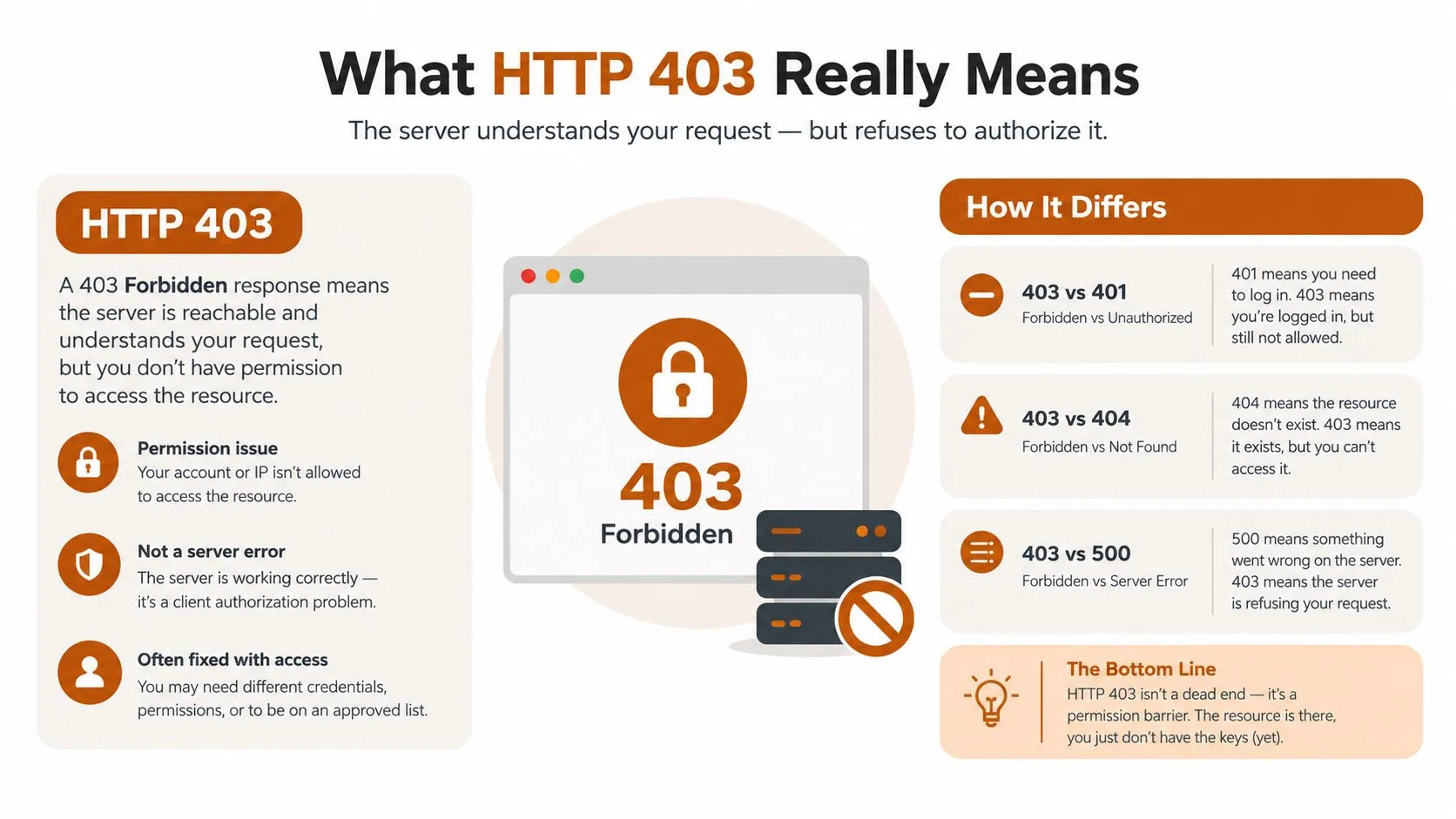
HTTP 403 Forbidden means the server understood the request and decided not to provide the requested content. The server may know the caller’s identity, inspect its request characteristics, and reject access under a security or authorization policy.
That differs from nearby status codes:
- 401 Unauthorized means the request needs valid authentication. The caller may gain access after presenting or refreshing the right credential.
- 403 Forbidden means the server has refused access, even though it understood the request. Changing the request’s identity or behavior may be necessary.
- 429 Too Many Requests indicates rate limiting. The target is explicitly signaling that request volume or frequency is too high.
- 404 Not Found means the requested resource isn’t available at that location.
- 500 Internal Server Error points to a server-side failure rather than a deliberate access decision.
The hotel analogy is useful. A 401 is the front desk asking you to show your room key. A 403 is the front desk checking your details and deciding you’re not getting inside, regardless of the key you’re holding. A 429 is the hotel telling you to stop crowding the lobby and try again later.
Why blind retries make the incident worse
Many collectors send every non-success response through one retry path. That works tolerably for transient network failures, but a deliberate 403 often remains stable across retries. Repeating the same request can raise the target’s confidence that the caller is automated, consume proxy capacity, and fill downstream queues with duplicate work.
Treat the response as a classification problem. Preserve the status code, headers, body, timing, destination, proxy identity, authentication state, and browser mode. Then decide whether the next action is credential refresh, identity replacement, slower pacing, browser rendering, or a controlled stop. A 403 is a request to change the conditions of access, not just to request the same page again.
Why Enterprise Scraping Keeps Seeing 403
Production incidents usually cluster around five causes. In practice, credential drift and IP reputation are the first areas to investigate, followed by fingerprint rules, source-specific throttling, and explicit policy enforcement. That ranking isn’t a universal law, but it reflects how often ordinary session and network changes break otherwise stable jobs.
| Cause | Approx. Frequency | Typical Signal |
|---|---|---|
| Missing or rotated authentication | Highest in routine operations | Expired cookies, rejected API keys, failed refresh flow |
| IP or geo blocking | Very common | One proxy pool fails while another region or network succeeds |
| WAF fingerprint rules | Increasingly common | Consistent rejection tied to client or browser characteristics |
| Rate limiting returned as 403 | Common on some stacks | Success declines after bursts or concurrency increases |
| Robots or legal enforcement | Source-dependent | Refusal follows policy, contractual, or crawler restrictions |
Credential drift
Session cookies expire, OAuth refresh tokens fail, API keys rotate, and login flows change without warning. A pipeline may continue sending a syntactically valid request that no longer carries the authorization state the source expects. The dashboard then shows a wall of 403s after a credential rotation, often across every worker at once.
The fix is not to add proxies. Store authentication state securely, validate it before a production run, refresh tokens through a controlled workflow, and isolate credential health from page extraction. A failed refresh should produce a clear authentication alert rather than an empty feed.
Network and geographic reputation
Datacenter ranges can carry a reputation that differs sharply from residential or mobile networks. A target may allow a request from one geography while refusing the same request from an embargoed region or a heavily used address range. The useful diagnostic is comparative behavior, not the absolute volume of requests.
Proxy selection should therefore consider target, geography, session continuity, and recent success history. A health-scored pool is more useful than a large undifferentiated list. Teams evaluating network options can compare the operational differences in this guide to proxy servers for web scraping.
Fingerprinting and browser signals
Modern WAFs can assess TLS and client signals, header order, cookie behavior, JavaScript execution, and consistency across a session. A request that carries a realistic User-Agent but behaves unlike the browser associated with it remains suspicious. Browser-missing JavaScript can produce the same outcome.
Pacing and policy enforcement
Some stacks return 403 when a caller exceeds an internal threshold, even though 429 would be the clearer response. Others block crawlers that disregard robots rules or cross an agreed access boundary. These cases need a governance decision, not an endless evasion loop. If access isn’t authorized or the collection conflicts with the source’s stated restrictions, stop and review the basis for collection.
Reading the Signal Behind a 403 Response
A 403 response contains more information than its status line. Start with one reproducible request and preserve the complete response before replaying the full pipeline. A single curl reproduction, captured through the same network path and authentication state, often tells you more than a noisy replay that changes several variables at once.
Inspect the headers first. Server may identify a delivery layer, while provider-specific fields such as X-Sucuri-ID, X-Akamai, or cf-ray can indicate that a WAF or edge service generated the response. X-Request-ID is valuable for correlating your logs with support or internal tracing. Header names aren’t proof by themselves, but they narrow the investigation.
Then read the body. Product-specific phrases, challenge instructions, JavaScript requirements, or a branded block page can reveal whether the target rejected the request at the edge, during a session check, or after rendering. Also compare timing. A near-instant refusal often points to a network, rule, or identity decision. A delay before rejection suggests that the target evaluated cookies, JavaScript, behavioral signals, or a challenge flow.
You should also test for a soft block. Some sources return 200 while replacing the expected page with a challenge, empty shell, consent wall, or generic error document. A status-only monitor misses this failure, so validate content structure, record counts, required fields, and representative values. Teams can also analyze your site’s headers as part of a broader header-inspection workflow, though production diagnosis still needs target-specific captures.
| Signal in headers or body | Likely cause | First action |
|---|---|---|
| Authentication-related body or expired session markers | Credential drift | Refresh credentials and test one authenticated session |
| Edge-provider identifiers with an immediate refusal | WAF or IP policy | Compare a healthy network identity and inspect request consistency |
| Challenge HTML or JavaScript requirement | Browser or fingerprint mismatch | Reproduce with a controlled browser session |
| 403 appears after bursts, then clears after quiet periods | Rate policy | Reduce concurrency and record target-level thresholds |
| 200 response with missing fields or challenge content | Soft block | Add content validation and quarantine the response |
Keep the raw body and headers for every 403, subject to your data-retention and privacy rules. The response should be part of the incident record, not discarded after the worker increments an error counter.
The Practical Mitigation Playbook
Mitigation works best when ranked by return on engineering effort. The first objective isn’t to deploy every anti-blocking technique. It’s to remove ordinary causes, reduce unnecessary pressure, and add a controlled fallback only where the source requires it.
Start with request and session hygiene
Standardize the request profile for each source. Keep the User-Agent, accepted content types, language settings, cookies, referer behavior, and header order consistent within a session. Don’t rotate every field independently. Inconsistent combinations can look less credible than a stable, ordinary client.
Authentication deserves its own component. Refresh cookies and tokens before they expire, detect failed refreshes explicitly, and prevent workers from continuing with known-invalid credentials. A session manager should expose health state to the scheduler so the system can pause a source instead of generating a larger failure storm.
Use network identity deliberately
Rotating proxies can help when a source has blocked an exit identity, but rotation isn’t a substitute for diagnosis. Datacenter proxies are generally easier to manage and may be appropriate for less protected sources. Residential or mobile networks can provide a different reputation profile, but they introduce higher cost, variable latency, and more complicated session affinity.
Use health scoring per target and geography. Remove failing exits from circulation, preserve a working session where continuity matters, and avoid switching identity in the middle of a workflow unless the target supports it. A practical comparison of static and rotating approaches is available in this guide to static versus rotating proxies.
Pace before you escalate
Concurrency is often the first lever engineers pull and the wrong one to pull upward. Apply a token-bucket or equivalent rate policy per source, with separate limits for listing pages, detail pages, search endpoints, and authenticated actions. Add jitter so workers don’t create synchronized bursts.
Retries should be bounded and classified. A transient network failure can use exponential backoff. A repeated 403 should trigger a different path, such as session validation, proxy replacement, browser fallback, or quarantine. If the system has no new information to introduce, another retry only increases cost.
Use browser rendering where it changes access conditions
Headless Chromium pays off when the source requires JavaScript execution, browser-managed cookies, interactive navigation, or a challenge flow that a plain HTTP client cannot complete. It’s theatre when the page is static and the team is using a browser merely because the request client was not instrumented correctly.
Browser sessions consume more compute and can increase latency. Keep them behind a source-specific fallback or use them as the primary mode only for sources that genuinely need them. Validate the extracted content after rendering, because a loaded browser page can still contain a challenge or incomplete state.
Don’t cargo-cult evasion techniques
Changing the User-Agent on every request, adding random delays without a rate model, and buying a larger proxy list are common rituals. None addresses an expired token, an inconsistent TLS profile, a blocked geography, or an explicit access policy. Effective mitigation changes a measurable input and checks whether the target-level success rate and data quality improve.
The team should record each change, its scope, and its effect. That turns incident response into an evidence-based tuning process rather than a sequence of guesses.
The Hidden Cost Curve of Anti-Bot Defenses
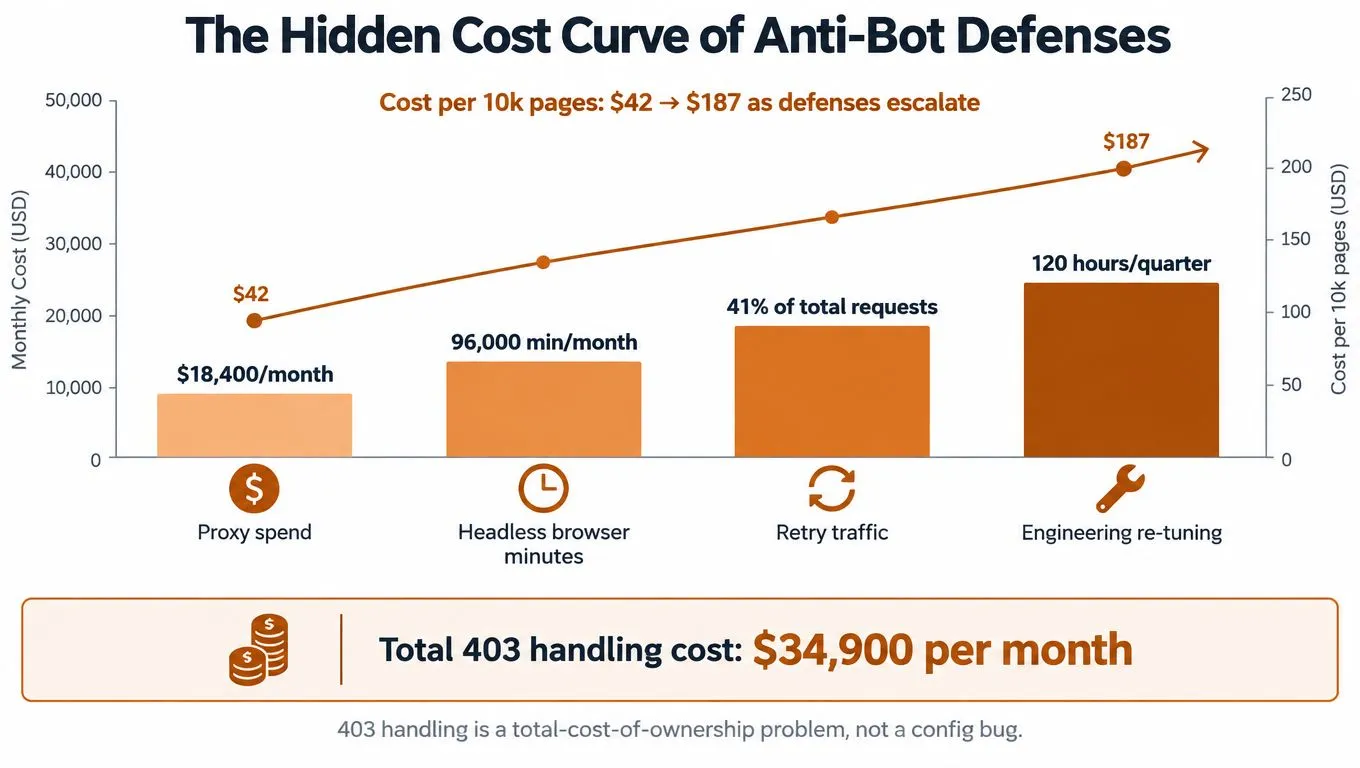
The business question isn’t whether a scraper can get through once. It’s whether the cost of getting through repeatedly remains lower than the value of the resulting data. Anti-bot defenses increase expense through several channels at once, including proxy usage, browser execution, retry traffic, monitoring, and engineering re-tuning.
A 2026 industry report found that 65.8% of respondents increased proxy usage year over year, 58.3% increased proxy spend, and more than 62% increased infrastructure spend, with stronger anti-bot protections cited as the driver. See the reported web data extraction cost trends for the underlying figures. Those numbers don’t establish a universal budget, but they do show why proxy cost alone is an incomplete operating metric.
Measure unit economics by source
A global 403 rate hides the sources that are consuming the budget. Track successful records, blocked requests, retry volume, browser minutes, proxy cost, and engineering interventions per target. One source may have a high refusal rate but low business value. Another may produce fewer pages while feeding a revenue-critical decision system.
Alerting should follow business impact. A small change in a low-priority feed may create a ticket. A sudden absence of validated records from a critical pricing source should stop downstream publication and notify the owner immediately. This is closer to a data SLO than a basic HTTP error monitor.
Make re-tuning predictable
Schedule reviews of source profiles, proxy pools, authentication state, schema validation, and fallback behavior. A controlled re-tuning cycle costs less than repeated fire drills because engineers can compare changes against historical success and data-quality signals.
The same logic applies to build-versus-buy decisions. A comparison of automated and manual data extraction costs is useful when the organization is deciding whether to fund more internal maintenance or outsource a recurring operation. The right choice depends on target variability, compliance requirements, internal capacity, and the value of controlling the extraction logic.
Designing a 403-Resilient Scraping Architecture
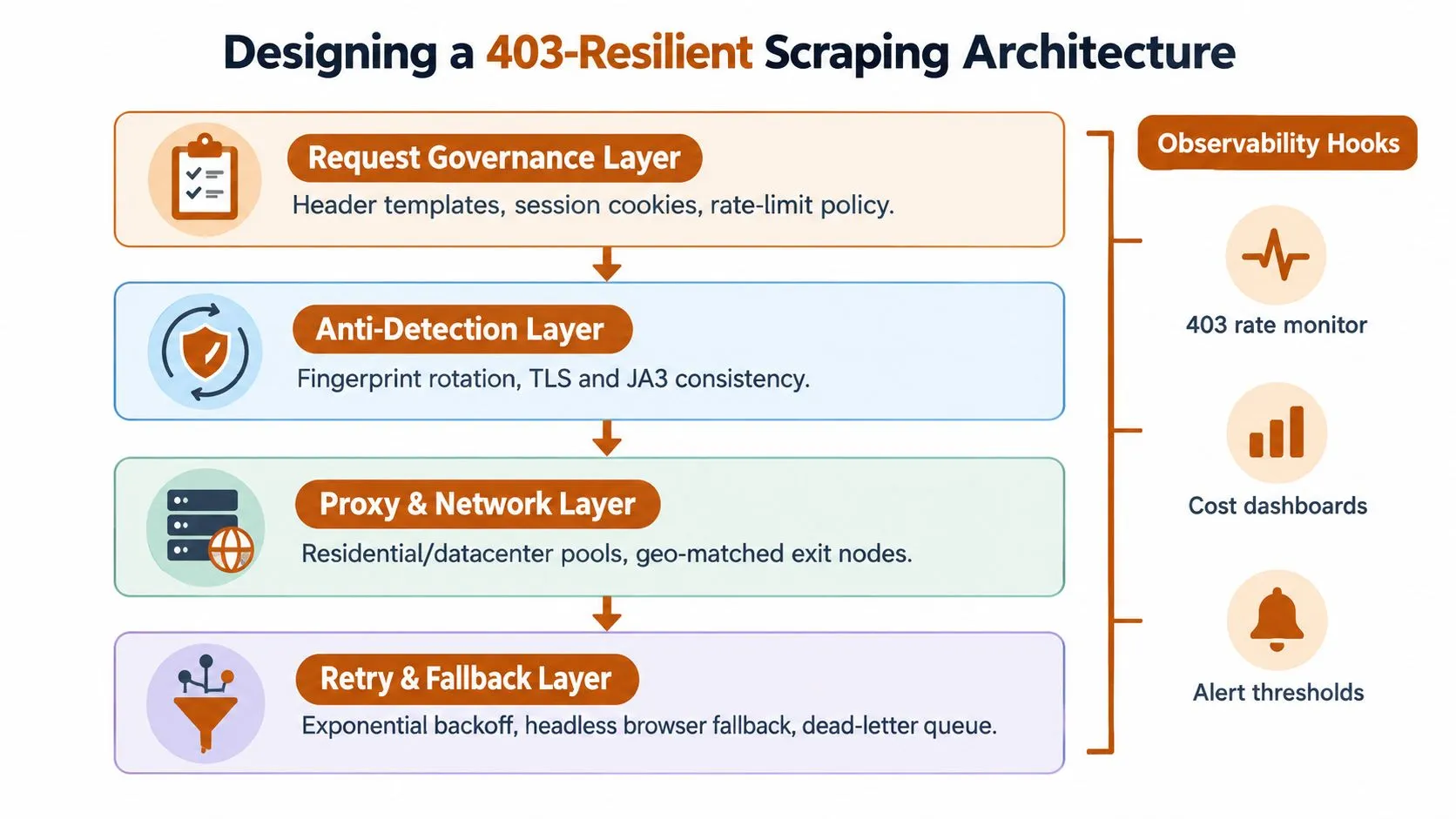
A resilient stack separates concerns instead of hiding every failure inside one worker. The request layer should know how to form a valid session. The network layer should know which exits are healthy. The retry layer should know when to slow down or stop. Observability should connect those decisions to data quality and cost.
The request governance layer
Begin with per-source configuration profiles. Each profile stores approved request headers, session behavior, authentication refresh rules, pacing policy, content validators, and collection boundaries. This prevents a global configuration from imposing the wrong behavior on every target.
The profile should also define what counts as a valid response. A successful status with missing fields or challenge content must be rejected before it reaches storage. Schema versioning makes source changes visible and gives downstream consumers a controlled way to handle field evolution.
The network and pacing layers
The proxy manager should maintain separate pools for geography, network type, and target compatibility. Health scoring needs more than reachability. It should include recent successful records, refusal patterns, latency, session continuity, and cost. The scheduler can then assign work using target-specific rules rather than round-robin rotation.
A pacing controller should enforce limits at the source and endpoint level. Exponential backoff with jitter belongs in the retry layer, while repeated 403s should move tasks into a quarantine or dead-letter queue. That queue preserves work for investigation without allowing the main pipeline to hammer a refusing source.
Rendering and observability
Use a browser pool for JavaScript-heavy sources and interactive workflows. Keep browser fallback explicit, with resource limits and content checks. A browser that completes a page load but returns a challenge document hasn’t solved the collection problem.
Every source dashboard should expose 403 rate, success rate, validated record count, latency, retry volume, proxy cost, and browser usage. The source profile, not the worker code, should carry the tuning decisions. Teams building with Scrapy can use the concepts in this guide to build scalable data pipelines with Scrapy, but the framework won’t remove the need for source-specific operations.
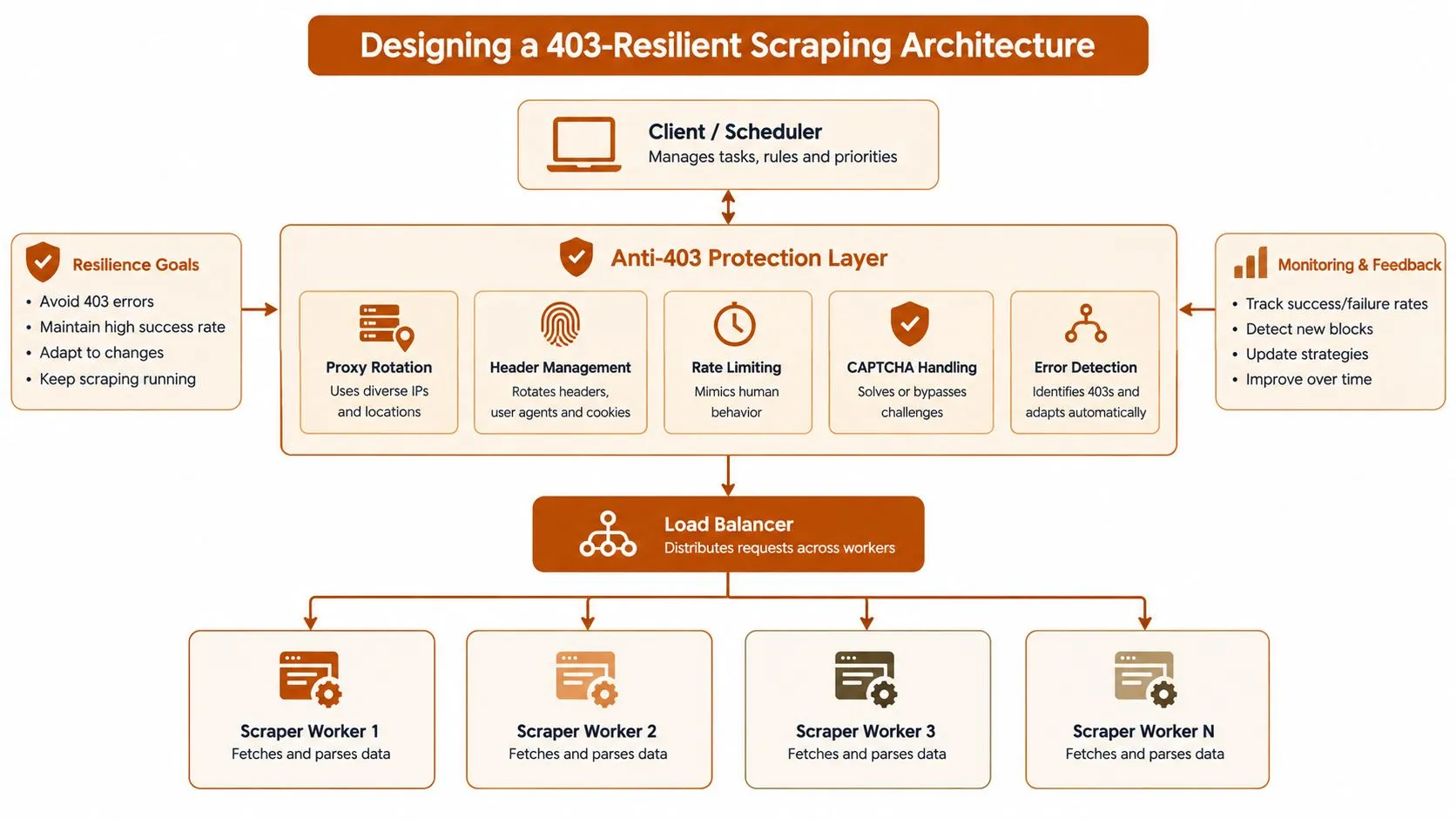
Source variability is the dominant maintenance driver. One target may require stable sessions and modest pacing, while another requires browser rendering and a geo-matched exit. Resilience is therefore a continuous re-tuning process, not a finished component you install once.
Your Operational Checklist and Final Word
Give the team a checklist that can be applied during every source review:
- Verify authentication: Test cookies, API keys, and refresh flows before collection begins.
- Standardize requests: Keep User-Agent, header order, session behavior, and accepted content consistent.
- Score network paths: Track proxy health by target, geography, latency, refusal pattern, and cost.
- Control request pressure: Enforce source-level pacing, bounded retries, exponential backoff, and jitter.
- Capture evidence: Store response headers and bodies for every 403, while following retention and privacy rules.
- Monitor the data SLO: Alert on blocked requests, empty outputs, missing fields, and invalid content, not only worker status.
- Maintain profiles: Keep per-source rules for authentication, pacing, rendering, validation, and fallback behavior.
A managed operation becomes more defensible when the target list is broad, sources change frequently, proxy and infrastructure costs keep rising, and internal engineers spend more time re-tuning than building product capabilities. In-house tooling still makes sense for a small set of stable, authorized sources when the team needs direct control and can support the operating burden.
WebscrapingHQ provides managed web data operations, custom extraction pipelines, monitoring, retries, proxy management, and recurring structured delivery for enterprise and growth-stage teams. If HTTP 403 incidents are turning a useful scraper into an unpredictable cost center, WebscrapingHQ can help assess the sources, schema, cadence, and operating model before you commit to another round of in-house re-tuning.
Want this done for you?
Send us the URLs. We'll quote it in 24 hours.
Paste the URL(s) you want scraped. We'll reply within 24 hours with a feasibility check and a ballpark quote.