
Jump to section
- Quick Comparison
- Plan the Scraping Workflow Before Writing Code
- Build Search URLs and Filters for US-Focused Collection
- Design Scraper Modules for Easy Maintenance
- When to Use Web Scraping HQ for Ongoing Ad Monitoring
- Build the Scraper with Playwright or Puppeteer
- Set Up the Project and Launch the Browser
- Wait for Rendered Ads and Extract Structured Fields
- Handle Scrolling, Pagination, Retries, and Selector Failures
- Clean, Export, and Compare Data Collection Approaches
- Define a Facebook Ads Library Data Schema
- Export to CSV or JSON for Analysis Pipelines
- Compare UI Scraping, API Access, and Managed Delivery
- Legal, Technical, and Operational Limits to Know
- Platform Rules, Throttling, and Detection Risks
- Mitigation Methods for Stable Data Collection
- Conclusion: Choose the Right Approach for Your Team
If I need Facebook Ads Library data fast, I have 3 paths: scrape the public UI with a headless browser, use Meta’s API, or hand the work off to a managed provider. The short version is simple: UI scraping is faster to start, the API is more stable for repeat jobs, and managed delivery cuts down in-house work.
Here’s the part that matters most: the Ads Library is JavaScript-rendered, so a plain request often misses data. If I scrape the UI, I need tools like Playwright or Puppeteer, waits for rendered ad cards, scroll or pagination handling, retries, proxy rotation, and field validation. If I use the API, I get structured output, but I need Meta approval first.
Whichever path I take, the job starts with a precise search. Our free Facebook Ad Library search URL builder sets the keyword or page, country, ad category, media type and dates in one link that I can open or hand to a scraper.
If I were setting this up today, Jul 15, 2026, I’d keep the plan simple:
-
Pick the method first: UI scraping, API, or managed delivery
-
Define the schema early: ad text, media URLs, advertiser info, run dates, impressions, placements, countries reached
-
Build from config: search terms, U.S. filters, and ad categories should sit outside the code
-
Split the scraper into parts: URL builder, browser manager, parser, pagination handler, validator, and storage
-
Prepare for failures: selector changes, throttling, blocked sessions, and partial loads
-
Export clean data: use JSON for nested fields and CSV for flat reports
-
Keep proof records: store the
ad_snapshot_urlwith each result
A few facts stand out. Impression data often appears as ranges, not exact counts. High concurrency can increase block risk. And no-login collection plus residential proxies usually gives steadier UI scraping than logged-in sessions on standard datacenter IPs.
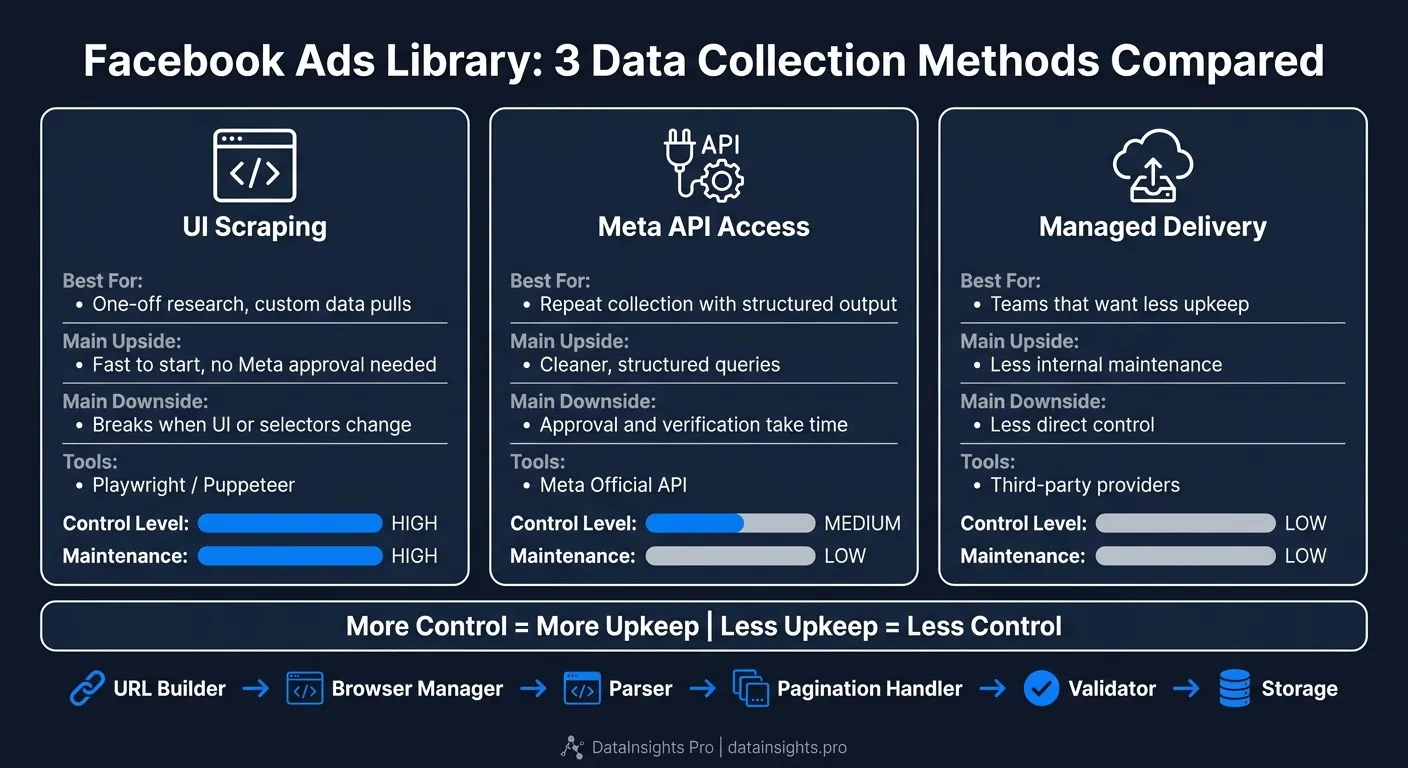
Quick Comparison
| Option | Best for | Main upside | Main downside |
|---|---|---|---|
| UI scraping | One-off research, custom data pulls | Fast to start, no Meta approval | Breaks when UI or selectors change |
| API access | Repeat collection with structure | Cleaner, structured queries | Approval and verification take time |
| Managed delivery | Teams that want less upkeep | Less internal maintenance | Less direct control |
So if I want flexibility, I scrape. If I want cleaner repeat collection, I use the API. If I want less day-to-day scraper work, I use a managed service. That’s the full playbook in plain English.
Plan the Scraping Workflow Before Writing Code
After you pick a collection method, map the workflow before you start coding. Define the data you need, how you’ll collect it, and where it will go once it’s collected.
That upfront planning saves time later. It also helps you avoid writing a scraper that works today but turns into a headache the moment the target site shifts.
Build Search URLs and Filters for US-Focused Collection
For US-focused collection, build search URLs from a JSON config with query, country, and category filters [2][3]. This keeps target settings out of the code, which makes updates much easier when collection needs shift.
Put those filters in an external config file so target changes don’t force code edits. If you need to switch markets, change categories, or tweak search terms, you can do that in one place instead of digging through the scraper.
Design Scraper Modules for Easy Maintenance
Split the scraper into modules so a single selector change doesn’t knock out the whole pipeline. In plain terms: each part should do one job. If the page layout changes, you want to patch the parser, not rebuild the URL builder or storage layer.
A clean architecture looks like this:
| Module | Responsibility |
|---|---|
| URL Builder | Constructs search URLs from config parameters |
| Browser Manager | Handles sessions, proxies, and geo-restrictions |
| Parser | Maps page elements to your defined data schema |
| Pagination Handler | Manages scroll-to-load and page transitions |
| Validator | Checks field completeness and flags missing data |
| Storage | Writes output to CSV, JSON, or a database |
Plan for schema shifts and pagination changes from the start, especially since page structure can change overnight [3]. That way, you can fix the parser module without tearing up the whole scraper.
Residential proxy rotation should sit inside the Browser Manager module. Automatic retries for short-lived errors should live there too, not be sprinkled through parsing logic [2].
When to Use Web Scraping HQ for Ongoing Ad Monitoring
For recurring collection, the issue isn’t just building a scraper. It’s keeping it alive.
A self-built scraper can make sense for one-off research or for a developer who wants full control. But for recurring, large-scale collection across multiple US markets or ad categories, upkeep starts to pile up fast. Selector patches, proxy handling, pagination drift, and QA all need steady attention.
Use Web Scraping HQ when recurring monitoring calls for stable delivery, structured output, and less in-house maintenance.
Build the Scraper with Playwright or Puppeteer
With your search filters locked in, the next step is the browser layer. This is where Playwright or Puppeteer in Node.js comes in. Use one of them to load the Ads Library, wait for the page to render, and pull data from the ad cards that appear on screen.
Set Up the Project and Launch the Browser
Start with a Node.js project and use Playwright or Puppeteer to open the Ads Library. Read the query from your config, then pass terms like nike or insurance into the search URL [2]. That keeps your scraper easy to reuse instead of hard-coding each search.
For steadier collection, run requests through residential proxies [1]. In practice, this gives you fewer blocks and fewer weird session issues.
Wait for Rendered Ads and Extract Structured Fields
Don’t start scraping the second the page opens. Wait until the ad cards are fully rendered with waitForSelector or locator-based waits. That small step can save you from a lot of half-loaded data and missing fields.
Once the page is ready, loop through each ad element and extract the fields you need, such as:
If selectors stop working, don’t panic. Open DevTools and inspect XHR or Fetch responses for JSON or GraphQL data [1]. Sometimes the cleanest path is to pull from the network layer before you deal with pagination.
Handle Scrolling, Pagination, Retries, and Selector Failures
Your browser loop needs to deal with how the Ads Library loads more results. That may mean infinite scroll, Load More clicks, or cursor-based pagination [3]. If you skip this part, the scraper may work on page one and then fall apart right after.
Add retry logic to the browser layer so timeouts or selector failures don’t kill the whole run [3]. And if a session gets blocked, switch to a new proxy and restart the browser context instead of hammering the same IP again [3].
After extraction is stable, normalize the fields into a schema for export.
Clean, Export, and Compare Data Collection Approaches
Before you export anything, map each ad card to a fixed schema. That step keeps your dataset clean and makes later analysis much less messy.
Define a Facebook Ads Library Data Schema
After extraction, normalize each record into two groups: advertiser fields and ad fields.
For the advertiser, capture:
-
advertiser_name -
advertiser_id -
page_category -
is_verified
For each ad, store:
-
ad_id -
status(Active or Inactive) -
start_date -
end_date -
ad_snapshot_url -
countries_reached -
impression_range_min -
impression_range_max -
ad_text -
media_type -
media_urls -
cta_text
Use Jul 15, 2026 in reports and ISO 8601 in databases. Also, split text-based impression ranges into two numeric fields. That makes filtering and sorting much easier. And keep ad_snapshot_url in every record. It gives you a clean trail for verification and audits.
Export to CSV or JSON for Analysis Pipelines
Once your fields are normalized, export in the format that fits your workflow.
Use JSON when you need nested data. Use CSV when you need flat reports. JSON keeps structures like media_urls arrays intact without forcing you to flatten them. CSV is usually the better pick for teams building pivot tables in Excel or Google Sheets.
It also helps to preserve raw fields alongside normalized ones. Why? Because sooner or later, you’ll want to check how a value was transformed. That extra context can save a lot of backtracking. Common downstream uses include competitor monitoring dashboards and ad verification audits [2][3].
Compare UI Scraping, API Access, and Managed Delivery
If you’re collecting data on a recurring basis, pick the delivery model that fits your maintenance budget.
UI scraping works well when you want flexible access. The API is better when you want structured official delivery. A managed data extraction service makes sense when your main goal is lower maintenance.
It’s a simple trade-off: more control usually means more upkeep, while less upkeep often means giving up some control.
Legal, Technical, and Operational Limits to Know
Once the scraper is up and running, the main problems shift. At that point, the big risks are blocking, throttling, and UI drift. These issues tend to matter most after pagination, selectors, and retries already work.
Platform Rules, Throttling, and Detection Risks
After the scraper is built, the next limit is staying below Facebook’s detection threshold. Stick to public ads that are visible without logging in, because Facebook actively looks for automation. Standard datacenter IPs are more likely to get flagged, and if you scrape while logged in, the account tied to that session can end up at risk.
Even a solid scraper can still hit throttling or short-term failures if it sends too many requests too fast. That can lead to partial responses or slower page loads. High concurrency pushes block risk up. In plain terms: pacing needs to be part of the system from day one, not something you tack on later.
Mitigation Methods for Stable Data Collection
Use the controls below to cut down failures without making the pipeline harder than it needs to be. Apply these controls in the browser manager, not inside the parser.
| Mitigation Method | Benefit | Limits |
|---|---|---|
| Residential proxies | Improves success rates on Facebook pages [1] | Higher cost than datacenter proxies |
| No-login access | Reduces account-ban risk and avoids tying the scraper to a Facebook profile [1][2] | May limit access to some restricted or personalized ad views |
| Automatic retries with pacing | Improves reliability when throttling or transient errors occur as operational controls [2] | Can worsen throttling if retries are too aggressive |
| Selector monitoring | Monitors selectors after UI changes before extraction fails | Requires ongoing engineering attention |
The setup that most often stays steady combines residential proxies with no-login access.
Conclusion: Choose the Right Approach for Your Team
Choose browser scraping for flexibility, the API for structure, and managed delivery for lower maintenance.
Want this done for you?
Send us the URLs. We'll quote it in 24 hours.
Paste the URL(s) you want scraped. We'll reply within 24 hours with a feasibility check and a ballpark quote.