
Jump to section
- Choose the Right Weibo Scraping Approach
- HTTP Requests vs Playwright vs Scrapy
- Desktop Weibo vs Mobile Weibo Endpoints
- Set Up a Python Weibo Scraper From Scratch
- Install the Environment and Dependencies
- Capture Cookies and Session Values With Playwright
- Build the First Scraping Workflows
- Extract Data Reliably and Handle Pagination
- Parse Posts, Profiles, and Engagement Fields
- Paginate Search Results and User Timelines
- Export Data to CSV, JSON, or a Database
- Run at Scale and Know When to Use a Managed Service
- Reduce Blocks With Backoff, Session Renewal, and Monitoring
- DIY Scraper vs Web Scraping HQ Managed Collection
- Conclusion: The Shortest Path to a Reliable Weibo Scraper
If I wanted a Weibo scraper that works, I’d use Playwright for login, HTTP requests for data pulls, and a simple retry system with a 3-second delay. That’s the short answer.
Here’s the full picture in plain English:
-
I can pull public posts, profiles, comments, engagement data, and hot search data
-
I usually need a visitor cookie for lighter public endpoints
-
I need a logged-in SUB cookie for keyword search and user timelines
-
I should expect cookie sessions to last a few days, not forever
-
I need to watch for long-text posts, pagination, duplicate records, and 418/429 rate-limit responses
-
I should export Chinese text with
utf-8-sigfor CSV and useutf8mb4in MySQL -
If I’m scraping at scale, I need backoff, session renewal, logging, and result checks
In other words: this guide is about building a Weibo scraper that pulls the right fields, moves through pages without gaps, and does not quietly fail when cookies expire.
What matters most is matching the method to the endpoint. Public JSON endpoints are lighter to scrape. Login-gated endpoints need a saved session. And if I’m running large crawls, maintenance time can grow fast.
Quick comparison:
| Method | Best use | Main limit |
|---|---|---|
| HTTP requests | Fast JSON fetching | Depends on valid cookies |
| Playwright | Login and cookie refresh | More browser overhead |
| Scrapy | Large crawls and pipelines | More setup work |
So if you want the shortest path, it looks like this: log in once, save session state, test a small endpoint, scrape JSON, handle pagination, and monitor for auth or parser errors.
Choose the Right Weibo Scraping Approach
Pick your tool based on three things: the endpoint, whether login is needed, and how much data you plan to crawl. In most cases, the best move is simple: use the lightest method that can still reach the endpoint you want.
HTTP Requests vs Playwright vs Scrapy
HTTP requests are the fastest option for public data. If you already have a valid cookie, you can call Weibo’s AJAX endpoints directly and get clean JSON with very little overhead. That’s why this is usually the best option when cookies are ready and the target endpoint returns JSON. The downside is pretty clear: it breaks when login needs user interaction or when cookies expire.
Playwright is best for login and cookie capture. Use it to sign in once, get through interactive checks, and export session state so you can reuse it later in HTTP requests.
Scrapy makes sense when you need concurrent crawling and pipeline output, especially for larger jobs.
| Approach | Best For | Cookie Handling |
|---|---|---|
| HTTP Requests | Hot searches, public comments, high-speed JSON fetching | Manual / SVS flow |
| Playwright | Login, session capture, bypassing anti-scraping screens | Automated / interactive |
| Scrapy | Large-scale timelines, structured crawls, database pipelines | Middleware-based pools |
The setup that works best in practice is usually a hybrid approach. Use Playwright once to log in and export cookies. Then load those cookies into a requests or httpx session for fast extraction. If the HTTP client hits an auth error, trigger an automatic refresh.
Desktop Weibo vs Mobile Weibo Endpoints
Desktop and mobile endpoints both return JSON, but mobile is often easier to parse. Desktop AJAX endpoints like /ajax/statuses/mymblog need a SUB cookie for most useful queries. The mobile site, m.weibo.cn, uses a simpler API structure, which makes it the better starting point for most scraping workflows [3][5].
| Endpoint Type | URL Pattern | Auth Required |
|---|---|---|
| Hot Search | /ajax/side/hotSearch | Visitor cookie |
| User Profile | /ajax/profile/info?uid={uid} | Visitor cookie |
| User Posts | /ajax/statuses/mymblog?uid={uid} | SUB cookie |
| Comments | /ajax/statuses/buildComments?id={id} | Visitor cookie |
| Keyword Search | /ajax/side/searchAll?q={query} | SUB cookie |
The rule is pretty consistent: public aggregation endpoints usually work with a visitor cookie, while anything tied to a user’s history or keyword search needs a logged-in SUB value. Match your cookie plan to the endpoint before you start coding. The next step is mapping those endpoints to the exact fields you want to pull.
Set Up a Python Weibo Scraper From Scratch

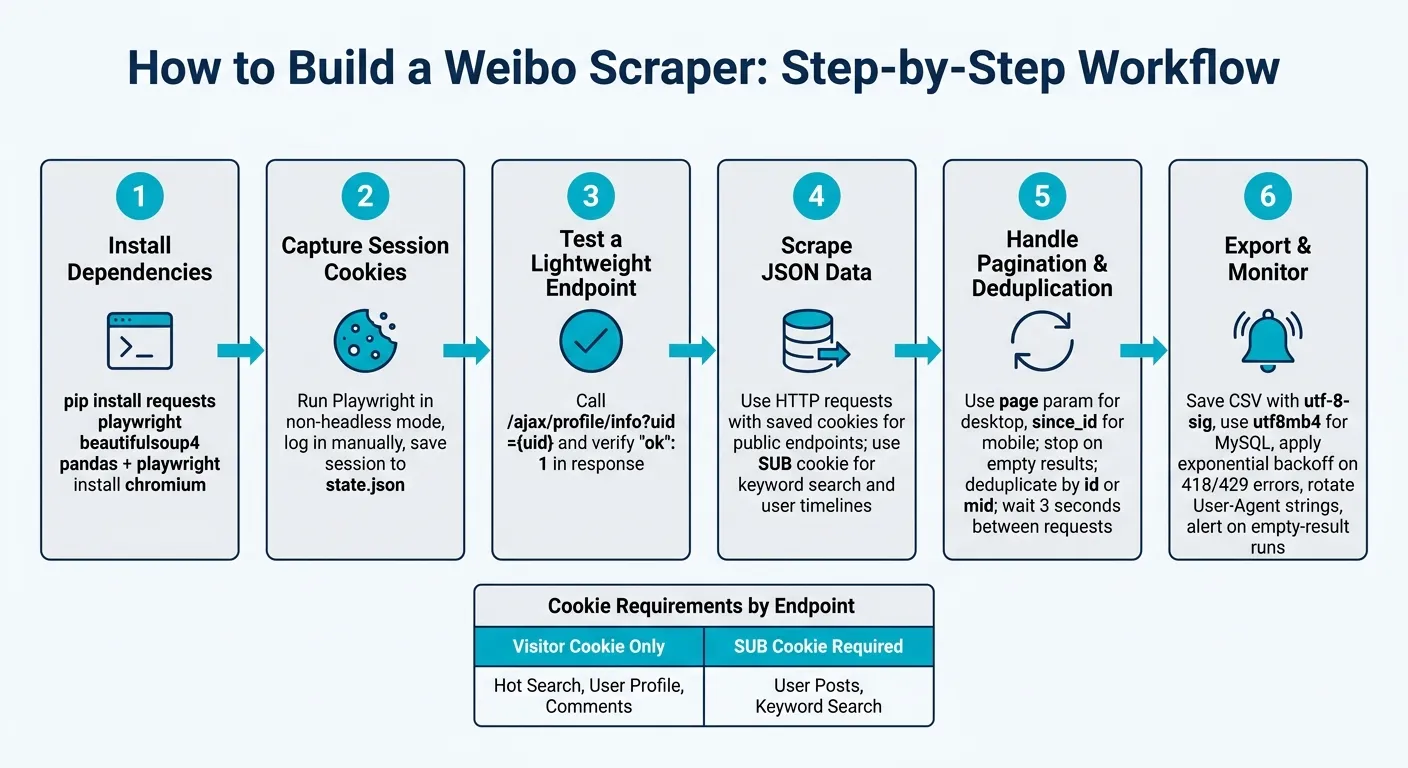
With your endpoint plan and cookie approach in place, the next move is simple: get your setup running. This part covers the main packages, how to grab session cookies with Playwright, and the first scraping flows worth building. Stick with the same cookie setup here: use HTTP requests for ready sessions, and use Playwright for login and refresh.
Install the Environment and Dependencies
Use Python 3.8 or later. It also helps to work inside a virtual environment so your packages don’t clash with other projects.
Install the main packages:
pip install requests playwright beautifulsoup4 pandas
playwright install chromium
You need both the Playwright package and Chromium. Chromium works well with Weibo’s dynamic pages [1].
| Category | Library | Purpose |
|---|---|---|
| Browser Automation | playwright | Login, cookie capture, dynamic content |
| HTTP Requests | httpx or requests | Calls to Weibo’s AJAX endpoints |
| HTML Parsing | beautifulsoup4 | Extracting fields from page markup |
| Data Export | pandas | Converting results to CSV or Excel |
| Database (optional) | pymysql / pymongo | Storing structured data at scale |
A simple way to organize the project is to split it into three files: cookies, scrapers, and utilities.
Capture Cookies and Session Values With Playwright
Grab SUB first. That’s the cookie that opens up keyword search and full user timelines.
For the first login, run Playwright in non-headless mode so you can sign in by hand:
from playwright.sync_api import sync_playwright

with sync_playwright() as p:
    browser = p.chromium.launch(headless=False)
    context = browser.new_context()
    page = context.new_page()
    page.goto("https://weibo.com")
    input("Log in, then press Enter...")
    context.storage_state(path="state.json")
    browser.close()
This saves your cookies and session values to state.json. After that, you can load the file on later runs instead of logging in again [1][7]. If the session expires, log in again and refresh the saved state before retrying [2].
Your AJAX requests should also include a current User-Agent plus X-Requested-With: XMLHttpRequest [4][2].
Once state.json is working, test a small endpoint before you build out full crawls. That quick check can save you a lot of time.
Build the First Scraping Workflows
Start with endpoints that tell you two things right away: your session works, and your parsing logic works.
A good path is to begin with hot topics, then move into keyword search and user profiles. Keyword search and user timelines need the saved SUB cookie [3][6].
For dynamic pages, wait until the page has finished loading its AJAX content before you parse it. In Playwright, that usually means wait_for_load_state("networkidle") or wait_for_selector [1][7]. If you skip that step, you’ll often parse half-loaded markup and get junk data.
Weibo also truncates posts pretty often. Watch for a longText flag in the JSON. If it’s there, fetch the full text from the post ID endpoint [1].
When you export results, save CSV files with utf-8-sig encoding so Chinese characters display the right way in Excel [4]. Also convert timestamps to U.S. date and time format when exporting.
Before you start a crawl, test the session with a lightweight endpoint such as:
https://weibo.com/ajax/profile/info?uid={uid}Check that the response includes "ok": 1 [4][9]. If it doesn’t, the cookie has expired, and you’ll need to refresh the session before moving on.
Extract Data Reliably and Handle Pagination
Once cookies are in place, the next job is simple in theory but easy to mess up in practice: map the JSON fields cleanly and move through pages without missing or repeating data.
Parse Posts, Profiles, and Engagement Fields
Endpoints like /ajax/statuses/mymblog and /ajax/profile/info return structured data that you can map into a stable schema.
Here are the core JSON keys:
| Field Category | JSON Key | Description |
|---|---|---|
| Post Content | text_raw | Full, unformatted post text |
| Post Identity | id | Unique post identifier for deduplication |
| Post Identity | mid | Message ID used in URL references |
| Timestamp | created_at | Post creation time for timeline ordering |
| Engagement | attitudes_count | Total likes or reactions |
| Engagement | comments_count | Total comment count |
| Engagement | reposts_count | Total shares |
| User Identity | screen_name | Display name of the account |
| Verification | verified_reason | Reason for verification |
| Media | pics | List of image URLs attached to the post |
Use that same mapping pattern for comments, search results, and hashtag pages. The goal is to keep field names steady no matter where the record came from.
Start with long posts. If isLongText is set, call /ajax/statuses/show?id={id} and pull the full text_raw. If you skip this step, your dataset can look fine on the surface while quietly storing trimmed posts. Pydantic helps here too. It can flag schema drift early, which is a lot better than finding broken records after a long crawl.
Once field mapping is stable, pagination usually becomes the next place things fall apart.
Paginate Search Results and User Timelines
Use page on desktop endpoints and since_id on m.weibo.cn feeds. Many desktop endpoints use page=1, 2, 3... for user timelines and keyword search. On infinite-scroll mobile feeds, check the response’s cardlistInfo object for since_id, then pass that value into the next request [1][8].
Stop when ok != 1, when the list comes back empty, or when max_pages is reached [4][8]. Also de-duplicate records by id or mid. That matters because partial failures and overlapping page windows can create repeats [4][10].
A few guardrails help a lot:
-
Wait at least 3 seconds between pagination requests to mimic human browsing patterns [4][2].
-
Normalize and de-duplicate before writing anything downstream.
That last part saves headaches. If page 4 overlaps a bit with page 5, or a retry returns some of the same posts again, your output stays clean.
Export Data to CSV, JSON, or a Database
Before exporting, normalize fields that Weibo returns in mixed formats. Engagement counts sometimes show up as strings like "1.2万" instead of integers. Convert those to 12000 before writing output.
The export format depends on what you plan to do next:
-
CSV works well for spreadsheets
-
JSON fits nested data like repost chains and media lists
-
Database makes sense for long-term brand monitoring and large-scale trend analysis
For large crawls, JSONL is often the safer pick. Each record sits on its own line, so if a run crashes halfway through, everything collected up to that point is still readable and usable. If you store data in MySQL, set the encoding to utf8mb4 so emojis and other non-ASCII text don’t break [4].
Run at Scale and Know When to Use a Managed Service
Once extraction, pagination, and export are working, the next job is making the scraper hold up on long runs.
Reduce Blocks With Backoff, Session Renewal, and Monitoring
A scraper that works for 10 minutes is not the same as one that runs for days without drifting off course. That jump usually comes down to a few plain controls.
Use automated backoff tied to your retry counter, and set alerts when retries start piling up. Add random delay jitter on top of a base 3-second throttle so your request pattern doesn’t look too neat and machine-like to anti-bot systems [2][4].
Renew sessions before they expire. Refresh cookies ahead of time, and automatically retry failed sessions with Playwright so the scraper can get back on track without someone stepping in by hand.
Watch failures by type, and alert on empty-result runs. This matters more than it may seem. Weibo can fall back to a hot timeline when cookies are invalid, so the scraper may look fine while pulling the wrong data. Rotate User-Agent strings and IPs to cut down on fingerprinting [2]. Parser breaks are another common issue. A schema change can land without warning, which is why logging that flags parsing failures early helps you catch problems before a long run turns into bad output [3].
These checks help stop a working scraper from sliding into partial runs, empty runs, or the wrong dataset.
DIY Scraper vs Web Scraping HQ Managed Collection
When upkeep starts eating more time than the data work itself, it’s time to switch to managed collection.
A DIY scraper fits when your volume is high enough to justify the engineering load. The tradeoff is simple: DIY means your team owns the upkeep, while managed collection moves that burden to the provider.
| Feature | DIY Scraper | Web Scraping HQ Managed |
|---|---|---|
| Development Time | 4–8 hours initial setup | Near zero |
| Maintenance Effort | Weekly cookie/endpoint updates | Handled by provider |
| Data Quality Controls | Manual validation scripts | Automated QA & structured output |
| Compliance Support | Internal legal review required | Built-in compliance frameworks |
Web Scraping HQ’s managed collection handles JSON or CSV output, automated QA, and compliance support for teams running recurring brand monitoring or market research. Custom plans include a tailored data schema, enterprise SLA, and priority support for larger jobs.
Conclusion: The Shortest Path to a Reliable Weibo Scraper
Use Playwright for auth, HTTP for bulk pulls, and automated monitoring for stability. Move to managed collection when maintenance becomes the bottleneck.
Want this done for you?
Send us the URLs. We'll quote it in 24 hours.
Paste the URL(s) you want scraped. We'll reply within 24 hours with a feasibility check and a ballpark quote.