Jump to section
- Key Steps:
- Legal and Ethical Considerations
- Best Buy’s Terms of Service
- How to Scrape Ethically
- Tools and Setup
- Web Scraping Tools You’ll Need
- Installing and Configuring Your Environment
- How to Scrape Best Buy with Python
- Step 1: Install Required Libraries
- Step 2: Inspect Best Buy’s Page Structure
- Step 3: Extract Product Information
- Step 4: Scrape Multiple Pages
- Step 5: Export Data to JSON or CSV
- Overcoming Anti-Scraping Measures
- Using Proxies and Rotating Headers
- Handling Captchas and Access Blocks
- Using Web Scraping HQ for Best Buy Data
- Web Scraping HQ Features
- Pricing Plans
- Best Practices for Scraping Best Buy
- Improving Your Scraping Workflow
- Staying Compliant with Data Laws
- Conclusion
Scraping data from Best Buy’s website is challenging but achievable with the right tools and ethical practices. For those new to the field, an ultimate guide to web scraping can provide a solid foundation. Here’s what you need to know:
-
Dynamic Content: Best Buy uses JavaScript to load product data, so traditional scraping tools won’t work.
-
Anti-Bot Measures: Systems like Cloudflare and Akamai Bot Manager block automated access.
-
Legal Restrictions: Best Buy’s Terms of Service prohibit scraping, but their official API is an alternative.
-
Tools: Use Python libraries like Playwright for JavaScript-heavy pages and residential proxies to bypass geo-restrictions.
-
Ethical Practices: Simulate human behavior, respect privacy, and avoid excessive server requests.
Key Steps:
-
Set Up Tools: Install Playwright, configure proxies, and handle JavaScript rendering.
-
Inspect HTML: Locate product data in
li.sku-itemelements or<script>tags with JSON data. -
Extract Data: Use scripts to gather product names, prices, and ratings.
-
Handle Pagination: Automate scrolling and navigate multiple pages.
-
Export Data: Save results in JSON or CSV format.
Scraping requires technical expertise, adherence to legal guidelines, and a focus on ethical data collection. For businesses, managed services like Web Scraping HQ can simplify the process while ensuring compliance.
Legal and Ethical Considerations
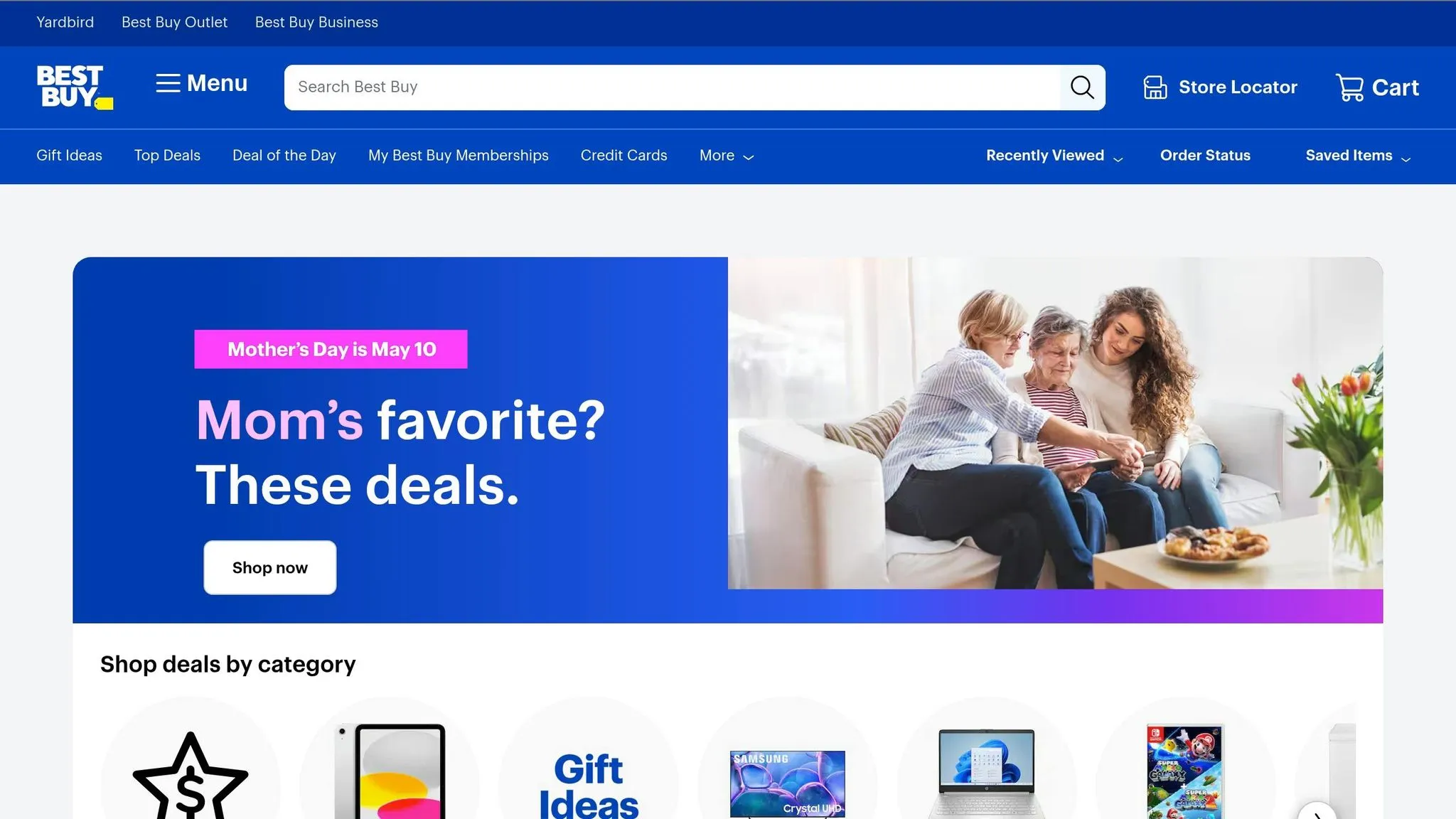
Before diving into scraping Best Buy’s website, it’s crucial to understand the legal boundaries. Best Buy’s Terms of Service clearly prohibit automated access:
“You agree not to use any robot, spider or other automatic device, process or means to access the Site for any purpose, including monitoring or copying any material on the Site, and not to use any device, software or routine that interferes with the proper working of the Site.”
This restriction is also outlined in the site’s robots.txt file, which blocks all crawling except for authorized search engines like Googlebot. Violating these terms can lead to legal consequences, especially if you bypass access controls like CAPTCHAs, extract personal data, or bypass anti-bot measures. Below, we’ll explore Best Buy’s legal terms and ethical guidelines for scraping.
Best Buy’s Terms of Service
For developers seeking a compliant option, Best Buy offers an official Developer API. This API provides access to product details, store information, and customer reviews. However, it comes with limitations:
-
Requests are capped at 5 per second and 50,000 per day.
-
Data caching is limited to 72 hours.
-
The API cannot be used to analyze pricing for third-party benefit.
The legal landscape for web scraping has been shaped by cases like hiQ v. LinkedIn (2017–2022), which determined that scraping publicly accessible data generally does not violate the Computer Fraud and Abuse Act (CFAA). However, legal expert Karan Sharma points out:
“The legal risk is almost never the act of scraping itself. It comes from what you collect, how you access it, and what you do with the data afterward.”
Understanding these boundaries is key to avoiding legal pitfalls. Next, let’s focus on how to approach scraping ethically.
How to Scrape Ethically
If you choose to scrape despite the restrictions, it’s important to minimize your impact on Best Buy’s servers. Here are some key practices:
-
Simulate human behavior: Add random delays (at least 1 second) between requests and schedule scraping during off-peak hours, like 2:00 a.m. local time.
-
Be transparent: Include a contact URL or email in your User-Agent string so administrators can reach out if issues arise.
-
Optimize bandwidth: Use headers like
Accept-Encoding: gzipto reduce data usage. Monitor server response times and immediately slow down if delays increase. -
Respect privacy: Stick to public product data such as prices, SKUs, and availability. Avoid collecting personal information like customer names or emails, as this could breach privacy laws like GDPR and CCPA.
Lastly, avoid unethical practices like bypassing authentication systems or creating fake accounts, as these actions could lead to CFAA violations. By following these guidelines, you can reduce risks while respecting Best Buy’s terms and resources.
Tools and Setup
To tackle Best Buy’s intricate web structure, you’ll need the right tools and setup to extract data efficiently while navigating their robust anti-bot systems like Akamai Bot Manager and Cloudflare. Best Buy’s reliance on JavaScript for rendering product data - like listings, prices, and images - means traditional HTTP libraries won’t cut it. Instead, you’ll need tools capable of executing JavaScript and mimicking user interactions. Here’s how to set up a reliable scraping environment.
Web Scraping Tools You’ll Need
For Python users, Playwright is ideal for handling JavaScript-heavy pages thanks to its asynchronous capabilities and ability to trigger lazy-loading mechanisms. Pair it with Scrapy for large-scale crawling and BeautifulSoup4 for lightweight parsing tasks.
If you’re working with JavaScript, Puppeteer is a strong choice. Its deep integration with Chrome makes it perfect for automating browser actions, such as bypassing Best Buy’s country selection splash screen. For parsing static HTML or pre-rendered content, combining Cheerio with Axios delivers excellent performance.
Given Best Buy’s reliance on real browser rendering to bypass splash screens and load content dynamically, a browser automation tool is essential.
Installing and Configuring Your Environment
Once you’ve chosen your tools, follow these steps to set up your environment:
-
Create a virtual environment to isolate dependencies. Run:
python -m venv venvActivate the environment with
source venv/bin/activate(macOS/Linux) orvenv\Scripts\activate(Windows). -
Install Playwright using:
pip install playwrightThen, download the required browser binaries:
playwright installTo reduce detection risks, launch Playwright with the argument
--disable-blink-features=AutomationControlled. This helps avoid common web scraping errors that often trigger anti-bot blocks. -
Set up residential proxies to use US or Canadian IPs. These proxies help bypass geo-restrictions and anti-bot measures. Proxy costs typically range from $1 to $3.25 per GB, depending on the provider.
-
Handle lazy loading by implementing scroll logic. Scroll in 400-pixel increments to ensure all product cards load before scraping. Automate interactions like selecting the “US” or “Canada” link on Best Buy’s splash screen, or use cookies to simulate a returning visitor.
With these tools and configurations in place, you’ll be ready to extract data from Best Buy’s challenging web environment.
How to Scrape Best Buy with Python
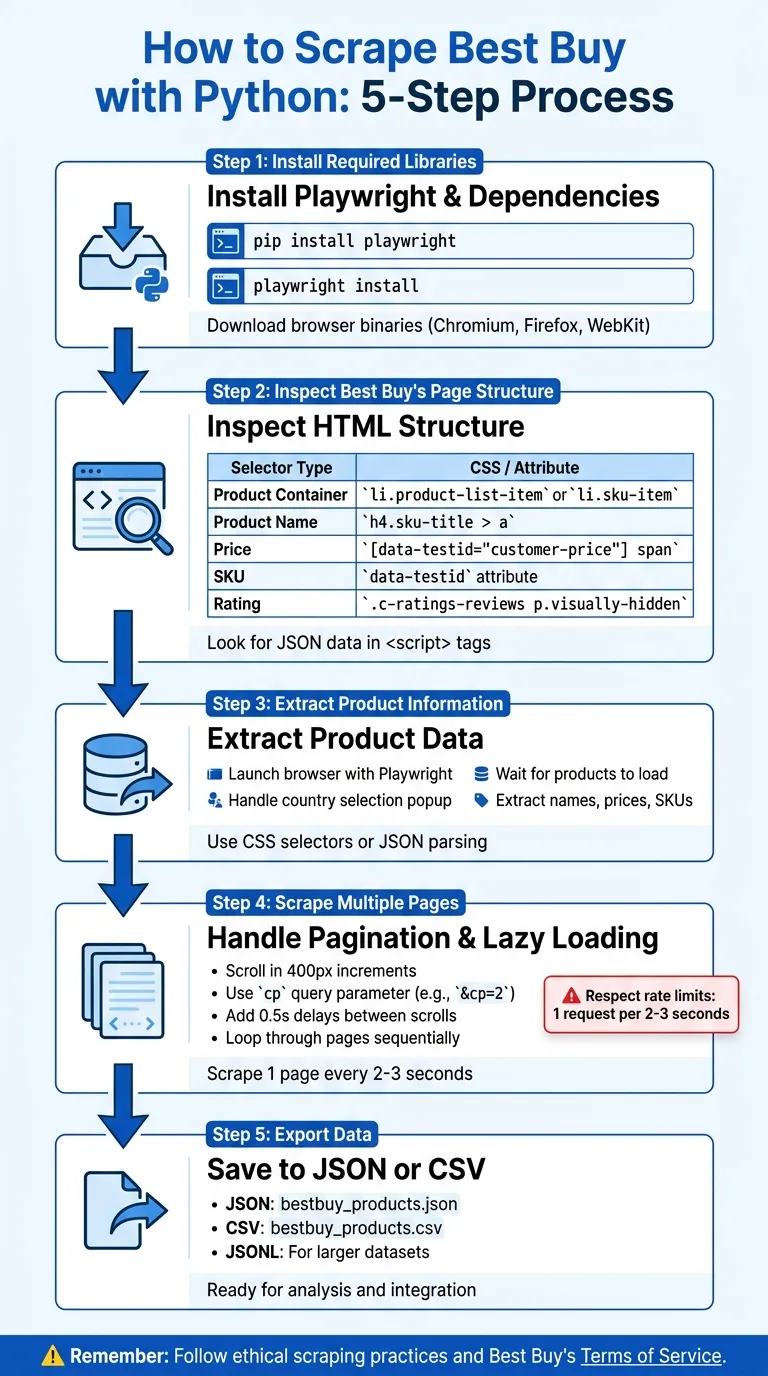
In this guide, you’ll learn how to build a Python scraper to extract product data from Best Buy using Playwright.
Step 1: Install Required Libraries
First, install Playwright and its browser binaries. Open your terminal and run:
pip install playwrightNext, download the browser binaries (Chromium, Firefox, and WebKit) with this command:
playwright installThis setup ensures you have the tools to render Best Buy’s dynamic content. To export data as CSV, install pandas as well:
pip install pandasOnce the libraries are installed, you’re ready to inspect the page structure.
Step 2: Inspect Best Buy’s Page Structure
To extract product data, inspect the page’s HTML structure. Open a Best Buy search results page in Chrome or Firefox, press F12 to launch Developer Tools, and right-click on a product to select “Inspect.”
Products are typically housed in li.product-list-item or li.sku-item containers. Product names are found in tags like h4.sku-title > a or h2.product-title, while prices are often located in elements with the [data-testid="customer-price"] attribute. You might also find hidden API endpoints in the Network tab under “Fetch/XHR” requests.
A key discovery: much of the product information is stored in <script type="application/json"> tags. Look for “productBySkuId” in the page source to access structured data, which is often cleaner than parsing scattered HTML.
| Data Point | CSS Selector |
|---|---|
| Product Container | li.product-list-item or li.sku-item |
| Product Name | h4.sku-title > a or h2.product-title |
| Price | [data-testid="customer-price"] span |
| SKU | data-testid attribute on li element |
| Rating | .c-ratings-reviews p.visually-hidden |
Step 3: Extract Product Information
Here’s a Python script to extract product names and prices:
from playwright.sync_api import sync_playwright

with sync_playwright() as p:
    browser = p.chromium.launch(headless=False)
    page = browser.new_page()
    page.goto('https://www.bestbuy.com/site/searchpage.jsp?st=laptop')

    # Handle the country selection screen
    if page.locator('.us-link').is_visible():
        page.click('.us-link')

    # Wait for products to load
    page.wait_for_selector('li.sku-item', timeout=5000)

    # Extract product details
    products = page.locator('li.sku-item').all()

    for product in products:
        name = product.locator('h4.sku-title a').inner_text()
        price = product.locator('[data-testid="customer-price"] span').first.inner_text()
        print(f"Product: {name} | Price: {price}")

    browser.close()
This script opens a visible browser window, navigates to Best Buy’s laptop search results, handles the country selection popup, and extracts product names and prices.
Step 4: Scrape Multiple Pages
To scrape multiple pages, you’ll need to handle pagination and lazy loading. Best Buy’s pagination uses the cp query parameter (e.g., &cp=2 for page 2), and products load in batches as you scroll.
Here’s how to manage both:
from playwright.sync_api import sync_playwright
import time

def scrape_page(page):
    # Scroll to trigger lazy loading
    for _ in range(5):
        page.evaluate('window.scrollBy(0, 400)')
        time.sleep(0.5)

    page.wait_for_selector('li.sku-item')
    products = page.locator('li.sku-item').all()

    data = []
    for product in products:
        name = product.locator('h4.sku-title a').inner_text()
        price = product.locator('[data-testid="customer-price"] span').first.inner_text()
        data.append({'name': name, 'price': price})

    return data

with sync_playwright() as p:
    browser = p.chromium.launch(headless=True)
    page = browser.new_page()

    all_products = []

    for page_num in range(1, 4):  # Scrape the first 3 pages
        url = f'https://www.bestbuy.com/site/searchpage.jsp?st=laptop&cp={page_num}'
        page.goto(url)

        if page.locator('.us-link').is_visible():
            page.click('.us-link')

        products = scrape_page(page)
        all_products.extend(products)
        print(f"Scraped {len(products)} products from page {page_num}")

    browser.close()
    print(f"Total products: {len(all_products)}")
The script scrolls the page in increments to load all product cards, then iterates through pages using the cp parameter to gather data sequentially.
Step 5: Export Data to JSON or CSV
Finally, save your scraped data to JSON or CSV for analysis. Use Python’s built-in json and csv modules:
import json
import csv

# Export to JSON
with open('bestbuy_products.json', 'w') as f:
    json.dump(all_products, f, indent=2)

# Export to CSV
with open('bestbuy_products.csv', 'w', newline='', encoding='utf-8') as f:
    writer = csv.DictWriter(f, fieldnames=['name', 'price'])
    writer.writeheader()
    writer.writerows(all_products)
For larger datasets, consider using JSONL format for better performance. This scraper now outputs organized data, ready for your next analysis. Keep in mind that you may need to address anti-scraping measures for consistent functionality.
Overcoming Anti-Scraping Measures
Scraping Best Buy requires more than just basic tools - it demands advanced strategies to navigate their tough anti-scraping defenses. As mentioned earlier, Best Buy employs systems like Cloudflare and Akamai Bot Manager to identify and block automated scripts. These measures, combined with regional restrictions (allowing access only from the US, Canada, and Mexico), make scraping particularly challenging. If your scraper triggers these defenses, you may face 403 Forbidden errors, CAPTCHA challenges, or be redirected to a country selection page.
Using Proxies and Rotating Headers
Residential proxies are the go-to solution for bypassing Best Buy’s IP blocks. Unlike datacenter IPs, which are frequently flagged and blocked, residential proxies imitate real user traffic from ISPs. Success rates vary by provider - Scrape.do boasts a 99% success rate, while ScraperAPI’s is significantly lower at 42%. To avoid regional restrictions, ensure your proxies are routed through IPs based in the US or Canada.
Another key tactic is rotating User-Agent strings. This helps mask your scraper by simulating requests from different browsers, making it harder for Akamai to fingerprint your activity. To bypass the country selection splash page, include cookies such as locDestZip and locStoreId in your request headers. This tricks the site into believing you’ve already chosen a store location. If you’re using tools like Playwright, applying stealth patches to hide the navigator.webdriver property can further disguise your automation efforts.
Handling Captchas and Access Blocks
CAPTCHAs and access blocks are inevitable hurdles, but there are ways to minimize their impact. For instance, if you encounter a 429 error (indicating too many requests), implement an exponential backoff strategy - waiting 2ⁿ seconds before retrying can prevent further blocks. Persistent blocks may require advanced techniques, such as using libraries like curl_cffi. These libraries replicate browser-level TLS handshakes, helping you bypass Akamai’s TLS fingerprinting, which standard Python requests often fail to handle.
To reduce CAPTCHA occurrences, rely on high-quality residential proxies and lower your request frequency. If CAPTCHAs still appear, services like 2captcha can solve them, though this adds both cost and latency. Another helpful strategy is session warming - start by visiting Best Buy’s homepage and maintaining cookies across requests. This makes your scraper resemble a returning user, reducing the chances of detection.
Using Web Scraping HQ for Best Buy Data
Web Scraping HQ simplifies the process of extracting data from Best Buy, handling the technical headaches like bypassing anti-bot measures, dealing with lazy loading, and navigating the country selection splash screen. This managed service takes care of all the complexities, so you don’t have to.
Web Scraping HQ Features
Web Scraping HQ provides data in formats like JSON, CSV, and JSONL, making it easy to integrate directly into your database or analytics tools. The platform automatically adjusts to changes in Best Buy’s website structure, saving you from the hassle of constantly updating your scraper. Plus, it offers guidance to ensure your scraping practices align with Best Buy’s Terms of Service.
This cloud-based service eliminates the need for local resources and addresses geo-blocking with residential IPs from both the US and Canada. Here are some of its standout features:
-
Structured Data Delivery: Data is pre-formatted in JSON, CSV, or JSONL for seamless use.
-
Automatic Site Updates: Adapts to changes in Best Buy’s HTML structure without manual intervention.
-
Anti-Bot Solutions: Handles JavaScript rendering and rotates IPs automatically.
-
Cloud-Based Service: No need to rely on your local system’s CPU or memory.
-
Geo-Blocking Solutions: Uses US and Canadian residential proxies to bypass restrictions.
-
Ethical Compliance Support: Provides guidance to ensure scraping remains within legal boundaries.
Pricing Plans
Web Scraping HQ offers two pricing options to cater to different business needs:
-
Standard Plan: At $449/month, this plan includes structured data delivery, automated quality checks, expert consultations, and customer support. Data is delivered within five business days, making it a great choice for businesses needing consistent access to Best Buy data without worrying about technical details.
-
Custom Plan: Starting at $999/month, this option is tailored for larger-scale operations. It includes custom data schemas, enterprise-level SLAs, flexible output formats, scalable solutions, and priority support. Data is delivered within 24 hours, ideal for businesses requiring high-volume or highly specific data extraction.
These pricing tiers make Web Scraping HQ a dependable solution for businesses of all sizes looking to extract and utilize Best Buy data efficiently.
Best Practices for Scraping Best Buy
Improving Your Scraping Workflow
Scraping Best Buy isn’t just about running a script - it’s about working smarter. Start by checking out Best Buy’s sitemaps, which are listed in their robots.txt file. These sitemaps can guide you to thousands of product URLs without having to crawl the entire website, saving both time and server resources.
For reliable product details, focus on extracting structured JSON data from <script> tags. Best Buy embeds key product information here (like productBySkuId), making it a more stable option compared to CSS selectors that might break with layout changes. To handle multiple pages at once, consider using tools like ThreadPoolExecutor or asyncio. Just be mindful of rate limits - space your requests to 1 every 2–3 seconds per IP to avoid triggering restrictions.
If you hit a 429 error, use exponential backoff - waiting 2ⁿ seconds after each failed attempt - to avoid an IP ban. Rotate through at least 50 genuine browser User-Agent strings with every request to reduce detection risk. For bypassing Akamai Bot Manager, tools like curl_cffi can help mimic Chrome’s TLS handshake since standard Python requests are often flagged.
Another trick is to establish cookies and session history. Start by visiting the homepage to simulate a returning user before accessing product pages. Use residential proxies based in the US or Canada, as Best Buy’s systems often block datacenter IPs. Finally, schedule your scraping during off-peak hours when user traffic is lighter to minimize your impact on the site’s performance.
Once your workflow is running smoothly, don’t forget to keep it within legal boundaries.
Staying Compliant with Data Laws
Efficiency is important, but staying on the right side of the law is just as critical. Scraping publicly available data like product listings or prices is generally allowed under the Computer Fraud and Abuse Act (CFAA). However, accessing content behind logins or paywalls crosses into unauthorized access. Always review bestbuy.com/robots.txt to see which areas of the site are off-limits for crawlers.
Even if the data is public, avoid scraping Personally Identifiable Information (PII), such as customer names or reviews tied to individuals. Doing so could trigger compliance requirements under laws like GDPR (EU), CCPA (California), or the DPDP Act (India). Additionally, bypassing technical barriers like CAPTCHAs or rate limits can violate DMCA Section 1201, which prohibits circumventing digital restrictions.
Using a clear and honest User-Agent string that includes a contact email shows good intentions and gives site administrators a way to reach you before escalating to legal action.
“If the data is visible without logging in, without paying, and without bypassing a restriction, then scraping is usually allowed.” - Karan Sharma, PromptCloud”
Conclusion
This guide highlights how the right tools and ethical practices can help you navigate Best Buy’s robust anti-scraping defenses. While scraping Best Buy presents its challenges, it’s entirely possible with the right strategies. You’ve explored methods to bypass advanced anti-bot protections like Cloudflare and Akamai Bot Manager, enabling the extraction of crucial product data such as names, SKUs, prices, and availability. With millions of visitors worldwide, Best Buy remains an essential resource for market research.
Success depends on selecting the best approach for your needs. For smaller-scale projects, browser automation tools like Playwright are effective. On the other hand, large-scale scraping often requires advanced solutions, such as APIs or residential proxies, to overcome geo-restrictions and ensure consistent results. Additionally, extracting embedded JSON data can simplify the process compared to parsing intricate HTML structures.
Equally important is adhering to legal and ethical boundaries. Follow Best Buy’s robots.txt guidelines, avoid collecting personal data, and manage your request rates to prevent server strain. As ScrapeOps explains:
“Scraping the web is generally considered legal as long as you’re scraping public data. Public data is any data not gated behind a login. Private data is a completely different story.”
Whether your goal is to monitor pricing trends, track inventory, or gather insights for market analysis, the techniques outlined here provide a reliable starting point. Always test your scripts thoroughly, act responsibly, and prioritize ethical considerations over aggressive tactics.
Want this done for you?
Send us the URLs. We'll quote it in 24 hours.
Paste the URL(s) you want scraped. We'll reply within 24 hours with a feasibility check and a ballpark quote.