Jump to section
- Setting Up Python for Web Scraping
- Libraries and Tools You’ll Need
- Installing and Configuring Your Environment
- Scraping Product Data from Macy’s
- Parsing HTML and Selecting Elements
- Working with JavaScript-Loaded Content
- Scraping Multiple Pages with Pagination
- Understanding and Automating Page Navigation
- Building Loops for Multi-Page Scraping
- Saving and Organizing Your Scraped Data
- Structuring Data for Easy Use
- Exporting Data to CSV or JSON Files
- Best Practices for Scraping Macy’s
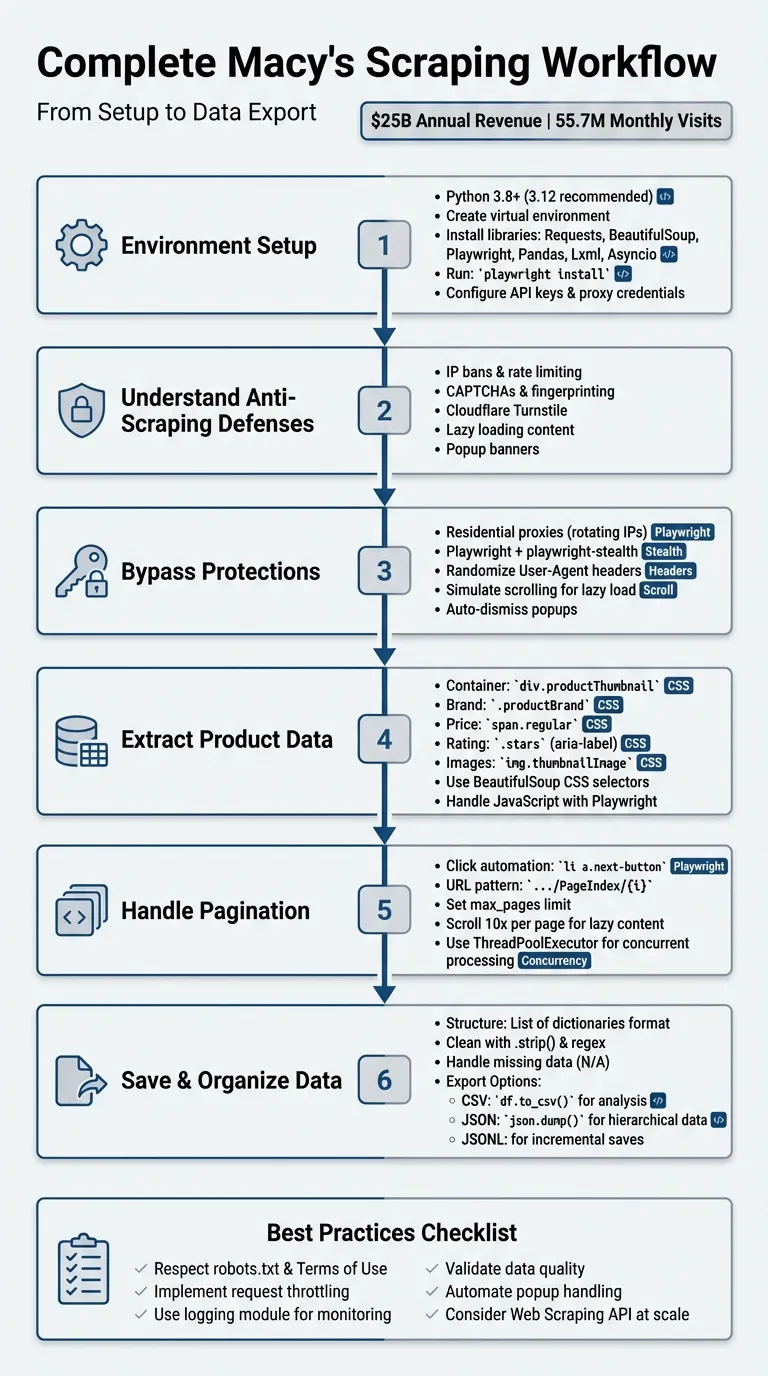
Macy’s is one of the largest department stores in the U.S., with over $25 billion in annual revenue since 2017 and 55.7 million monthly website visits. Businesses rely on web scraping to gather data like prices, inventory, customer reviews, and trends from Macy’s site. This guide explains how to build a scraper in Python while navigating Macy’s anti-bot protections like Cloudflare Turnstile and lazy loading.
Key takeaways:
-
Scraping Goals: Collect product details (names, prices, ratings, images, etc.) for market analysis and price tracking.
-
Anti-Scraping Protections: Macy’s uses IP bans, CAPTCHAs, and JavaScript-rendered content to block bots.
-
Tools Needed: Python libraries like
Requests,BeautifulSoup,Playwright, andPandasfor efficient scraping. -
Pagination and Lazy Loading: Handle multi-page navigation and simulate scrolling for dynamic content.
-
Exporting Data: Save results in structured formats like CSV or JSON for analysis.
This guide emphasizes ethical scraping practices, respecting rate limits, and using proxies to avoid detection.
Setting Up Python for Web Scraping
Macy’s website uses dynamic content and robust anti-scraping measures, so having a solid Python setup is critical. You’ll want to work with Python 3.8 or higher (3.12 is recommended) to ensure compatibility and avoid potential issues.
Libraries and Tools You’ll Need
To scrape Macy’s effectively, you’ll need a combination of libraries tailored for data extraction and browser automation. Here’s a breakdown:
-
Requests or HTTPX: These libraries handle HTTP requests to fetch raw HTML from Macy’s servers.
-
BeautifulSoup (bs4): This tool parses the HTML and helps you navigate the DOM structure to extract elements like product names and prices using CSS selectors.
-
Playwright (with Playwright-Stealth): Ideal for handling lazy-loaded or JavaScript-rendered content, as it can mimic human browsing behavior and mask automation fingerprints.
-
Fake-Useragent: Generates random browser headers to reduce the chances of detection.
-
Pandas: Organizes extracted data into structured formats like CSV files for easy analysis.
-
Lxml: A high-performance parser that speeds up HTML processing when paired with BeautifulSoup.
-
Asyncio: Boosts performance for large-scale scraping by enabling concurrent processing, which is much faster than traditional loops for handling thousands of URLs.
Installing and Configuring Your Environment
Start by creating a project directory and setting up a virtual environment. Open your terminal and run the following commands:
mkdir macys-scraper && cd macys-scraper
python -m venv .venv
Activate the virtual environment using:
-
Mac/Linux:
source .venv/bin/activate -
Windows:
.venv\Scripts\activate
Next, install the necessary libraries with:
pip install requests beautifulsoup4 lxml playwright playwright-stealth fake-useragent pandasOnce Playwright is installed, you’ll need to download its browser binaries. Run:
playwright installThis step ensures you have the required browsers (e.g., Chromium, Firefox, or WebKit) ready for scraping.
Since Macy’s employs advanced bot detection, you’ll need to configure proxy credentials or API keys to bypass these barriers. Set these as environment variables in your project, like so:
API_KEY = 'YOUR_KEY'With this Python setup, you’ll be well-prepared to dive into the scraping logic outlined in the next sections.
Scraping Product Data from Macy’s
To extract product data from Macy’s, focus on how the site organizes its product listings. These are typically found within div elements with the class productThumbnail or li elements tagged as cell productThumbnailItem. These containers hold key details like brand names, prices, ratings, and image URLs that you can target using CSS selectors.
Parsing HTML and Selecting Elements
Using BeautifulSoup, you can parse Macy’s HTML and extract product data efficiently with CSS selectors. After fetching a page with tools like Requests or HTTPX, locate the product containers and target the necessary fields. Here’s a quick reference:
| Data Point | CSS Selector / Attribute |
|---|---|
| Product Container | div.productThumbnail or li.cell.productThumbnailItem |
| Brand Name | .productBrand |
| Price (Regular) | .prices .regular or span.regular |
| Price (Sale) | span.regular.originalOrRegularPriceOnSale |
| Product Name | a[title] (extract the title attribute) |
| Rating | .stars (extract the aria-label attribute) |
| Image URL | img.thumbnailImage (src) or source[data-lazysrcset] |
If you need full product descriptions, navigate to individual product pages and scrape the content from div.details-content. Keep in mind that price information often includes extra text like “Now [2]. Keep in mind that price information often includes extra text like “Now $” or “Sale.” Use regex patterns such as quot; or “Sale.” Use regex patterns such as (\d+\.\d+) to cleanly extract numeric values.
While BeautifulSoup works well for static elements, you’ll need to adjust your scraper to handle content loaded dynamically through JavaScript.
Working with JavaScript-Loaded Content
Not all data is immediately available in Macy’s initial HTML. To handle this, simulate user interactions with Playwright to load dynamic content. Macy’s uses lazy loading, which means additional product thumbnails only render as you scroll down the page. Use commands like page.mouse.wheel(0, 2000) in a loop to simulate scrolling and ensure all products are visible before extracting data.
“The Macy’s website uses lazy loading, meaning that products only become available as the user scrolls down the page.” - Datahut
For a more efficient approach, intercept network requests instead of parsing HTML. Playwright’s page.on('response', ...) can capture XHR requests containing queryid=products. These requests return clean JSON data with structured product details, allowing you to bypass HTML parsing entirely.
Finally, handle popups like newsletter overlays by automating clicks on buttons with text such as “No, Thank You!” This prevents them from blocking access to page elements.
Scraping Multiple Pages with Pagination
When it comes to capturing Macy’s product listings, handling pagination is a key step. Macy’s organizes its products across multiple pages, accessible through a “Next” button. As Datahut explains:
“Macy’s doesn’t show all its products on a single page. Instead, the items are spread across many pages, and you need to click a ‘Next’ button to see more. That means we couldn’t just grab everything in one go - we had to visit each page one by one”.
Understanding and Automating Page Navigation
To navigate Macy’s pagination setup, begin by examining how the “Next” button functions. Open your browser’s Developer Tools (CTRL+SHIFT+I on Windows or Option + ⌘ + I on Mac), right-click the “Next” button, and select “Inspect”. Typically, this button appears as an anchor tag with the selector li a.next-button.
Next, check how the URL changes when you click “Next.” Macy’s often employs a predictable URL pattern like https://www.macys.com/shop/featured/women-handbags/Pageindex/2, where the page number increases incrementally. This pattern allows you to automate navigation by either simulating button clicks using Playwright or directly generating URLs. For example, in November 2024, a researcher scraping women’s handbags used Python to generate a list of pages with this pattern: [f'.../Pageindex/{i:d}' for i in range(1,14)]. The pages were then processed concurrently using ThreadPoolExecutor.
If you choose to automate clicks, ensure the “Next” button is both visible and enabled before interacting with it. Playwright provides methods like is_visible() and is_enabled() to confirm this. Once you’ve identified the navigation method, you can set up a loop to scrape data from multiple pages.
Building Loops for Multi-Page Scraping
To scrape multiple pages, create a loop that continues until the “Next” button becomes unavailable or a predefined page limit is reached. For instance, in January 2026, Datahut used Playwright to scrape over 17,000 product links from Macy’s “Sales & Clearance” section. Their script scrolled through each page 10 times to handle lazy-loaded content, then clicked li a.next-button until the button disappeared or a maximum of 999 pages was reached.
Here’s an example of a basic loop for URL-based pagination:
# Loop through pages, incrementing the page index
max_pages = 15
for page_num in range(1, max_pages + 1):
    url = f"https://www.macys.com/shop/featured/women-handbags/Pageindex/{page_num}"
Always define a max_pages variable to avoid infinite loops and to manage resources effectively . For click-based navigation, use a while loop that checks the availability of the “Next” button before each iteration, ensuring the process runs smoothly.
Saving and Organizing Your Scraped Data
When scraping product data, it’s crucial to organize it in a structured format. A list of dictionaries is a popular choice, where each dictionary represents a single product. Keys like “Product Brand Name”, “Price”, “Description”, “Rating”, “Image URL”, and “Product URL” make it easy to manage and analyze your data. This format is compatible with both JSON and CSV files, offering flexibility depending on your needs.
Structuring Data for Easy Use
To make your data analysis seamless, include key fields in your dataset. Start with product identifiers such as the brand name, product name, and SKU. Add pricing details like regular price, sale price, and discounts. Don’t forget metadata like descriptions, star ratings, and review counts. Other useful fields include image URLs, product page URLs, stock status, and available variants like sizes or colors.
Cleaning your data is another important step. Use methods like .strip() to remove unnecessary whitespace and regex patterns (e.g., (\d+\.\d+)) to extract numerical values like “$49.50” from text strings such as “Now $49.50”. For missing data, assign placeholder values like “N/A” or “None” to avoid errors during analysis.
Once your data is structured and cleaned, you’re ready to export it.
Exporting Data to CSV or JSON Files
The format you choose for exporting depends on your intended use. JSON is excellent for hierarchical data, such as products with multiple images or nested variants for colors and sizes. You can save your data using Python’s json library:
import json
with open("results.json", "w", encoding="utf-8") as f:
    json.dump(product_data_list, f, indent=2)
On the other hand, CSV is better suited for simpler analyses, like price tracking or market research in tools like Excel. To export your data as a CSV, convert your list of dictionaries into a pandas DataFrame and use the to_csv() method:
import pandas as pd
df = pd.DataFrame(product_data_list)
df.to_csv("results.csv", index=False)
For instance, in November 2024, data analyst Veraagiang shared a workflow for scraping Macy’s “women-handbags” category. The process involved collecting data into a pandas DataFrame with columns for brand, product, price, discount, and rating. The cleaned and organized data was then exported to a file named brand.csv .
If you’re working on a large-scale project, consider saving your data incrementally using JSONL (JSON Lines) files. This approach ensures that even if your scraper crashes, the data you’ve already collected remains safe.
Best Practices for Scraping Macy’s
To ensure your Macy’s scraper runs smoothly and effectively, it’s important to follow some key practices while respecting the site’s rules and guidelines.
First and foremost, your scraper should only gather publicly available data and strictly comply with Macy’s Privacy Policy, Terms of Use, and the directives outlined in their robots.txt file.
Since Macy’s employs anti-scraping measures to maintain server performance and prevent overload from excessive requests, it’s crucial to manage your scraper’s behavior carefully. Use techniques like request throttling, randomized User-Agent strings, and IP rotation to avoid detection. As data analyst Veraagiang wisely pointed out:
“At scale, investing in a Web Scraping API is your best bet to avoid getting blocked”.
Keep an eye on your scraper’s performance by implementing detailed logging - Python’s logging module is a great tool for this. This will help you quickly identify and address issues caused by site updates, such as changes to elements like div.productThumbnail.
To further enhance reliability, automate the handling of common interruptions, such as closing pop-ups or accepting banners. Additionally, validate the data you collect - check that price strings include the correct currency symbol, for instance - to catch structural changes early. These steps will help ensure your scraper remains efficient and adaptable.
Want this done for you?
Send us the URLs. We'll quote it in 24 hours.
Paste the URL(s) you want scraped. We'll reply within 24 hours with a feasibility check and a ballpark quote.