Jump to section
- Legal and Ethical Considerations Before You Scrape Google Ads
- What Types of Google Ads Data Can Be Collected
- How to Stay Compliant and Manage Request Rates
- How to Plan Your Google Ads Scraping Project
- Defining Your Use Case
- Choosing the Right Data Source
- DIY vs. Managed Scraping: Which Option Fits Your Needs
- How to Scrape Google Ads Data from Search Results
- How to Structure Your Search Queries
- Building a Basic Google Ads Scraper
- Scaling Your Scraper and Handling Anti-Bot Measures
- How to Scrape Google Ads Data from the Ads Transparency Center
- How to Navigate the Ads Transparency Center
- How to Automate Ads Transparency Center Scraping
- How to Structure and Analyze Historical Ad Data
- How to Turn Scraped Google Ads Data into Business Insights
- Cleaning and Normalizing Your Data
- Adding Business Context to Your Data
- Setting Up Monitoring and Alerting Workflows
- Conclusion: Key Takeaways and Next Steps
Scraping Google Ads data can provide insights into competitors’ strategies, market trends, and ad performance. Here’s what you need to know:
-
Why Scrape? Understand competitors’ keywords, ad copy, landing pages, and bidding strategies. This helps refine your campaigns and protect your brand.
-
Legal and Ethical Limits: Stay compliant with Google’s rules. Focus on publicly available data like ad headlines, URLs, and targeting information. Avoid personal data collection.
-
Data Sources: Use Google Search Results for real-time data and the Ads Transparency Center for historical insights.
-
DIY vs. Managed Services: Build your own scraper for control but expect frequent updates. Managed services save time but come at a cost (e.g., $449/month).
-
Tools & Techniques: Use Python, Selenium, and proxies for scraping. Rotate IPs, randomize delays, and cache queries to avoid detection.
-
Scaling: Employ residential proxies and handle anti-bot measures for larger projects.
-
Analyzing Data: Clean and normalize data, group by landing domains, and track metrics like ad longevity and platform distribution.
-
Monitoring: Automate scrapes and set alerts for new competitor ads or changes in campaigns.
Scraping Google Ads data requires careful planning, ethical practices, and ongoing adjustments to avoid detection and maximize insights.
Legal and Ethical Considerations Before You Scrape Google Ads
Before diving into scraping Google Ads data, it’s crucial to understand the legal landscape. While publicly visible ad data might seem accessible, Google’s Terms of Service strictly forbid using automated bots or headless browsers for data extraction. As Brand Vision explains:
“Google bans IPs or accounts that use headless browsers or bots to scrape their SERPs for Ad data.”
That said, scraping is still possible when done responsibly. Using SERP APIs or specialized tools that control request rates and avoid overwhelming Google’s servers can help you stay within acceptable boundaries. These tools also clarify what types of data can legally be collected.
Another key consideration is compliance with GDPR and CCPA. The rule here is straightforward: focus solely on ad-related data, not personal user information. Collecting ad headlines, landing page URLs, or advertiser names is fine, but personal identifiers are off-limits. Adhering to these regulations ensures ethical data collection while maintaining a sustainable approach to competitive research and SEO monitoring.
What Types of Google Ads Data Can Be Collected
The types of data you can legally scrape are limited to publicly accessible information - no logging in or bypassing security measures required. Here’s a breakdown:
| Data Category | Specific Data Points | Source |
|---|---|---|
| Ad Content | Headlines, descriptions, body text, CTAs | Search Results / Transparency Center |
| Advertiser Info | Advertiser name, advertiser ID, verified status | Transparency Center |
| Technical Details | Landing page URL, ad format (image/video/text) | Search Results / Transparency Center |
| Targeting | Target regions, first/last shown dates, ad variations | Transparency Center |
This information fuels competitive intelligence without crossing ethical lines. Avoid anything that requires authentication or involves user-level data, such as impression counts tied to individual accounts or campaign metrics.
How to Stay Compliant and Manage Request Rates
To keep your scraping efforts compliant, follow two essential practices. First, check Google’s robots.txt file to determine which areas automated crawlers should avoid. Second, pace your requests - aim for about one request per second to reduce the risk of triggering anti-bot measures.
Additionally, using IP rotation with residential proxies can help your scraper mimic normal browsing behavior, making it less likely to be flagged as a bot. As Traject Data points out:
“Google actively discourages web scraping, so ensure your methods align with legal guidelines.”
How to Plan Your Google Ads Scraping Project
Planning is the backbone of any successful Google Ads scraping project. Without a solid strategy, you risk gathering irrelevant data or building systems that fail whenever Google updates its interface.
Defining Your Use Case
Your use case shapes every aspect of your project - what data you need, where to get it, and how often to collect it. Here are some common goals:
-
Competitive Intelligence: Want to know which keywords your competitors are targeting? Scraping can reveal how often their ads appear, their messaging strategies, and whether they’re bidding on your brand name (a tactic known as brand bidding). This data can refine your bidding strategy and messaging.
-
Ad Copy and Funnel Optimization: By analyzing competitors’ headlines, calls-to-action, and landing pages, you can uncover techniques that might work for your own campaigns.
-
Market Research: Expanding into a new region? Scraping ads across different locations helps identify key players in the local market.
Choosing the Right Data Source
Your data source should align with your specific objectives. Here’s a quick breakdown of the most useful sources:
-
Google Search Results (SERPs): Ideal for real-time, keyword-specific insights. You’ll see which ads appear, what they say, and where they lead.
-
Ads Transparency Center: Introduced in 2023, this tool is perfect for advertiser-level research. It provides a detailed look at every active ad a company runs, including creative variations and regional targeting. According to the SociaVault Team:
“The Google Ads Transparency Center is a goldmine. It shows you every ad a company is running.”
Here’s a comparison of key data sources:
| Source | Best For | Key Data Points |
|---|---|---|
| Google Search (SERPs) | Keyword-specific, real-time research | Ad position, extensions, tailored ad copy |
| Ads Transparency Center | Comprehensive advertiser analysis | Active ads, historical data, regional targeting |
| Google Shopping / Maps | E-commerce and local business insights | Product prices, ratings, local business details |
For the Ads Transparency Center, using the advertiser’s unique Advertiser ID (found in the ad URL, starting with “AR”) yields more accurate results than searching by name.
DIY vs. Managed Scraping: Which Option Fits Your Needs
Once you’ve nailed down your data requirements and sources, it’s time to decide how to extract the information. Should you build your own scraper or use a managed service? Each option has its pros and cons.
-
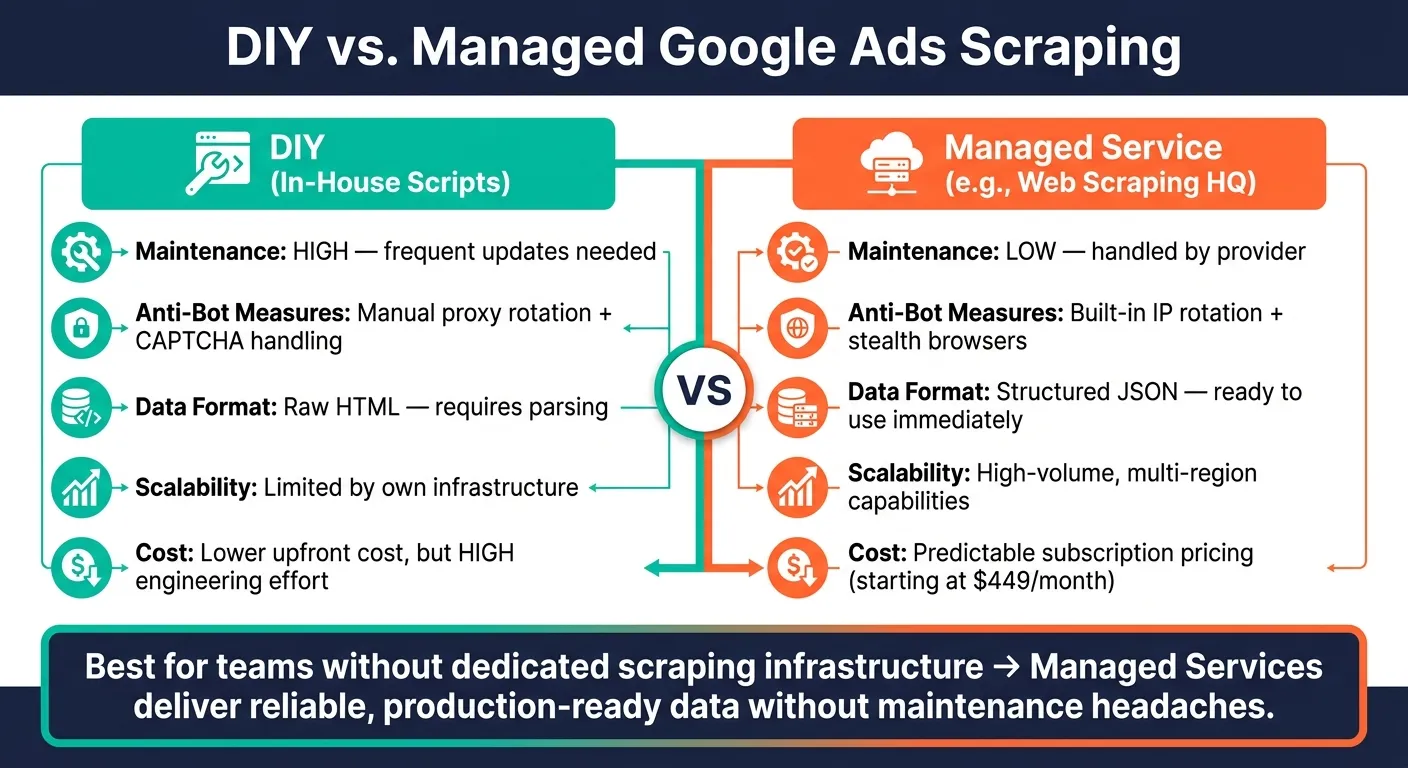
DIY Scraping: Building your own scraper gives you more control, but it’s a constant game of catch-up. Google frequently updates its layout and anti-scraping measures, so your scripts will require regular maintenance to resolve common scraping errors. Without dedicated resources, this can quickly become a headache.
-
Managed Services: Providers like Web Scraping HQ handle the heavy lifting, including proxy rotation, CAPTCHA solving, and JavaScript rendering. They deliver pre-structured JSON data, saving you time and effort. However, this convenience comes at a cost, with subscriptions starting at $449/month.
Here’s a side-by-side comparison:
| Feature | DIY (In-House Scripts) | Managed Service (Web Scraping HQ) |
|---|---|---|
| Maintenance | High; frequent updates needed | Low; handled by the provider |
| Anti-Bot Measures | Manual proxy rotation, CAPTCHA handling | Built-in IP rotation and stealth browsers |
| Data Format | Raw HTML; requires parsing | Structured JSON, ready to use |
| Scalability | Limited by infrastructure | High-volume, multi-region capabilities |
| Cost | Lower upfront, higher engineering effort | Predictable subscription pricing |
For teams without dedicated scraping infrastructure, managed services are often the better choice. They provide reliable, production-ready data without the headaches of maintaining your own tools.
This planning stage lays the groundwork for tackling technical challenges like query structuring and scaling. Next up: how to scrape Google Ads data from search results to turn your plan into action.
How to Scrape Google Ads Data from Search Results
Once you’ve decided on your data sources and approach, it’s time to dig into the details. Scraping Google Ads from search results involves systematically capturing the sponsored listings that show up when someone searches for specific keywords on Google. This process needs to work across hundreds - or even thousands - of queries.
How to Structure Your Search Queries
The foundation of any scraping project is a well-organized query. The key parameter here is q, which represents your search keyword. Replace spaces with + (e.g., project+management+software). Another crucial component is location targeting, especially for keywords with a local focus like “plumber near me.” Use the location parameter with a full string (e.g., Austin, Texas, United States) or the gl parameter with a two-letter country code (e.g., us). Combine this with hl (language code, such as en) and device (desktop or mobile) to match the audience you’re analyzing.
It’s worth noting that ad results can vary significantly between desktop and mobile. A keyword might produce entirely different advertisers depending on the platform, so running both versions helps you capture a more complete dataset.
For larger projects involving many keywords, it’s best to organize your inputs in a CSV or JSON file. Each row or object should include fields like keyword, location, device, and language. This setup allows your scraper to process everything automatically, saving you from manual input.
| Parameter | What It Does | Example |
|---|---|---|
q | Defines the search keyword | best+ai+tools |
location | Sets geographic target | New York, New York, United States |
gl | Two-letter country code | us |
hl | Two-letter language code | en |
device | Target platform | desktop or mobile |
google_domain | Regional Google version | google.com |
Building a Basic Google Ads Scraper
To get started, you’ll need a basic Python setup. Tools like requests, Selenium (with undetected_chromedriver), and pandas or json for output will cover most of your needs. Begin by loading your keyword and location list from a CSV file. Then, construct the search URL or API payload for each entry, fetch the page, parse the HTML DOM for ad data, and save the results into a structured file. The key data points to extract include:
-
Ad headlines
-
Descriptions
-
Display URLs
-
Final landing URLs
-
Ad positions
-
Extensions like sitelinks or phone numbers
Since Google renders ads using JavaScript, a simple requests.get() call often won’t return any ads. To handle this, use undetected_chromedriver with Selenium, which ensures you’re capturing the fully rendered DOM. Additionally, randomize delays between requests to mimic human behavior and reduce the risk of being blocked.
Once your scraper is reliably pulling ad data, the next challenge is scaling it up while managing anti-bot defenses effectively.
Scaling Your Scraper and Handling Anti-Bot Measures
Scaling your scraper requires careful planning to navigate Google’s anti-scraping measures. These include IP rate limiting, CAPTCHA challenges, browser fingerprinting, and JavaScript validation. For smaller-scale projects, tools like undetected_chromedriver and randomized delays are often enough. But for larger operations, you’ll need a more advanced strategy.
Rotating residential proxies is a must when scaling up. Data center IPs are flagged quickly, but residential proxies mimic real user traffic, helping you avoid HTTP 429 errors (Too Many Requests) that can disrupt your scraping. Combine this with rotating User-Agent headers and varying your device parameter to avoid detection. Mixing desktop and mobile queries also makes your activity appear more natural.
“The consistent rotation of millions of IPs at the backend is what makes a scraper robust and scalable to produce a reliable data pipeline.” - Darshan Khandelwal, Chief of Technology, Scrapingdog
Cache repeated queries to reduce your overall request volume. If a keyword is used in multiple campaigns, caching the results minimizes exposure to anti-bot triggers. For navigating through pages of results, use the start offset parameter (e.g., start=10 for page 2) instead of manually clicking through pages in a browser. This approach is faster and less likely to be flagged.
How to Scrape Google Ads Data from the Ads Transparency Center
Scraping search results gives you real-time ad data, but the Google Ads Transparency Center provides a treasure trove of historical ad information. This tool offers a detailed archive of every verified advertiser’s campaigns across multiple platforms. Unlike real-time scraping, which only shows current ads, the Transparency Center lets you analyze up to 13 months of ad data for free, without needing to log in.
How to Navigate the Ads Transparency Center
To get started, head to adstransparency.google.com. The quickest way to find competitor ads is by searching their domain name (e.g., nike.com) instead of their brand name. Searching by name can lead to incomplete results since legal entity names often differ from consumer-facing brands.
“Domain search is faster than name search and usually more reliable, because verification records sometimes lag the marketing brand.” - AdMapix Editorial Team
Use the available filters to refine your search. As of 2026, the “When & where ads showed” section is expanded by default, making it easier to identify patterns in geography and platforms without extra effort. If you’re monitoring your own brand, regular searches for your domain can help you spot unauthorized affiliates or trademark bidding.
Once you’re comfortable navigating the platform, you can move on to automating data collection.
How to Automate Ads Transparency Center Scraping
Manual browsing is fine for occasional checks, but it’s not practical for large-scale data collection. For programmatic access, start by extracting the advertiser ID - a unique identifier beginning with “AR” that you’ll find in the Transparency Center URL. With this ID, your script can directly query the advertiser’s entire creative library, bypassing the need for manual domain or name searches.
Key fields to extract for each ad include:
-
advertiser_id -
ad_id -
ad_headline -
ad_text -
ad_format -
destination_url -
regions_shown -
platforms -
first_shown_date -
last_shown_date
For image-based ads, raw text may not be available in the DOM. Use OCR tools to extract headlines and descriptions, converting them into a structured format. Keep in mind that new ads may take 24–48 hours to appear in the archive.
Automation ensures efficient data collection, making it easier to scale your efforts.
How to Structure and Analyze Historical Ad Data
When organizing your data, group records by landing domain instead of advertiser name. This approach consolidates ads from parent companies and subsidiaries into a single view. To prioritize ads, calculate a “Days Running” metric by subtracting first_shown_date from last_shown_date. Ads that have been active for 30+ days often indicate profitable campaigns.
“If an ad has been running for weeks or months, it’s likely profitable. Advertisers don’t keep losing ads alive.” - Ads Insight Pro
Examine the destination_url to understand funnel intent. For example, a URL leading to a “vs.” comparison page suggests bottom-of-funnel targeting, while links to webinars or whitepapers indicate top-of-funnel lead generation. Another valuable metric is creative velocity, which tracks how frequently an advertiser updates headlines or formats. This can reveal whether they are aggressively testing or running a more static campaign.
Here’s a breakdown of key analysis areas to include in your workflow:
| Analysis Type | Metric to Track | Business Insight |
|---|---|---|
| Longevity | First/Last Shown Dates | Identifies likely profitable “winning” creatives |
| Channel Mix | Platform Distribution | Shows whether a competitor leans on Search, YouTube, or Display |
| Messaging | Headline/Copy Patterns | Reveals primary value propositions and hooks |
| Landing Page | Destination URL Type | Maps the competitor’s funnel strategy (awareness vs. conversion) |
| Volume | Total Active Ad Count | Acts as a proxy for overall advertising budget scale |
How to Turn Scraped Google Ads Data into Business Insights
Once your Google Ads scraper starts delivering raw data, the real challenge begins: transforming that data into actionable insights for your business.
Cleaning and Normalizing Your Data
Before diving into analysis, your data needs to be well-structured and consistent. Start by standardizing formats - dates should follow the YYYY-MM-DD structure, currency values should match the $1,250.00 format, and fields like ad headlines should be categorized as text, while metrics like clicks, impressions, CTR, and CPC should use appropriate numerical formats (integers or floats). Timestamps should also be converted into clear date/time formats.
Deduplication is key when combining multiple data sources. Additionally, optimize text fields by replacing URL-encoded characters (like ”+” signs) with spaces, making keyword strings more readable and searchable.
It’s worth noting that many common scraping templates leave gaps in impression data - over 60% of rows, in some cases. This happens because Google doesn’t publicly structure all fields. Keep this limitation in mind and treat impression data as directional rather than exact.
Once your data is cleaned, adding business context will unlock deeper insights.
Adding Business Context to Your Data
Raw ad data becomes much more meaningful when paired with additional context. For example, follow the destination URLs in ads to extract landing page metadata, such as H1 tags, meta titles, or specific offers. This can help you understand the full conversion funnel. A URL leading to a /compare/ page might indicate bottom-of-funnel intent, while a link to a webinar signup page suggests top-of-funnel lead generation.
Regional mapping can also reveal messaging differences. For instance, a brand might focus on feature-heavy messaging in U.S. campaigns but highlight environmental benefits in European markets. Categorizing ads by format - text, static images, video, or carousel - adds another layer of competitive insight.
“Structured, historical snapshots = faster detection of unusual activity.” - Octoparse
If you’re running your own campaigns, compare scraped competitor data with your internal performance metrics - like CTR, conversion rates, and cost per acquisition. This allows you to benchmark your campaigns against competitors and identify opportunities to refine your strategy.
Setting Up Monitoring and Alerting Workflows
While cleaning and enriching your data is important, continuous monitoring ensures ongoing value.
One-time scrapes are helpful for initial research, but regular monitoring delivers long-term insights. Since Google doesn’t archive old ads, you’ll need to build your own historical database by scheduling scrapes - weekly for most industries, and daily for fast-paced sectors like e-commerce or finance.
Set up alerts to track critical changes. Here are some key triggers and actions:
| Alert Type | Trigger Condition | Recommended Action |
|---|---|---|
| New Competitor Ad | Ad appears that wasn’t in the previous dataset | Analyze the messaging for potential strategy shifts |
| Brand Bidding | Competitor ad targets your brand keywords | Adjust bids or update copy to protect brand traffic |
| Ad Disappearance | Ad missing for more than 24 hours | Log failed tests to avoid repeating ineffective strategies |
| Account Anomaly | Sudden spike in ad count or unexpected regions | Investigate for unauthorized campaigns |
For automated notifications, tools like NodeCron can send email alerts when significant changes occur.
If managing this infrastructure feels like too much effort, services like Web Scraping HQ offer pre-cleaned, structured data on a schedule, allowing your team to focus on extracting insights instead of maintaining pipelines.
Conclusion: Key Takeaways and Next Steps
Scraping Google Ads data can unlock insights into competitor strategies and help safeguard your brand keywords, but it’s not as simple as it sounds. Success hinges on having clear goals and committing to regular updates and refinements.
The businesses that see the best results start by defining their objectives - whether it’s monitoring brand bidding, studying ad copy trends, or analyzing competitor landing pages. From there, they choose the right data source: live SERPs for up-to-the-minute information or the Ads Transparency Center for historical data. Staying within publicly available data and implementing rate limiting are crucial to avoid disruptions. Without consistent tracking, PPC budgets can quickly go to waste.
On the technical side, challenges like dynamic content, IP blocking, and inconsistent data can throw off your analysis. These issues demand ongoing adjustments, especially as Google’s page structures and anti-bot defenses evolve.
If managing these hurdles feels overwhelming, services like Web Scraping HQ offer managed plans starting at $449/month. They handle tricky tasks like anti-bot protection, JavaScript rendering, and delivering structured data, letting your team focus on turning insights into action.
Want this done for you?
Send us the URLs. We'll quote it in 24 hours.
Paste the URL(s) you want scraped. We'll reply within 24 hours with a feasibility check and a ballpark quote.