
Jump to section
- Setting Up Playwright for Dynamic Content Scraping
- Installing and Configuring Playwright
- User-Agent Rotation and Anti-Detection Techniques
- Extracting Financial Data Using Playwright
- Scraping Stock Prices and Ratings
- Handling JavaScript-Loaded Content
- Scraping Earnings Transcripts Using Scrapy
- Setting Up a Scrapy Spider
- Handling Anti-Scraping Challenges and Best Practices
- Overcoming CAPTCHAs and IP Blocks
- Data Storage and Management
- Advanced Techniques and Managed Services
- Optimizing Scraping with Advanced Tools
- When to Use Managed Services
Scraping data from Seeking Alpha is challenging due to its JavaScript-heavy design, anti-bot measures, and lack of a public API. However, tools like Playwright and Scrapy can help collect data for personal research or analysis. Here’s a quick breakdown:
-
Challenges: Seeking Alpha prohibits scraping in its Terms of Use, employs CAPTCHAs, and uses advanced anti-bot systems.
-
Why scrape?: The platform provides early access to earnings call transcripts, stock ratings, and market data, which are valuable for financial analysis.
-
Tools: Use Playwright for JavaScript-rendered pages and Scrapy for static content. Combine them for robust scraping.
-
Anti-detection tips: Rotate User-Agent headers, use residential proxies, and implement delays to avoid being flagged.
-
Legal considerations: Always comply with the platform’s Terms of Use and data privacy laws like GDPR and CCPA.
While scraping Seeking Alpha requires technical expertise and ethical considerations, it can provide access to financial insights not easily available elsewhere.
Setting Up Playwright for Dynamic Content Scraping
Playwright uses the DevTools Protocol to control browsers, making it a powerful tool for scraping dynamic content. It supports Chromium, Firefox, and WebKit, giving you the flexibility to handle JavaScript-heavy pages. Unlike basic HTTP libraries that only fetch raw HTML, Playwright allows JavaScript to fully render, letting you extract the actual data displayed on the page.
Installing and Configuring Playwright
To get started, install Playwright by running:
pip install playwrightNext, download the required browser binaries. For example, to set up Chromium, use:
playwright install chromiumPlaywright offers both synchronous and asynchronous implementations. The synchronous approach works well for simpler scripts, while the asynchronous (asyncio) method is better suited for tasks that require concurrent scraping.
For production environments, launch the browser in headless mode to save resources and improve speed:
chromium.launch(headless=True)During development, you can set headless=False for visual debugging. When creating a browser context with browser.new_context(), you can customize properties like viewport size (e.g., 1920x1080) or set a custom User-Agent to mimic real browsing behavior.
Since Seeking Alpha relies on dynamic content, it’s essential to use Playwright’s waiting mechanisms. Instead of relying on time.sleep() from Python, use methods like page.wait_for_selector() to ensure key elements are loaded or page.wait_for_load_state('networkidle') to confirm that network activity has settled. For asynchronous processing, you can use page.wait_for_timeout() instead of hard-coded delays.
To improve performance, block unnecessary resources such as images or stylesheets using page.route(). This can reduce bandwidth usage by about 75% [1]. Additionally, apply exponential backoff strategies for failed requests, introducing delays of 1s, 2s, and 4s to handle potential network issues. This is particularly useful since failed requests can account for up to 30% of total scraping time.
Once your browser setup is optimized, focus on implementing anti-detection measures to further disguise automated activity.
User-Agent Rotation and Anti-Detection Techniques
Playwright’s default headers can reveal bot activity, so it’s crucial to update them. Set a realistic User-Agent string in browser.new_context(user_agent="..."), using values from actual browsers like Chrome or Firefox. Rotate these User-Agent strings across sessions to avoid creating a consistent fingerprint.
The navigator.webdriver property is another giveaway of automation. Disable it by adding the --disable-blink-features=AutomationControlled flag to your browser’s launch arguments. For more robust protection, consider using the stealth plugin from playwright-extra, which masks several fingerprinting signals, including WebGL data and canvas fingerprints.
To make your scraper behave more like a human user, introduce small delays. For instance, you can add a slight slowdown between actions:
chromium.launch(slow_mo=50)This introduces a 50ms delay between actions. You can also simulate typing delays (e.g., delay=100) or vary the viewport size slightly to further mimic natural browsing behavior.
Residential proxies are another effective tool. Unlike datacenter IPs, residential proxies use IP addresses assigned to real households, making them less likely to be flagged. Additionally, saving and reusing cookies (e.g., from a cookies.json file) helps maintain session state, making your scraper appear as a returning user rather than a new visitor on every request.
Extracting Financial Data Using Playwright
Playwright can help you extract financial data directly, even from sites with anti-detection measures. For example, Seeking Alpha relies heavily on JavaScript to load stock prices, ratings, and analyst summaries. This means you’ll need to wait for these elements to fully render before extracting them.
Scraping Stock Prices and Ratings
The trick to reliable data extraction is using dynamic waits instead of fixed timeouts. When navigating to a stock page, you can use page.wait_for_selector() to target the specific element containing the price or rating before reading its content.
Playwright’s locator feature is especially handy because it automatically re-fetches elements if the DOM changes. For instance:
page.locator('[data-test-id="stock-price"]')This method ensures you always get the latest value, even on pages where data updates in real time.
For pages with multiple data points, page.wait_for_load_state("networkidle") is a great way to confirm that all background API calls have finished. This method waits until there are no more than two active network connections for at least 500ms, ensuring that dynamic charts and tables are fully loaded.
Instead of parsing rendered HTML, consider intercepting API responses directly. By monitoring the Network tab in your browser’s DevTools, you can identify the endpoints Seeking Alpha uses to load financial data. Then, you can use a command like this:
page.wait_for_response(lambda response: "api/data" in response.url)This approach captures raw JSON data, which is cleaner and easier to work with than scraping HTML.
Handling JavaScript-Loaded Content
Dynamic loading often presents challenges, especially when content appears only after interaction or scrolling. Many Seeking Alpha pages use lazy loading, where additional content - like article lists or historical data tables - loads as you scroll. To handle this, you can use page.evaluate() to execute JavaScript that scrolls to the bottom of the page:
await page.evaluate("window.scrollTo(0, document.body.scrollHeight)")Wrap this in a loop to keep scrolling until no new content appears.
For infinite scroll or dynamically expanding sections, combine scrolling with wait_for_function() to pause until a specific JavaScript condition is met. This method is particularly useful for live tickers or data that updates periodically. By checking whether a specific value has changed, you can ensure all relevant content is captured before moving on.
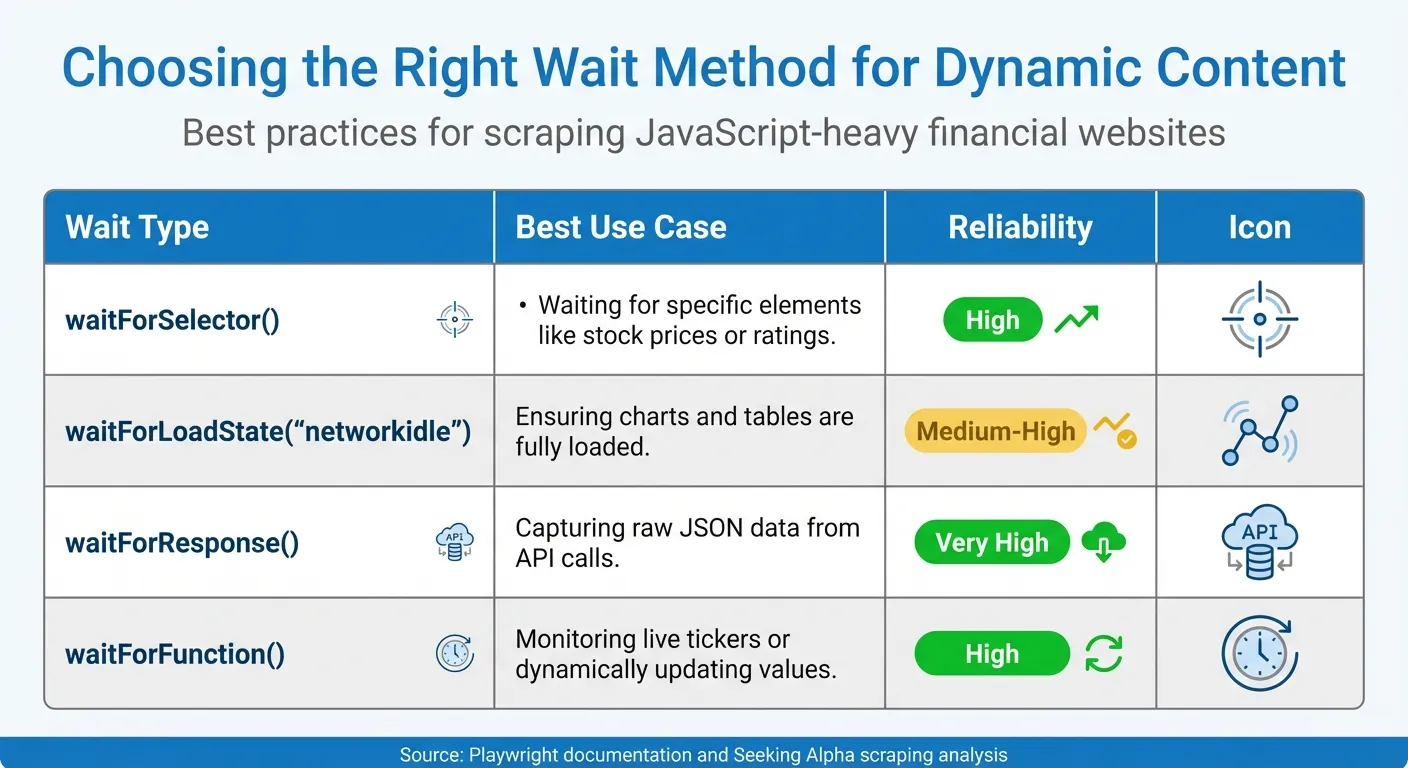
Here’s a quick table summarizing the best wait methods for different scenarios:
| Wait Type | Best Use Case | Reliability |
|---|---|---|
waitForSelector() | Waiting for specific elements like stock prices or ratings | High |
waitForLoadState("networkidle") | Ensuring charts and tables are fully loaded | Medium-High |
waitForResponse() | Capturing raw JSON data from API calls | Very High |
waitForFunction() | Monitoring live tickers or dynamically updating values | High |
“Playwright allows us to automate web headless browsers like Firefox or Chrome to navigate the web just like a human being would: go to URLs, click buttons, write text and execute JavaScript.” - Bernardas Ališauskas, Author, Scrapfly
Once you’ve extracted the page content using page.content(), you can use libraries like BeautifulSoup or Parsel to parse it. These libraries are often faster and more efficient for complex data extraction compared to relying solely on Playwright’s locators for every detail.
Scraping Earnings Transcripts Using Scrapy
Scrapy is a great tool for extracting static earnings transcripts, offering a lightweight and efficient way to handle large-scale crawling. Unlike Playwright, which is ideal for dynamic content, Scrapy skips rendering JavaScript by default. This makes it faster and less resource-intensive when working with static pages.
Setting Up a Scrapy Spider
Start by directing your spider to Seeking Alpha’s earnings transcript index page [transcript index URL]. Your spider will need two parsing methods: one to gather links to individual transcripts using CSS selectors like .dashboard-article-link::attr(href), and another to extract content from each transcript page, targeting elements such as #a-body > p or div#a-body p.
For transcripts spread across multiple pages, look for a “next page” link (e.g., response.css('li.next a::attr(href)')) and generate follow-up requests to gather all the content. Stefano Fiorucci, a Software Engineer, offers this advice:
“It seems that the transcripts are organized in various pages. So, I think that you have to add to your parse_transcript method a part where you find the link to next page of transcript, then you open it and submit it to parse_transcript.”
If your selectors aren’t working, use Scrapy’s fetch command to examine the raw HTML response and troubleshoot.
To make your spider more robust, it’s essential to implement middleware that can handle anti-scraping measures.
Handling Anti-Scraping Challenges and Best Practices
Seeking Alpha employs advanced anti-bot systems designed to differentiate between human visitors and scrapers by analyzing a range of signals. The key to successful scraping lies in avoiding detection altogether rather than just solving CAPTCHAs. As Diego Asturias, Technical Writer at RapidSeedbox, explains:
“Smart scraping should then focus on avoiding detection entirely rather than constantly solving challenges.”
Financial sites like Seeking Alpha scrutinize factors such as IP reputation, browser fingerprints, TLS handshakes, and even user behavior, including mouse movements. Datacenter IPs are flagged almost immediately, whereas residential and mobile IPs blend more naturally with legitimate traffic. Residential proxies, while costing $3–$8 per GB, are essential for high success rates. By implementing effective avoidance strategies, you can achieve success rates exceeding 90% at a cost of just $0.10 to $0.50 per 1,000 requests, compared to $1 to $3 per 1,000 for CAPTCHA-solving services [11].
Overcoming CAPTCHAs and IP Blocks
Beyond avoiding detection, bypassing CAPTCHAs and IP blocks is another critical step. Rotating residential or mobile proxies helps distribute requests across multiple IP addresses. Mobile proxies, though more expensive, offer the highest trust scores, while residential proxies strike a balance, making them ideal for financial sites. Tools like playwright-stealth can address over 200 known headless browser leaks, including the navigator.webdriver property, which often flags automated tools.
Modern anti-scraping systems also analyze TLS fingerprints, and mismatches in JA3 hashes can result in blocks. Tools such as curl_cffi allow you to spoof TLS fingerprints to align with your declared User-Agent. Since failed requests can consume up to 30% of scraping time, implementing robust retry logic with exponential backoff and random jitter is vital.
To mimic human behavior, simulate mouse movements using Bézier curves and introduce randomized delays between actions. Perfectly linear, robotic movements are easily flagged by behavioral analysis systems. Additionally, respect the retry-after header and maintain a DOWNLOAD_DELAY of at least 2 seconds between requests to reduce suspicion.
Once these anti-scraping measures are in place, the focus can shift to managing and storing the collected data effectively.
Data Storage and Management
After overcoming anti-scraping challenges, it’s crucial to store your data securely and efficiently. During active scraping, save data in JSONL (JSON Lines) format. This ensures that even if your scraper is blocked mid-process, previously collected data remains intact. For smaller projects, formats like CSV or JSON are sufficient, but larger datasets benefit from cloud-based solutions such as MongoDB or Amazon S3, offering scalability and faster querying.
Handle sensitive files like auth.json with care. Store these credentials using environment variables or secrets managers rather than hardcoding them, especially for financial sites. Monitoring tools are also essential for tracking task statuses and error logs, enabling you to quickly adapt if Seeking Alpha’s website structure changes and impacts your data extraction process.
Advanced Techniques and Managed Services
Optimizing Scraping with Advanced Tools
Once you’ve mastered the basics of bypassing anti-scraping measures, advanced tools can take your efficiency to the next level. A simple but effective tactic is blocking unnecessary resources like images, fonts, and stylesheets, which can cut bandwidth usage by up to 75%. This is especially helpful when scraping financial data on Seeking Alpha, where heavy media files can slow down operations.
For handling multiple tasks at once, Python’s asyncio combined with semaphores allows you to run several browser contexts simultaneously. However, it’s wise to limit these to 3–5 contexts until you’re sure your system can handle the load. For sites with infinite scrolling, custom JavaScript scripts and dynamic wait methods ensure you capture all new content. Fine-tune scrolling with loops designed to detect when dynamic content is fully loaded.
If you’re scraping on a large scale - say, 10,000 pages daily - expect infrastructure costs to range from $190 to $780 per month. To avoid losing data if your scraper crashes, write results directly to JSONL files or store them in SQL databases. For cleaning and organizing extracted data, Python libraries like BeautifulSoup or Parsel are often faster and more reliable than browser-based parsing methods.
These optimizations make your scraping process smoother and set the stage for deciding whether to switch to managed services.
When to Use Managed Services
At some point, managing your in-house tools can become overly complex, and that’s where managed services step in as a practical solution for large-scale data extraction. Kevin Sahin, Co-founder of ScrapingBee, puts it well:
“Advanced web scraping isn’t just about parsing HTML anymore. While beginners struggle with basic requests and BeautifulSoup, professional developers are solving complex scenarios… sites that load content through multiple AJAX requests, and hide data behind layers of JavaScript rendering.”
Managed services are especially useful when the time and effort needed to work around advanced protections, like JavaScript-heavy sites or anti-bot systems, outweigh the cost of a subscription. Seeking Alpha, for instance, uses sophisticated defenses like Cloudflare Turnstile and DataDome, which can be tough for standard headless browsers to bypass consistently. Providers like Web Scraping HQ handle these challenges seamlessly, managing TLS fingerprinting, proxy rotation, and browser consistency, so you don’t have to maintain complex infrastructure.
For production-level scraping involving thousands of URLs, managed services bring built-in concurrency management and rotating residential proxies to the table, minimizing the risk of IP blocks. Take Web Scraping HQ as an example: their Standard plan costs $449/month and offers structured JSON/CSV outputs, automated quality checks, and legal compliance, with results delivered within five business days. Their Custom plan, starting at $999/month, caters to enterprise needs with faster delivery (24 hours), flexible output formats, and priority support - perfect for businesses relying on frequent data extraction from financial platforms like Seeking Alpha.
Managed APIs typically charge between $1 and $10 per 1,000 pages. When you factor in the costs of DIY setups - proxies ($100–$500/month), compute resources ($50–$150/month), and monitoring tools ($30–$100/month) - managed services often turn out to be more economical. They also save you from constantly updating headers, fixing browser binaries, or tackling memory leaks, freeing up your team to focus on analyzing the data rather than maintaining the scraping infrastructure.
Want this done for you?
Send us the URLs. We'll quote it in 24 hours.
Paste the URL(s) you want scraped. We'll reply within 24 hours with a feasibility check and a ballpark quote.