
Jump to section
- Setting Up Your Scraping Environment
- Installing Python and Required Libraries
- Installing JavaScript Scraping Tools
- Scraping Static Wikipedia Content
- Downloading Wikipedia Pages with Requests
- Extracting Data with BeautifulSoup
- Scraping Dynamic Content and Structured Data
- Using Playwright for Dynamic Content
- Building a Scrapy Project for Structured Data
- Scraping Best Practices and Compliance
- Setting Rate Limits and User-Agent Headers
- Working Around Anti-Scraping Measures
- Saving Scraped Data
- Complete Code Example: Scraping a Wikipedia Page
- Conclusion
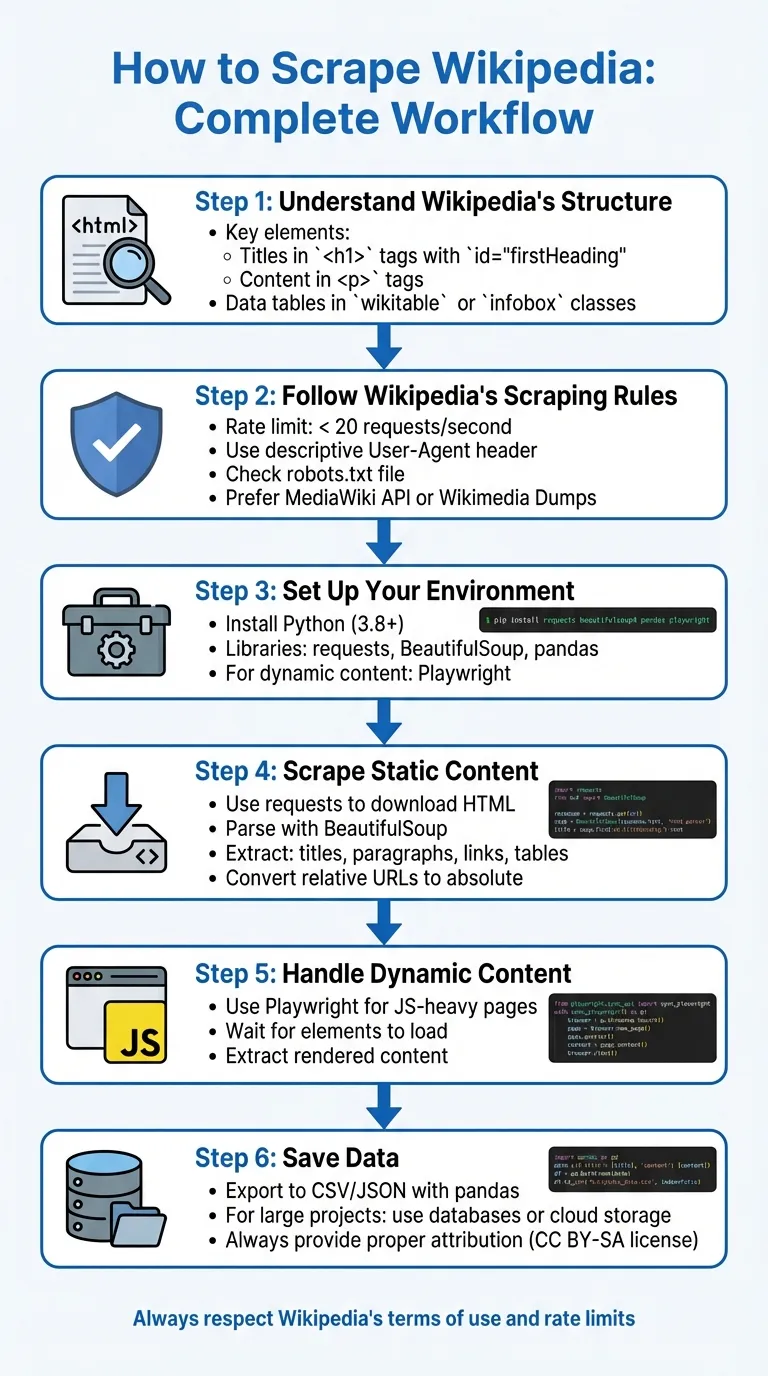
Scraping Wikipedia involves extracting data from its structured HTML or using its APIs while respecting its guidelines. Here’s how you can do it:
-
Understand Wikipedia’s Structure: Wikipedia pages have predictable layouts, with titles in
<h1>tags (id="firstHeading"), content in<p>tags, and data tables using CSS selectors for web scraping likewikitableorinfobox. -
Follow Wikipedia’s Scraping Rules:
-
Limit requests to fewer than 20 per second.
-
Use a descriptive User-Agent header.
-
Check the robots.txt file for restrictions.
-
Use the MediaWiki API or Wikimedia Dumps when possible to reduce server load.
-
-
Set Up Your Environment:
-
Install Python and libraries like
requests,BeautifulSoup, andpandas. -
For dynamic content, use tools like Playwright.
-
-
Scrape Static Content:
-
Use
requeststo download HTML. -
Parse with
BeautifulSoupto extract titles, paragraphs, links, and tables. -
Convert relative URLs to absolute ones.
-
-
Handle Dynamic Content:
-
Use Playwright to render JavaScript-heavy pages.
-
Extract content after ensuring all elements are loaded.
-
-
Save Data:
-
Export data to CSV or JSON using
pandas. -
For larger projects, consider databases or cloud storage.
-
Key Tip: Always respect Wikipedia’s terms of use and provide proper attribution for the data you collect.
Here’s a basic Python example to scrape the title and links from a Wikipedia page:
import requests
from bs4 import BeautifulSoup

url = "https://en.wikipedia.org/wiki/Python_(programming_language)"
headers = {'User-Agent': 'Mozilla/5.0'}

response = requests.get(url, headers=headers)
if response.status_code == 200:
    soup = BeautifulSoup(response.text, 'html.parser')
    title = soup.find('h1', id='firstHeading').text.strip()
    links = [f"https://en.wikipedia.org{a['href']}" for a in soup.find_all('a', href=True) if a['href'].startswith('/wiki/')]
    print(f"Title: {title}")
    print(f"Links: {links[:5]}")  # Display first 5 links
else:
    print(f"Error: {response.status_code}")
This script fetches the page title and internal links while adhering to basic scraping practices.
Setting Up Your Scraping Environment
Installing Python and Required Libraries
Before diving into scraping Wikipedia, it’s essential to have your development environment ready. Start by checking your Python version: Scrapy requires Python 3.10 or higher, while Playwright works with Python 3.8+ , and Crawlee needs Python 3.9+.
To keep your setup clean and avoid conflicts with system-wide packages, create a virtual environment. Run python -m venv venv to set one up, then activate it. On macOS/Linux, use source venv/bin/activate, and on Windows, run venv\Scripts\activate . This is a standard practice in Python development for web scraping.
If you’re on Windows and installing Scrapy with pip, you’ll also need Microsoft Visual C++ Build Tools, which can take up additional disk space. For a simpler route, consider using Anaconda or Miniconda, installing Scrapy via the conda-forge channel. macOS users should first run xcode-select --install to set up the required command-line tools.
To install core libraries, use pip (or manage dependencies with Poetry):
pip install requests beautifulsoup4 pandas lxml . Here’s what these libraries do:
-
requests: Handles HTTP requests. -
beautifulsoup4: Parses HTML. -
pandas: Manages and processes data tables. -
lxml: Provides fast and efficient parsing.
For more structured scraping needs, add Scrapy with pip install scrapy.
Once the basics are in place, you can move on to tools for handling dynamic content.
Installing JavaScript Scraping Tools
Although most Wikipedia content is static HTML, some pages include dynamic elements that require browser automation. Playwright is a powerful tool for this, capable of automating Chromium, Firefox, and WebKit browsers.
To set it up, install Playwright with:
pip install playwright
Then, download the required browser binaries by running:
playwright install .
For those working in Node.js environments, Puppeteer is another option. However, Playwright is often a better choice for Python-based workflows since it supports more browsers. That said, keep in mind that browser automation tools like Playwright are slower and more resource-intensive compared to static parsers like BeautifulSoup. Use them only when dealing with pages that rely heavily on JavaScript. For standard Wikipedia articles with text and tables, the combination of requests and beautifulsoup4 is faster and more efficient.
Scraping Static Wikipedia Content
Downloading Wikipedia Pages with Requests
Scraping static Wikipedia pages is a straightforward process because their content is embedded directly in the HTML source code. Using Python’s requests library, you can fetch the HTML of any Wikipedia article. Always include a User-Agent header to mimic a browser and reduce the chances of bot detection.
Here’s an example that downloads the Wikipedia page for Python (programming language):
import requests

url = "https://en.wikipedia.org/wiki/Python_(programming_language)"
headers = {'User-Agent': 'Mozilla/5.0'}

try:
    response = requests.get(url, headers=headers, timeout=10)
    response.raise_for_status()
    html_content = response.text
    print("Page downloaded.")
except requests.exceptions.RequestException as e:
    print(f"An error occurred: {e}")
Make sure the response.status_code returns 200, indicating the request was successful. The response.raise_for_status() method captures HTTP errors if they occur. Adding timeout=10 ensures your program doesn’t hang indefinitely if the server is unresponsive - this is a good practice recommended in the Requests documentation.
The HTML content can be accessed via response.text, while binary data (e.g., images) is available through response.content.
Extracting Data with BeautifulSoup
After downloading the HTML, you can use BeautifulSoup to parse and extract specific elements. Start by creating a soup object with the downloaded HTML and a parser. While 'lxml' offers better performance, 'html.parser' is sufficient for most tasks:
from bs4 import BeautifulSoup

soup = BeautifulSoup(response.text, 'html.parser')
Wikipedia’s consistent structure makes it easier to target specific elements. For example, the main article title always uses the firstHeading ID:
title = soup.find('h1', id='firstHeading').text.strip()To extract paragraphs, look for <p> tags, and filter out short or empty ones (e.g., those under 10 characters).
When working with links, remember that Wikipedia often uses relative URLs starting with /wiki/. Convert these to absolute URLs by appending them to https://en.wikipedia.org:
links = soup.find_all('a', href=True)
for link in links:
    if link['href'].startswith('/wiki/'):
        full_url = f"https://en.wikipedia.org{link['href']}"
        print(full_url)
For structured data, look for tables with the wikitable class. These tables can be converted into structured formats using pandas.read_html:
import pandas as pd
tables = pd.read_html(str(soup.find('table', class_='wikitable')))
To clean up text, you can remove citation numbers by targeting <sup> tags with the reference class and calling .decompose() on them [1]. If the text contains strange characters, check the response.encoding or set it to 'utf-8' manually before accessing response.text.
| Element Type | CSS Selector | Purpose |
|---|---|---|
| Page Title | h1#firstHeading | Extracts the article’s title |
| Body Paragraphs | p | Extracts narrative content |
| Data Tables | table.wikitable | Targets structured data tables |
| Internal Links | a[href^="/wiki/"] | Finds links to other Wikipedia pages |
| Images | img | Extracts image elements (src attr) |
If you’re unsure where specific data is located, use soup.prettify() to explore the HTML structure. For complex pages, narrow your search by first identifying a unique parent container and then applying find_all() within that scope to avoid irrelevant results.
This method provides a solid starting point for more advanced scraping techniques, which will be covered in upcoming sections.
Scraping Dynamic Content and Structured Data
Using Playwright for Dynamic Content

While most Wikipedia pages consist of static HTML, some include JavaScript-rendered elements like collapsible infoboxes or interactive tables. To handle these, Playwright runs a real browser instance (Chromium, Firefox, or WebKit) to execute JavaScript before scraping begins .
To get started, ensure Playwright is installed and set up correctly. Use page.goto() to navigate to the desired URL and page.wait_for_selector() or page.wait_for_load_state("networkidle") to ensure all elements are fully loaded before scraping. This prevents errors caused by attempting to extract content that hasn’t rendered yet.
“Standard Scrapy could not handle dynamic content… By combining it with Playwright, I could finally interact with dynamic pages, wait for content to load, and scrape data that was previously invisible.” - BrowserStack
Playwright provides flexible options for extraction. You can use locators like page.locator('table.infobox').inner_text() to grab data directly or pass the page’s HTML content (page.content()) to BeautifulSoup for more complex parsing. For better performance, always launch Playwright in headless mode (headless=True) to save resources. Additionally, use page.route() to block unnecessary resources such as images or fonts, which can significantly cut down bandwidth usage.
For large-scale projects involving structured data across numerous pages, Scrapy’s framework is a better fit.
Building a Scrapy Project for Structured Data
Once you’ve handled dynamic content with Playwright, Scrapy is ideal for extracting structured data at scale. It’s particularly effective for efficiently scraping multiple Wikipedia pages. Start by creating a new project with scrapy startproject <project_name> and then generate a spider using scrapy genspider <spider_name> <target_url>. Use browser developer tools to identify CSS selectors for the elements you want to extract. Common targets include table.infobox for summary tables, th.infobox-label for field names, and td.infobox-data for their corresponding values.
For pages with JavaScript-rendered content, integrate Playwright into Scrapy using the scrapy-playwright plugin. Update your settings.py file by adding TWISTED_REACTOR = 'twisted.internet.asyncioreactor.AsyncioSelectorReactor'. Then, enable Playwright for specific requests by including meta={"playwright": True} in your spider. This approach allows Scrapy to maintain its high performance on static pages while leveraging Playwright’s capabilities for dynamic ones.
“In my experience, Scrapy-Playwright is an excellent integration. It’s valuable for scraping websites where content only becomes visible after interacting with the page - whether it’s clicking buttons or waiting for JavaScript to load - while still leveraging Scrapy’s powerful crawling capabilities.” - Satyam Tripathi
Finally, export your scraped data to formats like CSV or JSON using the -o flag (scrapy crawl <spider_name> -o data.csv). For more organized results, Python’s zip() function can help combine related lists into clean dictionaries, simplifying the process of handling multiple data points.
Scraping Best Practices and Compliance
Setting Rate Limits and User-Agent Headers
Following Wikipedia’s scraping guidelines is essential to ensure compliance and avoid disruptions. Start by setting precise rate limits and including a clear, informative User-Agent header. For example, use a format like ClientName/Version (Contact; Username) Framework/Version to identify your scraper. This helps administrators contact you if there are any issues.
“Set an informative User-Agent string with contact information, or you may be IP-blocked without notice.”
– MediaWiki API Etiquette
For requests to the main site (/wiki/), keep your average below 20 requests per second with no more than 10 concurrent requests. The REST API allows fewer than 10 requests per second and 5 concurrent requests, while the unauthenticated Action API is stricter, permitting only 5 requests per second with a single concurrent request. To stay safe, process requests sequentially - wait for one to finish before starting another.
If you receive an HTTP 429 (Too Many Requests) response, respect the delay specified in the Retry-After header. Additionally, use the maxlag=5 parameter to pause your scraper during periods of high server load.
These steps help you work within Wikipedia’s rules while reducing the risk of being blocked.
Working Around Anti-Scraping Measures
Wikipedia employs several countermeasures to manage scrapers, including rate limiting and IP blocks. To avoid issues, always follow their robots.txt directives and include the Accept-Encoding: gzip header to reduce bandwidth usage. If you encounter a ratelimited error, implement an exponential backoff strategy, gradually increasing the delay between retries.
“Bots that repeatedly try to get around these guidelines or rate limits, and/or threaten the stability of the sites may be blocked.”
– Wikimedia Robot Policy
To minimize the number of requests, batch them using the pipe character (|) in API calls (e.g., titles=PageA|PageB). For higher request limits, authenticate using OAuth 2.0, which increases the Action API’s allowance to 10 requests per second and up to 3 concurrent requests. Also, avoid storing cookies or executing unnecessary JavaScript during high-volume scraping. Stick to canonical URLs like /wiki/Title instead of query parameters to optimize CDN caching.
By respecting these measures, you can maintain smooth operation without compromising site stability.
Saving Scraped Data
Once you’ve gathered your data, save it in an organized format. Use tools like Pandas to export data into CSV files (df.to_csv()) or json.dump() for nested data structures. Before saving, clean the data by removing citation references, converting relative URLs to absolute ones, and stripping out HTML style tags to make the text more usable.
For larger projects, databases are more efficient than flat files. They support advanced queries and handle data at scale. Consider using cloud storage solutions like Amazon S3, Google Cloud Storage, or Microsoft Azure for scalability and reliability.
Finally, remember that Wikipedia content is licensed under Creative Commons Attribution-ShareAlike. Always provide proper attribution when storing or republishing scraped data.
These practices ensure your data is not only well-organized but also compliant with licensing requirements.
Complete Code Example: Scraping a Wikipedia Page
Here’s a Python script that pulls the title, infobox details, and references from a Wikipedia page, then saves the data into a CSV file. The script adheres to Wikipedia’s scraping policies, as previously outlined.
import requests
from bs4 import BeautifulSoup
import pandas as pd

# Target URL
url = "https://en.wikipedia.org/wiki/Elon_Musk"

# Set User-Agent to avoid being blocked
headers = {
    "User-Agent": "WikipediaScraper/1.0 (contact@example.com)"
}

# Fetch the page
response = requests.get(url, headers=headers)

# Verify that the request was successful
if response.status_code == 200:
    soup = BeautifulSoup(response.text, 'html.parser')

    # Extract the title using the unique ID
    title = soup.find('h1', id='firstHeading').get_text(strip=True)

    # Extract infobox data from the table with class "infobox"
    infobox = soup.find('table', class_='infobox')
    infobox_data = {}

    if infobox:
        for row in infobox.find_all('tr'):
            label = row.find('th', class_='infobox-label')
            data = row.find('td', class_='infobox-data')
            if label and data:
                infobox_data[label.get_text(strip=True)] = data.get_text(strip=True)

    # Extract references from the ordered list with class "references"
    references_list = soup.find('ol', class_='references')
    references = []

    if references_list:
        for ref in references_list.find_all('li'):
            references.append(ref.get_text(strip=True))

    # Structure the data for CSV export
    scraped_data = {
        "Title": [title],
        "Infobox": [str(infobox_data)],
        "References_Count": [len(references)],
        "First_Reference": [references[0] if references else "N/A"]
    }

    # Save the scraped data to a CSV file
    df = pd.DataFrame(scraped_data)
    df.to_csv('wikipedia_scraped.csv', index=False)

    print(f"Successfully scraped: {title}")
    print("Data saved to wikipedia_scraped.csv")
else:
    print(f"Page fetch failed. Status: {response.status_code}")
This script uses get_text(strip=True) to clean and simplify the extracted text, ensuring the output is readable. It combines all the previously discussed techniques into a single, practical example.
To run this script, make sure you have the necessary libraries installed:
pip install requests beautifulsoup4 pandasOnce executed, the script will save the extracted data into a file named wikipedia_scraped.csv, making it easy to analyze or share.
Conclusion
From setting up your environment to managing both static and dynamic content, every step plays a role in ensuring a smooth and compliant approach to scraping Wikipedia. The key to success lies in understanding Wikipedia’s structured format and leveraging the right Python tools. Libraries like Requests and BeautifulSoup make it easy to extract data from its predictable HTML layout, and Wikipedia’s open licensing allows data use as long as proper attribution is provided. The complete code example illustrates how these tools can work together to pull titles, infobox data, and references with just a few lines of Python.
However, technical know-how must always go hand-in-hand with ethical practices. Ethical scraping isn’t optional - it’s essential. Always follow the guidelines to protect your access and ensure the site’s stability. For example, check Wikipedia’s robots.txt file at https://en.wikipedia.org/robots.txt before scraping, limit your requests to fewer than 20 per second, and include a descriptive User-Agent header with your contact information.
When selecting your method for data extraction, prioritize wisely. The MediaWiki API should always be your first choice for structured data. It offers clean JSON outputs, adheres to official policies, and is less likely to be affected by layout changes on Wikipedia. HTML scraping should only be a fallback when the API doesn’t provide the specific data you need.
Lastly, don’t forget that Wikipedia’s content falls under Creative Commons licenses. Proper attribution is not just a legal requirement - it’s a fundamental part of using the data responsibly. By combining ethical practices, reliable infrastructure, and compliance with licensing terms, you can ensure your scraping efforts are both effective and sustainable.
Want this done for you?
Send us the URLs. We'll quote it in 24 hours.
Paste the URL(s) you want scraped. We'll reply within 24 hours with a feasibility check and a ballpark quote.