Jump to section
- Key Takeaways:
- Quick Tips:
- Legal and Ethical Guidelines for Scraping Lazada
- Setting Up Your Python Environment
- Installing Python and Required Libraries
- Creating a Virtual Environment
- Analyzing Lazada’s Page Structure
- Using Browser DevTools
- Identifying Dynamic Content
- Scraping Static Content with Requests and BeautifulSoup
- Sending HTTP Requests
- Parsing HTML with BeautifulSoup
- Scraping Dynamic Content with Playwright
- Installing and Setting Up Playwright
- Extracting JavaScript-Rendered Content
- Scaling Your Scraping with Scrapy
- Creating a Scrapy Project
- Managing Pagination
- Bypassing Anti-Bot Measures
- Using Proxies and IP Rotation
- Solving CAPTCHAs
- Storing and Processing Scraped Data
- Cleaning and Formatting Data
- Exporting Data to Files and Databases
- Conclusion
Web scraping Lazada involves collecting product data such as names, prices, descriptions, reviews, and seller details from its web pages. It’s useful for tasks like price monitoring, market research, and sentiment analysis. However, Lazada’s dynamic JavaScript-based content and anti-bot measures make scraping challenging.
Key Takeaways:
-
Tools: Use
Playwrightfor dynamic content,Scrapyfor large-scale projects, andRequests + BeautifulSoupfor static pages. -
Legal Considerations: Lazada’s Terms of Service prohibit scraping for commercial purposes without permission. Check the
robots.txtfile and respect rate limits (1 request/sec). -
Challenges: Handle JavaScript-rendered content, avoid IP bans, and address CAPTCHAs.
-
Ethical Scraping: Stick to public data and avoid restricted areas like login pages.
Quick Tips:
-
Use proxies and rotate IPs to prevent detection.
-
Randomize delays between requests and mimic human behavior.
-
Clean and format data for storage in CSV, JSON, or databases like SQLite.
Scraping Lazada requires careful planning, ethical practices, and the right tools to navigate its technical and legal barriers.
Legal and Ethical Guidelines for Scraping Lazada
Before diving into scraping Lazada, it’s crucial to understand the platform’s legal boundaries. Lazada’s Terms of Service explicitly prohibit automated scraping for commercial purposes unless you have their clear permission . For instance, Clause 2.5 of the Philippines’ terms forbids automated tools from accessing the platform. Zoltan Bettenbuk, CTO of ScraperAPI, emphasizes:
“Lazada’s terms explicitly prohibit the practice of scraping for commercial purposes unless explicit permission has been obtained”
To begin, check Lazada’s robots.txt file for the specific country domain you plan to target, such as https://www.lazada.com.ph/robots.txt or https://www.lazada.sg/robots.txt. As of December 2025, Lazada generally permits crawling of public search and product pages but strictly blocks access to restricted areas, like login or signup sections (/wow/gcp/id/member/login-signup) . This distinction is key: scraping publicly available product listings is far less risky legally than attempting to access data behind login walls.
Rate limiting is another important consideration. Stick to a pace of about 1 request per second. Going beyond this limit can trigger a 429 error (Too Many Requests), signaling that you’ve exceeded Lazada’s thresholds. The eBay vs. Bidder’s Edge case serves as a cautionary tale, where excessive requests that slowed down servers were deemed “harmful” to the business. To avoid detection, use jitter - randomized delays between requests to simulate human browsing behavior.
Regional privacy laws also play a role. For example, scraping Lazada’s Singapore site requires compliance with the Personal Data Protection Act (PDPA), particularly when dealing with personal data. The safest approach is to stick to public information already indexed by search engines. As AlphaScrape advises:
“If a website explicitly prohibits scraping in its T&C, it’s best to respect this and seek other legal channels to access the data”
If you’re working on a large-scale commercial project, consulting a legal expert is highly recommended to ensure your activities don’t cross into unfair competition territory.
When encountering server errors like 429 or 5xx, use exponential backoff - a method that gradually increases wait times between retries to give the server time to recover. Additionally, set up monitoring systems to alert you if more than 5% of requests fail within an hour. This is a strong indicator that you need to adjust your scraping strategy, such as scaling back requests or rotating IP addresses. Ultimately, ethical scraping isn’t just about avoiding legal trouble - it’s about respecting the platform and its resources.
Setting Up Your Python Environment
Before diving into scraping Lazada, ensure your Python environment is ready to go. Start by checking if Python is installed. Open your terminal (or PowerShell if you’re on Windows) and type python --version or python3 --version. If you see a version number, you’re good to go. If not, you’ll need to install Python.
For Windows users, the Microsoft Store is the easiest way to install Python 3.14 and later. It simplifies updates and version management. Alternatively, you can download the installer from Python.org - just make sure to select the “Add Python to environment variables” option during installation. On macOS, grab the installer from Python.org (note that Python 3.14 requires macOS 10.15 Catalina or newer) or use Homebrew with the command brew install python. If you’re on Linux, Python is usually pre-installed, but you can update it via your package manager, such as running sudo apt install python3 on Ubuntu.
Installing Python and Required Libraries
After setting up Python, it’s a good idea to update pip to avoid compatibility issues with modern packages. Run:
pip install --upgrade pipFor scraping Lazada, you’ll need a few libraries depending on your requirements. Use requests and beautifulsoup4 for handling static content, which often requires mastering CSS selectors for data extraction, playwright for pages with JavaScript, and scrapy for larger-scale projects. You can install these all at once with:
pip install requests beautifulsoup4 playwright scrapyIf you’re using Playwright, don’t forget to download its browser binaries (Chromium, Firefox, and WebKit) by running:
playwright installKeep in mind that Scrapy requires Python 3.10 or newer as of late 2025.
Once these tools are installed, it’s time to set up a virtual environment to keep your project dependencies organized.
Creating a Virtual Environment
A virtual environment is essential for any scraping project. It prevents conflicts between dependencies in different projects and ensures you don’t need administrative privileges to install packages. The Scrapy documentation emphasizes this:
“We strongly recommend that you install Scrapy in a dedicated virtualenv, to avoid conflicting with your system packages”.
To create a virtual environment, run:
python -m venv venvIf you’re on Windows, activate the environment with:
venv\Scripts\activateOn macOS or Linux, activate it using:
source venv/bin/activateOnce activated, you’ll notice your terminal prompt changes to include the environment name. Now, install your scraping libraries within this environment to keep everything clean and conflict-free.
Analyzing Lazada’s Page Structure
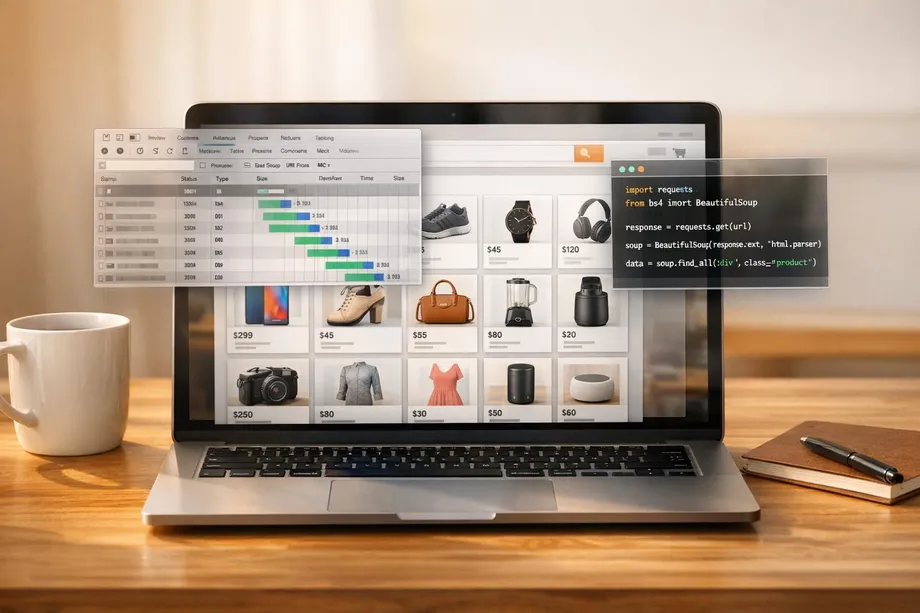
To extract product details effectively from Lazada, it’s crucial to understand its HTML structure. The easiest way to do this is by using your browser’s built-in DevTools.
Using Browser DevTools
Start by opening any Lazada product page. Press F12 to open DevTools, or right-click an element on the page and select Inspect. Once DevTools is open, use the “Select an element” tool (a cursor icon in the top-left corner of the panel) to hover over product details. This will highlight the corresponding HTML code, showing you the tags and attributes - like class or id - you’ll need when building your web scraper for beginners.
For instance:
-
Product names might appear in
divorspantags with classes such as.c16H9dor.title. -
Prices often reside in elements with classes like
.priceor.pdp-price.
Take note of these selectors for future reference. Since Lazada frequently changes its class names, look for more stable attributes like data-item-id whenever possible. To avoid personalized content or cached data, use an incognito window when inspecting the page structure.
Additionally, check the Network tab in DevTools for internal JSON endpoints (e.g., /api/search, /api/product). These endpoints often provide structured data that can simplify your scraping.
Once you’ve mapped the HTML structure, the next step is distinguishing between static and dynamic content.
Identifying Dynamic Content
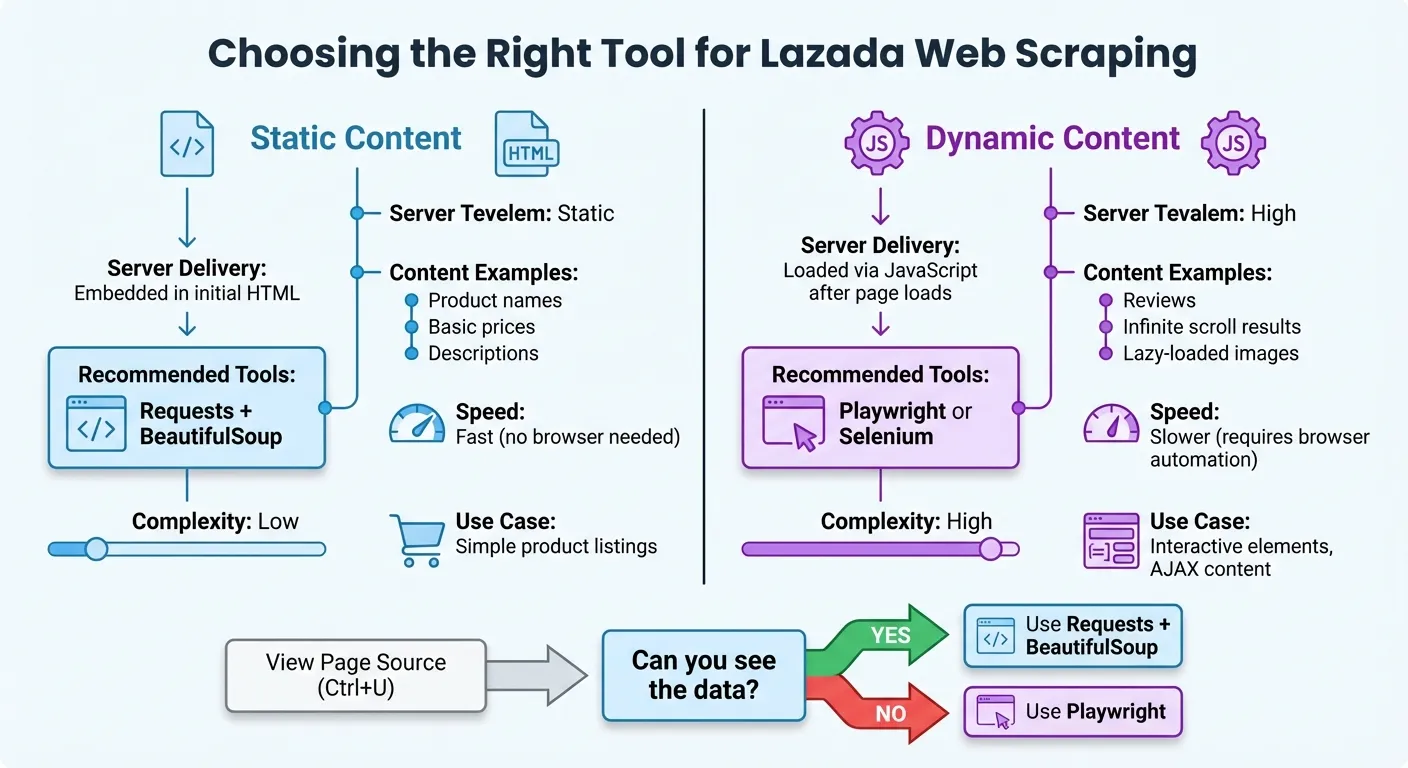
Not all Lazada content is delivered the same way. Some data is static - embedded directly in the HTML - while other data is dynamic, loaded by JavaScript after the page is initially delivered. This difference is key when choosing your scraping tools.
To identify dynamic content:
-
View the raw HTML by pressing Ctrl+U or selecting “View Page Source.”
-
Disable JavaScript in your browser settings. If certain elements disappear, they are dynamically rendered.
Common examples of dynamic content on Lazada include reviews, infinite scroll results, and lazy-loaded images.
| Content Type | Server Delivery | Scraping Tool Needed |
|---|---|---|
| Static Content | Delivered as part of the initial HTML file | requests + BeautifulSoup |
| Dynamic Content | Loaded via JavaScript after the page loads | Playwright or Selenium |
This breakdown highlights why tools like Playwright are essential for handling dynamic elements. By mapping out which parts of the page are static and which are dynamic, you can ensure you’re using the right tools for each scraping task.
Scraping Static Content with Requests and BeautifulSoup
When dealing with static content, combining requests for fetching HTML and BeautifulSoup for parsing it is a straightforward and effective approach. This setup works well for extracting details like product names, prices, and other information embedded directly in a webpage’s source code.
Sending HTTP Requests
Start by sending a GET request to the Lazada URL you want to scrape. Always include headers to avoid issues like 403 errors, which can occur if the server suspects unusual activity.
Here’s a simple example:
import requests

url = "https://www.lazada.com.my/shop/guardian/?ajax=true"
headers = {
    "User-Agent": "Mozilla/5.0 (Windows NT 10.0; Win64; x64) AppleWebKit/537.36 (KHTML, like Gecko) Chrome/120.0.0.0 Safari/537.36",
    "Accept-Language": "en-MY"
}

response = requests.get(url, headers=headers)
print(response.status_code)
The Accept-Language header ensures the response matches the desired regional format. For instance, using en-MY retrieves data in Malaysian Ringgit (RM), while id-ID would return prices in Indonesian Rupiah. For scraping multiple pages, using requests.Session() can simplify cookie management and maintain session persistence.
In May 2023, a developer successfully used this method to scrape product names and prices from Lazada Malaysia’s Guardian shop. By targeting an AJAX-specific URL, they extracted items like “UPHAMOL 250 Children Suspension” priced at “RM7.80” directly into Python dictionaries, avoiding the complications of browser automation.
Parsing HTML with BeautifulSoup
Once you’ve fetched the HTML, pass it to BeautifulSoup for parsing. You can use the built-in html.parser or opt for lxml for faster performance by installing it with pip install lxml [1].
from bs4 import BeautifulSoup

soup = BeautifulSoup(response.content, 'html.parser')
products = soup.find_all('div', class_='Bm3ON')

for product in products:
    name = product.find('div', class_='RfADt')
    price = product.find('span', class_='ooOxS')

    if name and price:
        print(f"Product: {name.text.strip()}")
        print(f"Price: {price.text.strip()}")
The class names like Bm3ON, RfADt, and ooOxS are just examples. Since Lazada frequently updates its DOM structure, requiring you to maintain web scrapers for long-term use, always inspect the current webpage using Developer Tools to identify the correct selectors. Additionally, the .text.strip() method ensures the extracted data is clean by removing extra whitespace and newline characters.
This technique works well for static content. However, if you find that correct selectors are returning no data, the page content is likely dynamic. In such cases, you’ll need to switch to a tool like Playwright, which is covered in the next section.
Scraping Dynamic Content with Playwright
When static scraping methods fail due to missing elements, dynamic scraping with Playwright steps in as the perfect solution.
If you’re using BeautifulSoup and getting empty results despite using the correct selectors, chances are you’re dealing with JavaScript-rendered content. For example, Lazada loads much of its product data, reviews, and pricing through background API calls after the initial page load. This is where Playwright shines - it operates a real browser, executes JavaScript, and makes all dynamically loaded content accessible for scraping.
Installing and Setting Up Playwright
To get started, you’ll need to install Playwright and its browser binaries. Open your terminal and run the following commands:
pip install playwright
playwright install
The first command installs the Playwright library, while the second downloads the required browser engines (Chromium, Firefox, or WebKit). For simplicity, you can use the synchronous API, but the asynchronous API is better suited for handling multiple tasks concurrently.
Here’s a basic setup using the synchronous API:
from playwright.sync_api import sync_playwright

with sync_playwright() as p:
    browser = p.chromium.launch(headless=False)
    page = browser.new_page()
    page.goto("https://www.lazada.com/products/example-product")

    # Your scraping code here

    browser.close()
Set headless=False to see the browser in action during testing. Switch to headless=True for production to run the browser in the background.
Extracting JavaScript-Rendered Content
To scrape JavaScript-rendered content, you need to ensure the elements are fully loaded before extracting them. Playwright’s wait_for_selector() method is perfect for this, as it pauses execution until the desired elements appear in the DOM:
# Wait for the price element to load
page.wait_for_selector('span.pdp-price', timeout=10000)
price = page.locator('span.pdp-price').inner_text()
print(f"Price: {price}")
For pages that rely on multiple background API calls, use wait_for_load_state("networkidle"). This ensures all network activity has settled before proceeding, waiting until there are no more than two active connections for at least 500 milliseconds.
If the page uses lazy-loading to display additional content, you can programmatically scroll to trigger it:
# Scroll to load more products
for _ in range(5):
    page.evaluate('window.scrollTo(0, document.body.scrollHeight)')
    page.wait_for_timeout(2000)
“Playwright has a robust auto-waiting mechanism. It automatically waits for elements to be ready before trying to click or scrape them, which drastically reduces the flaky, unpredictable errors.” - CrawlKit
For an even faster and cleaner approach, intercept Lazada’s internal API responses. This allows you to access structured JSON data directly, bypassing the need to scrape the DOM entirely. This method is both efficient and reliable, especially for data-heavy pages.
Scaling Your Scraping with Scrapy
When it comes to managing large-scale data extraction, Scrapy is a game-changer. For a platform like Lazada, with its vast product catalog, you need more than just a basic script. Scrapy’s asynchronous processing and ability to handle distributed crawling make it a perfect fit for high-volume scraping tasks.
One of Scrapy’s standout features is its ability to target internal AJAX or JSON endpoints. By using your browser’s DevTools (press F12), you can inspect XHR or Fetch requests in the Network tab. These URLs can then be replicated in your Scrapy spider, allowing for faster and more reliable data extraction. This method not only streamlines your process but also leverages Scrapy’s asynchronous capabilities to scale your efforts effectively.
Creating a Scrapy Project
To get started, initialize your project with the following command:
scrapy startproject lazada_scraperThis sets up the necessary directories and configuration files. Next, define your data structure in the items.py file. This ensures all your scraped data is organized and consistent:
import scrapy

class LazadaItem(scrapy.Item):
    product_id = scrapy.Field()
    title = scrapy.Field()
    price = scrapy.Field()
    rating = scrapy.Field()
    review_count = scrapy.Field()
    is_in_stock = scrapy.Field()
Your spider logic goes into the spiders directory. Here’s an example of a simple spider that extracts data from Lazada’s JSON endpoints:
import scrapy
import json

class LazadaSpider(scrapy.Spider):
    name = 'lazada_spider'

    def start_requests(self):
        url = 'https://www.lazada.com/catalog/?ajax=true&page=1'
        yield scrapy.Request(url, callback=self.parse)

    def parse(self, response):
        data = json.loads(response.text)

        for item in data.get('mods', {}).get('listItems', []):
            yield {
                'product_id': item.get('itemId'),
                'title': item.get('name'),
                'price': item.get('price'),
                'rating': item.get('ratingScore'),
                'review_count': item.get('review')
            }
To avoid getting blocked, configure your settings.py with a realistic USER_AGENT and set a DOWNLOAD_DELAY between 1.0 and 1.5 seconds. This helps mimic human browsing behavior. Your goal should be a success rate where at least 90% of the scraped pages return essential data like product IDs and prices.
Managing Pagination
Handling pagination is key to ensuring complete coverage of Lazada’s product listings. Scrapy’s generator model makes this straightforward. Within the parse method, you can yield a request for the next page. For Lazada’s numbered pagination, check if the listItems array in the JSON response contains data. If it’s empty, you’ve reached the last page:
def parse(self, response):
    data = json.loads(response.text)
    items = data.get('mods', {}).get('listItems', [])

    for item in items:
        yield {
            'product_id': item.get('itemId'),
            'title': item.get('name'),
            'price': item.get('price')
        }

    # Continue to the next page if there are items
    if items:
        current_page = response.meta.get('page', 1)
        next_page = current_page + 1
        next_url = f'https://www.lazada.com/catalog/?ajax=true&page={next_page}'
        yield scrapy.Request(next_url, callback=self.parse, meta={'page': next_page})
For HTML-based pagination, use response.follow, which simplifies handling relative URLs and is more reliable than manually building URLs. To further optimize your spider, enable AUTOTHROTTLE_ENABLED = True in your settings. This feature adjusts the request rate based on server response times, ensuring smoother crawling.
When your data is ready, export it using one of these commands:
scrapy crawl lazada_spider -o products.jsonor
scrapy crawl lazada_spider -o products.csvFor larger datasets, consider exporting in JSON Lines format (.jsonl). It’s memory-efficient and works well for streaming large amounts of data. Use -O (uppercase) to overwrite existing files or -o (lowercase) to append data to an existing file.
Bypassing Anti-Bot Measures
To keep data extraction running smoothly, bypassing anti-bot measures is essential. By sticking to ethical scraping practices, you can lower the chances of detection and maintain data quality.
Platforms like Lazada have robust anti-bot systems in place. These include IP blocking, CAPTCHA challenges, JavaScript fingerprinting, and behavioral analysis. As Emily Chen, an Advanced Data Extraction Specialist at Scrapeless, explains:
“Lazada uses a variety of anti-crawler technologies, including CAPTCHA challenges, IP restrictions, and behavioral analysis, to prevent data scraping from unofficial APIs”.
Instead of relying heavily on CAPTCHA solvers, focus on prevention. By using techniques like residential proxies, mimicking real browser behavior, and timing requests appropriately, you can reduce CAPTCHA triggers by 70–90%.
Using Proxies and IP Rotation
Residential proxies are key for scraping Lazada. While datacenter proxies are quickly flagged, residential IPs are seen as regular home users and are less likely to be blocked. Make sure to use proxies from the same country as the Lazada domain you’re targeting - Thai IPs for lazada.co.th or Indonesian IPs for lazada.co.id - to avoid triggering cross-border security alerts.
Managed proxy services like ScrapeOps, Oxylabs, or BrightData handle automatic IP rotation and manage proxy pools efficiently . These services rotate IPs after a set number of requests or when blocking patterns are detected.
Additionally, rotate User-Agent strings along with IPs. If your IP changes but the User-Agent remains the same across multiple requests, Lazada’s systems may flag the activity. Randomizing delays between 0.2–1 second also helps mimic human behavior.
Here’s a sample Scrapy configuration for proxies and User-Agent rotation:
ROTATING_PROXY_LIST = [
    'http://proxy1.example.com:8000',
    'http://proxy2.example.com:8000',
    'http://proxy3.example.com:8000',
]

DOWNLOADER_MIDDLEWARES = {
    'rotating_proxies.middlewares.RotatingProxyMiddleware': 610,
    'rotating_proxies.middlewares.BanDetectionMiddleware': 620,
}

USER_AGENT_LIST = [
    'Mozilla/5.0 (Windows NT 10.0; Win64; x64) AppleWebKit/537.36 (KHTML, like Gecko) Chrome/120.0.0.0 Safari/537.36',
    'Mozilla/5.0 (Macintosh; Intel Mac OS X 10_15_7) AppleWebKit/537.36 (KHTML, like Gecko) Chrome/120.0.0.0 Safari/537.36',
    'Mozilla/5.0 (X11; Linux x86_64) AppleWebKit/537.36 (KHTML, like Gecko) Chrome/120.0.0.0 Safari/537.36'
]

DOWNLOAD_DELAY = 1.5
RANDOMIZE_DOWNLOAD_DELAY = True
For Playwright users, you can configure proxies and stealth settings to avoid automation detection:
from playwright.sync_api import sync_playwright

def scrape_with_proxy():
    with sync_playwright() as p:
        browser = p.chromium.launch(
            headless=False,  # Headful mode reduces detection
            proxy={
                "server": "http://proxy.example.com:8000",
                "username": "your_username",
                "password": "your_password"
            },
            args=['--disable-blink-features=AutomationControlled']
        )

        context = browser.new_context(
            viewport={'width': 1200, 'height': 800},
            user_agent='Mozilla/5.0 (Windows NT 10.0; Win64; x64) AppleWebKit/537.36'
        )

        page = context.new_page()
        page.goto('https://www.lazada.com/catalog/')

        # Simulate natural scrolling
        page.evaluate('window.scrollBy(0, window.innerHeight / 2)')
        page.wait_for_timeout(2000)

        # Extract data
        products = page.query_selector_all('.product-item')
If these measures still lead to blocks, the next step involves handling CAPTCHAs.
Solving CAPTCHAs
When preventive techniques fall short, CAPTCHAs like reCAPTCHA v2, invisible reCAPTCHA v3, or custom challenges may appear. The goal is to minimize their occurrence and only use solvers as a backup.
AI-based CAPTCHA solvers like CapSolver handle challenges in 1–3 seconds with 85–95% accuracy, costing about $0.40–$0.90 per 1,000 solves. Human-assisted solvers, such as 2Captcha, take longer (15–30 seconds) but achieve higher accuracy (95–99%) at a cost of $1.00–$3.00 per 1,000 solves.
| Feature | AI/Automated Solvers | Human-Assisted Solvers |
|---|---|---|
| Speed | 1–3 seconds | 15–30 seconds |
| Cost | $0.40–$0.90 per 1k | $1.00–$3.00 per 1k |
| Accuracy | 85–95% | 95–99% |
| Best For | High-volume tasks | Complex puzzles |
Here’s an example of integrating 2Captcha:
import requests
from twocaptcha import TwoCaptcha

solver = TwoCaptcha('YOUR_API_KEY')

def solve_recaptcha(site_key, page_url):
    try:
        result = solver.recaptcha(
            sitekey=site_key,
            url=page_url
        )
        return result['code']
    except Exception as e:
        print(f"CAPTCHA solving failed: {e}")
        return None

# Use the token in your request
captcha_token = solve_recaptcha('6Le-site-key', 'https://www.lazada.com/products/...')
if captcha_token:
    response = requests.post(
        'https://www.lazada.com/verify',
        data={'g-recaptcha-response': captcha_token}
    )
As a fallback, consider human-in-the-loop solutions. According to GoProxy:
“If CAPTCHA persists, switch to human-in-loop resolution or use a reputable third-party API”.
Alternatively, managed unblocker services like Oxylabs Web Unblocker, BrightData Web Unlocker, or Zyte API can handle CAPTCHA solving along with IP rotation, cookies, and headers. While these services are more expensive - ranging from $1,000 to $5,000 for scraping 1 million pages per month - they offer an all-in-one solution for scraping highly protected pages.
Storing and Processing Scraped Data
Once you’ve scraped data from Lazada, the next step is to clean, format, and store it properly. This ensures your data is accurate and ready for analysis. Raw data often contains issues like promotional text, missing values, or relative URLs. Processing this data effectively transforms it into a reliable dataset.
Cleaning and Formatting Data
Scraped data is rarely in perfect shape. For example, prices might include phrases like “Sale price₱” or “From RM”, product names may have unnecessary spaces, and URLs could be incomplete. Python’s string methods, like .strip() and .replace(), can help remove unwanted characters. You can then convert prices into numerical values for easier analysis.
When dealing with currency, use Python’s decimal.Decimal instead of float() to avoid rounding errors in calculations. Lazada operates in six Southeast Asian markets, so you’ll encounter currencies like Philippine Pesos (PHP), Malaysian Ringgit (MYR), Thai Baht (THB), Singapore Dollars (SGD), Indonesian Rupiah (IDR), and Vietnamese Dong (VND). To standardize, convert all prices to USD using current exchange rates based on the target domain.
Here’s an example of a Python data cleaning pipeline:
from dataclasses import dataclass
from decimal import Decimal
from datetime import datetime
import re

@dataclass
class LazadaProduct:
    product_id: str
    title: str
    price: Decimal
    currency: str
    price_usd: Decimal
    is_in_stock: bool
    url: str
    timestamp_utc: str

    def __post_init__(self):
        # Clean title
        self.title = self.title.strip()

        # Convert relative URL to absolute
        if self.url and not self.url.startswith('http'):
            self.url = f"https://www.lazada.com.my{self.url}"

def clean_price(price_string):
    """Remove currency symbols and promotional text from price strings"""
    price_string = re.sub(r'(Sale price|From|Was|MSRP|Save \d+%)', '', price_string)
    price_string = re.sub(r'[₱RM฿$SGD£¥kr]', '', price_string)
    price_string = price_string.replace(',', '').strip()
    return Decimal(price_string) if price_string else Decimal('0')

def convert_to_usd(amount, currency_code):
    """Convert Southeast Asian currencies to USD using Feb 2026 rates"""
    # Exchange rates as of Feb 23, 2026
    rates_to_usd = {
        'MYR': Decimal('0.2569'),
        'SGD': Decimal('0.7907'),
        'THB': Decimal('0.0322'),
        'PHP': Decimal('0.0173'),
        'IDR': Decimal('0.000059'),
        'VND': Decimal('0.000038'),
        'USD': Decimal('1.0000')
    }
    return round(amount * rates_to_usd.get(currency_code, Decimal('0')), 2)

# Example usage
raw_price = "Sale price₱1,299.00"
cleaned_price = clean_price(raw_price)
usd_price = convert_to_usd(cleaned_price, 'PHP')

product = LazadaProduct(
    product_id="123456789",
    title="  Wireless Bluetooth Headphones  ",
    price=cleaned_price,
    currency="PHP",
    price_usd=usd_price,
    is_in_stock=True,
    url="/products/wireless-headphones-123456789",
    timestamp_utc=datetime.utcnow().isoformat()
)

print(f"Cleaned: {product.title}")
print(f"Price: ${product.price_usd} USD (₱{product.price} PHP)")
print(f"URL: {product.url}")
To avoid duplicates, maintain a list of product IDs you’ve already processed. Instead of cleaning data after each request, batch process 10-20 items at a time for better efficiency.
Once cleaned, the data is ready for export.
Exporting Data to Files and Databases
The storage format you choose depends on how you’ll use the data. CSV is great for spreadsheets like Excel or Google Sheets. JSON works well for web applications and APIs, while JSONL (JSON Lines) is ideal for handling large datasets because it processes data line by line.
For local projects, SQLite is a simple, file-based database. In production environments with higher demands, PostgreSQL or MySQL are better choices. If you’re working with varying data structures from multiple e-commerce sites, MongoDB offers flexibility.
Here’s how you can export your cleaned data:
import csv
import json
import sqlite3
from typing import List

def export_to_csv(products: List[LazadaProduct], filename='lazada_products.csv'):
    """Export products to CSV with US formatting"""
    with open(filename, 'w', newline='', encoding='utf-8') as f:
        writer = csv.writer(f)
        writer.writerow(['Product ID', 'Title', 'Price USD', 'Currency',
                        'In Stock', 'URL', 'Scraped At'])

        for product in products:
            writer.writerow([
                product.product_id,
                product.title,
                f"${product.price_usd:.2f}",
                product.currency,
                'Yes' if product.is_in_stock else 'No',
                product.url,
                product.timestamp_utc
            ])

def export_to_jsonl(products: List[LazadaProduct], filename='lazada_products.jsonl'):
    """Export to JSON Lines"""
    with open(filename, 'w', encoding='utf-8') as f:
        for product in products:
            json_obj = {
                'product_id': product.product_id,
                'title': product.title,
                'price_usd': float(product.price_usd),
                'original_price': float(product.price),
                'currency': product.currency,
                'in_stock': product.is_in_stock,
                'url': product.url,
                'scraped_at': product.timestamp_utc
            }
            f.write(json.dumps(json_obj) + '\n')

def save_to_sqlite(products: List[LazadaProduct], db_name='lazada.db'):
    """Save products to SQLite database with batch inserts"""
    conn = sqlite3.connect(db_name)
    cursor = conn.cursor()

    cursor.execute('''
        CREATE TABLE IF NOT EXISTS products (
            product_id TEXT PRIMARY KEY,
            title TEXT,
            price_usd REAL,
            original_price REAL,
            currency TEXT,
            in_stock BOOLEAN,
            url TEXT,
            scraped_at TEXT
        )
    ''')

    data = [
        (p.product_id, p.title, float(p.price_usd), float(p.price),
         p.currency, p.is_in_stock, p.url, p.timestamp_utc)
        for p in products
    ]

    cursor.executemany('''
        INSERT OR REPLACE INTO products
        VALUES (?, ?, ?, ?, ?, ?, ?, ?)
    ''', data)

    conn.commit()
    conn.close()
Conclusion
Successfully scraping Lazada requires a mix of technical know-how and ethical considerations. Start by checking the site’s robots.txt file, stick to a 1-second request interval, and use the right tools for both static and dynamic content extraction. For larger projects, Scrapy is a reliable option for handling pagination and large-scale crawling tasks efficiently.
However, scraping isn’t without challenges. Anti-bot measures can increase scraping time by up to 30% if not handled correctly. To avoid issues like IP bans and CAPTCHAs, use rotating residential or mobile proxies, introduce randomized delays, and implement exponential backoff strategies for retries. Additionally, keep a close eye on your selectors, as Lazada frequently updates its HTML structure, which can disrupt your scraping logic.
Once the data is extracted, ensure it’s cleaned and formatted to suit your needs. Use formats like CSV for spreadsheets, JSON Lines for handling large datasets, or databases like SQLite and PostgreSQL for more structured queries.
If managing these technical hurdles feels overwhelming, consider outsourcing to a managed service like Web Scraping HQ. Starting at $449/month, they provide clean, structured data in formats like JSON or CSV, along with automated quality checks, legal compliance, and expert consultation. This allows you to focus on analyzing the data rather than dealing with the complexities of scraping and maintenance.
Want this done for you?
Send us the URLs. We'll quote it in 24 hours.
Paste the URL(s) you want scraped. We'll reply within 24 hours with a feasibility check and a ballpark quote.