Jump to section
- Why Small Scrapers Break at Scale
- Put policy before throughput
- Define success beyond HTTP status
- Choosing Your JavaScript Tooling Stack
- Cheerio for static responses
- Puppeteer for Chromium control
- Playwright for isolation and varied browser behavior
- Architectural Patterns for Production Pipelines
- Normalize before you enqueue
- Control each host independently
- Retries, Rate Limits, and Resilience Patterns
- Handling Dynamic Content, CAPTCHAs, and Anti-Bot Defenses
- Decide when not to fight the defense
- Proving the Data Is Trustworthy
- Validate fields, not just pages
- Detect silent omissions
- Governance, Pipelines, and When to Outsource
[]
A script that handled a few hundred product pages can look perfectly healthy until someone points it at a much larger catalog. Then the hidden assumptions surface: there’s no request budget, no per-host identity, no durable queue, no recovery plan, and no way to tell a genuine empty result from a blocked response. Large scale web scraping isn’t the same program with a larger loop. It’s a distributed data system operating against software you don’t control.
The practical consequences are immediate. You need a policy gate before discovery, a scheduler before fetching, separate workers for rendering and parsing, and quality checks that can reject plausible-looking but incomplete records. The parser still matters, but it’s downstream of decisions about access, reliability, observability, and data contracts. A useful comparison, such as wine price intelligence reports, also depends on consistent source coverage and normalized fields, not merely on collecting more pages.

Why Small Scrapers Break at Scale
A small scraper usually combines discovery, downloading, parsing, and output in one process. That’s reasonable for a controlled experiment. It becomes fragile when the same process must handle multiple domains, changing templates, JavaScript rendering, retries, and partial failures overnight.
The first failure is often operational rather than syntactic. A loop that waits for each request sequentially may finish eventually, but it provides no useful control over host concurrency. A loop that fires requests concurrently finishes faster until it triggers throttling, exhausts memory, or causes a target to return challenge pages. Neither pattern gives operators a durable record of what was attempted, what failed, and what should be retried.
Practical rule: Treat every URL as a state transition, not as a line in a loop.
Put policy before throughput
Start with a source inventory. Record permitted hosts, URL patterns, intended fields, update frequency, geographic variants, and the reason the data is needed. Fetch each host’s robots.txt, parse user-agent-specific Allow and Disallow rules, and retain the retrieval time and policy version with the crawl configuration.
The Robots Exclusion Protocol was proposed in 1994 to give site operators a way to communicate crawler preferences, and the Internet Engineering Task Force published RFC 9309 in September 2022. The standard describes how crawlers should interpret robots.txt, but it doesn’t authenticate clients or technically enforce access decisions. Your crawler must enforce the policy itself and still assess terms, privacy obligations, copyright, database rights, and local requirements. RFC 9309 is a protocol reference, not a universal permission document.
A production design separates discovery, fetching, rendering, parsing, validation, and delivery. Durable queues preserve work when a worker crashes, while metrics reveal whether the problem is transport, rendering, extraction, or source change. Teams evaluating the operational side of this work may also find a practical distributed web scraping fault tolerance guide useful when deciding where process boundaries belong.
Define success beyond HTTP status
A 2xx response only proves that a server returned content. It doesn’t prove that the content contains the requested product, that the required fields exist, or that the response wasn’t an interstitial challenge. Track request success, parse success, schema completeness, freshness, duplicates, and retry volume by host and URL pattern.
That distinction changes release management. After every parser change, replay a labeled sample and compare required-field completeness and semantic accuracy with the agreed baseline. Keep raw responses or screenshots for a sampled audit set, attach schema versions to outputs, and block deployment when the parser produces structurally valid but semantically empty records.
Choosing Your JavaScript Tooling Stack
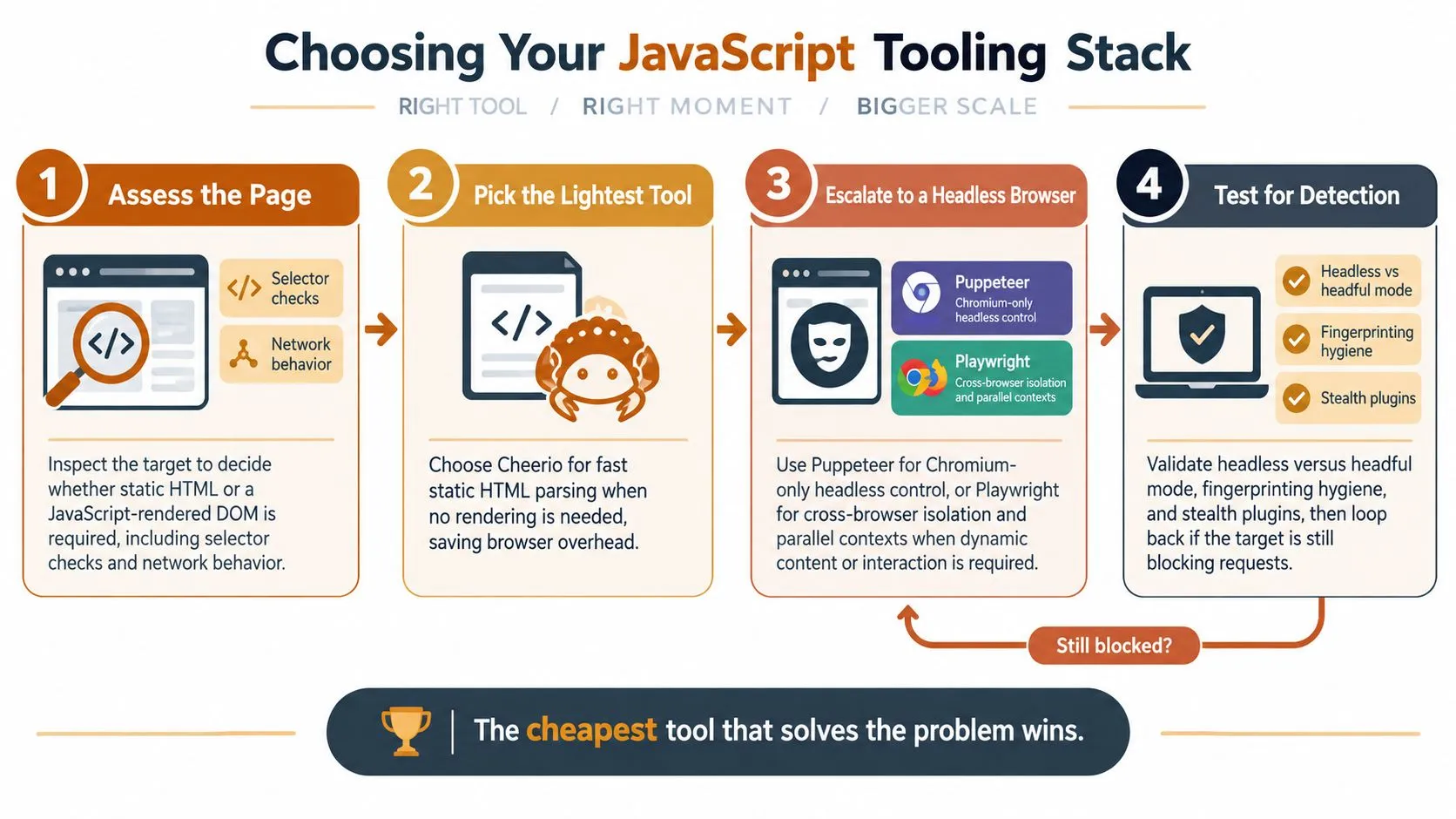
Tool selection should follow page behavior. Start with direct HTTP, parse the returned HTML, and escalate to a browser only when inspection shows that the required data arrives after JavaScript execution or interaction. Rendering every URL by default is one of the most expensive design mistakes in JavaScript scraping because browser workers consume substantially more CPU, memory, and bandwidth than ordinary HTTP clients.
Cheerio for static responses
Cheerio is the right default when the server returns the content you need in HTML. It gives you familiar CSS selectors without starting Chromium, which makes it well suited to catalog pages, article archives, and server-rendered detail pages.
import { load } from "cheerio";

export function parseProduct(html, url) {
  const $ = load(html);

  return {
    url,
    name: $(".product-title").first().text().trim(),
    price: $(".price").first().text().trim(),
    sku: $("[data-sku]").attr("data-sku") ?? null
  };
}
Cheerio is the wrong choice when the initial response contains only a shell, when pagination depends on browser events, or when a token and subsequent API call are created during execution. Don’t solve that problem by adding arbitrary delays. Inspect the network behavior first.
Puppeteer for Chromium control
Puppeteer is useful when Chromium compatibility is sufficient and you need direct control over pages, navigation, cookies, screenshots, or network interception.
import puppeteer from "puppeteer";

const browser = await puppeteer.launch({ headless: true });
const page = await browser.newPage();

await page.goto(url, { waitUntil: "domcontentloaded" });
await page.waitForSelector(".product-title", { timeout: 15000 });

const product = await page.$eval(".product-title", el => ({
  name: el.textContent.trim()
}));

await browser.close();
Puppeteer becomes a poor default when most pages are static, when you need strong browser isolation across multiple engines, or when a single browser process becomes a reliability boundary for unrelated jobs. Keep browser lifetimes controlled, recycle unhealthy workers, and avoid opening a new browser for every URL.
Playwright for isolation and varied browser behavior
Playwright offers Chromium, Firefox, and WebKit automation with isolated browser contexts. Contexts make session separation easier, while its locator model and waiting behavior reduce some common timing errors. The JavaScript web scraping with Playwright beginner guide is a useful starting point, but production code still needs queueing, policy enforcement, and validation around the browser.
Neither Puppeteer nor Playwright makes a scraper invisible. Headless versus headful mode, browser fingerprints, TLS behavior, cookies, viewport settings, and interaction patterns can all affect detection. Stealth plugins may hide simple automation signals, but they’re not a durable answer to a modern risk engine. Use stable identities, realistic session behavior, conservative rates, and the least intrusive access path before considering evasion tooling.
Architectural Patterns for Production Pipelines
The scalable shape is a sequence of independently deployable stages:
- Discovery creates candidate URLs and records their source.
- Fetching performs direct HTTP requests under host-level limits.
- Rendering handles only URLs classified as requiring a browser.
- Parsing converts raw material into a versioned schema.
- Validation checks field presence, types, semantics, and freshness.
- Delivery publishes accepted records and routes exceptions for review.
Durable queues connect these stages. They let you retry a failed fetch without rerunning discovery, scale browser workers separately from parsers, and pause one host without stopping unrelated sources.
Normalize before you enqueue
Canonicalization prevents the same logical page from consuming capacity repeatedly. Lowercase hosts, remove default ports and fragments, normalize tracking parameters, and define which query parameters represent content rather than analytics. Apply per-host deduplication before dispatch, then retain the original URL separately for provenance.
A duplicate request is still work. It can consume a connection slot, trigger a rate limit, and distort coverage metrics without adding a new record. The batch data processing guide provides useful context for separating ingestion batches from downstream transformations.
Control each host independently
Use a token-bucket limiter per host, with a concurrency cap and a measured refill rate. On 429, 503, connection failures, DNS failures, unavailable robots.txt, or redirect loops, reduce pressure and apply exponential backoff with jitter. RFC 9309 doesn’t standardize crawl-delay, so implementations can interpret it differently. Honor explicit delay signals conservatively, but let observed server health cap your actual rate.
A host-level circuit breaker should open when failures exceed the threshold you’ve defined for that source. It should remain open long enough for the target to recover, then test with a small number of requests before ramping up. This is safer than allowing every worker to retry simultaneously.
| Architecture | Best for | Cost per page | JavaScript support | Detection risk |
|---|---|---|---|---|
| Direct HTTP | Static HTML and documented endpoints | Lowest | None unless you call the endpoint directly | Lower when traffic is conservative |
| Headless browser | Client-rendered pages and interaction | Highest | Full browser execution | Higher because browser behavior is observable |
| Hybrid | Mixed catalogs with selective rendering | Variable, usually controlled | Render only classified URLs | Depends on the browser subset and access policy |
The hybrid design usually wins operationally. It keeps direct HTTP as the cheap path, reserves browser capacity for demonstrated requirements, and records why each URL was escalated. When building an internal team, knowing how to find big data engineers is relevant because this work sits between application engineering, distributed systems, and data operations.
Retries, Rate Limits, and Resilience Patterns
Failures are normal. The dangerous design is treating every failure as temporary and immediately trying the same request again. A retry storm can worsen an outage, increase pressure on the target, and hide a structural parser or policy problem behind a growing queue.
Give each job an idempotency key derived from the canonical URL, source, schema version, and crawl intent. Store attempts separately from the logical job so a retry cannot create duplicate deliveries. Classify outcomes before deciding whether to retry:
- Retryable transport errors: connection resets, DNS failures, and temporary service responses.
- Rate signals:
429responses or explicit throttling, which require slower scheduling. - Structural failures: missing selectors, changed JSON shapes, and empty templates, which need parser review.
- Permanent outcomes: policy exclusions, confirmed not-found pages, or invalid URLs.
A compact retry worker might look like this:
const sleep = ms => new Promise(resolve => setTimeout(resolve, ms));

async function fetchWithRetry(job, fetcher, limits) {
  for (let attempt = 0; attempt <= limits.maxAttempts; attempt++) {
    try {
      const response = await fetcher(job.url);

      if (response.status === 429 || response.status === 503) {
        throw Object.assign(new Error("temporary source response"), {
          retryable: true,
          status: response.status
        });
      }

      if (!response.ok) {
        return { status: "permanent_failure", code: response.status };
      }

      return { status: "fetched", body: await response.text() };
    } catch (error) {
      if (!error.retryable || attempt === limits.maxAttempts) {
        return { status: "failed", error: error.message };
      }

      const base = limits.baseDelayMs * (2 ** attempt);
      const jitter = Math.random() * limits.jitterMs;
      await sleep(base + jitter);
    }
  }
}
The worker still needs a per-host scheduler. A global concurrency setting can overload a small host while leaving another host underused. Maintain separate buckets, persist session cookies when the source expects continuity, and sign requests only where the source’s documented API requires it. Proxy rotation doesn’t fix bad pacing or a broken parser. Free proxy pools add unstable latency, shared reputation, and uncertain privacy, so they’re rarely a sound foundation for unattended production work. The guide to avoiding blocks while scraping covers the operational mindset, but no technique replaces authorization and measured traffic.
Handling Dynamic Content, CAPTCHAs, and Anti-Bot Defenses
A page needs a browser when the data is absent from the initial response, when an interaction triggers the relevant request, or when the source deliberately assembles the document in the client. Verify that requirement with the network panel or a saved response before writing browser code. Many pages that look dynamic still expose structured data in HTML or call a data endpoint that can be accessed through an authorized integration.
Wait for evidence of readiness, not an arbitrary timeout:
await page.goto(url, { waitUntil: "domcontentloaded" });
await page.waitForSelector("[data-product-id]", { state: "visible" });
With Playwright, intercept responses to identify the data source the interface consumes:
page.on("response", async response => {
  if (response.url().includes("/api/") && response.request().resourceType() === "xhr") {
    console.log(response.status(), response.url());
  }
});
Capture only what you’re authorized to collect, and don’t assume an endpoint is stable merely because the browser uses it. Private APIs, tokens, and session flows can change without notice.
CAPTCHAs mark a different class of problem. Simple client-side checks may respond to ordinary browser behavior, but mature systems evaluate reputation, cookies, interaction timing, browser characteristics, network origin, and historical patterns. Cloudflare, DataDome, and PerimeterX-style defenses can turn a parser task into an infrastructure and compliance project.
Decide when not to fight the defense
Use a browser for genuine rendering requirements, not as an automatic bypass. Keep identities consistent, preserve sessions where appropriate, reduce concurrency, and stop when the source signals that access isn’t welcome. Residential proxy networks, fingerprint diversity, and human-in-the-loop services can address some operational cases, but they introduce cost, privacy, and governance obligations. They also don’t guarantee durable access.
The business question matters. If a source changes frequently and spends significant effort distinguishing automated clients, maintaining the proxy, browser, and challenge-solving stack may cost more than the data supports. A managed operation such as WebscrapingHQ can absorb browser execution, proxy management, retries, and source maintenance when the internal team needs the output rather than another infrastructure program.
Proving the Data Is Trustworthy
A crawl can report successful requests while delivering a biased dataset. A bot challenge may contain a valid HTML document, a regional route may return no listings, and a changed selector may leave the parser with empty strings. Transport success and decision-ready data are separate outcomes.
Validate fields, not just pages
Define required fields and semantic checks for each source. A product record might require a stable identifier, a nonempty name, a parseable price, and a source timestamp. Validation should reject impossible combinations, detect sudden type changes, and preserve the reason for rejection.
Schema versions make changes visible. Store the parser version, source version, retrieval time, and transformation history with each record. For important fields, attach a confidence score based on selector agreement, type validation, source signals, and whether the value came from HTML, structured data, or a rendered view.
A quality checklist should include:
- Completeness: Compare valid records with the planned URL set and expected source partitions.
- Freshness: Check that timestamps and update windows meet the delivery requirement.
- Uniqueness: Resolve duplicate URLs and duplicate entities separately.
- Drift: Alert when field distributions, selectors, page lengths, or category coverage change sharply.
- Auditability: Retain sampled raw responses, screenshots where appropriate, and parser metadata.
- Human review: Route ambiguous records and representative samples to an operator.

Detect silent omissions
The most damaging failures often produce no HTTP error. One region can fall to zero results because a geo route changed, a mobile template was returned, or a challenge page passed through a weak parser. Compare coverage across regions, languages, devices, categories, and URL templates. Alert on a partition disappearing, not only on the overall record count falling.
Automated-traffic detection has the same measurement problem. A 2025 study analyzed more than 4.4 million logs across roughly 480,000 sessions, with fewer than 12,000 sessions labeled malicious by firewall rules, and identified substantial label noise that complicates evaluation. The study on automated-traffic detection and label noise illustrates the broader lesson: labels and apparent success can misrepresent what happened.
Your pipeline needs provenance, not just output files. The data provenance guide is relevant because downstream users should be able to trace a value back to its source response, parser version, validation decision, and delivery run.
Governance, Pipelines, and When to Outsource
A durable scraping program has a short operational checklist:
- Inventory sources: Define hosts, URL patterns, fields, purpose, and update needs.
- Review access signals: Record
robots.txt, terms, authentication boundaries, privacy constraints, and operator feedback. - Version schemas: Keep parser, schema, and transformation versions with every delivery.
- Gate releases: Replay labeled samples and reject changes that reduce required-field completeness.
- Preserve evidence: Store sampled raw material and decisions for audit and debugging.
- Prepare incidents: Pause a host quickly, honor takedown requests, and document remediation.
Build in-house when the source set is narrow, access is stable, the team can own maintenance, and the data is central to a product you control. Outsourcing becomes rational when targets change constantly, browser and proxy operations distract from core work, or compliance evidence and multi-geo delivery exceed the team’s capacity. For recurring market monitoring, a resource such as Product Metrics pricing analysis also shows why normalized, regularly refreshed outputs matter more than one successful extraction.
WebscrapingHQ is one managed option for recurring extraction, with production pipelines operating since 2019, computer-vision and LLM-assisted parsing, multi-geo coverage, monitoring, retries, and SLA-backed feeds. The right choice is the one that continues producing explainable, validated records after the target changes, not the one that wins a single prototype benchmark.
WebscrapingHQ can design and operate JavaScript scraping pipelines that separate direct HTTP collection from browser rendering, with monitoring, retries, proxy management, and structured delivery. If your team needs dependable data from changing sources without maintaining the entire crawler infrastructure, visit WebscrapingHQ to discuss the sources, fields, and delivery schedule.
Want this done for you?
Send us the URLs. We'll quote it in 24 hours.
Paste the URL(s) you want scraped. We'll reply within 24 hours with a feasibility check and a ballpark quote.