Jump to section
- Why Batch Data Processing Still Matters in 2026
- What Batch Data Processing Actually Means
- Batch vs Stream Processing and When to Choose Each
- Core Building Blocks of a Batch Pipeline
- Ingestion establishes what belongs to the run
- Staging preserves the evidence
- Processing applies business meaning
- Storage and serving make results useful
- Operational Concerns That Make or Break Batch Jobs
- Monitoring must describe the shape of a run
- Common Tools and Tech Stacks for Batch Workloads
- Batch Data Processing for Web Scraping Pipelines
- Case Study and Implementation Checklist
You wake up to a refreshed sales dashboard, a completed compliance report, and an updated competitor price table. No engineer pressed a button at midnight. Scheduled jobs collected source data, transformed it, checked its quality, and published the results before the business day began.
That pattern is batch data processing, and it remains a deliberate choice in 2026. Streaming is valuable when information loses value within seconds, but batch is often the better fit when teams need predictable costs, reproducible outputs, complete input windows, and audit trails. Its historical role began with punch-card automation and matured into scheduled mainframe workloads, a progression documented by AWS’s overview of batch processing and IBM’s history of time-sharing.
This guide explains what batch processing means, how it differs from streaming, which architectural layers support it, and how to operate it reliably. It also applies the model to web extraction, where scheduled crawls, price refreshes, compliance snapshots, and raw-page retention all benefit from durable, replayable workflows.
Why Batch Data Processing Still Matters in 2026
A finance team can wait until a full day of transactions is available before producing its report. A compliance team may need a fixed evidence package that can be retained and reviewed, rather than an instant alert. A retail intelligence team may get more value from a scheduled competitor snapshot than from a stream of partial observations that changes throughout the day.
That operating pattern has deep roots. Batch processing grew from late-nineteenth-century punch-card automation, with the 1890 U.S. Census serving as a documented milestone in Herman Hollerith’s tabulating system. By the 1960s, mainframes were running scheduled programs from magnetic tape and early operating systems. Queued, unattended execution had become a commercial computing pattern, as AWS describes in its overview of batch processing and enterprise use.
The economic case is still practical. A batch job groups records, reuses compute resources, and runs during a predictable window. Engineers can inspect a fixed input, replay a failed run, and compare one output snapshot with another. Those properties fit compliance-heavy work, where lineage and retained evidence can matter as much as freshness.
Practical rule: Choose batch when the business can define “complete,” and when a reproducible answer is more valuable than an immediate one.
Scheduled processing also fits established reporting cycles. IBM explains how business computing adopted scheduled workloads to reduce downtime between programs and keep expensive central systems productive when interactive access was limited. That model supported payroll, billing, reporting, and large-scale record compilation. Its descendants remain in warehouse refreshes, ETL jobs, and managed web extraction pipelines, as IBM’s history of time-sharing explains.
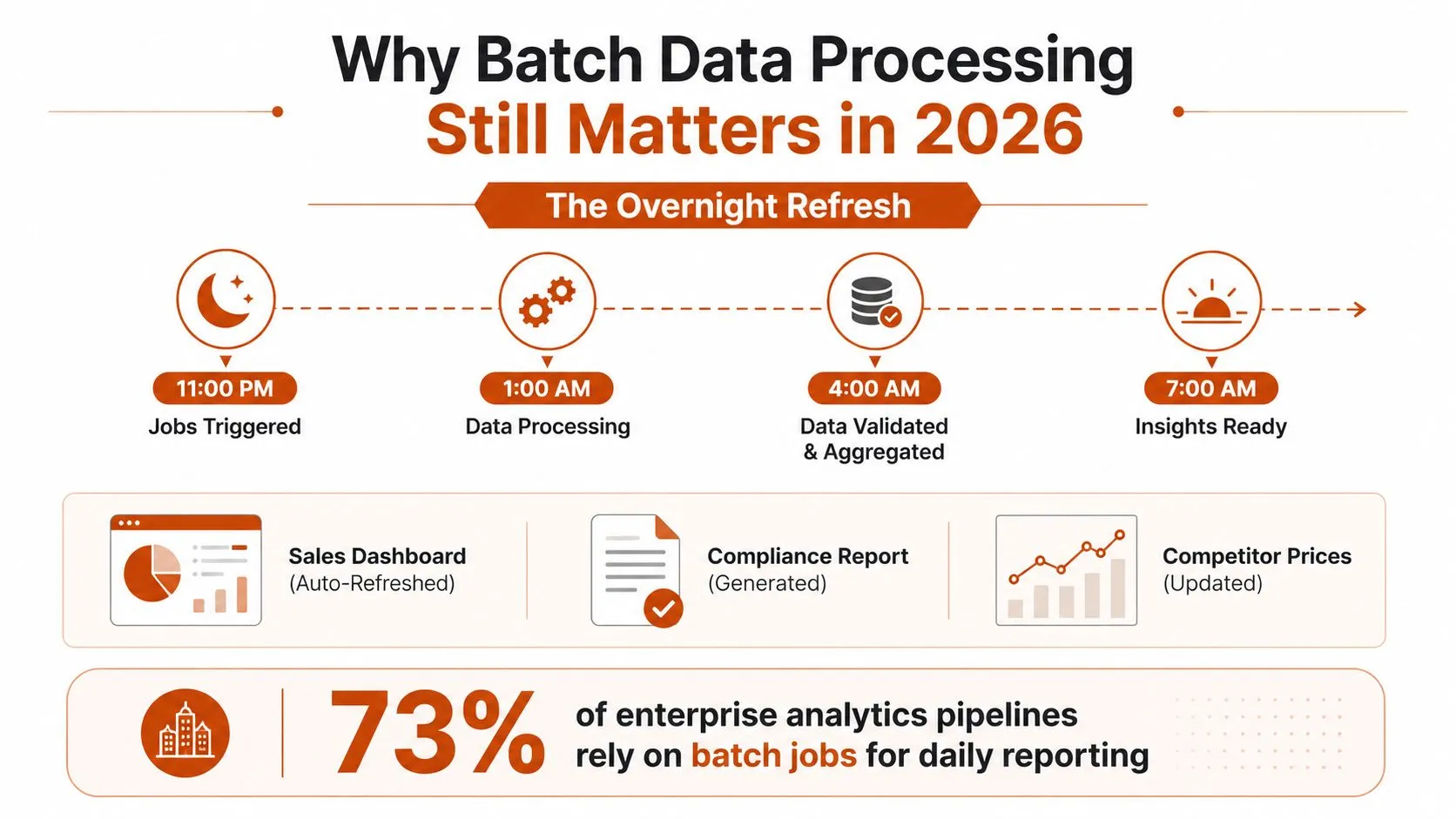
The relevant question in 2026 is whether a workload rewards throughput, control, auditability, and cost discipline more than instant reaction. Offline model preparation, historical analysis, embedding generation, compliance reporting, and scheduled web extraction often meet that test. Batch can be the smarter economic choice when managed pipelines provide retries, logging, retention, and predictable execution without paying for continuous processing.
What Batch Data Processing Actually Means
Formally, batch data processing collects a bounded group of records and processes them together as one unit of work, usually after a time window closes or a trigger confirms that input is ready. The batch might contain files that arrived overnight, transactions from a completed business day, URLs assigned to a crawl, or historical records selected for a backfill.
A production batch job has several defining properties:
- Finite input: The job knows which records belong to the run.
- A trigger: A cron schedule, file-arrival event, upstream completion signal, or operator action starts execution.
- A completeness boundary: The system can identify the input window or dataset it intends to process.
- Retryability: Engineers can run the same work again without corrupting the destination.
- Repeatability: The job follows an orchestrated process rather than behaving like an improvised script.
The boundary matters because it gives engineers a known input set to validate, process, and replay. A file may arrive overnight, a crawl may close after its assigned URLs are collected, or a backfill may target a defined historical range.
Laundry illustrates the same operating principle. Washing one sock as soon as it appears wastes water, attention, and machine time. Waiting for a full load allows one cycle to handle the complete set. In a pipeline, the items are records, and the cycle is a controlled job run.
That distinction separates a production pipeline from a one-off command. A script may transform a file once. A batch pipeline records what arrived, applies versioned logic, writes results to known locations, reports failures, and supports a controlled rerun. Managed execution can also provide logging, retention, retries, and scheduled resource use, which helps explain why batch remains practical for compliance-heavy work and planned web extraction.
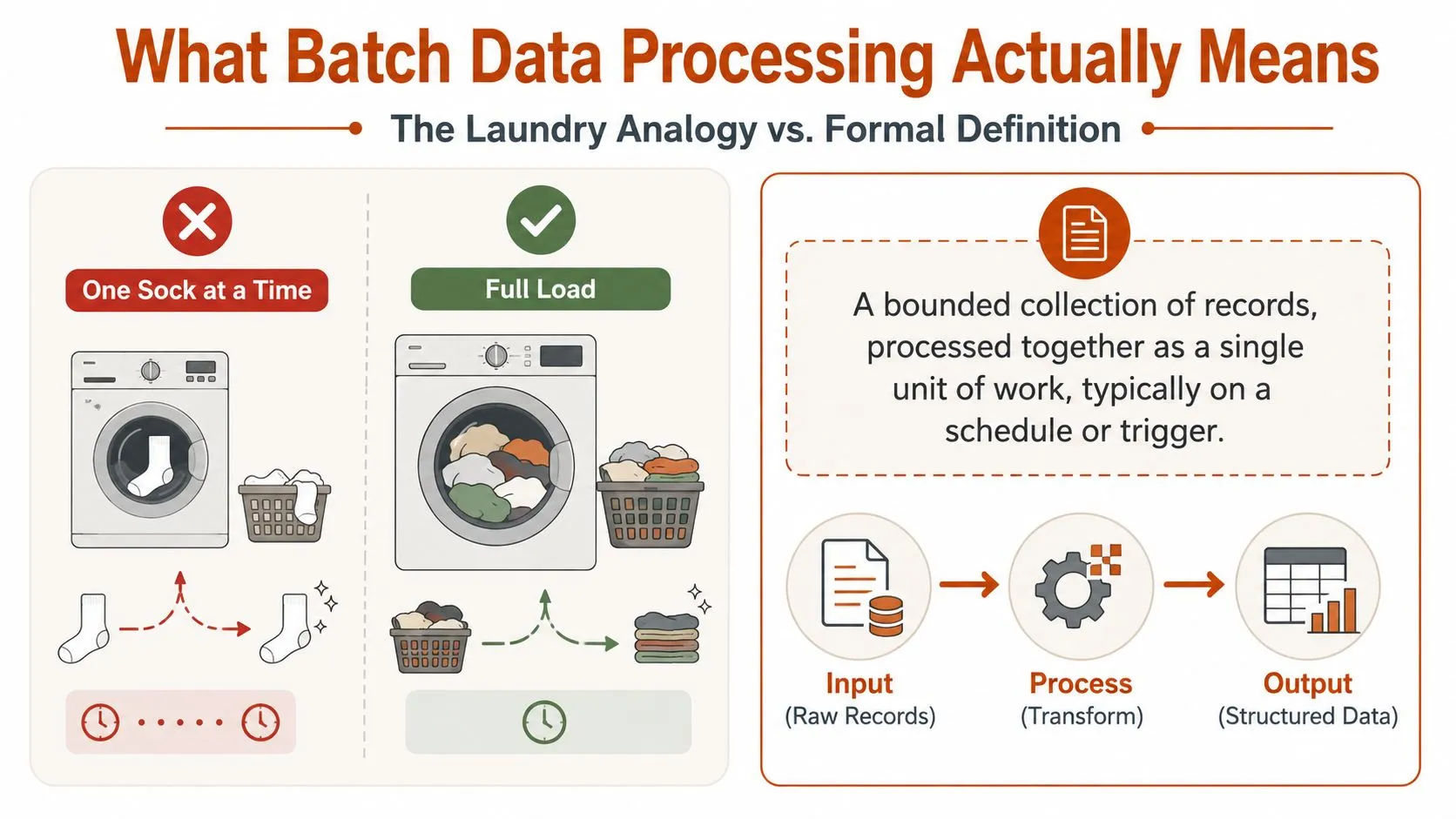
A typical run follows this shape:
- Collect raw records during a defined window.
- Validate schemas, required fields, and file completeness.
- Transform the records into a usable structure.
- Publish curated data to a warehouse, API, report, or file destination.
- Record status, lineage, metrics, and the input snapshot used.
Parsing often makes raw material usable. For a practical explanation of converting unstructured content into structured fields, see what data parsing means. Teams comparing implementation patterns can also browse batch processing articles.
The useful mental model is simple: a batch job is a small, reproducible data pipeline with an explicit boundary, an output contract, and a recovery path.
Batch vs Stream Processing and When to Choose Each
Start with three evaluation questions: How quickly must the result arrive? What does sustained processing cost? How important is a complete, reproducible input set? These questions expose the trade-off more clearly than treating batch and stream processing as competing defaults.
Batch processing waits for a bounded dataset or defined window. Stream processing handles data that keeps arriving and produces results as events appear. A stream can reduce waiting, but the team must also manage event ordering, partial windows, late records, state, and infrastructure that remains available.
| Dimension | Batch Processing | Stream Processing |
|---|---|---|
| Input shape | Bounded files, records, or time windows | Unbounded event flow |
| Typical response | Scheduled or triggered output | Continuously updated output |
| Main optimization | Throughput and resource efficiency | Freshness and low latency |
| Debugging | Replay a known input window | Reconstruct event order and state |
| Strong fit | Reports, reconciliation, historical analysis, web crawls | Fraud detection, live alerts, operational decisions |
| Main risk | Stale results and expensive backfills | Operational complexity and incomplete context |
The Berkeley Spark Streaming benchmark makes the latency trade-off concrete: reducing the batch window reduced end-to-end latency, while increasing throughput increased latency. The benchmark report details this throughput and latency trade-off. Smaller windows can make results arrive sooner, but they may require more frequent coordination and resource use.
Fraud detection illustrates the boundary. A transaction may need a decision while authorization is still in progress, so streaming usually fits. Nightly inventory reconciliation has a different purpose. The business may need all relevant records, consistent joins, and a report that can be regenerated, making batch the stronger economic choice.
Web extraction often combines both models. A retailer might run a broad crawl on a schedule, then refresh a limited set of important prices more frequently. Browser automation or asynchronous requests can collect fresh pages, while normalization, deduplication, and loading still run in batches. Teams planning browser-based collection can consult this guide to real-time data scraping with Playwright.
Compliance-heavy workloads often favor batch because a defined input window supports review, repeatable calculations, and controlled correction. Managed pipelines can also schedule resource use around predictable demand, reducing the cost of keeping a continuously active system when the business does not need second-level responses.
Many production designs use both approaches. Streaming handles immediate operational signals, while batch provides a ground-truth recomputation layer for historical correction and reconciliation. The choice should follow the value curve of the workload, not architectural fashion. Engineers comparing recovery boundaries can review these durable architecture case studies.
If waiting an hour is acceptable and you need a repeatable result, batch is a strong default. If the answer loses value within seconds, streaming deserves serious consideration.
Core Building Blocks of a Batch Pipeline
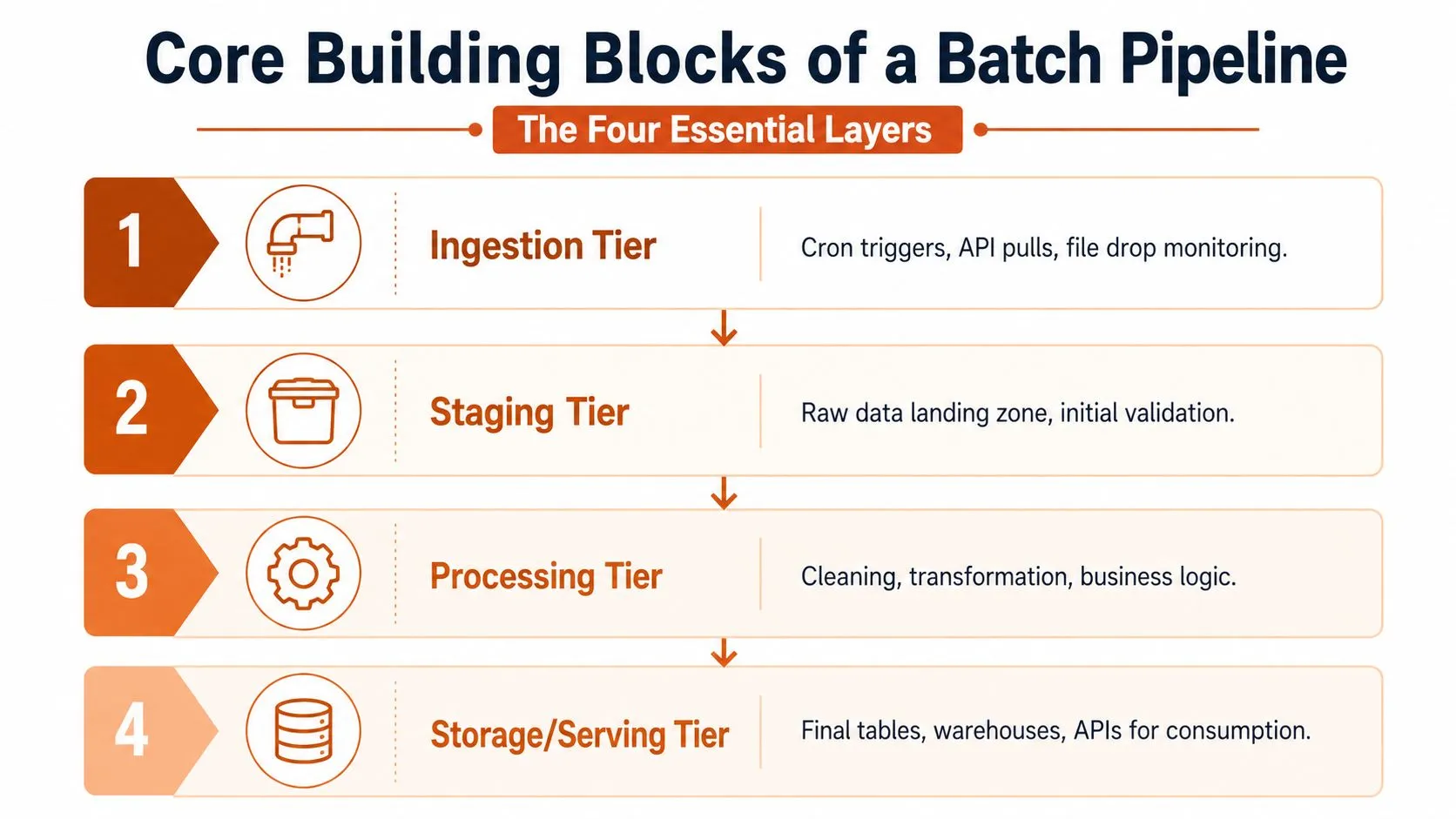
A batch architecture becomes easier to debug when you follow the path of data instead of memorizing product names. Most production systems contain four layers, even when a single platform combines several of them.
Ingestion establishes what belongs to the run
The ingestion tier receives files, pulls APIs, reads event logs, or monitors object-storage locations. A scheduler may start the process, or a file-arrival event may signal that input is ready. The forgotten failure mode is duplicate ingestion. Without stable source identifiers, the same file or record can enter the pipeline more than once.
Use source keys, content hashes, arrival metadata, and an ingestion manifest. Those details let the pipeline answer a basic question later: which exact inputs did this run consume?
Staging preserves the evidence
The staging tier stores raw data and performs initial validation. It might hold downloaded files, raw HTML, API responses, or untouched source exports. Keep this layer separate from curated tables so that transformation logic can change without forcing another external extraction.
Teams often omit a retention and partition strategy. That makes replay expensive and turns a recoverable mistake into a manual reconstruction exercise.
Processing applies business meaning
The processing tier cleans fields, parses structures, joins datasets, applies business rules, and rejects invalid records. Workers may run on a cluster, in containers, or through serverless functions. Resource isolation matters here because one unusually large partition or expensive join can consume capacity needed by unrelated jobs.
Engineers should separate deterministic transformations from side effects. A parser should produce the same result for the same input and versioned logic whenever practical.
Storage and serving make results useful
The final tier writes warehouse tables, lakehouse datasets, reports, APIs, or downstream files. Partitioning by a meaningful date or source boundary can make reads and corrections more manageable. The destination should also expose run identifiers and data-quality status, not only business columns.
A practical pipeline might therefore look like this:
- Trigger: Scheduler or upstream completion event.
- Landing: Raw files and source snapshots.
- Transform: Validation, parsing, joins, and normalization.
- Publish: Curated tables and delivery files.
- Observe: Logs, metrics, lineage, and alerts.
For teams building a crawler that must grow beyond a single process, this material on scalable data pipelines with Scrapy shows how collection and bulk loading can fit into a larger design.
The architecture doesn’t need to be complicated on day one. It does need clear boundaries. When a run fails, engineers should know whether the source never arrived, the scheduler skipped a dependency, a worker exhausted resources, or the destination rejected a write.
Operational Concerns That Make or Break Batch Jobs
A batch pipeline can succeed in testing and still fail regularly in production. The difference usually comes from recovery behavior, not transformation logic.
Start by separating transient failures from poison-pill records. A network timeout, rate limit, or temporary service error deserves bounded retries with exponential backoff. A malformed document or invalid schema may fail every time, so sending it through endless retries only delays the rest of the workload. Route persistent failures to a dead-letter location with the source identifier, error reason, and run metadata.
Idempotency is the second foundation. Every write should have a deterministic key, such as a source ID combined with a logical observation date. An UPSERT or MERGE pattern can then safely apply a rerun without creating duplicates. Truncate-and-reload is simpler for small, disposable datasets, but it becomes risky when downstream consumers need continuity or when a partial failure occurs after the destination has already changed.
Late-arriving data creates a different problem. A source may deliver yesterday’s record today, or an upstream correction may invalidate a previously published result. Use a watermark to define normal progress, then maintain a reconciliation window that revisits recent partitions. For historical corrections, run a targeted backfill rather than restarting every partition by default.
The 2026 discussion of incremental processing identifies late-arriving and inconsistent data as a recurring weakness in batch systems, particularly because corrections can produce inconsistent analytical results and unnecessary recomputation. The paper on incremental processing explains this operational gap.
Monitoring must describe the shape of a run
A green status alone isn’t enough. Track duration drift, input and output row counts, rejected records, partition skew, freshness, and SLA status. Alert when a job finishes unusually quickly as well as when it runs too long. A sudden short run may indicate an empty source, a broken selector, or an upstream export that contained only headers.
| Concern | Symptom | Recommended Pattern |
|---|---|---|
| Transient error | Timeouts or throttling | Exponential backoff with bounded retries |
| Poison record | The same item fails repeatedly | Dead-letter queue with structured error details |
| Duplicate write | Repeated rows after reruns | Deterministic keys and UPSERT or MERGE |
| Late input | Corrected records miss the report | Watermarks plus reconciliation windows |
| Silent source change | Successful run with bad fields | Schema checks and anomaly thresholds |
| Governance gap | Unknown access or unclear origin | Lineage, retention, and access logging |
Data governance belongs in the pipeline rather than in a later review. Mask or restrict PII, record transformation lineage, enforce retention rules, and log access to sensitive outputs. Teams evaluating data-quality monitoring tools can use these requirements as a checklist, regardless of which monitoring platform they select.
Common Tools and Tech Stacks for Batch Workloads
Select tools by workload shape, not by brand familiarity. A dependency-heavy pipeline that needs backfills has different requirements from a small file transformation that runs after an upload.
For orchestration, Airflow, Dagster, and Prefect suit workflows with explicit dependencies, schedules, retries, and historical reruns. AWS Step Functions and Azure Data Factory appeal to teams that want managed coordination and more visual configuration. Airflow is powerful, but it can be excessive for a single uncomplicated transfer. This comparison of Airflow and simpler metrics tools is useful when deciding whether a full workflow orchestrator matches the operational need.
Transformation should follow the data’s shape. dbt works well for SQL-first modeling inside a warehouse. Spark and PySpark suit large joins, broad transformations, and unstructured inputs. Apache Beam is useful when portability across execution runners matters.
Compute runtimes provide the execution boundary:
- Kubernetes Jobs: Useful when teams already operate containerized workloads and need resource controls.
- AWS Batch: A natural choice for queued, elastic jobs with varying compute requirements.
- Databricks clusters: Suitable for Spark-heavy transformations, notebooks, and managed data engineering.
- Serverless functions: Practical for lightweight, short-lived tasks such as file validation or small API pulls.
Storage and metadata complete the stack. Object storage holds raw and staged material, warehouse tables serve analytical consumers, and catalog systems such as AWS Glue or Unity Catalog help teams discover datasets, manage permissions, and document ownership.
| Layer | Representative Tools | Best Fit Workload |
|---|---|---|
| Orchestration | Airflow, Dagster, Prefect | DAGs, dependencies, schedules, backfills |
| Managed coordination | Step Functions, Data Factory | Cloud-native workflows with lower platform management |
| Transformation | dbt, Spark, Beam | SQL modeling, heavy joins, portable pipelines |
| Compute | Kubernetes Jobs, AWS Batch, Databricks | Elastic or containerized execution |
| Storage | Object stores, warehouses, lakehouses | Raw retention, curated analytics, downstream serving |
| Metadata | Glue, Unity Catalog | Discovery, governance, and access control |
A nightly web-data pipeline might use an orchestrator to request extraction, object storage for raw responses, Python workers for parsing, dbt for warehouse models, and a notification task for delivery. A smaller workflow could use a managed scheduler, a serverless fetcher, and a catalog-managed landing zone instead.
The right stack is the smallest one that provides the required retries, observability, replayability, and governance.
Batch Data Processing for Web Scraping Pipelines
A web extraction operation becomes more reliable when the team treats each crawl as a bounded data product rather than a loose collection of requests. A realistic schedule might include a nightly full-site crawl, a more frequent refresh of priority prices, and a recurring schema-validation pass.
The nightly job starts by loading a URL queue. Workers fetch pages, observe rate limits, handle proxy assignment, and store raw responses. A parser then extracts fields, a deduplication stage removes repeated observations, and a loader writes structured records with source and run identifiers.
The higher-frequency job doesn’t need to revisit every page. It can target priority URLs and update only the fields whose freshness affects decisions. A separate validation job checks whether expected fields, types, and page structures still match the current schema.
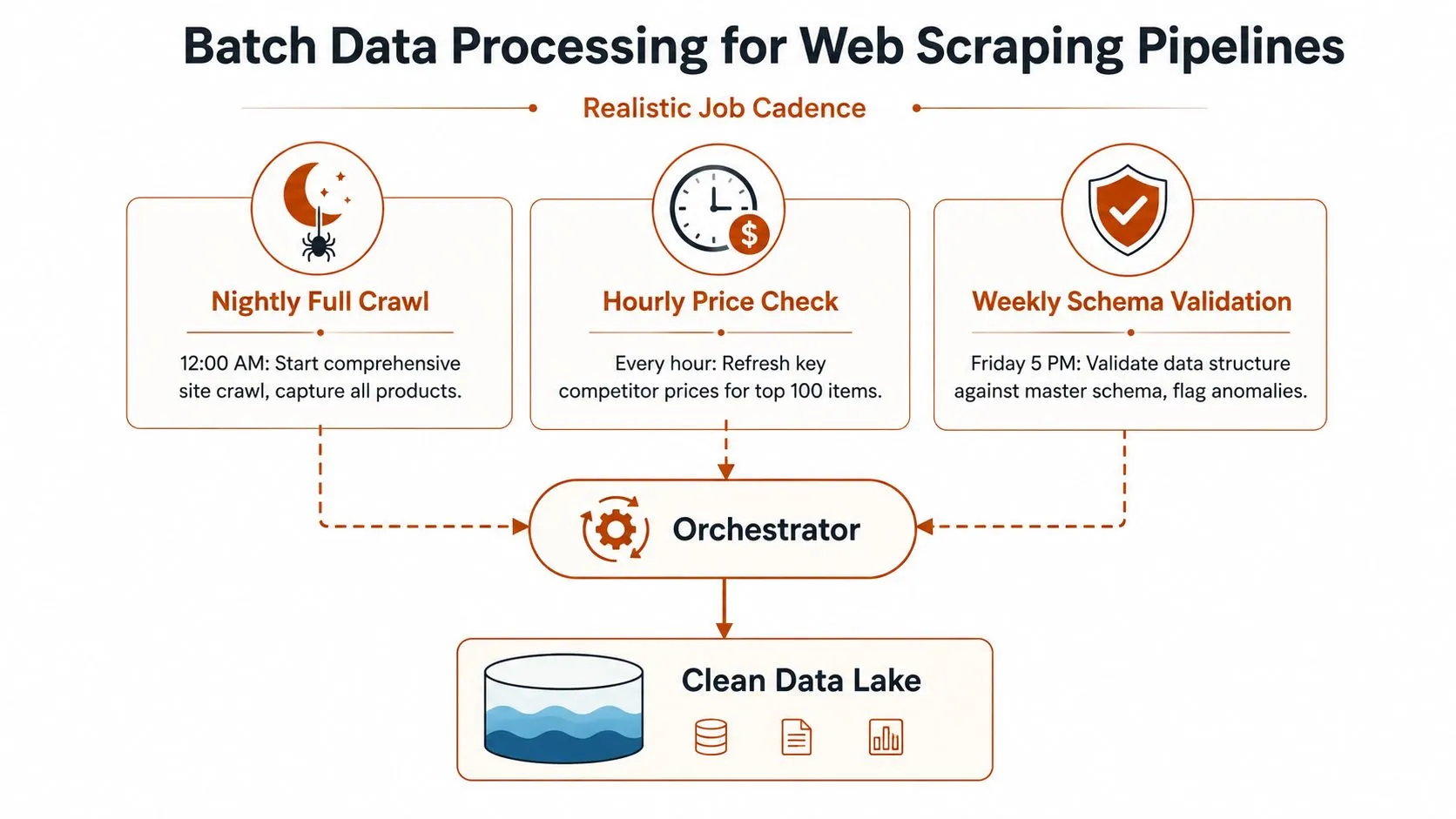
Chunking makes recovery practical. Instead of rerunning an entire crawl after one failure, the orchestrator can retry the failed URL partition or parsing stage.
- Request batches: Pull a controlled set of URLs from the queue.
- Fetch batches: Apply polite rate limits, proxy rotation, and response handling.
- Parse batches: Convert HTML or rendered content into versioned fields.
- Quality batches: Check required values, types, duplicates, and change patterns.
- Load batches: Write using deterministic keys and preserve run metadata.
The operational checklist should also include CAPTCHA fallback queues, checksum-based change detection, and storage for raw HTML alongside parsed output. Raw snapshots let engineers reprocess content after improving a parser, without making another request to the source. They also provide evidence for compliance and help explain why a field changed.
For teams working with Python and tabular output, this guide to cleaning web-scraped data with Python and pandas covers the normalization stage that follows extraction.
The objective isn’t merely a successful crawl. It’s a durable, reproducible batch where every output traces back to a source snapshot, schema version, and execution record. That design is especially valuable when a buyer needs historical comparisons, regulatory evidence, or a defensible explanation for a reported value.
Case Study and Implementation Checklist
Consider a retail intelligence team that previously maintained a collection of independent scrapers. A site redesign could break parsing overnight, a failed crawl could delay the morning refresh, and engineers had to inspect logs before knowing whether the problem came from access, extraction, or loading.
A managed pipeline can separate those responsibilities. The collection layer handles crawling and source access, the parsing layer maps pages to the required schema, and the batch layer deduplicates, validates, and delivers structured results on a defined cadence. Raw responses and run metadata remain available for reprocessing, while monitoring and retries reduce the amount of manual intervention required from the retail team.
The outcome isn’t an invented performance percentage or a guaranteed uptime figure. The practical improvement is operational: fewer manual recovery tasks, a more predictable refresh cycle, and clearer ownership when a source changes.
Use this checklist before implementation:
- Map sources: Record domains, page types, fields, access constraints, and expected change frequency.
- Choose cadence: Separate full crawls, priority refreshes, and validation runs.
- Define storage: Keep raw snapshots, staged records, curated outputs, and run manifests distinct.
- Version schemas: Track field changes and retain the parser version used for each output.
- Design recovery: Add deterministic keys, bounded retries, dead-letter handling, and targeted backfills.
- Set alerts: Monitor freshness, duration, volume, rejected records, and schema anomalies.
- Assign ownership: Decide which collection, infrastructure, and maintenance tasks stay internal.
- Select delivery: Match CSV, JSON, warehouse tables, S3 drops, webhooks, reports, or dashboards to downstream needs.
Batch isn’t a legacy holdover waiting for replacement. It’s a deliberate engineering choice for workloads where cost control, completeness, auditability, and deterministic outputs matter more than instant reaction.
WebscrapingHQ provides managed web data operations and custom extraction pipelines that handle scheduled collection, parsing, monitoring, retries, proxy management, and structured delivery. If your team needs recurring competitor data, compliance evidence, or reprocessable web snapshots without maintaining every scraper internally, visit WebscrapingHQ to discuss the required sources, schema, cadence, and delivery format.
Want this done for you?
Send us the URLs. We'll quote it in 24 hours.
Paste the URL(s) you want scraped. We'll reply within 24 hours with a feasibility check and a ballpark quote.