
Jump to section
- Table of Contents
- Why XPath contains() Matters for Ahrefs Scrapers
- Why exact matches break first
- Anatomy of contains() with Text and Nodes
- Text node versus full node string value
- The safe default for Ahrefs rows
- Case, Whitespace, and Attribute vs Node Text
- Case sensitivity and release drift
- Whitespace and hidden formatting
- Attribute text and visible text are different
- Practical contains() Examples in lxml, Selenium, and Scrapy
- lxml for direct HTML parsing
- Selenium for live pages
- Scrapy for response selectors
- XPath 1.0 Limits and How to Work Around Them
- What XPath 1.0 can’t do natively
- When to move the logic out of XPath
- Debugging Selectors That Suddenly Stop Matching
- A triage sequence that saves time
- Questions to ask before you edit the selector
- Best Practices and When to Skip Scraping Altogether
You’re probably staring at an Ahrefs table that worked yesterday and now returns nothing. The label is still there, the row still exists, but one extra wrapper, a capitalization change, or a lazy-loaded chunk of HTML has turned a clean selector into an empty result set. In Ahrefs-style interfaces, that’s normal, because the page is not a static document. It’s a moving target built from labels like Domain Rating, backlinks, organic traffic, and traffic value, and public scraper tools treat that data as structured, repeatable, and broad enough to support global analysis across many geographies, not a one-off lookup (RankMax’s Ahrefs scraper overview, Apify’s Ahrefs scraper notes).
XPath contains() is the first selector I reach for in that situation, but only when I know what kind of node I’m matching and what kind of failure I’m trying to avoid. A brittle equals check is usually the wrong starting point on Ahrefs dashboards, especially when rows are loaded dynamically or when the same metric label appears in slightly different forms across views. If you’re deciding whether to keep pushing on Ahrefs-style scraping or look at a broader workflow, consider an alternative to Ahrefs as part of the tooling comparison, and if you need the selector-family trade-offs first, CSS selectors versus XPath is the better baseline.
Table of Contents
Open Table of Contents
- Why XPath contains() Matters for Ahrefs Scrapers
- Anatomy of contains() with Text and Nodes
- Case, Whitespace, and Attribute vs Node Text
- Practical contains() Examples in lxml, Selenium, and Scrapy
- XPath 1.0 Limits and How to Work Around Them
- Debugging Selectors That Suddenly Stop Matching
- Best Practices and When to Skip Scraping Altogether
Why XPath contains() Matters for Ahrefs Scrapers
A selector like //td[text()='Domain Rating'] can work on a clean export and fail the moment Ahrefs changes how it renders the same label. One release wraps the text in a child span, another delays the row until you scroll, and a selector that looked precise turns into an empty result set. On SEO dashboards, that kind of breakage is normal.
Why exact matches break first
Ahrefs-style tables are a poor fit for strict equality because the visible label is often not the entire node you are matching. The public scraping tools around Ahrefs expose labels such as Domain Rating, backlinks, global rank, organic traffic, traffic value, and linking websites, so selectors often need to match stable fragments instead of neat one-to-one identifiers. That is where contains() earns its place, especially when you are working through Apify’s Ahrefs scraper documentation.
contains() does not fix a bad selector by itself. It gives you room to work when the meaning stays the same but the markup shifts, which happens often on Ahrefs rows that mix domain text, metric labels, nested spans, and rerendered table cells. In production, that difference matters more than the syntax itself.
Practical rule: use
contains()to target the stable fragment, then narrow the row with one more predicate. Do not treat it as a replacement for every selector you write.
The same rule applies whether you are scraping with a browser driver, parsing HTML directly, or building selectors from a response object. Ahrefs data is loaded dynamically, and some rows only appear after interaction, so selectors that assume the full table is already present miss records entirely. A lazy-loaded dashboard punishes broad XPath and brittle exact-match XPath in the same way.
contains() is the first text-matching tool because it handles release drift better than equals. It still depends on row scope, load timing, and whether the label lives in text content or in a descendant node. If the Ahrefs UI becomes too unstable for that kind of selector work, it may be time to consider an alternative to Ahrefs.
For teams comparing selector strategies, a focused comparison of CSS selectors and XPath helps clarify why contains() is often the safer XPath choice for these dashboards. CSS selectors are useful in their own right, but XPath gives you finer control when the visible label is split across nested elements or wrapped by interface code that changes from release to release.
Anatomy of contains() with Text and Nodes
The two forms that matter most are contains(text(), 'substring') and contains(., 'substring'). People often treat them as interchangeable. They’re not, and on Ahrefs tables the difference shows up immediately.
Text node versus full node string value
text() inspects the immediate text node of the current element. The dot, ., refers to the full string value of the current node, including text inside descendants. If Ahrefs renders Domain Rating directly inside a cell, contains(text(), 'Domain Rating') can work. If the label is wrapped in a child span, that same selector may fail, while contains(., 'Domain Rating') still sees the text.
Think of a row like this, with a domain in one cell and a metric label in another. If the label is plain text in the target cell, the text-node form is precise enough. If the label sits inside <span>Domain Rating</span>, the node-string form is safer because it sees the visible text after the browser assembles the descendants.
The safe default for Ahrefs rows
The safest default on Ahrefs-style tables is to start with the broader node string, then narrow the surrounding structure. That usually means matching the row first, then the cell, then the text fragment. It’s slower to write, but it’s less likely to break when a release wraps the label in an extra element.
A practical example is a row where the third cell contains a domain and a later cell contains Domain Rating. A selector that scopes to the row and then uses contains(., 'Domain Rating') is usually more reliable than one that assumes the exact text node sits unwrapped in the cell. The moment Ahrefs inserts an icon, badge, or hidden helper text, text() can stop seeing what the browser shows.
The rule of thumb is simple. If the text might be wrapped, use .. If you already know the text is a direct node and you want to avoid accidental matches from descendants, use text(). On Ahrefs, the first case happens more often.
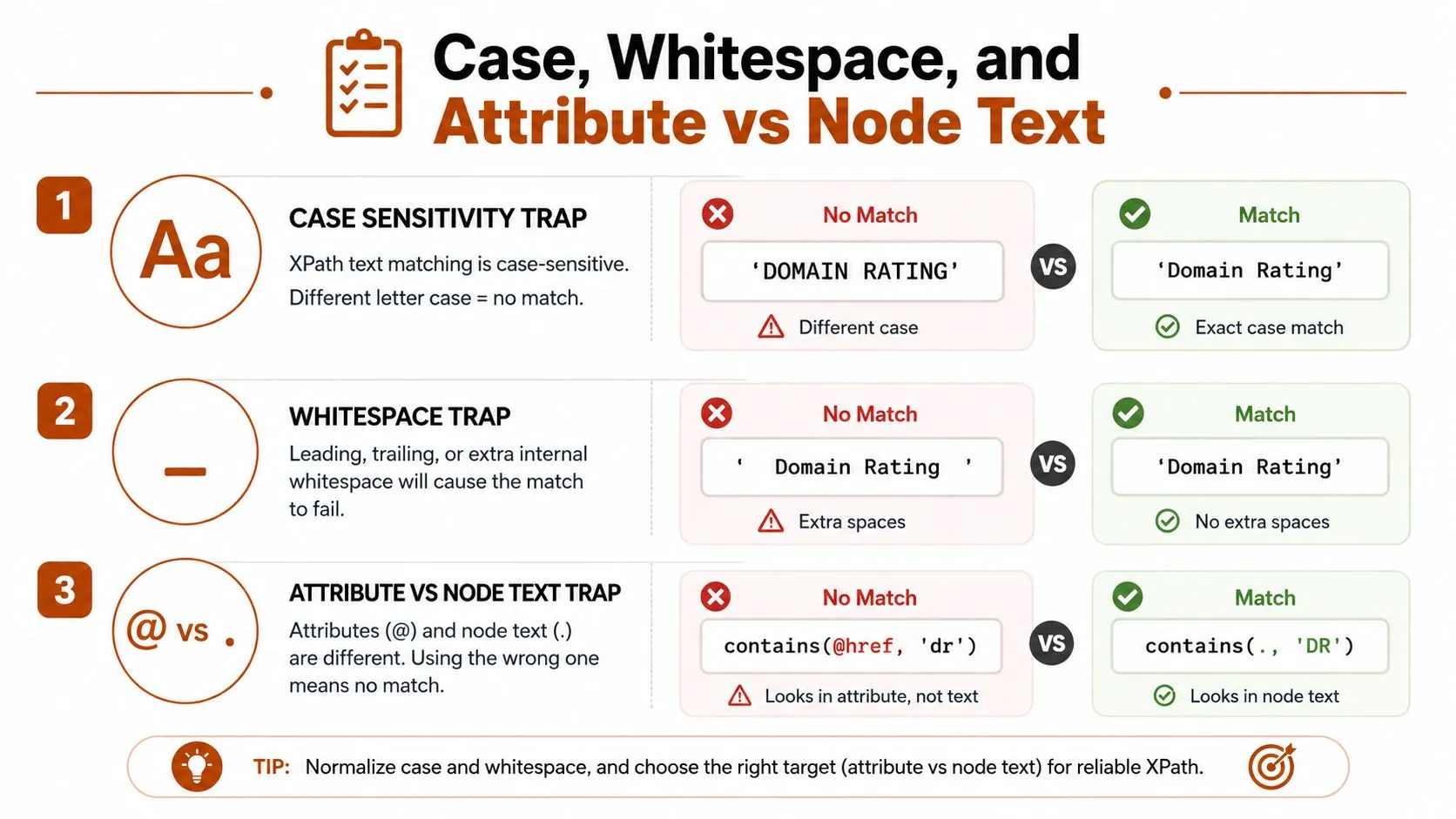
Case, Whitespace, and Attribute vs Node Text
Three failure modes waste the most time in production. They do not look like bugs at first. They look like the selector just stopped working.
Case sensitivity and release drift
XPath 1.0 is case-sensitive, so contains(., 'Domain Rating') will not match DOMAIN RATING. That matters when exports, alternate views, or UI updates normalize labels differently. The fix is to normalize the text before matching, not to guess at every label variant.
A common pattern is translate(., 'ABCDEFGHIJKLMNOPQRSTUVWXYZ', 'abcdefghijklmnopqrstuvwxyz') around the node text, then compare against a lowercase substring. That gives you a case-insensitive search inside XPath 1.0, which is what most browser drivers, Scrapy, and default lxml setups are running. When Ahrefs changes capitalization in a table label or export view, that translation step is usually what keeps the selector alive.
Whitespace and hidden formatting
Whitespace breaks more selectors than people expect. Tabs, newlines, and non-breaking spaces can make a visible Domain Rating fail a literal comparison. If a cell looks right in DevTools but returns zero nodes, normalize-space() is the first thing to try.
Use normalize-space(.) when the text may be padded or split across lines. It trims and compresses whitespace before matching, which is useful when Ahrefs shifts the table layout or inserts spacing around metric names. A selector that looks correct in the browser can still fail if the underlying node has extra padding characters.
If a visible label matches manually but not in XPath, suspect whitespace before you suspect the DOM.
Attribute text and visible text are different
Matching visible text is not the same as matching an attribute. A link may show Domain Rating in the page body but carry the useful identifier in href, data-*, or another attribute. In that case, contains(., 'DR') and contains(@href, 'dr') solve different problems.
That split matters on dashboards where the clickable element and the visible label are not the same node. Sometimes the right answer is an attribute match because the node text is unstable. Sometimes the text is the right signal because the attribute is opaque or versioned. A selector that confuses the two looks neat and fails in production.
XPath 1.0 also stops short when the text needs pattern matching beyond simple containment. If a release keeps changing the label shape, or the useful signal is buried in a mixed-format string, I switch to a regex pass after extraction. The regular expression guide at Web Scraping HQ’s regex examples is the cleaner follow-up when XPath alone is too blunt. For a wider sanity check on what changes when the browser sees a different node than the markup suggests, the latest from AI Website Detector covers related scraping edge cases from the other side of the stack.
Practical contains() Examples in lxml, Selenium, and Scrapy
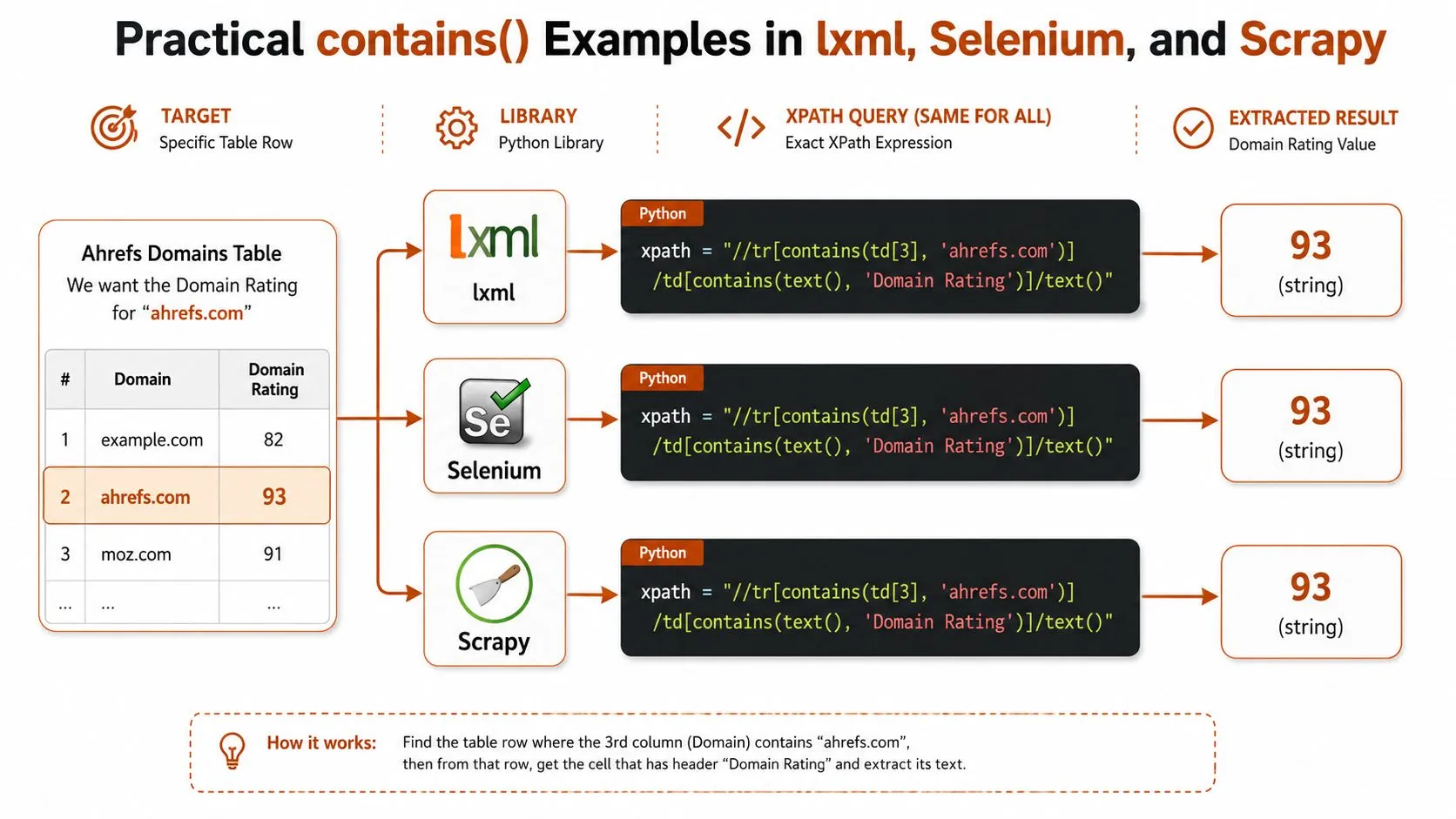
A single Ahrefs-style table row shows why contains() behaves differently across stacks. The domain lives in one cell, the metric label sits in another, and the value is often rendered beside it after the page state settles. The XPath can stay close across tools, but the extraction step changes with the library and with how much of the page has loaded.
lxml for direct HTML parsing
With lxml, start with the narrowest XPath that matches the row, then convert the result into a string or a node only after the match succeeds. If the page source already contains the row, a selector like this is a practical starting point:
//tr[contains(., 'ahrefs.com')]/td[contains(., 'Domain Rating')]
From there, pull the value from the adjacent cell or tighten the row predicate until the match is specific enough. lxml is fast and direct, but it only sees the HTML you give it. If Ahrefs has not loaded the row yet, the selector can be correct and still return nothing.
Selenium for live pages
Selenium uses the same XPath logic, but the browser state controls whether the node exists yet. A page may not render the target row until after a wait, so the safer pattern is to wait first and locate second. That matters on Ahrefs pages where rows load lazily as you scroll.
The contains() call usually sits inside a WebDriverWait or find_element call, and the return value is a WebElement, not raw text. After the locator matches, you still need .text or an attribute read. If the row only appears after interaction, the XPath can be right and still produce nothing until the page is exercised.
Scrapy for response selectors
Scrapy keeps the XPath familiar, but it returns Selector objects, so the post-match step changes again. In practice, you chain .xpath() calls and then use .get() or .getall() depending on whether you need one string or several.
That difference matters in an Ahrefs pipeline, because the same XPath can work in lxml, Selenium, and Scrapy while the surrounding extraction code behaves differently. The selector is only half the problem. The other half is how each framework materializes the match and how early in the crawl the row is available.
The most reliable debugging habit is to scope the row first, then the metric label, then the target cell. If the row appears only after scrolling or pagination, match after the page state is complete, not before. For teams building this into larger crawls, building scalable data pipelines with Scrapy is a better companion than another generic XPath cheat sheet. For a useful cross-check on related scraping edge cases, see the latest from AI Website Detector.
XPath 1.0 Limits and How to Work Around Them
XPath 1.0 is good enough for a lot of Ahrefs work, but it has hard edges. It doesn’t give you native case-insensitive comparison or regex matching, so the neatest-looking selector is often not the most reliable one.
What XPath 1.0 can’t do natively
If your label can vary in case, XPath 1.0 won’t compare it flexibly without help. If your target text needs a pattern rather than a substring, XPath 1.0 won’t give you regex support in the default environments used by lxml, Selenium, and Scrapy. That means the common “just use XPath for everything” instinct eventually runs into a wall.
The workaround is usually translate() for case folding and normalize-space() for formatting cleanup. Those two functions solve more Ahrefs selector problems than any fancy predicate. They don’t create true linguistic matching, but they’re enough for dashboard text that only varies in capitalization and spacing.
When to move the logic out of XPath
If the text variation is messy, pre-filter the strings in Python and pass a narrowed set of nodes into XPath or a second pass. That’s cleaner than stacking three awkward predicates into one expression and hoping it stays readable. For broader HTML parsing tasks, Python’s ElementTree parsing patterns can help you separate parsing from matching when XPath starts becoming a crutch.
There are times when you should step up to a richer parser or a different approach. If the site structure is changing too often, or if you need language-level text logic, XPath 2.0 or another regex-aware parser may be worth the complexity. For most Ahrefs scrapes, though, that’s overkill. The win is knowing when the selector should stay simple and when the matching logic belongs outside XPath.
Decision rule: use XPath 1.0 for stable structural matching, use Python for messy text logic, and only reach for a more advanced parser when the selector is becoming a second application.
Debugging Selectors That Suddenly Stop Matching
A selector that worked last week and now returns an empty list usually isn’t “broken” in the abstract. It’s broken against a new page state. Ahrefs and similar dashboards change markup often enough that selectors should be treated as versioned artifacts, not permanent truths.
A triage sequence that saves time
Start by confirming the page loaded the expected rows. On lazy dashboards, the HTML may not contain the row until you scroll or trigger another request. Then inspect the live node, not the old saved HTML, because the browser may have wrapped the label or moved it into a child element.
After that, test the XPath in the browser console with document.evaluate() so you’re debugging the same DOM the user sees. Narrow the predicate one piece at a time, then swap text() for . if the label is wrapped. If the label is visibly correct but still fails, normalize whitespace before rewriting the whole selector.
The best fixes are usually small. A row-scoped predicate, a whitespace normalizer, or an attribute match often restores the selector without changing the overall strategy.
Questions to ask before you edit the selector
- Did the page finish loading the target rows? Check whether the data is fetched on scroll or after pagination.
- Did the visible label move into a child node? Swap
text()for.when the wrapper changed. - Did capitalization change? Use
translate()before you rewrite the whole path. - Did hidden whitespace appear? Try
normalize-space()before changing the structure. - Did the useful signal move to an attribute? Match
@hrefor another stable attribute instead of visible text.
For common failure patterns across web scrapers, 7 common web scraping errors and their solutions is a more useful reference than trial and error in a production notebook.
Best Practices and When to Skip Scraping Altogether
The most effective habit is simple. Prefer stable attributes over visible text when you can, normalize whitespace explicitly, and version-control every selector that touches an Ahrefs dashboard. That keeps changes visible instead of letting them drift into broken output.
Ahrefs scraping is also changing economically. Ahrefs found that AI Overviews were associated with a 34.5% lower average CTR for the top-ranking page in its analysis of 300,000 keywords (Ahrefs on AI Overviews and CTR). That changes the value of broad keyword harvesting, because the traffic model behind some SERP-adjacent data is weaker than it used to be.
For some workflows, parsing the browser network traffic from a HAR file is cleaner than fighting the DOM. For others, an official API or a structured export is a better fit than selector maintenance. Use XPath when you need flexible, row-level matching on live HTML. Use HAR parsing when the data is loaded dynamically and the DOM keeps shifting. Use an API when the platform gives you the fields you need without a scraper in the middle.
If you’re still choosing the implementation path, don’t start with the tool. Start with the data shape, the update cadence, and how often the markup changes. That choice saves more time than any clever contains() expression ever will.
If you need a team that can turn fragile Ahrefs-style selector work into a monitored, maintained pipeline, WebscrapingHQ can help design, build, and operate it without leaving you to absorb every markup change yourself.
Want this done for you?
Send us the URLs. We'll quote it in 24 hours.
Paste the URL(s) you want scraped. We'll reply within 24 hours with a feasibility check and a ballpark quote.