Jump to section
- What a Price Range Monitor Records
- Define the outputs before choosing tools
- Monitor Price Bands to Set Your Floor and Ceiling
- Monitor price bands by segment
- Cadence and Breach Rules by Watch Type
- Default cadence and alert rules
- Make the confirmation rule unambiguous
- Build the Pipeline and Parse Ranges
- Register targets and preserve fetch evidence
- Extract named fields, not convenient numbers
- Validate before calculating the median
- Site Changes Proxies and False Alerts
- Diagnose before increasing request volume
- Give repairs an owner and a deadline
- Choose In-House or a Managed Retainer
- Compare scope and responsibility
- Know when the in-house job should stop
You’re comparing the same monitor across retailer tabs when a price alert arrives. One listing shows a discount, another is out of stock, and the third hasn’t loaded correctly. Before you can act, you need to know whether the price moved or the collection job broke.
A dependable monitor price range pipeline separates those events. It compares equivalent products, preserves the evidence behind each observation, and uses a rolling median with consecutive-breach rules so an isolated advertised price doesn’t become a buying recommendation.
What a Price Range Monitor Records
Say a category buyer tracks the same SKU across several retailers. The buyer wants to know when an available offer moves outside an approved band, not whenever a page changes. A useful record must therefore describe both the price and the conditions under which someone could buy at that price.
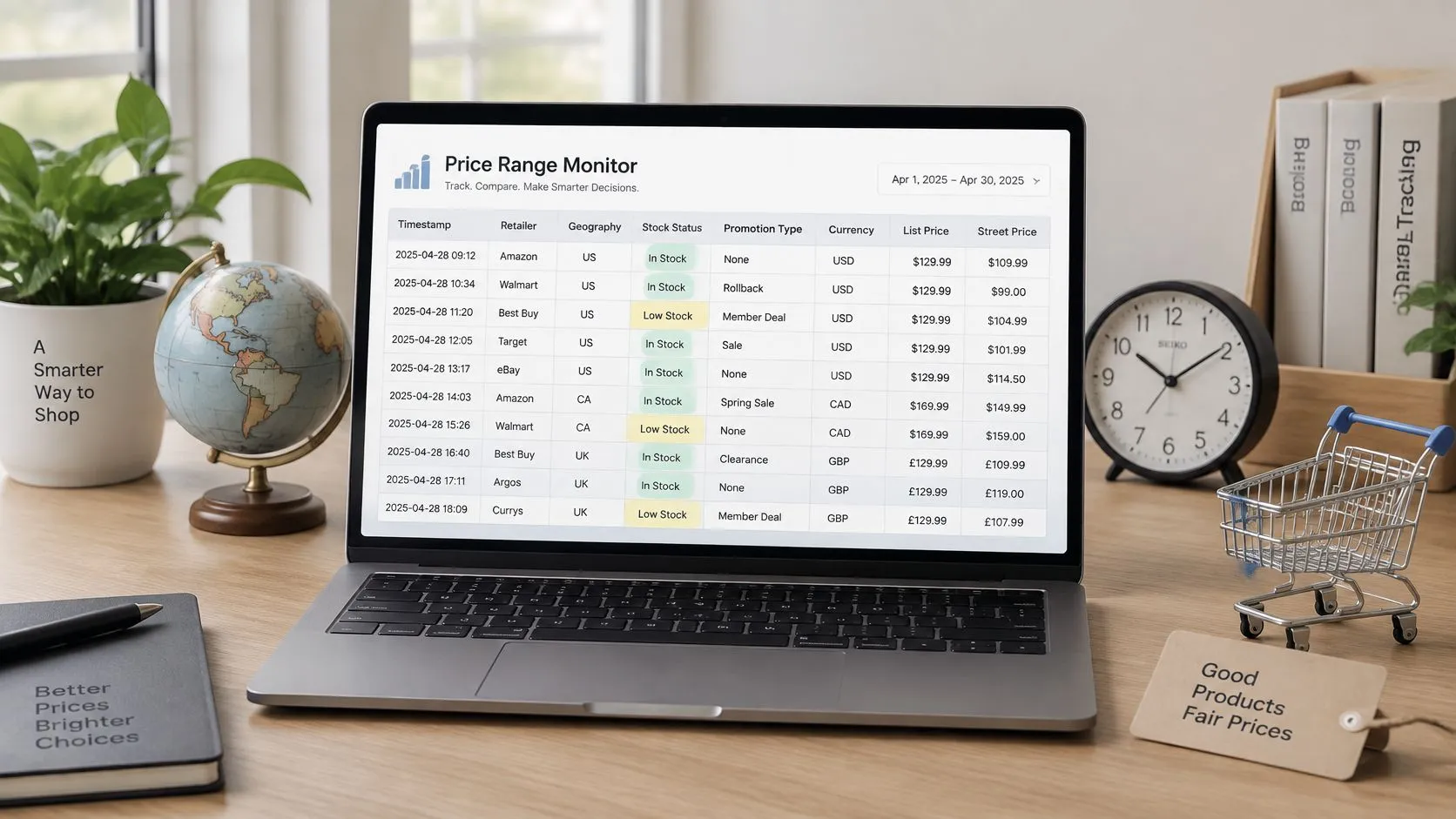
Each observation needs a timestamp, retailer, geography, stock status, promotion type, currency, list price, and street price. Keep the product identifier and page URL alongside them. A retailer’s product title alone isn’t a reliable join key because titles can change without the underlying product changing.
Define the outputs before choosing tools
The pipeline must emit distinct artifacts that downstream users can inspect:
- Raw observation. Preserve extracted text, collection time, page URL, and fetch metadata so an analyst can reconstruct the decision.
- Normalized price. Store a comparable amount in the reporting currency with an explicit tax treatment.
- Range verdict. Label a valid observation as inside the band, under the floor, or over the ceiling. Keep invalid observations outside this classification.
- Notification payload. Prepare an email, Slack message, or webhook containing the product, retailer, evidence, and reason for the alert.
A database row and a notification aren’t interchangeable. Analysts need the history even when no notification is appropriate, while recipients need a concise explanation rather than an entire extraction log.
Operational rule: An unavailable observation is not an unusually cheap offer.
Three traps deserve separate controls: mixing tax-inclusive and tax-exclusive amounts, treating an out-of-stock page as a zero price, and notifying on every crawl. Assign validation failures their own status rather than forcing them into a price verdict.
Use data quality monitoring tools to make those distinctions visible to the operator. Establish the build order before implementation: lock cadence and thresholds, then fetch, parse, store, and notify.
Monitor Price Bands to Set Your Floor and Ceiling
A 1440p gaming monitor can look like a bargain until you discover it has a different refresh rate or panel type from the model you track. Segment products by resolution, refresh rate, panel technology, HDR capability, and screen size before setting a monitor price range. That keeps unlike listings out of the same comparison.
The U.S. gaming reference bands below come from IndexBox’s gaming-monitor market guide, which distinguishes list prices from promotional street prices where available. The Full HD and professional ranges come from Dataintelo’s PC monitor market report, which reports market prices rather than separate MSRP bands.
Monitor price bands by segment
| Tier | List price | Sale or street price |
|---|---|---|
| Entry 1080p/144 Hz | USD 189 to 279 | USD 149 to 229 on promotion |
| Mainstream 1440p/165 Hz IPS | USD 349 to 499 | USD 299 to 399 in major sales |
| Enthusiast 1440p/240 Hz or 4K/144 Hz | USD 599 to 899 | Establish from observed in-stock offers |
| Flagship 4K/240 Hz OLED or 49-inch super-ultrawide | USD 999 to 2,199 | Establish from observed in-stock offers |
| 24-inch Full HD | Use the retailer’s struck-through price for the tracked SKU | USD 140 to 280 reported market range |
| 4K professional | Use the retailer’s struck-through price for the tracked SKU | USD 800 to 2,200 reported market range |
Use a rolling median of validated, in-stock observations as the reference for each product and retailer. A single advertised price should not reset the band: treat it as a breach only when the configured consecutive-observation rule is met. Keep provisional floors near the relevant promotional range and ceilings near the list range, then tune them against actual observations for the tracked SKU.
For HDR comparisons, PCMag’s monitor buying guide recommends targeting VESA DisplayHDR 600 or higher. Store certification separately from a retailer’s HDR marketing label so listings with different capabilities do not enter the same cohort.
OLED deserves a separate review cycle. Tom’s Hardware’s OLED shipment coverage reports 2025 shipment-growth estimates of 64% and 92% from different analysts. The differing estimates are a reason to revisit the band rather than treat an OLED premium as permanent.
A statistical floor and an advertised-price policy answer different questions. MAP enforcement insights from Online Brand Growth provide context for the policy side; retail price intelligence covers the broader competitive-pricing use case.
Cadence and Breach Rules by Watch Type
Start a stable catalog with a daily off-peak collection window. More frequent collection isn’t automatically more useful: someone must review the resulting exceptions, and the target site must support the request load.
The schedule below is a hypothetical operating configuration, not a measured industry standard or a contractual recommendation. Its numerical settings are proposed implementation choices to test during a dry run. Select a row according to the buying decision, then adjust it only through an explicit configuration change.
Default cadence and alert rules
| Watch type | Crawl cadence | Floor and ceiling | Alert when |
|---|---|---|---|
| Stable catalog | Once a day, off-peak | 14-day rolling median ±10% | Two consecutive breaches |
| Known promotion | Every 2–4 hours | Fixed campaign floor | First in-stock price under the floor |
| MAP or compliance floor | Every 6 hours | Contract minimum as the floor | Single breach, with page URL |
| Fast marketplace | Hourly | Rolling median ±8%; ignore coupons under 3% | Three consecutive breaches |
| Large B2B catalog | Weekly | Median within the specification cohort | Week-over-week move over 5% |
The daily catalog configuration suits a buyer who needs a considered response rather than immediate intervention. Consecutive breaches provide confirmation without requiring someone to inspect every small movement.
A promotion watch serves a different purpose. The campaign owner has already approved a floor, so a moving baseline could weaken the control by gradually accepting the very discount the team intended to detect. Keep that floor fixed for the campaign and define its expiry.
Make the confirmation rule unambiguous
For a hypothetical daily catalog watch, consecutive means successive scheduled, valid observations beyond the same boundary. An under-floor observation followed by an over-ceiling observation shouldn’t satisfy the same counter.
Use explicit state transitions:
- Valid and inside the band. Clear the pending breach counter.
- Valid and outside the same boundary. Advance the corresponding counter.
- Invalid or missed collection. Break confirmation and record an operational exception.
- Already notified and still outside. Update the incident rather than sending another identical alert.
A MAP check should evaluate the advertised offer against the applicable policy, not infer a contract minimum from competing sellers. Capture the page URL and the relevant offer conditions, and route possible exceptions for review before enforcement.
For marketplace coupons, retain the advertised base price and any conditional discount separately. The proposed noise filter must not erase a policy-relevant advertised price or a genuine campaign violation.
A confirmation counter should represent independent scheduled observations, not repeated retries of the same failed request.
Add small scheduling jitter to avoid synchronized requests. Apply bounded retries within a run, but don’t let those attempts generate extra breach confirmations.
For a B2B catalog, check cohort membership before interpreting movement. A changing product mix can alter the cohort median even when no individual seller changes a price. Record the cohort definition with each baseline so the buyer can distinguish composition changes from price changes.
Build the Pipeline and Parse Ranges
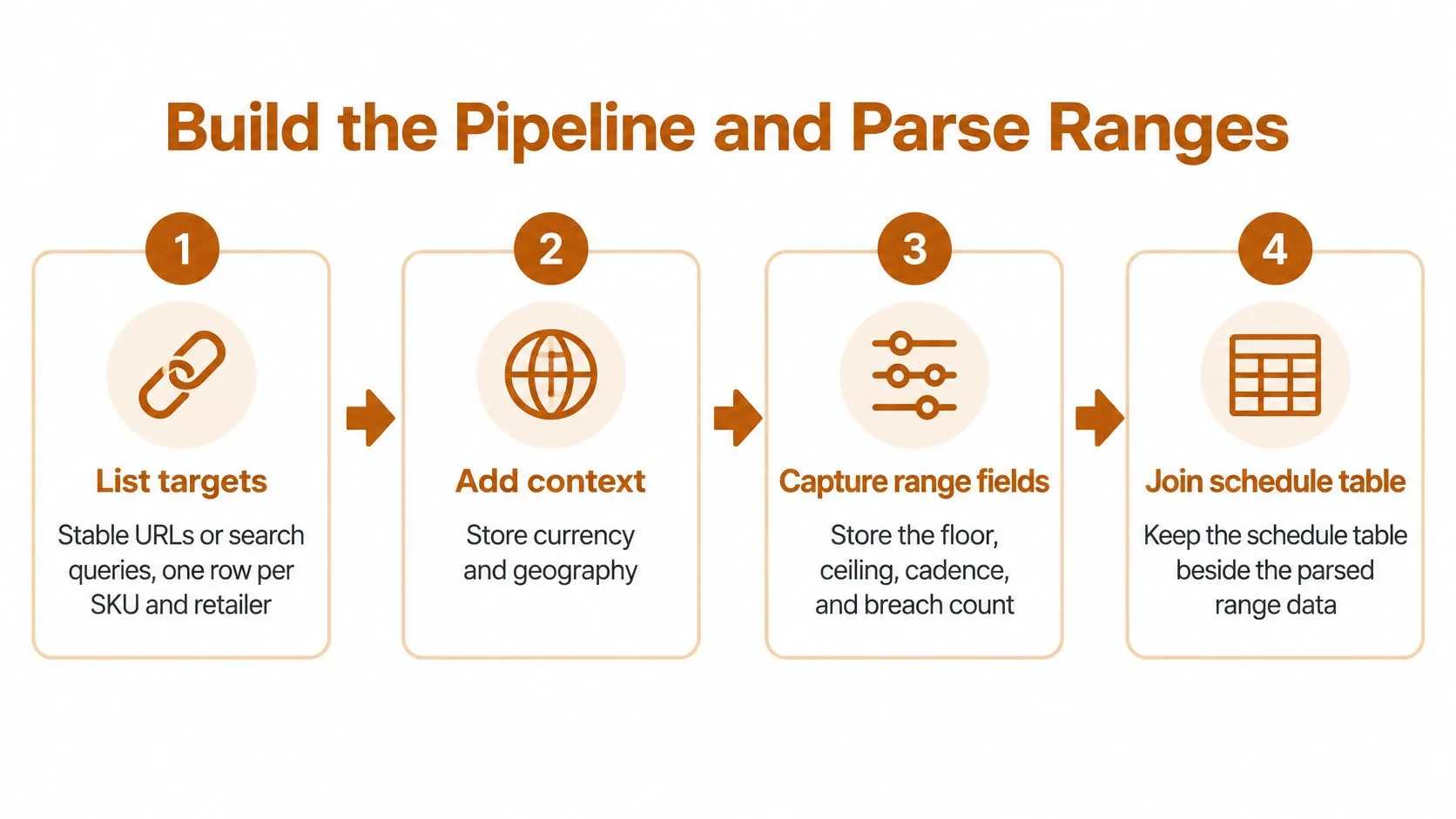
Build a small, inspectable pipeline before expanding retailer coverage. A scheduler, an HTTP client, a site-specific parser, a validation layer, and a durable store are sufficient building blocks. Use a browser renderer only when the required offer isn’t available in the initial response.
Register targets and preserve fetch evidence
Create a target registry with a row for each SKU-retailer combination. Include the stable URL or search query, expected product identifier, geography, currency, parser version, and watch configuration. Store the cadence, floor, ceiling, and confirmation rule beside the target rather than burying them in application code.
Fetch using a bounded timeout. Record the HTTP status, final URL, collection timestamp, and content hash before attempting extraction. Preserve enough response evidence to investigate a disputed observation without rerunning the page and potentially seeing a different offer.
A Python implementation might use Requests for static responses, Beautiful Soup for named HTML nodes, and Playwright for pages that require browser rendering. The choice matters less than keeping fetch failures separate from parsing failures.
Extract named fields, not convenient numbers
Parse the struck-through list price, current street price, currency, stock text, and promotion label from explicit selectors or validated structured fields. Don’t search the entire page for the first currency symbol. Retailers may display installment amounts, accessory prices, or recommended products nearby.
The distinction between extraction and interpretation is central to what data parsing involves. Preserve the original text alongside the interpreted value so reviewers can inspect ambiguous formats.
For a hypothetical displayed range, store the low and high endpoints separately. Evaluate the low endpoint against a floor and the high endpoint against a ceiling, but first establish why the page contains a range. A family listing covering several configurations may need variant-level targets rather than a single SKU verdict.
Normalize with explicit rules:
- Currency and locale. Interpret decimal and thousands separators using the page locale, then retain both original and reporting currencies.
- Conversion. Record the observation-date exchange-rate source and rate used.
- Tax treatment. Tag the amount as tax-inclusive, tax-exclusive, or unresolved; unresolved amounts don’t enter a comparable baseline.
- Availability. Map retailer text to in stock, out of stock, or unknown.
- Promotion. Classify the offer as coupon, sale, bundle, or none while retaining eligibility conditions.
Validate before calculating the median
Compute the baseline from historical, valid, in-stock street prices. Exclude the candidate observation from its own comparison baseline so a new extreme doesn’t immediately move the threshold used to judge it.
Balance retailer contributions if collection frequencies differ. Otherwise, a frequently crawled retailer can dominate a pooled median. A per-retailer baseline is often easier to interpret when the buyer’s question concerns a specific seller.
Quarantine missing nodes and conflicting prices. As a hypothetical validation setting, route an unexplained jump above 40% to review when no promotion label is present; calibrate that setting against the category before production. Store nulls only as missing-field indicators in failure records, never as valid prices, and reject zero-priced offers from automatic evaluation.
After validation, apply the configured breach rule. Send the SKU, retailer, previous valid price, new price, applicable boundary, collection time, and evidence URL. Write CSV or JSON on the agreed delivery cadence, and version the schema when field names, types, or meanings change.
Finish with a hypothetical single-SKU dry run containing three valid observations, a forced null, and a synthetic breach. Confirm that the null creates an operational exception and that the breach follows the configured confirmation rule before enabling unattended scheduling.
Site Changes Proxies and False Alerts
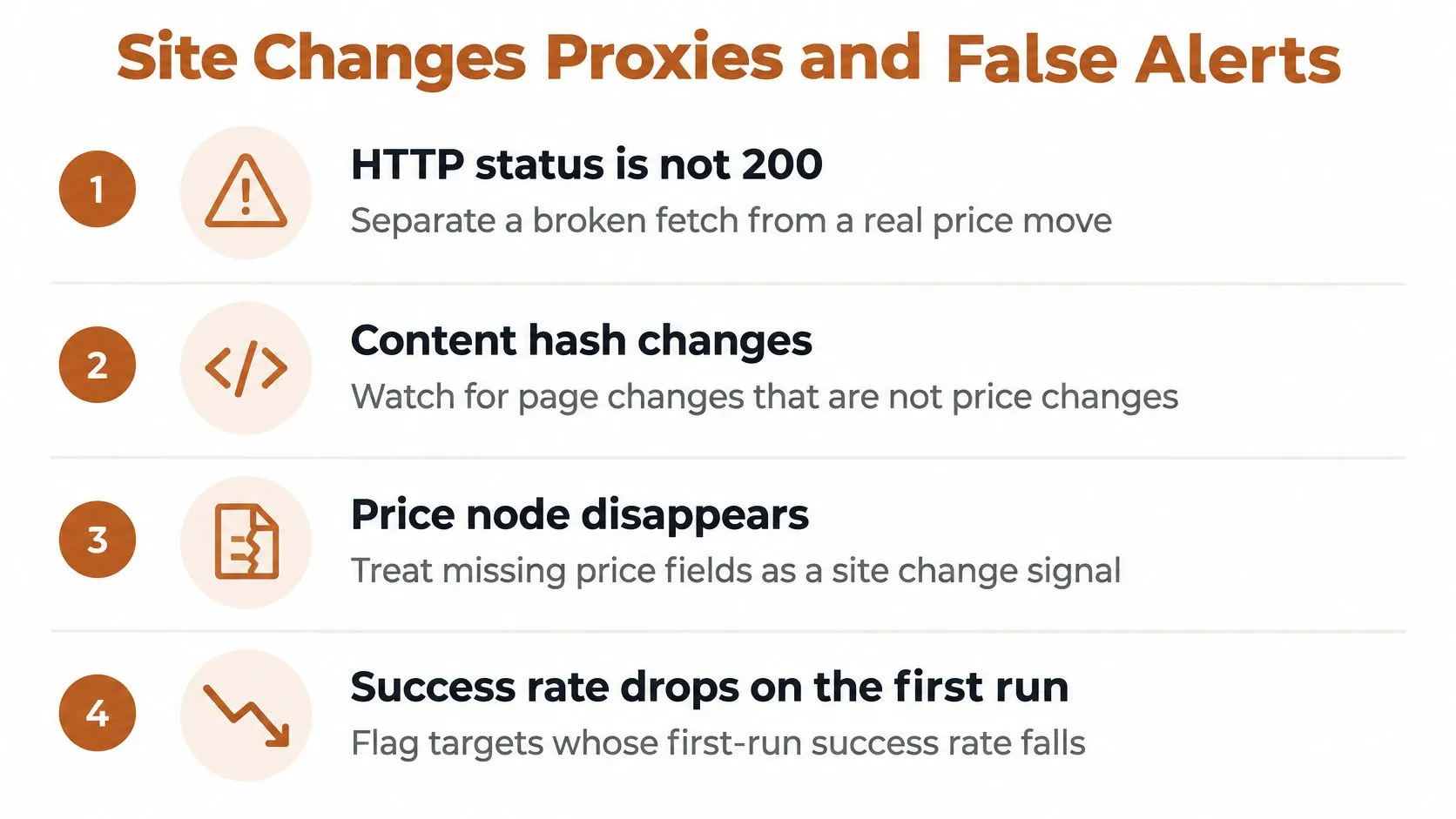
Hold price alerts when extraction integrity is uncertain. A failed request, a challenge page, or a missing price selector is an operational incident, not evidence that a monitor became cheaper.
Treat a non-success response as a failed fetch. A changed content hash alone doesn’t establish breakage because normal page content changes, but a changed hash combined with a disappearing price node deserves investigation. Also verify the expected product identifier so a redirect to a category page can’t pass as a successful observation.
Diagnose before increasing request volume
Keep a structured run log containing status, latency, proxy exit, selector version, final URL, and validation outcome. These fields let the operator distinguish an unavailable server from a working page whose structure changed.
For a hypothetical retry policy, allow two retries for transient 429 or 5xx responses, using backoff and respecting any server-provided retry instruction. After the retry budget is exhausted, close the run as failed. Don’t keep retrying until the reporting deadline disappears.
Use different remedies for different symptoms:
- Server or rate-limit response. Slow down, honor retry guidance, and inspect the request schedule.
- Successful response with missing fields. Compare the saved page with a known-good fixture and repair the parser.
- Unexpected login or challenge page. Check session state and permitted access before changing infrastructure.
- Wrong product or variant. Repair target resolution rather than changing the price selector.
Proxy rotation is appropriate only when diagnosis points to an IP-reputation or network-access problem. Residential and datacenter proxies won’t fix a renamed HTML attribute or an incorrect SKU mapping.
Keep a consistent identity within each retailer session. Changing identity mid-session can create additional challenges and make troubleshooting harder. The practical controls in avoiding blocks while scraping belong alongside request pacing and session management, not in place of them.
Give repairs an owner and a deadline
At WebscrapingHQ, per-target monitoring flags a drop in extraction success rate within the first run after a site change. Those operational alerts reach our team rather than asking the client to diagnose scraper breakage.
The operator should compare the failed response with a retained fixture, update selectors, and rerun validation before releasing held observations. A repaired selector isn’t ready merely because it returns a number; it must return the correct offer, currency, availability, and variant.
Release condition: Restore price notifications only after the repaired parser passes the target’s validation checks.
Define extraction-success targets separately from feed-delivery targets. A delivered file containing invalid prices doesn’t constitute a healthy collection process, while an explicit failure record can be a correct operational output.
Site-change re-tuning is included in every recurring engagement. Our on-call engineer re-tunes the pipeline within 48 hours at no additional cost. If success remains below the agreed target after that window, escalate to the accountable human rather than allowing silent degradation.
Choose In-House or a Managed Retainer
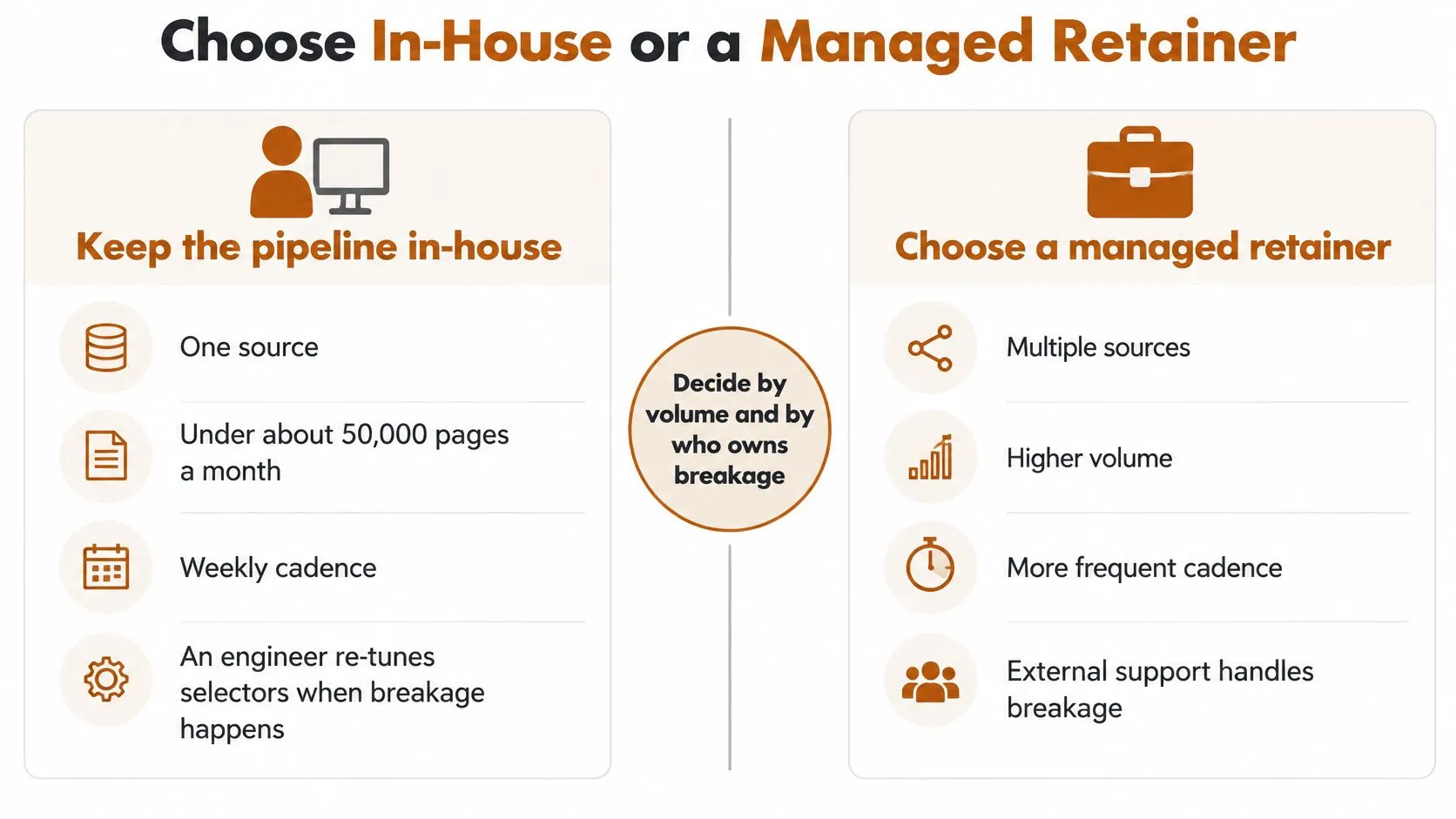
Keep the pipeline in-house when the work is narrow enough for a named engineer to own: a single source, a weekly collection cycle, and, as a planning scenario, fewer than about 50,000 pages per month. This isn’t a universal capacity limit. The decisive question is whether that engineer has time to repair selectors, investigate questionable observations, and maintain delivery when other priorities compete.
A small script can be appropriate for a bounded watch. It stops being an economical choice when buyers depend on daily multi-retailer delivery but nobody owns breakage. Don’t confuse a successful demonstration with a staffed production service.
Compare scope and responsibility
These are illustrative managed retainer bands, not contractual offers. We price every recurring engagement on its scope, including collection volume, cadence, delivery format, and operational requirements.
| Band | Scope | Monthly price |
|---|---|---|
| Small | Weekly recurring delivery; single source and schema; up to 50K pages per month; CSV or JSON; standard 48h site-change SLA | USD 500 to 1,500 |
| Medium | Daily recurring delivery; multi-source and multi-schema; up to 500K pages per month; CSV, JSON, S3/GCS, or webhook; AI extraction; standard 48h site-change SLA | USD 1,500 to 5,000 |
| Enterprise | Hourly or real-time cadence available; multi-region and multi-language coverage; custom SLAs; visual AI inspection and human QA | From USD 5,000 |
The Medium plan is our most common option. Enterprise scope can also include any delivery format, custom PDF reports, data residency, compliance reporting, and escalation paths.
A hybrid arrangement can preserve internal control without assigning every repair to your engineering team. Your engineer owns the schema, business thresholds, and destination system; the managed operator handles extraction maintenance and proxy operations. Document who approves a schema change and who can pause questionable data.
Know when the in-house job should stop
Stop expanding an internal job when its owners can’t explain missing observations, reproduce an alert, or commit to repairing a broken target. More sources will increase the unresolved maintenance burden rather than improve decision quality.
Use the comparison of managed scraping services and internal operations to evaluate ownership, not just infrastructure expense. Include review time and delayed delivery in the decision, even when those costs don’t appear on a hosting invoice.
Prepare a scoped request with the target list, expected variants, watch configuration, geographic coverage, delivery format, and representative output. Include the evidence fields needed for price disputes and the handling required for unavailable products.
Put the site-change response window in the written scope. We scope each engagement to the customer’s volume, cadence, and delivery format, then price it as a recurring monthly retainer. That gives both teams a concrete basis for deciding whether the monitor price range watch is supportable before collection begins.
WebscrapingHQ builds and runs recurring price-monitoring pipelines with structured delivery, validation, operational monitoring, and site-change re-tuning. Visit WebscrapingHQ with your target retailers, desired cadence, and output format to request a scoped monitor price range pipeline that separates actionable breaches from collection failures.
Want this done for you?
Send us the URLs. We'll quote it in 24 hours.
Paste the URL(s) you want scraped. We'll reply within 24 hours with a feasibility check and a ballpark quote.