
Jump to section
- Choosing an Extraction Technique by Page Type
- The View Source Test
- Crawler Versus Extractor
- Setting Scope, Policy and Provenance Before Coding
- When Signals Conflict
- The Provenance Record
- How to Extract Fields from a Page Step by Step
- Normalization and Validation
- Handling Rate Limits, JavaScript and Anti-Bot Defenses
- Pacing by Domain
- Proxies and Headless Browsers
- Testing Accuracy and Catching Drift Early
- Four Error Types
- Drift Monitoring
- Choosing Delivery Formats That Match Downstream Systems
- Deciding Whether to Build or Buy Your Pipeline
Your price feed ran overnight, returned a clean file, and nobody noticed that half the prices came from the wrong part of the page. That’s the normal failure mode when extracting data from web pages. The script didn’t crash. It produced plausible values, and the downstream dashboard trusted them. A production pipeline has to prevent exactly that outcome. It needs a defined source policy, stable selectors, validation against a schema, and records that show where each value came from and when. Without those controls, you’ve got a script that works until a template changes, a consent banner appears, or a site starts returning soft blocks.
Choosing an Extraction Technique by Page Type
Technique choice sets your error budget before a single request goes out. A parser on a rendered page returns nothing and you’ll notice. A browser on a static page works but costs more per record than it should, and both mistakes compound across a full crawl.
| Technique | Best for | Handles JavaScript | Main risk |
|---|---|---|---|
| HTML parsing (BeautifulSoup, lxml, Cheerio) | Static pages where values appear in the raw HTML | No | Breaks when class names or markup change |
| Browser automation, interactive sessions (Playwright, Selenium) | Low-volume jobs needing logins, clicks, filters or multi-step flows | Yes | Session state and timing make runs slow and flaky |
| Headless rendering at scale (managed browser pool) | High-volume JavaScript catalogues and listings where each page renders independently | Yes | Higher cost per page and easier to fingerprint |
| Computer vision | Prices or specifications shown as images, canvas or obfuscated markup | Not required | OCR errors on small or distorted text |
| LLM parsing | Many templates, free-text descriptions and semantic fields | Depends on upstream rendering | Plausible but wrong values; needs validation |
The two browser rows split on one axis: session state. Use automation when the job is a scripted interaction, a login flow, a filter sequence, or a paginated form. Use a headless pool when each URL is independent and the volume justifies paying for rendering. If you’re unsure which you’re building, count how many steps come before the page you want.
The View Source Test
One test decides most cases. Open View Source, search for the value you need, and check whether it’s present before any scripts run. If it is, a parser is enough and a browser only adds cost, latency, and failure points. If the value appears only in the inspected DOM after rendering, you need a rendered page, which is the core distinction covered in this guide to how dynamic pages load content after the initial response.
Test the rule with the smallest parser you can write. Fetch the page with requests, parse it with BeautifulSoup, select a labelled element such as soup.select_one('[itemprop=price]'), and compare the result with what View Source showed. If they match across a representative sample, don’t escalate to a browser out of habit.
Crawler Versus Extractor
Keep two jobs separate. The crawler decides which URLs to fetch: it manages the frontier, deduplicates requests, respects crawl delays, and retries failures. The extractor decides which fields to keep from each response and validates them against a schema. They fail differently, and that’s the practical reason for the split. A crawler failure is loud: missed URLs, blocked requests, duplicated pages. An extractor failure is quiet. The page arrives fine, the selector returns a plausible value from the wrong node, and the dataset absorbs it.
Separate the logic so each failure stays contained. A template fix shouldn’t force a full refetch, and a change to crawl scope shouldn’t require revalidating field accuracy. Provenance records need both sides anyway: which URL was fetched, when it was fetched, and which extractor version produced each stored value.
Working rule: Start with the cheapest technique that passes validation on a sample of 50 to 100 pages, and escalate only when the evidence shows it fails.
LLM parsing earns its cost when templates vary widely or fields require semantic reading. On one stable layout at high volume, selectors are faster, cheaper, and easier to audit.
Setting Scope, Policy and Provenance Before Coding
Robots.txt is a crawler instruction, not a permission system. An allowed path tells you nothing about whether a login-gated, contract-restricted, or personal-data page may be collected. Teams that treat it as access control end up with no defensible answer when a site owner asks why a field was collected, and in pipelines I’ve reviewed, the disputes that escalate are the ones with no logged decision behind them.

Run a fixed sequence before writing selectors. Fetch and cache robots.txt, record allowed paths and any declared crawl delay, then check the terms of service, whether an official API or data feed exists, whether authentication is involved, and whether personal data is present. This sequence sits inside the broader practice described in this overview of ethical data collection principles for web projects, and it is where legal review belongs, especially for personal data under rules such as GDPR or CCPA.
Treat each approved source like a budgeted allowance. Scope defines what the pipeline may spend, and a policy check running at fetch time works as the drift alert: when robots.txt or the terms page changes, collection pauses instead of quietly violating the new rules.
When Signals Conflict
Robots.txt, terms of service, and an API policy can disagree, and the scraper code should never arbitrate between them. Apply two rules. First, the strictest applicable signal wins: a contract restricting fields overrides a permissive robots.txt, and an API’s rate and usage terms govern anything collected through that API. Second, any disallow or contract restriction stops collection on the affected paths until legal review records a written decision in the source register. Silence is not the permissive signal. An absent robots.txt does not open login-gated or personal-data pages.
Identify your operator openly while you wait. A descriptive user-agent string with a contact address gives site owners a way to reach you, which a generic browser string deliberately prevents. Sites that want to block you will do so regardless; the honest identity is what lets a dispute get resolved instead of escalated.
The Provenance Record
Each source needs a record containing:
- Access rule relied on: Public page, contract, API terms, or customer authorization
- Collection purpose: Price monitoring, compliance review, research, or another stated use
- Identity and timestamp: Who collected it, under what operator identity, and when
- Fields and retention: Exactly what’s collected and how long it’s kept
- Escalation path: Who decides when the site changes its policy
Two cases show why the record matters. A price monitor collecting public list prices can rely on public access and data minimization. A compliance team collecting dealer pages under a signed agreement needs the contract reference, permitted fields, and retention terms attached to the source. Research environments apply the same discipline, as described in this discussion of auditable AI analysis for researchers, where provenance makes later verification possible.
Keep a one-page source register per domain and review it quarterly. Pair the review with the fetch-time policy check so a change surfaces the week it ships rather than the quarter after. If the register can’t explain why a field was collected, the pipeline shouldn’t collect it.
How to Extract Fields from a Page Step by Step
The crawler ran without errors all week. Every response came back 200, every field parsed, and the downstream table updated on schedule. None of that means the data was right. A fetched page only becomes usable once its fields are located, typed, validated, and stored with provenance, which is why extraction belongs inside a governed pipeline rather than in a script that happens to return values.
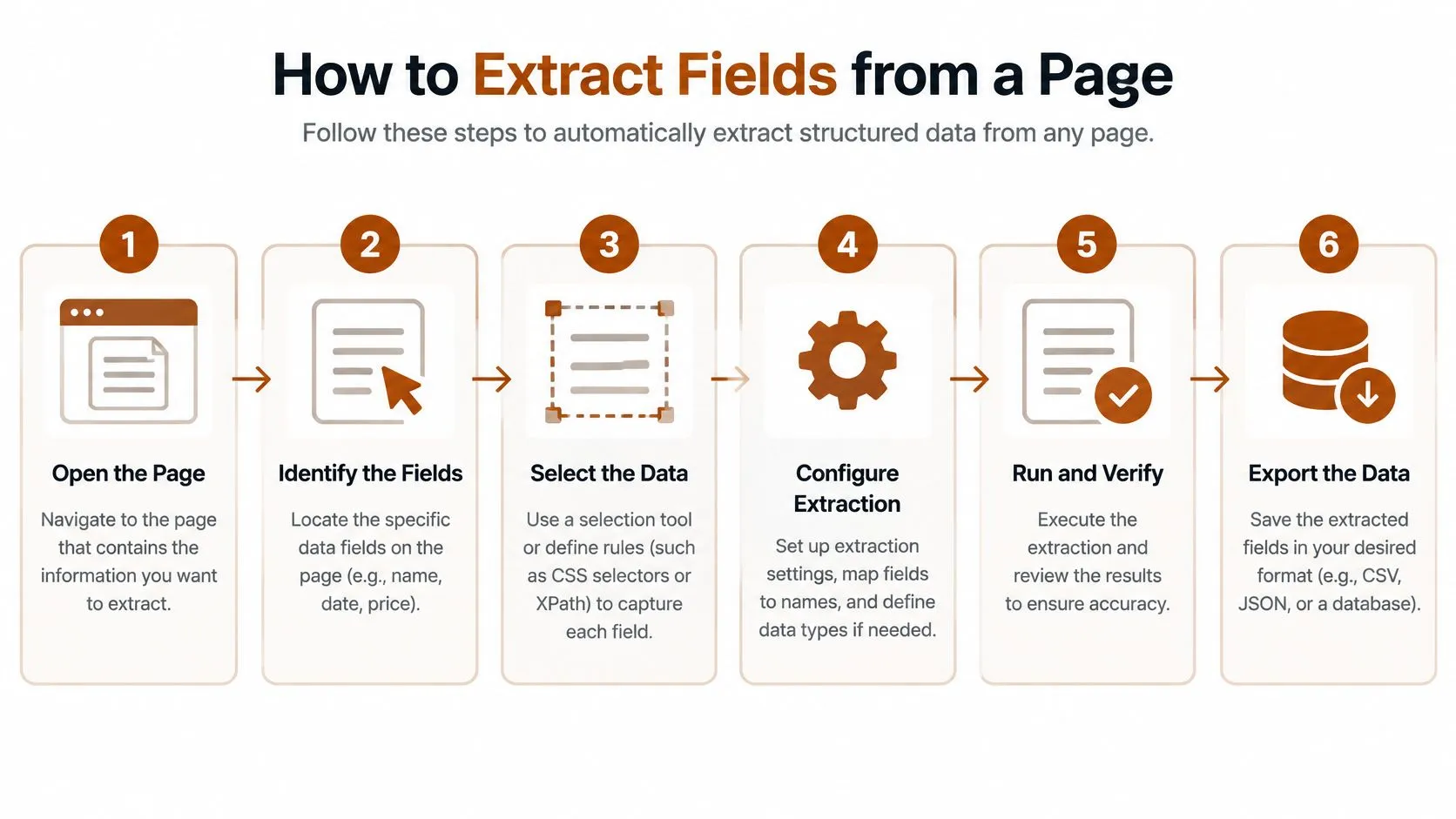
The eight steps below are the working sequence.
-
Classify templates. Sample URLs and group pages by layout and rendering mode, because one selector set rarely fits product, listing, and article pages. The common slip is building for the first URL you opened and discovering three more templates in production.
-
Fetch representative pages. Save the raw HTML and, where they differ, the rendered DOM, so failures can be reproduced later. Without saved responses, you’re debugging a page that may no longer exist in that form.
-
Find stable anchors. Prefer JSON-LD, meta tags, data attributes, and labelled table headers over auto-generated classes such as
css-1x2y3, which change on every deploy. Remember that JSON-LD can lag a promotional price shown visibly on the page, so cross-check it against rendered text. -
Write one selector per field. Use CSS or XPath anchored to semantic attributes or visible labels, not brittle position counts. A selector tied to the fourth div in a container breaks when a banner is inserted above it.
Normalization and Validation
-
Extract into a typed schema. Define each field’s type, whether it’s required, and what null means before extraction begins. A missing element that returns an empty string can otherwise look like a valid empty record.
-
Normalize values. Convert dates to ISO 8601, currencies to ISO codes with minor units, and locale numbers correctly, because 1.234,50 and 1,234.50 represent the same amount in different locales. Units need the same treatment, especially where pages mix metric and imperial measures.
-
Validate every record. Check required fields, plausible ranges, types, and duplicates against a stable record key. Range checks catch the quiet errors, such as a price that’s syntactically valid but belongs to another product. Failed records should count against a per-domain error budget, so a spike in rejects triggers investigation instead of silently filling the table with gaps.
-
Store provenance with the record. Keep the source URL, timestamp, and parser version alongside each value. When a downstream user questions a figure, you can point to the exact response and code version that produced it.
A scraper that returns valid-looking JSON hasn’t necessarily returned the right values. Validation against the live page is what separates the two.
Consider a product feed where the price field passed type checks for two weeks. The selector had drifted to a currency element in the page footer, so every record carried a plausible, incorrectly sourced amount. A range check alone wouldn’t have caught it, but field-level provenance and spot-checks against the visible page would have. A drift alert comparing extracted values against sampled rendered pages turns that failure into a same-day fix rather than a discovery someone makes in a spreadsheet two weeks later. Timestamped, versioned records are what make that kind of alerting possible.
Handling Rate Limits, JavaScript and Anti-Bot Defenses
| Signal | Likely cause | Response |
|---|---|---|
| HTTP 429 Too Many Requests | Rate limit reached | Honour Retry-After, reduce concurrency, back off exponentially with jitter |
| HTTP 200 with CAPTCHA or empty layout | Soft block served as a normal page | Treat as failure, store raw HTML, never parse as an empty record |
Pacing by Domain
Set a request limit per domain, use bounded concurrency, and apply exponential backoff with jitter so retries don’t synchronize into a second spike. Honour Retry-After when it’s present, and keep separate limits by domain, identity, and endpoint, because a single global threshold doesn’t model how sites throttle traffic. A missing robots.txt file doesn’t mean unrestricted crawling either, and rate limiting doesn’t stop deliberately slow clients, so treat pacing as a stability and courtesy measure rather than proof that access is acceptable.
Store the raw HTML, status code, headers, timestamp, locale, and parser version for sampled responses. When a selector starts returning blanks, those artifacts show whether the site changed, the locale shifted, or you were served a challenge page with a 200 status.
For example, a retail catalogue run that hit repeated 429 responses at high concurrency completed its nightly job after concurrency was cut sharply and jittered backoff was added. Slower pacing finished sooner in wall-clock terms because fewer requests needed retrying.
Proxies and Headless Browsers
Choose datacenter, residential, or mobile proxies according to target sensitivity, and match proxy geography when prices or availability are localized. Rotate per session rather than per request for logged-in flows, because changing address mid-session looks like account sharing and breaks state. Tie proxy spend to a cost per thousand pages estimate before scaling, or the infrastructure bill will decide your architecture for you.
Headless browsers need restraint. Block images, fonts, and video where they aren’t extraction targets, reuse browser contexts instead of launching a browser per page, and wait for a specific selector or network idle instead of fixed sleeps. Fixed sleeps are both slow and unreliable, since they waste time on fast pages and still fail on slow ones. Practical rendering patterns are covered further in this tutorial on extracting data from JavaScript pages with Puppeteer.
Policy boundary: If access requires solving a CAPTCHA or defeating a WAF challenge, return to the access rule recorded during scoping. Don’t add a bypass and call it engineering.
Also avoid retrying non-idempotent requests blindly. Replaying a form submission or filter action can duplicate state or trigger stricter controls, so retries need response-aware logic, not a simple loop.
Testing Accuracy and Catching Drift Early
A pipeline can report healthy aggregate accuracy while its highest-value template quietly returns empty fields. Treat accuracy as an error budget with explicit limits per field and per template, and report precision, recall, field-level F1, invalid-record rate, and coverage by template. One concrete setup: a retail price feed sets a required-field F1 floor of 0.95 per template, caps invalid records at 2% of each run, and requires a minimum record count per category. Breaching any limit quarantines that template’s output and alerts the owner, so bad rows never reach the published dataset.
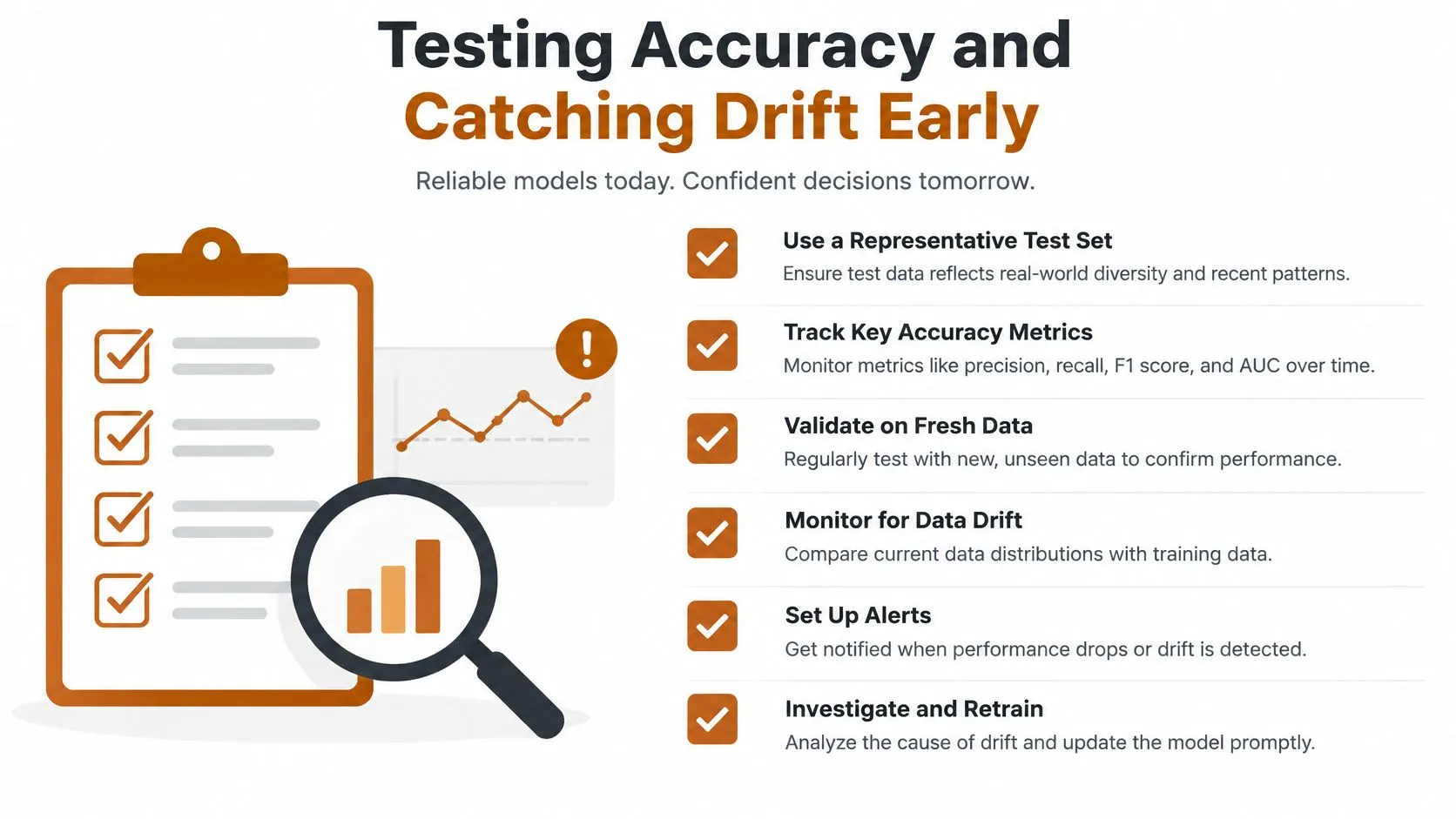
Build a stratified test set covering templates, languages, geographies, pagination states, missing fields, consent banners, lazy-loaded media, and A/B variants. Validate against independently labelled records rather than the parser’s own previous output, or you will confirm your errors back to yourself. Refresh the labelled set periodically, because a stale test set measures a version of the site that no longer exists.
Four Error Types
Production failures cluster into four classes, and each calls for a different fix. Attribute errors select the wrong field, such as pulling a list price when the page shows a sale price. Grounding failures return a value that was never in the source. Pinpointing errors pull correct text from the wrong location, like the price of a recommended product further down the page. Locator errors occur when the XPath or CSS selector stops matching after a markup change. The first three all produce records that satisfy the schema while containing wrong values.
Schema-valid output can still be wrong. Spot-check extracted values against the live rendered page, store selector or model evidence with a confidence score on each record, and quarantine low-confidence records for review before they enter the dataset.
Drift Monitoring
Run canary URLs on every job and alert when required-field presence drops, value distributions shift, DOM signatures change, or record counts move materially from baseline. Most extraction failures arrive as gradual drift rather than total outage, and the approaches in this guide to monitoring website changes over time catch markup shifts before they take a template offline.
Multi-page workflows compound errors. A navigation failure on page two can silently truncate a listing run, so a feed expecting a full catalogue might publish only the first page of records unless a record-count alert intervenes. Checkpoint progress between pages, keep page states idempotent, and run an independent completeness check before anything reaches downstream systems.
Choosing Delivery Formats That Match Downstream Systems
| Format | Best for | Watch for | Typical cadence |
|---|---|---|---|
| CSV | Spreadsheet review and BI imports of flat fields | Nested data does not fit; fix encoding and delimiters | Daily or weekly files |
| JSON | Nested records, API ingestion and ML training data | Schema must be versioned | Per run or streamed |
| Webhook | Event alerts such as price drops or stock changes | Receiver needs retries and idempotency keys | Per event |
| S3 drop | Data lake and warehouse loads | Partition by date and source | Scheduled |
| PDF report | Compliance reviews with exceptions highlighted | Not machine-readable; pair with a CSV | Monthly, plus exception alerts |
Deliver a versioned dataset, not raw HTML, with the provenance fields defined during extraction attached to every file or event. The format should follow the receiver. Analysts reviewing flat fields work fastest in CSV, while API consumers and training pipelines need JSON that preserves nesting.
Cadence follows the decision the data supports. Daily delivery suits price and SERP tracking, weekly files suit market research snapshots, and monthly PDF compliance reports work when exception-triggered alerts run in between. Pair every PDF with the CSV from the same run, because reviewers need readable exceptions and systems need machine-readable records.
Schema discipline: A renamed field silently breaks a downstream dashboard unless the schema version increments and receivers are told before release.
Webhooks deserve particular care. Receivers must handle retries and duplicate events through idempotency keys, or a single price drop will be recorded several times.
Deciding Whether to Build or Buy Your Pipeline
A team with a few stable sources and an engineer on call has a different problem from a team tracking many retail domains across regions. Treat build vs buy as an operations decision: whoever runs extraction owns provenance records, error budgets, retries, drift alerts, and the late-night page when a selector fails before a compliance deadline.

Score five points, candidly:
- Source count and update frequency: How many domains, and how often must they refresh?
- Expected site-change rate: How often will selectors need re-tuning?
- Proxy and anti-bot needs: Can your team operate that infrastructure lawfully and reliably?
- Output formats and service levels: Who consumes the data, and what happens when a run is late?
- Internal capacity: Who handles monitoring, retries, and drift alerts outside business hours?
If three or more answers point toward managed operations, outsourcing is the signal, a trade-off examined in this comparison of using web scraping services instead of managing extraction yourself. One option is WebscrapingHQ, which runs managed web data operations covering scoping and feasibility estimates, custom parsers combining computer vision and LLM extraction, monitoring and re-tuning, proxy management, and delivery as CSV, JSON, webhooks, S3 drops, or PDF compliance reports.
Either way, run a two-week pilot on three representative sources using the provenance and validation rules above. Measure field-level F1, invalid-record rate, and cost per thousand pages before committing to a schedule.
If your team needs governed extraction with provenance records, drift monitoring, and validated delivery rather than another fragile script, WebscrapingHQ can scope your sources, build custom parsers, and operate the pipeline on a fixed schedule. Visit the site to request a feasibility estimate for your target pages and required output format.
Want this done for you?
Send us the URLs. We'll quote it in 24 hours.
Paste the URL(s) you want scraped. We'll reply within 24 hours with a feasibility check and a ballpark quote.