Jump to section
- Table of Contents
- Why R for Web Scraping and When to Reconsider
- What R does well in practice
- Where the ceiling shows up
- Set up the project like it will survive
- Scraping Static HTML with rvest Step by Step
- A minimal working pattern
- Multi-page jobs need validation, not hope
- Choosing the Right R Package for the Job
- Match the package to the site behavior
- Compare the usual options before you commit
- Handling Pagination, Authentication, and Forms
- Pagination and sessions in one workflow
- Choose the transport before you fight the page
- Anti-Bot Defenses and How Far to Push Them in R
- Start with polite controls
- Know the escalation path
- Storing Data and Running Scrapers on a Schedule
- Write for the next consumer, not the current script
- Scheduling is part of the scraper, not a separate task
- From R Prototype to Managed Web Data Operation
- Recognize the handoff signals
- Choose the endpoint based on the failure mode
You’ve got a deadline, a source site that keeps changing, and a spreadsheet habit that’s starting to break under volume. Maybe you need daily product prices from three marketplaces, SERP snapshots for a keyword set, or multilingual forum posts for a model pipeline. That’s where R programming web scraping earns its keep, not as a clever script, but as a repeatable data-acquisition workflow that can survive real work.
R is strongest when the target is structured HTML and the downstream job stays close to analysis. The same environment that parses pages with rvest can clean columns, normalize text, validate records, and feed modeling or reporting code without a language handoff. It gets weaker when the site is heavily JavaScript-driven, when browser automation becomes the whole project, or when anti-bot work starts to dominate the schedule.
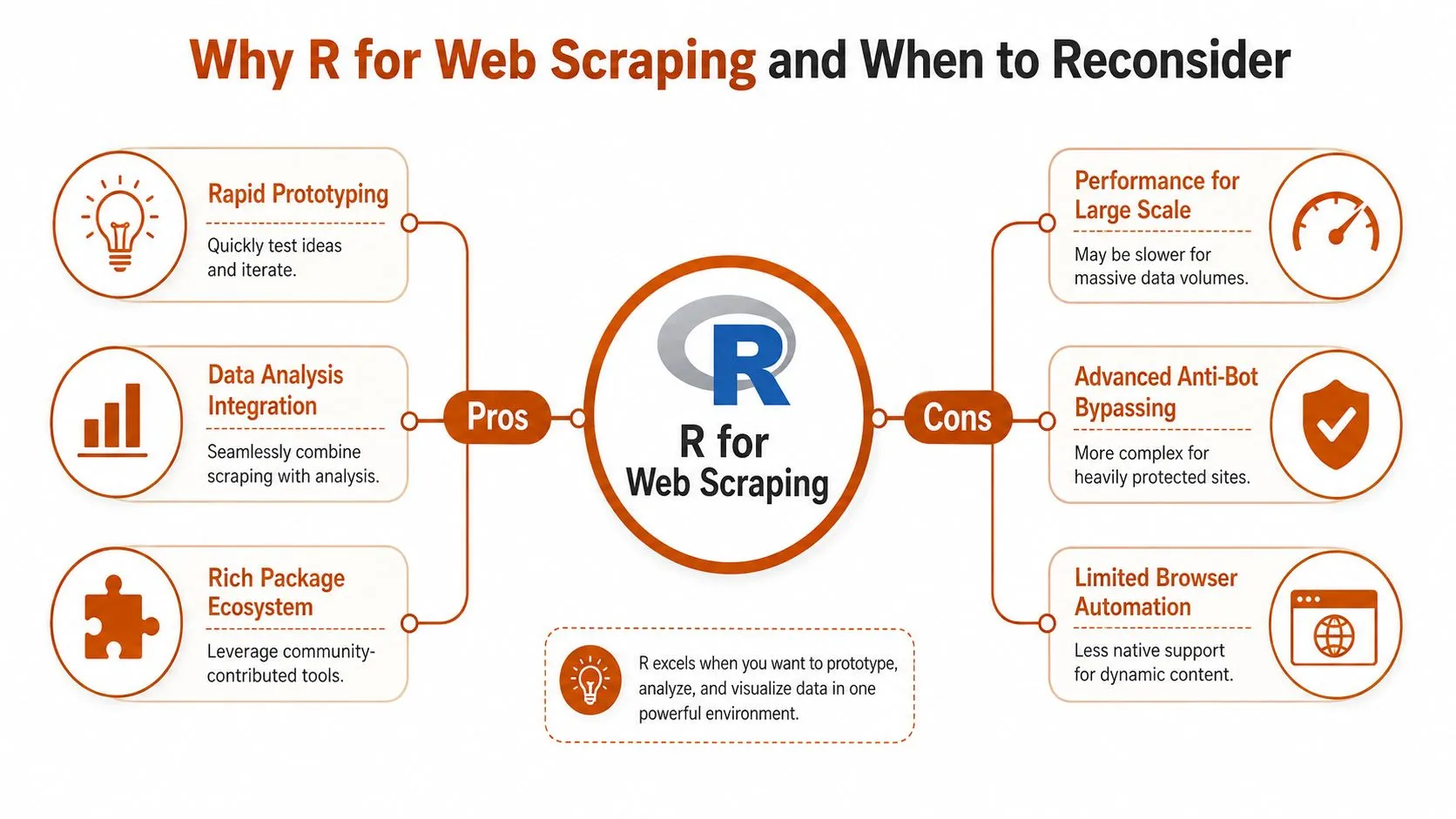
Table of Contents
Open Table of Contents
- Why R for Web Scraping and When to Reconsider
- Scraping Static HTML with rvest Step by Step
- Choosing the Right R Package for the Job
- Handling Pagination, Authentication, and Forms
- Anti-Bot Defenses and How Far to Push Them in R
- Storing Data and Running Scrapers on a Schedule
- From R Prototype to Managed Web Data Operation
Why R for Web Scraping and When to Reconsider
A mid-sized retailer asks for daily prices across three marketplaces. The SEO team wants SERP snapshots for a large keyword list. An AI startup wants forum text in several languages. In each case, the first question isn’t “Can R parse HTML?” It’s “Should this live in R at all, or are we about to build an operational system that needs a different stack?”
What R does well in practice
R shines when the source pages are relatively stable and the output is tabular. The standard workflow is familiar and compact, read_html() to fetch, html_elements() or html_node() to select, then html_text2() or html_table() to extract. That same fetch, select, extract pattern works for headlines, links, image URLs, prices, and table data, which is why so many production scrapers start as small rvest scripts before they become pipelines. The older html_nodes() syntax still shows up in legacy code, but modern projects are cleaner when you stick to the newer selection helpers documented in current guides like the practical rvest overview at R Statistics.
Its strength is that scraping and analysis can stay in one place. You can select a table, convert the text, standardize names, and hand the result straight into dplyr, stringr, or modeling code without exporting into another runtime first. That matters when the business wants fast iteration, not a separate data engineering project with its own deployment path.
Practical rule: if the page is static enough that you can explain the extraction in one sentence, R is probably a good fit.
Where the ceiling shows up
The ceiling arrives when pages depend on browser behavior more than HTML. JavaScript-rendered content, infinite scroll, login state, and anti-bot checks can all push an R scraper from “clean extraction” into “mini browser operations team.” That’s where tools like RSelenium or seleniumPipes may help, but the maintenance burden rises fast, especially if the site changes often or uses layered defenses. For a strategic comparison between data acquisition methods, the trade-off with API access is usually worth reviewing alongside scraping, and this WebscrapingHQ guide on scraping versus APIs is a sensible reference point.
There’s also a practical boundary around scale. R can loop politely across many pages, but once you’re managing proxy rotation, browser farms, CAPTCHA friction, and constant page churn, the cost of keeping the pipeline alive can exceed the value of the data. At that point, the decision isn’t about syntax anymore. It’s about operations, monitoring, and who owns the failure rate.
Set up the project like it will survive
The most common mistake is treating setup as an afterthought. Start with a current R build, create a separate RStudio Project for the scraping job, and lock the dependencies with renv so six months from now you’re not debugging package drift. Install the base toolkit in one go, rvest, httr, xml2, stringr, jsonlite, and dplyr, then keep the project isolated from whatever else is on your machine.
A scraper that works only on the day you wrote it isn’t a scraper. It’s a demo.
Windows, macOS, and Linux each fail in different ways. On some systems, libcurl or SSL certificate issues show up first. If you add RSelenium, Java becomes part of the conversation too, which is why browser automation in R can feel heavier than people expect. The payoff for doing this carefully is boring in the best way, a cloneable project folder that opens cleanly, installs cleanly, and doesn’t force a fresh round of environment debugging every time a new page needs to be added.
Scraping Static HTML with rvest Step by Step

Static HTML is the easiest place to make R pay off. If the data is already in the page source, the work is not about wrestling the browser, it is about pulling the right nodes, checking that the markup still matches your assumptions, and writing extraction code that survives minor site edits. A clean rvest workflow stays small and predictable, fetch the page, select the target, extract the values, then tidy the result before anything gets saved.
A minimal working pattern
Start with read_html() for the URL, then use a CSS selector with html_elements() or html_element() to target the node you care about. From there, html_text2() gives you readable text, html_attr() pulls attributes such as href or src, and html_table() turns a table into a data frame when the markup is cooperative. Current teaching material at LADAL’s web scraping tutorial follows this same structure, and that is because the failure modes stay simple while the page stays static.
A basic pattern looks like this in practice:
- Fetch the page: use
read_html()on the target URL. - Select the node: prefer a readable CSS selector over a more brittle path.
- Extract the field: use
html_text2(),html_attr(), orhtml_table()depending on the content. - Clean immediately: standardize strings with
stringrbefore you bind multiple pages together.
Selector choice is where a scraper stays maintainable or turns into a mess. CSS selectors are usually easier to read and revise than XPath on everyday content pages, especially when a site redesign moves one wrapper div and breaks a brittle path. For a closer look at selector strategy, mastering CSS selectors for web scraping is worth reading before you hard-code a pattern you will have to support later. The same selector discipline also makes it easier to scale one page into many pages because you can reuse the same extraction function across the whole list.
Multi-page jobs need validation, not hope
For pagination, build a URL vector and loop through it with a polite delay. Reusing the same extraction function across pages is the right instinct, but the second instinct should be validation. Empty results are often silent failures, not real no-data pages, so count rows, inspect a few samples, and keep a retry path for pages that return an unexpected layout.
If a selector returns nothing, assume the page changed before you assume the site has no data.
That advice saves more time than a clever helper function. Pages drift, wrappers get renamed, and table structures change under you without warning. The safer R scrapers do not trust a single pass. They extract, validate, and then write downstream only when the shape still matches the contract you expected.
Choosing the Right R Package for the Job
A lot of wasted time comes from using the wrong package for the wrong layer of the problem. rvest is the presentation layer, xml2 is the parser underneath it, and httr is where you get control over the request itself. Once the page stops being a plain HTML document, the package choice starts to matter as much as the selector.
Match the package to the site behavior
Use rvest when the HTML already contains the data. Use httr when you need headers, cookies, session state, or request control. Use RSelenium or seleniumPipes when you need the browser to click, scroll, or execute client-side scripts. V8 can be useful when the site’s JavaScript is the primary source of the data but you don’t want a full browser session for every request.
On a simple product listing page, a selector such as .product-card .price plus html_text2() is enough. On a modern app shell that loads content after render, the same selector may return nothing until the page finishes executing. That’s the moment to ask whether the page exposes a JSON endpoint, whether a headless browser is justified, or whether the project should move out of R entirely.
Compare the usual options before you commit
| Package | Best for | JavaScript support | Operational complexity |
|---|---|---|---|
rvest | Static HTML extraction | Low | Low |
httr | Request control, headers, sessions | Low | Moderate |
xml2 | Parsing and DOM handling | Low | Low |
RSelenium | Browser-driven workflows | High | High |
seleniumPipes | Browser automation with Selenium | High | High |
V8 | Running page scripts without a full browser | Moderate | Moderate |
The table is the decision framework. If the site is static, keep it simple. If the site needs a session but not a browser, httr often gives you more control than people expect. If the site is heavily scripted and the data can’t be reached any other way, browser automation is possible in R, but it’s rarely the easiest long-term maintenance choice.
A broader evaluation of extraction options is also useful when a team is choosing between scrapers, connectors, or managed services, and this WebscrapingHQ overview of data extraction tools fits that conversation well.
Handling Pagination, Authentication, and Forms
Once a job leaves the first page, the work becomes less about extraction and more about state. Pagination can hide in query parameters or in link hrefs. Authentication may require cookies, custom headers, or a form POST. Modern sites often mix all three, which is why demo code that only reads a public page doesn’t survive long in production.
Pagination and sessions in one workflow
The practical approach is to inspect the page source, find the next-page pattern, and then decide whether the next page is just a URL variation or a true session-dependent request. If the catalog is public, looping over pages with read_html() may be enough. If the site expects a login, httr becomes the workhorse because it can send headers, accept cookies, and keep a session alive across requests.
Form handling is where many scrapers get sloppy. Login forms often hide tokens in the HTML, and those tokens need to be collected before the POST happens. If the token expires mid-run, the scraper may fail halfway through a job and produce a partial dataset that looks valid until someone audits it later.
Choose the transport before you fight the page
| Situation | Best starting point | Why it usually wins |
|---|---|---|
| Static pagination | rvest | The next page is just another URL |
| Login wall with cookies | httr | Session state matters more than markup |
| Form submission | httr | POST requests are easier to control |
| JavaScript-only content | RSelenium or seleniumPipes | The browser must render the state |
| Script-generated data endpoint | httr or V8 | Calling the underlying request is simpler than visual scraping |
That matrix keeps teams from overengineering early. If the page already exposes a JSON endpoint in the network calls, pulling the endpoint directly is usually cleaner than scraping the rendered view. If the business only needs a stable feed, the smartest move might be to stop fighting the front end and consume the underlying data layer instead.
Anti-Bot Defenses and How Far to Push Them in R
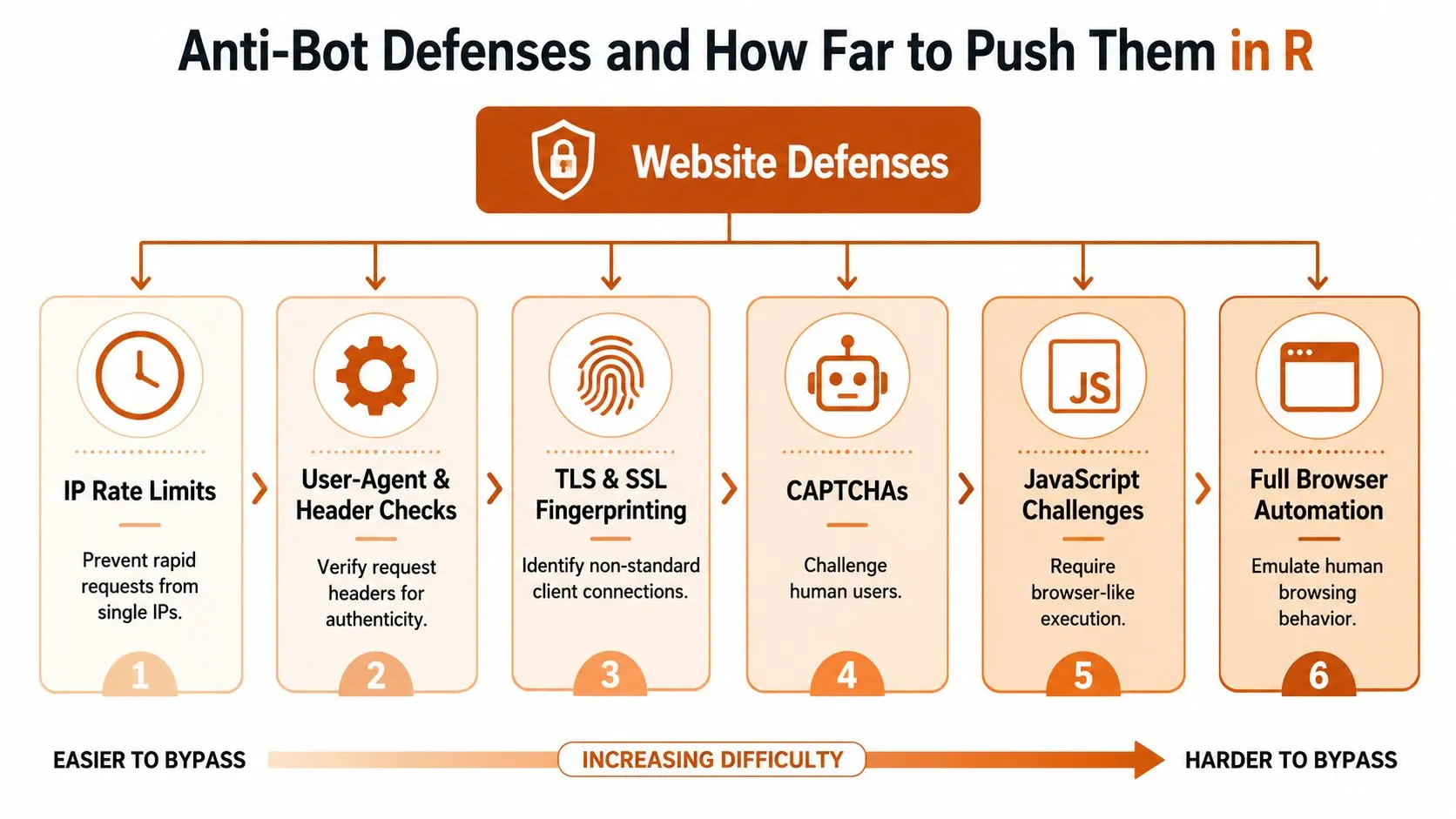
Sites defend themselves in layers, and R users usually hit those layers in order. The early ones are cheap to handle. The later ones are a signal that the site owner doesn’t want your traffic, or that your collection method has become a full-time maintenance problem.
Start with polite controls
The first defense is usually rate limiting. The conservative R guidance is still the right baseline, check robots.txt, follow the site’s Terms of Service, and use about one request per second when no crawl-delay is specified, as described in the R scraping teaching resource at SMAC’s web scraping notes. That rule is not about etiquette alone. It reduces the chance of tripping simplistic bot filters and helps you build a crawl that behaves like a careful human session instead of a bursty script.
From there, user-agent and header checks are the next obstacle. httr can set headers directly, which lets you make your requests look consistent and explicit. Cookie sessions matter too, especially on sites that gate data behind a logged-in experience or that expect continuity across page views.
Know the escalation path
The harder problems are TLS fingerprinting, CAPTCHA challenges, and JavaScript-based verification. At that stage, rotating user agents is only a partial fix, and proxy rotation becomes part of the design whether you like it or not. This WebscrapingHQ guide to static versus rotating proxies is a useful reference when you’re deciding how much of that burden you want to absorb yourself.
- If the site only checks request rhythm: slow down and cache results.
- If headers are being checked: set them deliberately with
httr. - If logins are expiring: persist cookies and re-authenticate cleanly.
- If CAPTCHAs are recurring: you’re no longer in a simple R scripting problem.
- If fingerprinting blocks a meaningful share of requests: the project has outgrown casual DIY scraping.
That last point is the honest one. When CAPTCHA solving, proxy procurement, and constant re-tuning become normal operating work, the build-versus-buy question changes. A managed pipeline can absorb proxy management, retries, and anti-bot mitigation as part of the service, which is often a better use of engineering time than hand-maintaining evasive logic inside an R script.
Storing Data and Running Scrapers on a Schedule
A scraper that runs once is a proof of concept. A scraper that runs on a schedule is a data product. The difference is less about extraction syntax and more about what happens after the crawl succeeds or fails.
Write for the next consumer, not the current script
CSV is still the simplest handoff for analysts. JSON fits APIs and nested records. Parquet is the better choice when jobs get larger or when you want efficient downstream processing. If the data is landing in a warehouse or operational database, push it through DBI and odbc instead of stacking up flat files that somebody has to move later. For a practical view of how storage choices connect to broader hygiene, the article on database management best practices is a strong companion read.
Scheduling is part of the scraper, not a separate task
On Linux, cron is the standard answer. On Windows, taskscheduleR does the job. GitHub Actions can run lightweight scheduled pulls when the environment is simple and the access rules are clear. A tiny Shiny admin page can also be enough for on-demand runs if the team wants a manual trigger without giving everyone terminal access.
The rest of the scaffold should be boring and visible:
- Structured logging: record start, finish, and error states.
- Retry logic: use exponential backoff for transient failures.
- Content hashing: detect whether a page changed before you reprocess it.
- Health checks: send a concise completion email with record counts.
That combination is what separates a utility script from a pipeline someone can trust on Monday morning. It also exposes the jobs that are becoming more expensive than they should be, which is usually the moment to re-evaluate the stack instead of layering on more brittle fixes.
From R Prototype to Managed Web Data Operation
Most successful R scraping projects follow the same arc. They start with rvest, get hardened with httr and a schedule, and then run long enough to hit one of three walls, scale, anti-bot escalation, or schema churn across sources. That’s when the key decision appears, keep extending the R system or hand the operations to a team built for web data delivery.
Recognize the handoff signals
If the site owner changes HTML often, your selectors will drift and the maintenance queue will grow. If the site pushes browser challenges or CAPTCHA friction into the normal path, the work shifts from extraction to defense handling. If the business needs the same feed across multiple countries or languages, the orchestration burden grows even when the parsing code itself stays small.
A managed option becomes rational when the project needs monitoring, retries, proxy management, and delivery guarantees more than it needs new scraping logic. That doesn’t mean R was the wrong starting point. It means the prototype did its job and surfaced the operating reality early enough to make a smarter decision.
Choose the endpoint based on the failure mode
If the site offers an API, use it. If the data source is stable and the maintenance burden is tolerable, keep the scraper in R. If the data is important but the operational load keeps climbing, move to a dedicated service or a managed web data operation. WebscrapingHQ’s overview of why teams move to managed scraping services fits that decision point, especially when the underlying issue is reliability rather than extraction syntax.
WebscrapingHQ is one option for teams that want a production web data operation instead of maintaining the pipeline themselves. It handles custom extraction, monitoring, retries, proxy management, and ongoing changes when source sites move.
The cleanest scraper is the one you don’t have to wake up to repair.
That’s the true threshold. R remains excellent for prototyping, structured extraction, and analysis-heavy workflows, but it isn’t a free pass around operations. When the business depends on the feed and the page owners keep changing the rules, the right answer is often to stop treating scraping like a side script and start treating it like a managed service.
If you want the scraping work to stop living in fragile one-off scripts, WebscrapingHQ can build and run the pipeline for you, including monitoring, retries, and anti-bot handling. Visit WebscrapingHQ to see how a managed web data operation fits your R workflow and whether it’s time to move from prototype to a service that can stay up without weekend interventions.
Want this done for you?
Send us the URLs. We'll quote it in 24 hours.
Paste the URL(s) you want scraped. We'll reply within 24 hours with a feasibility check and a ballpark quote.