Jump to section
- Table of Contents
- Why the Web Scraping vs API Question Is Usually Framed Wrong
- The real decision is field by field
- The three questions that actually matter
- How Each Access Model Actually Works
- What APIs do well in practice
- What scraping requires managing
- Reliability, Speed, and Cost Compared
- Reliability favors the contract
- Speed and cost are tied together
- Legal, Compliance, and ToS Risk
- APIs are cleaner because the permission is explicit
- Scraping lives in the gray areas
- Enterprise Use Cases That Decide the Choice
- Price monitoring is rarely one-method pure
- Ad verification depends on what the page looks like
- AI training data pipelines need breadth
- Building a Hybrid Pipeline Without Schema Headaches
- Normalize once, then tag the source
- Cadence and versioning prevent quiet drift
- In-House Engineering vs Managed Web Data Operations
- What you actually own if you build scraping yourself
- A decision checklist that actually works
Most advice on web scraping vs API is lazy. It tells teams to “use an API when you can, scrape when you must,” then stops before the decision gets real, which is where production work usually breaks. The better framing is narrower and more useful, which data field needs to come from which source, on what schedule, and with what tolerance for change.
| Criterion | API | Web Scraping |
|---|---|---|
| Data shape | Structured, schema-stable payloads | Parsed from visible page content |
| Reliability | Higher when the contract holds | More brittle when markup or defenses change |
| Speed | Usually faster and cleaner | Slower because it simulates browsing |
| Coverage | Limited to exposed fields | Broader if the data is publicly visible |
| Maintenance | Lower if the provider keeps the contract stable | Higher because sites change without notice |
| Best fit | Clean, permitted, transactional data | Missing fields, public pages, competitive coverage |
A useful rule is simple. Start with the API if it exists, is reliable, and fits the budget. Use scraping only for the gaps, the long tail, or the sources that never offered a usable endpoint in the first place. That’s not compromise, it’s how production pipelines stay alive.
Table of Contents
Open Table of Contents
- Why the Web Scraping vs API Question Is Usually Framed Wrong
- How Each Access Model Actually Works
- Reliability, Speed, and Cost Compared
- Legal, Compliance, and ToS Risk
- Enterprise Use Cases That Decide the Choice
- Building a Hybrid Pipeline Without Schema Headaches
- In-House Engineering vs Managed Web Data Operations
Why the Web Scraping vs API Question Is Usually Framed Wrong
The binary framing is the mistake. Production teams rarely choose one access model forever, they choose a source strategy, then mix methods by field and cadence. A retailer’s SKU, price, and availability might come from an API on one marketplace, then from scraped pages on a smaller competitor that never exposed those fields cleanly.
The real decision is field by field
APIs are a much newer, formalized access model, and the modern ecosystem accelerated after REST was introduced in 2000 by Roy Fielding, while scraping works by parsing public HTML that was never designed as a clean data contract history of APIs and scraping. That difference matters because one model is built for machine-to-machine exchange and the other is built to interpret whatever a browser renders.
Practical rule: if the field already exists in an API and the contract is stable, take the API and move on. Scrape only when the endpoint is missing, incomplete, or priced like a punishment.
The better mental model is layered. Use the API for fields with strong coverage, use scraping for missing attributes, and decide separately for each source whether freshness, stability, and cost justify the complexity. Teams that treat the whole problem as a single choice end up overengineering the easy sources and underplanning the hard ones.
The three questions that actually matter
The first question is whether an API exists. The second is whether it’s affordable and stable enough to trust in production. The third is whether it exposes everything you need, not just the convenient fields the provider decided to publish.
When teams answer those three questions, the result is often a hybrid pipeline, not a purity test. That’s why beginner comparisons miss the operational reality and why seasoned teams build source-specific policies instead of global rules. If one source gives you clean endpoints and another gives you only rendered pages, pretending those are the same problem just wastes engineering time.
How Each Access Model Actually Works
An API call and a browser scrape both start with a URL, then split immediately into different operating models. An API request hits a documented endpoint, usually with authentication, declared rate limits, and a predictable response format such as JSON or XML. Scraping fetches the page like a browser would, then extracts data from HTML, the DOM, or rendered output after JavaScript runs.
What APIs do well in practice
APIs are built around contracts. The provider decides the schema, the pagination rules, the authentication model, and the rate window, then returns structured data that downstream systems can consume without guessing. That is why APIs fit transaction-heavy workflows where predictability matters more than raw surface area.
A stable API still fails, but it fails in narrower ways. The token expires, the quota is exhausted, the schema changes, or the endpoint disappears. Those failures are unpleasant, but they are visible and usually documented before they hit your pipeline.
What scraping requires managing
Scraping starts with the public page, then takes on every operational burden the site throws at it. That includes proxy rotation, JavaScript rendering, browser fingerprinting, CAPTCHA handling, retries, and DOM parsing. A web scraping API abstracts those hard parts so the user sends a URL and receives clean HTML, JSON, or CSV back instead of running browser automation directly how web scraping APIs handle the hard parts.
If you need a support platform API reference that shows how a documented endpoint is supposed to behave, the support platform API docs are a useful pattern to study.
A direct scraper fails differently from an API. It breaks when markup shifts, when a class name changes, when content loads late, or when the site starts treating your traffic like a bot. That is why direct scraping without a maintenance plan becomes a standing ops burden instead of a one-time engineering task. For a related real-time extraction pattern, see the internal guide on how WebSocket-based data extraction works.
Reliability, Speed, and Cost Compared
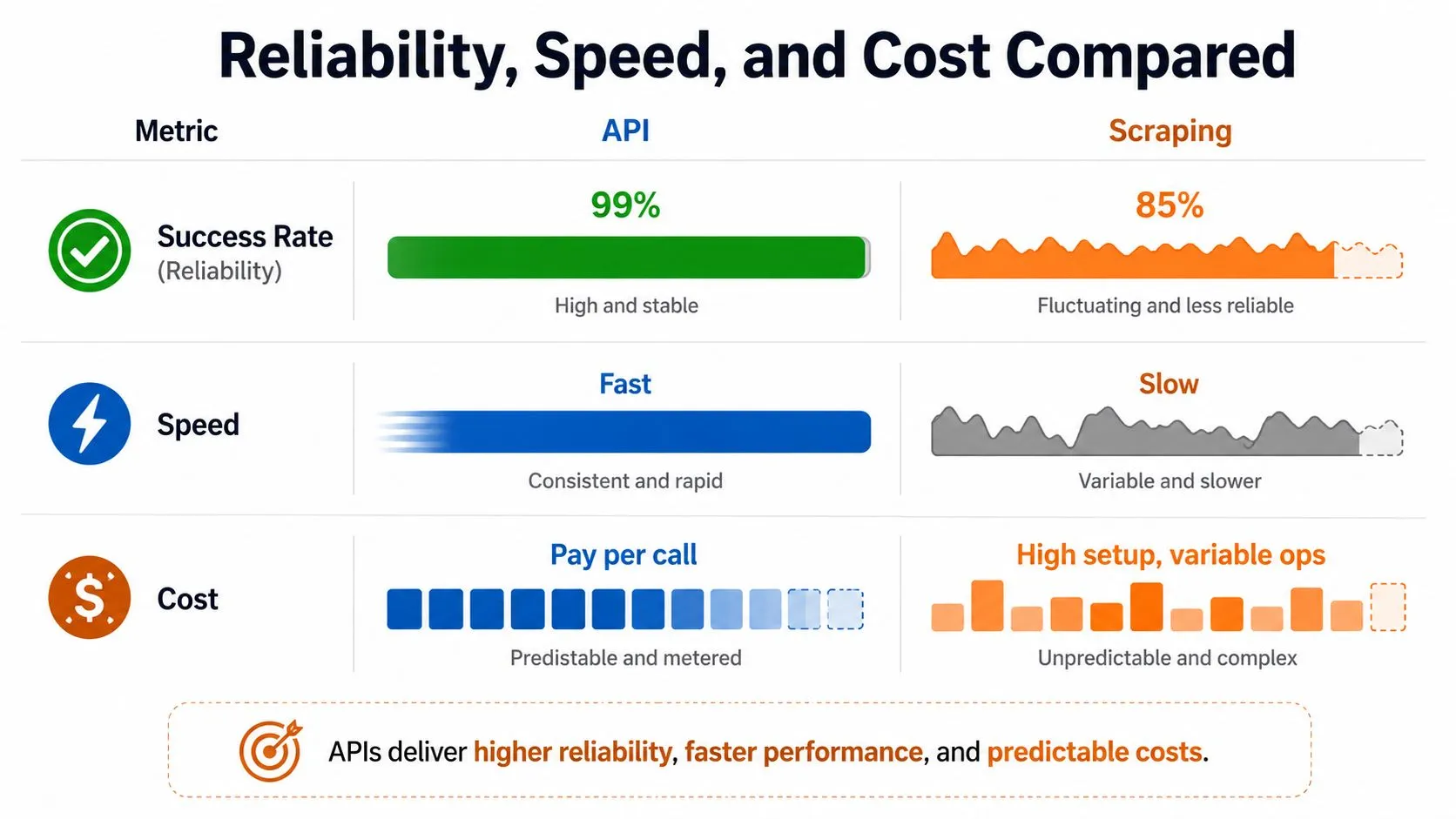
The cleanest way to compare web scraping vs API is through the metrics production teams feel, success rate, speed, and price benchmark criteria for scraping infrastructure. That framing exposes the trade-offs, not the marketing version.
| Criterion | API | Web Scraping |
|---|---|---|
| Reliability | Usually stronger because the schema is explicit | Depends on page structure and anti-bot defenses |
| Speed | Typically faster because the response is already structured | Slower because rendering and parsing add overhead |
| Cost | Often metered and easier to forecast | Less visible upfront, then heavier in proxy, compute, and maintenance |
| Maintainability | Lower ongoing burden if the provider is stable | Higher ongoing burden because site changes create breakage |
Reliability favors the contract
APIs are usually more reliable because they return structured payloads directly. The provider has already decided what the fields mean, so your parser doesn’t need to infer whether a value came from a product card, a hidden span, or a late-loaded fragment. With scraping, the page layout is part of the dependency graph, which means any site redesign can become an incident.
The hidden cost is maintenance, not just extraction. Every anti-bot change, selector drift, or rendering issue creates work for the team that owns the pipeline. That’s why teams underestimate scraping when they price only infrastructure and ignore the engineering time needed to keep it running.
Speed and cost are tied together
APIs are usually faster because they return JSON, XML, or cleaned content instead of asking your code to render a page and parse the DOM. Scraping has to simulate browsing, which adds latency before the first useful byte reaches your system. If the site is JS-heavy or protected, that overhead gets worse.
Cost is the part many teams misread. API pricing looks obvious because it is metered. Scraping looks cheap until you count proxies, compute, retries, monitoring, and the engineer who keeps patching anti-bot failures at 11 p.m. For a practical breakdown of direct and indirect extraction costs, the internal comparison on automated vs manual data extraction cost is worth reading.
My take: if a clean API covers the field you need, don’t build a scraper to save pennies. You’ll usually spend more on maintenance than you ever save on requests.
If you’re evaluating API usage for another workflow, the same discipline helps when you want to monitor and optimize OpenAI costs. The method is the same, meter the source, track the contract, and watch the operational burden, not just the invoice.
Legal, Compliance, and ToS Risk
Legal risk is not a generic warning label. It changes with the source type and with how you use the data. An official API with a clear license gives you contractual access within stated limits. Scraping public pages sits in a different posture, where site terms, robots controls, blocking behavior, and the purpose of the data all shape the risk profile.
APIs are cleaner because the permission is explicit
With an official API, the provider tells you what is allowed. That does not make everything free or unrestricted, but it does create a clearer lane for permitted use, rate compliance, retention rules, and auditability. Partner APIs can still be restrictive, yet they are easier to defend in a review than trying to infer permission from a public web page.
That difference matters in procurement and security reviews. If your team is asking whether a data source can be used in a customer-facing workflow, an API contract gives legal and operations teams something concrete to review. A scraped source usually starts with ambiguity and forces everyone to argue over intent, access method, and downstream reuse.
Scraping lives in the gray areas
Public visibility does not automatically mean unrestricted reuse. A site may expose content in the browser while still objecting to automated access through its terms, its technical controls, or both. If you are republishing the data, redistributing it, or using it in a commercial workflow, the risk profile is more serious than if you are only consuming it internally.
A concrete example helps. A team that scrapes a retailer’s catalog for price comparison may be fine for internal analysis, then runs into trouble the moment it republishes product pages or refreshes them at scale after the retailer’s terms forbid automated collection. The same source, the same data, and a different use case can move the project from tolerated to disputed fast.
For a broader security lens on proxying, controls, and operational exposure, the internal note on AI web scraping security is useful because it treats access mechanics as part of the risk model, not an afterthought. Proxies, rotating IPs, and browser automation do more than keep requests alive. They also widen the audit trail you have to explain if someone asks how the data was collected and whether the collection behavior matched the source’s terms.
Practical advice: if the source has an official API, treat scraping as a fallback, not a default. That one decision removes a lot of compliance ambiguity before it turns into a review-cycle problem.
A good legal review starts with source classification. Official API, partner API, public page, or protected page. Then it asks whether the use is internal enrichment, customer-facing product output, or redistribution. That sequence is much more useful than the usual advice to “be careful,” because it maps directly to the risk teams have to sign off on.
For a tighter checklist on legal exposure, web scraping legal risks and mitigation is worth keeping in the review packet. It is the kind of reference that helps engineering and legal speak the same language before a source becomes a production dependency.
Enterprise Use Cases That Decide the Choice
Enterprise use cases kill abstract debate fast. Once the workload is real, the question becomes which source covers which field reliably, and which part of the pipeline can tolerate missing data or extra maintenance. In practice, the strongest answer is often hybrid, because no single access model covers every source in a broad market.
Price monitoring is rarely one-method pure
Retail price monitoring usually starts with the major marketplaces, where an API may cover the most stable product fields. Then teams scrape the smaller retailers, regional stores, or brand sites that don’t expose the same schema. That’s how the pipeline stays broad enough to be useful without forcing every source into the same access pattern.
The operational logic is simple. Use the API where it exists and is stable, then scrape the long tail where coverage matters more than contractual neatness. Trying to force the same method onto every retailer just produces either incomplete coverage or unnecessary maintenance.
Ad verification depends on what the page looks like
Ad verification leans heavily on visual capture and page interpretation because the creative, placement, and surrounding context aren’t always exposed in a nice API. A screenshot or rendered page often matters more than a clean JSON record, which pushes the workflow toward scraping or browser-driven extraction. The key signal is not whether the page has an endpoint somewhere, but whether that endpoint tells you what rendered.
AI training data pipelines need breadth
Training data for AI models usually has a different constraint set. The need for breadth, freshness, and source diversity often outgrows what any single API can provide, so scraping becomes the default acquisition method for public web data. APIs still matter, but usually as narrow supplements for structured fields that are already exposed reliably.
The common thread is coverage. When the business needs a complete market map, the pipeline usually ends up combining clean endpoints and parsed public pages, not choosing one ideology.
Building a Hybrid Pipeline Without Schema Headaches
A hybrid pipeline only works if the schema stays disciplined. The mistake is to combine API responses and scraped payloads at the ingestion edge, then let downstream consumers guess which source produced which field. That creates reconciliation noise, broken transforms, and arguments about which value should win when the two sources disagree.
Normalize once, then tag the source
The right pattern is a unified schema layer. API fields and scraped fields should land in the same structure, but each record should keep source-of-truth metadata so downstream systems know whether the value came from a contract or from parsed page content. That source tagging matters when a field changes shape, disappears, or starts returning conflicting values.
Use reconciliation logic deliberately. If the API says one thing and the rendered page says another, the system needs a rule, not a shrug. For a practical implementation pattern, the internal guide on normalizing web-scraped data with Python is relevant because schema alignment is the part that makes hybrid pipelines survive.
Cadence and versioning prevent quiet drift
APIs often tolerate higher-frequency polling than scraping because they’re built for predictable machine access. Scraping can still run frequently, but each increase in cadence raises the chance of blocks, overhead, or maintenance churn. That means the schedule should match the source, not the other way around.
Version pinning matters too. APIs deprecate fields, pages change layouts, and the pipeline needs a clear way to separate old mappings from current ones. Without that discipline, the hybrid stack becomes a pile of brittle one-offs that only the original engineer understands.
Bottom line: hybrid doesn’t mean messy. It means each source keeps its own failure model, and the schema layer hides that complexity from the rest of the stack.
In-House Engineering vs Managed Web Data Operations
Once the sources multiply, the build-vs-buy question gets sharper. API integration usually stays in-house because the provider already absorbs most of the hard parts. Scraping is different. Proxy management, anti-bot handling, browser rendering, retries, monitoring, and schema maintenance do not stop after setup, they return every time a source changes.
What you actually own if you build scraping yourself
If your team owns the scraper, it owns the failures too. Someone has to watch blocked requests, adjust headers, rotate proxies, re-test selectors, and keep parsing logic current when site structure changes. That workload climbs fast when the pipeline spans multiple sources or mixed update cadences.
Managed operations change the workload profile. WebscrapingHQ has run production-grade pipelines since 2019, including 1,680 dealer compliance reports per month for a U.S. verification bureau, with managed infrastructure that absorbs site changes, proxy challenges, and CAPTCHA defenses without customer-side maintenance. That does not make the underlying work disappear, it moves it to the operating layer instead of your product team.
A decision checklist that actually works
- Check API coverage first: If the official API gives you the fields you need with acceptable stability, use it.
- Map the missing fields: If the API leaves gaps, decide whether scraping fills them cleanly or creates fragile edge cases.
- Estimate maintenance accurately: Count proxy rotation, anti-bot work, selector upkeep, and retries as real engineering load.
- Separate compliance by source: Do not treat public pages and contractual APIs as the same legal problem.
- Choose hybrid by default for broad coverage: Use APIs where they are strong, scrape where they are necessary.
- Buy managed operations when the scrape surface grows: If the team spends more time keeping data alive than using it, the build path is already too expensive.
For teams that want a managed model instead of inheriting the scraper stack themselves, the internal overview on why choose web scraping services instead of managing it on your own explains the operational trade-offs in plain terms.
The recommendation is straightforward. Use APIs wherever they exist and behave well, use scraping to fill coverage gaps, and move to managed web data operations once the maintenance burden starts competing with product work. That is the point where the data pipeline stops being a feature and starts being a liability.
If you want a team that can scope, build, and run the extraction layer for recurring sources, visit WebscrapingHQ. They handle managed web data operations, custom scraping, and ongoing maintenance for teams that need reliable feeds without turning internal engineers into scraper firefighters.
Want this done for you?
Send us the URLs. We'll quote it in 24 hours.
Paste the URL(s) you want scraped. We'll reply within 24 hours with a feasibility check and a ballpark quote.