
Jump to section
- Table of Contents
- Why Justdial Scraping Is a Real Engineering Project
- How Justdial Serves Its Data
- Start with the entry URL and pagination pattern
- Look for embedded structured state
- Choosing the Right Extraction Method for Each Field
- Lightweight parsing for static fields
- Browser automation for dynamic or gated fields
- A Step-by-Step Extraction Workflow
- 1. Inspect the page source before writing selectors
- 2. Iterate pagination through the known page pattern
- 3. Normalize every row into a stable schema
- 4. Export after normalization, not before
- Handling Anti-Bot Blocking at Scale
- Treat block detection as a first-class check
- Use proxy rotation and geo-aware routing
- Build retries around failure types, not just counts
- Governing the Pipeline for Long-Term Reliability
- Schema versioning keeps downstream consumers safe
- Data quality should cover duplicates and normalization
- Monitoring belongs outside the scraper
- Build Versus Buy for Justdial Data Operations
- When to build
- When to buy
- The signal to switch
- Your First 30 Days of a Justdial Pipeline
You start with a clean idea. Pull Justdial listings for a few cities, maybe a single category, then hand the result to sales or SEO. The first run looks manageable, then the pipeline meets pagination, duplicate listings, changing layouts, and blocked responses, and the “simple scraper” turns into a production system.
That shift is normal on Justdial because the platform is enormous. Its database was reported at approximately 29.4 million listings in 2020, with 536,236 active paid campaigns and 10,984 employees on the platform side, which tells you this isn’t a neat toy dataset but a dense business graph that needs careful extraction, normalization, and de-duplication (Justdial scale summary). A later summary described it as India’s largest local business directory with 30 million+ listings across 1,000+ cities, which reinforces the same point, the hard part is keeping the data clean, not finding it.
Table of Contents
Open Table of Contents
- Why Justdial Scraping Is a Real Engineering Project
- How Justdial Serves Its Data
- Choosing the Right Extraction Method for Each Field
- A Step-by-Step Extraction Workflow
- Handling Anti-Bot Blocking at Scale
- Governing the Pipeline for Long-Term Reliability
- Build Versus Buy for Justdial Data Operations
- Your First 30 Days of a Justdial Pipeline
Why Justdial Scraping Is a Real Engineering Project
A weekend script can pull a few business cards. A production pipeline has to survive the parts a demo never sees, category pages with uneven result density, city pages that paginate differently, records that repeat across nearby localities, and fields that appear in one profile but not the next. That is why Justdial scraping looks more like operating a local-business ingestion system than writing a parser.
The scale changes the failure mode. At Justdial’s size, the job is not to “collect data,” it is to decide which categories and cities matter, how often they should be refreshed, what counts as a duplicate, and where human review belongs when business names, addresses, and phone numbers disagree. The site’s breadth also explains why the same feed gets used for lead generation, competitive intelligence, and local-market research instead of one-off lookups (Justdial scale summary).

Practical rule: if a Justdial job only works on one category page, it is a demo. If it keeps delivering clean rows after the site shifts layout, it is a pipeline.
Traffic behavior also explains why the site stays relevant. Semrush estimated 41.73 million visits to justdial.com in July 2026, with 92.59% of those visits coming from India and 69.3% of traffic from Google organic search (Semrush overview). That pattern points to a search-driven discovery layer, which is why structured fields matter more than page text.
For teams that want a parallel mental model, the mechanics are similar to other local directories. The workflow patterns in this IndiaMart data extractor guide and this Outsoci guide to Google Maps scraping follow the same sequence, discovery, pagination, profile normalization, and ongoing maintenance, even though the source is different.
How Justdial Serves Its Data
Justdial’s surface looks like a normal search site, but the useful data is often present before the page fully paints. In practice, the first check is whether the category or city results arrive as a paginated sequence, and whether the fields you need sit in the response source or are fetched later by client-side code. Once that boundary is clear, selector work becomes much easier.
Start with the entry URL and pagination pattern
A category page usually gives you the first slice of results, then the rest follows a page pattern such as /page-2, /page-3, and so on. The scraper should treat the results page as a structured listing surface, not as a single infinite scroll document. Walking the known pagination path is more stable than guessing when scrolling has finished.
Open DevTools and check whether the next-page links or navigation state are already visible in the page source. If they are, iterate directly instead of waiting on rendered DOM changes. That usually cuts fragile waiting logic and keeps the crawler closer to the site’s own structure.
Look for embedded structured state
One practical clue on Justdial is embedded __NEXT_DATA__ JSON. Community implementations note that this state can carry the fields needed for extraction and is often more stable than scraping text from changing DOM nodes (discussion of Justdial source inspection and __NEXT_DATA__). When that JSON exists, parse it first, then fall back to the rendered page only for fields that do not appear there.
A parser that starts with structured state usually breaks less often than one built around visible text nodes.
If the listing page exposes names, categories, and addresses in the server response, that is the cleanest path. If contact details or expanded fields only appear after interaction, those belong in a browser step, not in the first-pass parser. For JavaScript-heavy pages, the same rule applies elsewhere too, and the Puppeteer guide for JavaScript pages is useful background even outside Justdial.
Choosing the Right Extraction Method for Each Field
The fastest pipeline is usually hybrid. Use a lightweight requests-based parser for fields that are already present in HTML or embedded JSON, then reserve browser automation for the pieces that need rendering or interaction. That split keeps costs down without pretending every Justdial field is equally accessible.
Lightweight parsing for static fields
Names, categories, addresses, and often ratings are the first candidates for a requests and parser stack. They’re usually visible in the listing markup or in embedded state, which means you can extract them without launching a browser for every record. That makes the crawl cheaper, faster, and easier to scale.
This is also where selector discipline matters. CSS selectors are often enough when the structure is regular, while XPath becomes useful when you need to traverse relative relationships or handle awkward nesting. A practical comparison of these approaches is covered in the CSS selectors vs XPath differences guide, and that distinction matters when a page has repeated business cards with slightly different internal structures.
Browser automation for dynamic or gated fields
Selenium comes in when the page needs interaction, popup handling, or dynamic content that doesn’t appear in the initial HTML. Community examples for Justdial use Selenium to locate listing containers, iterate through cards, normalize string values, and export to CSV (GeeksforGeeks Selenium example). That pattern is heavier, but it’s often the right choice when phone numbers, emails, or expanded profile details are hidden behind client-side behavior.
Rule of thumb: if a field is present in the first response, don’t pay the browser tax for it.
The trade-off is operational. Browser automation is more faithful, but it costs more to run and maintain. Requests-based scraping is lighter, but it can miss contact data or break when the page shifts rendering behavior. In production, the answer is rarely “one tool for everything.” It’s usually a narrow parser for the common fields and a browser path for exceptions.
A Step-by-Step Extraction Workflow
The cleanest Justdial workflow starts with a category and city URL, then works outward from the page source. You inspect the first response, identify how pagination is exposed, parse the structured state if it exists, and only then decide whether a browser pass is needed for edge fields. That sequence keeps the scraper tied to the site’s actual delivery model instead of to whatever happens to be visible in a browser window.
1. Inspect the page source before writing selectors
Open the result page, look at the HTML, and search for embedded JSON, navigation state, or obvious card containers. If the page source already contains listing records or page links, use them. If it doesn’t, note which pieces are delayed to client-side rendering and separate those from the fields you can get cheaply.
2. Iterate pagination through the known page pattern
Once the category and city URL are known, iterate page links until you hit your chosen cap or stop receiving records. Don’t rely on scrolling alone. On a directory site, pagination is a more predictable contract than the rendered viewport.
3. Normalize every row into a stable schema
Justdial records are heterogeneous, so your extractor should write into a consistent schema even when some fields are absent. Use one canonical field for business name, one for category, one for address, one for phone number, and one for rating. Empty values are acceptable, inconsistent column names are not.
4. Export after normalization, not before
Write the cleaned output to CSV or JSON after the record is normalized. That way downstream teams see stable column names and don’t inherit parser quirks. If you need both analytic feeds and archival copies, produce both in the final step, not inside the scraping loop.
| Field | Typical Source | Recommended Method | Notes |
|---|---|---|---|
| Business name | Listing card or embedded state | Requests plus parsing | Usually available early |
| Category | Listing card or page metadata | Requests plus parsing | Normalize category labels |
| Address | Listing card or profile view | Requests, then browser if needed | Often has formatting noise |
| Phone number | Profile detail or rendered field | Browser automation when hidden | May require interaction |
| Ratings | Listing card or embedded data | Requests plus parsing | Watch for missing values |
| Reviews | Detail page | Mixed approach | Use browser only if text is loaded dynamically |
For teams comparing directory sources, the same field-design discipline shows up in other platforms too. The extraction logic in local business directories is often similar across sources, which is why cross-source patterns are useful when you design your schema.
Handling Anti-Bot Blocking at Scale
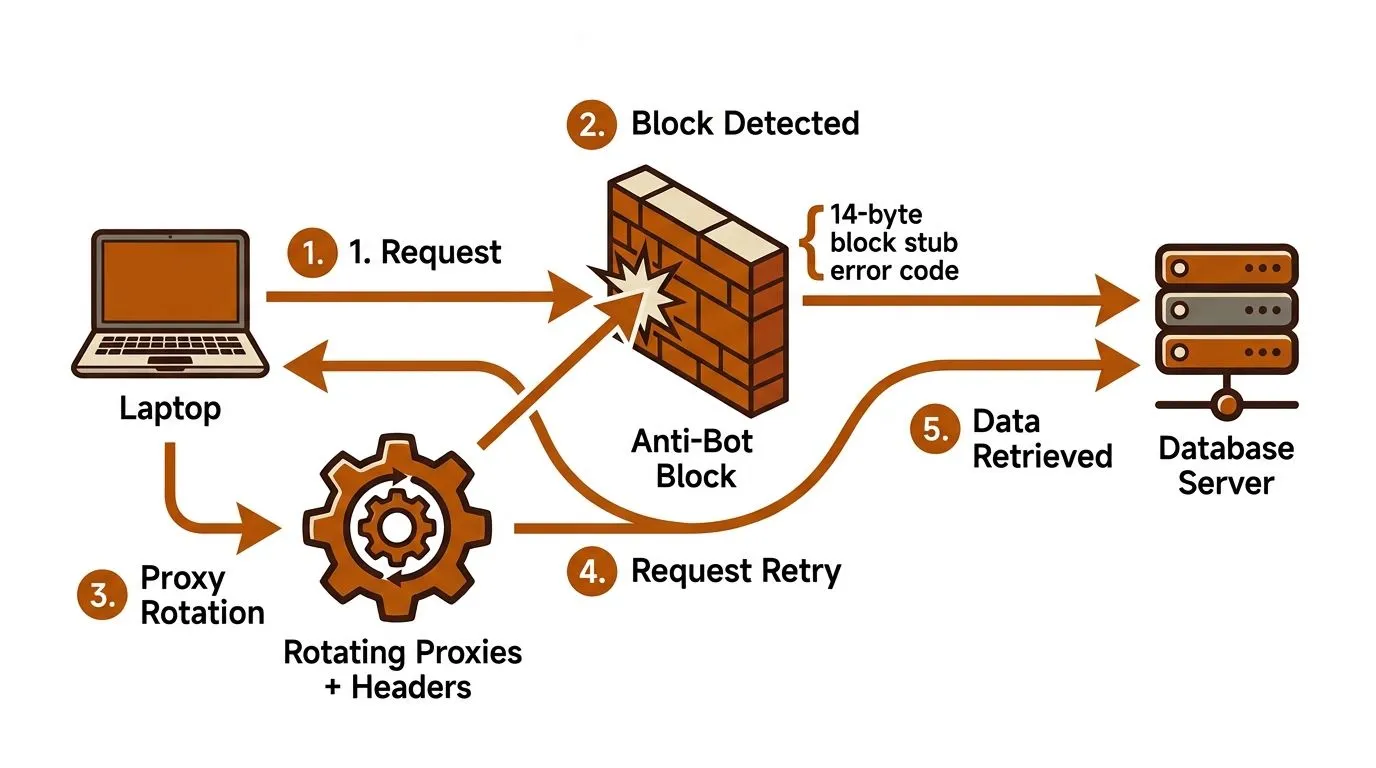
Most Justdial failures don’t come from bad selectors. They come from blocked responses that look like success at the transport layer and junk at the application layer. One public Apify implementation explicitly mentions an India-geo access chain and fallback handling for Justdial’s 14-byte block stub, which is a clear signal that plain requests can return unusable payloads in production (Apify Justdial scraper notes).
Treat block detection as a first-class check
The scraper should inspect response length, status patterns, and content shape before it hands the body to the parser. If a response is suspiciously short or missing the expected listing markers, classify it as blocked, not empty. That difference matters because an empty category and a blocked request require completely different retries.
Use proxy rotation and geo-aware routing
When the site is resistant to direct requests, rotating proxies and regionally accessible requests become normal infrastructure, not a rescue tactic. The practical logic is simple, change the request path, then test whether the actual page comes back. A detailed discussion of proxy selection and rotation strategies is available in the best proxy servers for web scraping guide, and that kind of routing layer is often the difference between a brittle crawler and a working one.
Build retries around failure types, not just counts
A retry on a blocked payload should not behave like a retry on a temporary timeout. If the block appears immediately after a request pattern changes, escalate to a different proxy or provider path. If the parser fails on a valid page, keep the request layer intact and fix the selector or JSON extraction path instead.
The core mental model is blunt. Success rate is an engineering target, not a mystery. If the pipeline can’t distinguish blocked, empty, and malformed responses, it will keep retrying the wrong thing.
Governing the Pipeline for Long-Term Reliability
A Justdial pipeline gets fragile when extraction logic, cleanup logic, and delivery logic all live in the same script. The better pattern is a governance layer that sits above the crawler and decides how records are versioned, validated, and delivered. That separation becomes essential once multiple teams rely on the output.
Schema versioning keeps downstream consumers safe
When a field changes name or shape, downstream systems should not break without warning. Version the schema, document the mapping, and keep backward compatibility checks in place before rollout. That lets you add fields, rename fields, or tighten normalization rules without surprising a sales team or analyst who depends on the feed.
Data quality should cover duplicates and normalization
At Justdial scale, duplicate businesses, location variants, and alternate spellings are normal. The governance layer should decide how to collapse near-identical records, how to handle null values, and when a row needs human review. That’s not a nice-to-have, it’s how millions of listings stay usable after the first crawl.
Monitoring belongs outside the scraper
A scraper can pass unit tests and still drift in production. Monitor row counts, block rates, parser exceptions, and missing-field spikes, then alert when the pattern changes. For maintenance-oriented teams, the long-term scraper maintenance guide is a useful companion because it frames upkeep as a process, not a patch cycle.
Operational truth: if no one watches the output quality, the pipeline degrades quietly.
Governance also clarifies delivery. A recurring feed should have a defined refresh cadence, a schema doc, and a runbook for incident response. That’s what makes the data trusted month after month, even when the site changes underneath it.
Build Versus Buy for Justdial Data Operations
A DIY Justdial pipeline makes sense when the scope is narrow, the freshness requirement is moderate, and your team can own maintenance. It breaks down when the source changes often, the volume grows, or the business expects recurring delivery with low tolerance for gaps. The core question isn’t whether you can build it, it’s whether you want that work living inside your product team.
WebscrapingHQ is one option when you want managed extraction and recurring delivery instead of a script you have to babysit. The company describes itself as a managed web data operations provider established in 2019, with workflows that cover scoping, build, monitoring, retries, proxy management, anti-bot mitigation, and delivery in formats such as CSV, JSON, webhooks, and dashboards. It also cites delivery workloads such as 1,680 dealer compliance reports per month, which is the kind of operational footprint that signals an ongoing service rather than a one-off project.
When to build
Build if you need a limited set of fields, your technical team already owns scraping infrastructure, and the source doesn’t need constant human intervention. That works well for targeted research, proof-of-concept lists, or a narrow regional feed.
When to buy
Buy if the pipeline has to keep running while your internal team focuses on product, analytics, or sales operations. Managed operations are also a rational choice when blocking behavior, schema drift, and retry logic start consuming more time than the data itself. In those cases, the hidden cost is maintenance, not extraction.
The signal to switch
Switch when your output quality depends on a process no one on your team wants to support at 2 a.m. If a crawler needs ongoing proxy tuning, parsing fixes, and delivery checks, it has become an operations problem. That’s the point where a managed service or a dedicated data partner starts making more sense than another round of internal patching.
Your First 30 Days of a Justdial Pipeline
Week 1 should define scope. Pick the target categories, cities, and refresh frequency, then write the schema and acceptance rules for duplicates, null values, and required fields. The goal is not code, it’s a contract.
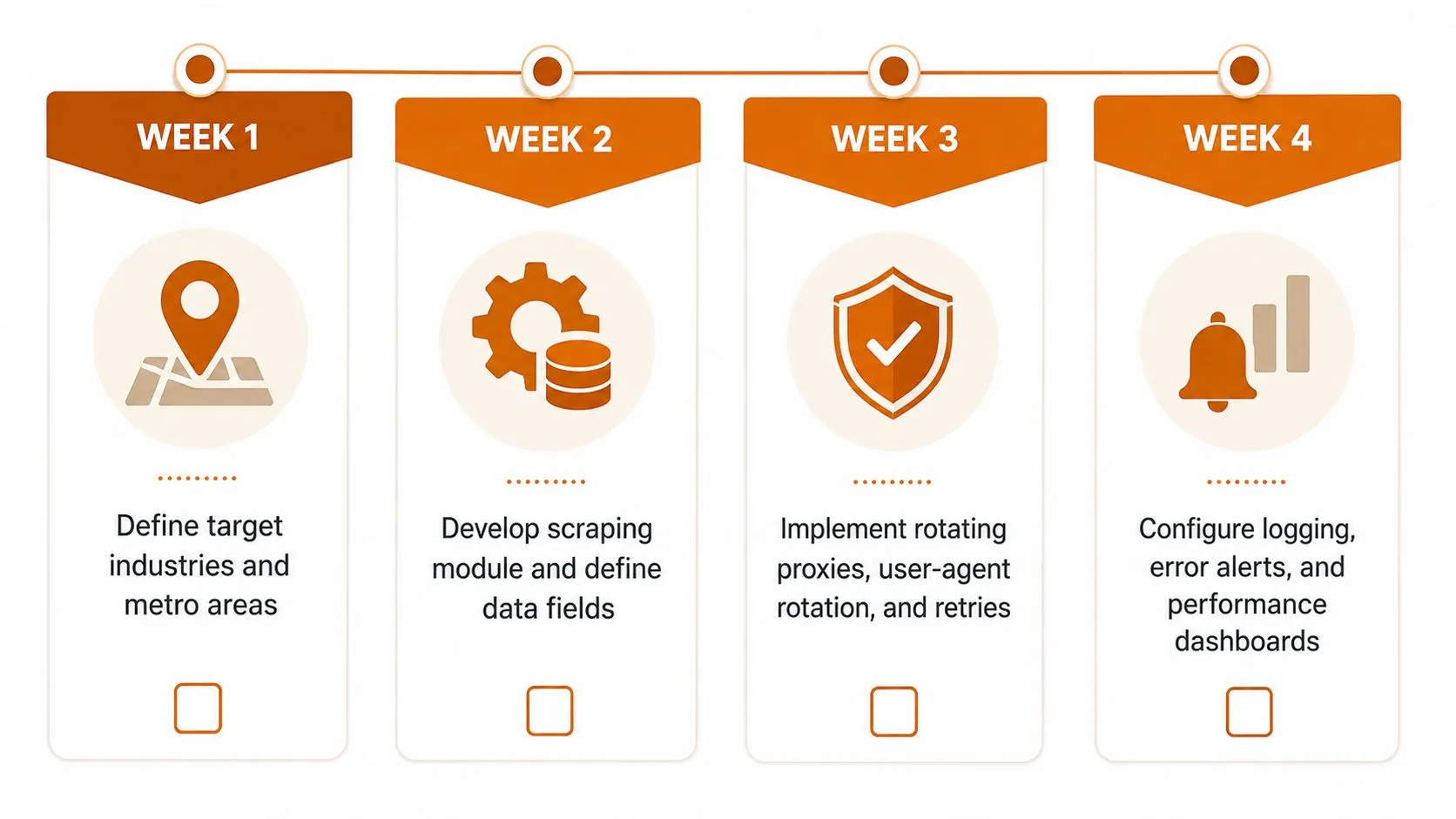
Week 2 is the first extractor. Build the page inspection logic, parse the structured state, and export a clean CSV or JSON sample that downstream users can review. If the sample isn’t stable, stop there and fix the schema before adding more pages.
Week 3 adds anti-bot handling and retries. Put block detection, proxy rotation, and fallback logic into the crawler, then test against the same category across several runs. Week 4 should focus on monitoring, alerting, and the first governance review, with a runbook that says who checks what and when.
A simple first-sprint checklist works better than trying to solve every edge case on day one. Define, extract, harden, then govern. That sequence keeps the pipeline honest and gives you a clean path from prototype to recurring delivery.
If you need a Justdial workflow that survives pagination changes, blocked responses, and ongoing schema drift, WebscrapingHQ can design and run the extraction pipeline for you. Visit WebscrapingHQ to discuss managed delivery, anti-bot handling, and recurring structured feeds for local-business data.
Want this done for you?
Send us the URLs. We'll quote it in 24 hours.
Paste the URL(s) you want scraped. We'll reply within 24 hours with a feasibility check and a ballpark quote.