Jump to section
- Table of Contents
- The Short Version for Busy Readers
- What Web Scraping Does
- Side-by-Side Technical and Operational Differences
- How Crawling and Scraping Work Together in a Pipeline
- Legal Compliance and Bot Defense Realities
- Choosing Between Crawling and Scraping by Business Goal
- Build or Buy and When Managed Services Pay Off
- Frequently Asked Questions About Crawling and Scraping
You’re on a call with product, ops, and engineering. Someone asks for a “scraper,” someone else says you need a “crawler,” and the room starts using the words interchangeably even though the pipeline problem is still unclear. The useful question isn’t which term sounds more technical. It’s whether you need to discover URLs, extract fields, or do both in sequence.
| Criterion | Web Crawler | Web Scraper |
|---|---|---|
| Main job | Find and revisit URLs across a site or sites | Pull specific fields from known pages |
| Typical output | URL inventories, metadata, link graphs, change signals | Structured rows in CSV, JSON, warehouse tables |
| Best fit | Coverage, freshness tracking, recrawl monitoring | Price, stock, reviews, listings, record extraction |
| Operational focus | Deduplication, depth, frontier management, politeness | Selector stability, parsing accuracy, layout resilience |
| Failure mode | Wasted crawl budget, duplicate URLs, missed pages | Broken selectors, partial records, malformed fields |
| Throughput profile | Usually lower because breadth and link discovery take time | Usually higher because pages are already known |
| Anti-bot pressure | Significant at scale, especially when revisiting broad site surfaces | Significant on dynamic or protected pages, especially at field scale |
That separation matters because modern bot volume is already large enough that both layers run in a hostile environment. Imperva reported that automated traffic reached 53% of all web traffic in 2025, up from 51% in 2024, while Cloudflare reported that by December 2, 2025, humans accounted for only 47% of HTML requests on its network, with 44% from non-AI bots and about 9% from AI bots plus Googlebot combined. Those figures don’t just describe the internet, they explain why crawling and scraping have to be treated as production systems, not scripts. (web crawling stats and industry benchmarks)
Table of Contents
Open Table of Contents
- The Short Version for Busy Readers
- What Web Scraping Does
- Side-by-Side Technical and Operational Differences
- How Crawling and Scraping Work Together in a Pipeline
- Legal Compliance and Bot Defense Realities
- Choosing Between Crawling and Scraping by Business Goal
- Build or Buy and When Managed Services Pay Off
- Frequently Asked Questions About Crawling and Scraping
The Short Version for Busy Readers
A team usually reaches this decision in the middle of a real mess. The data request is already live, the target sites are changing, and somebody wants a plan that won’t break the moment the first layout shifts. The right mental model is simple. Crawling and scraping are different stages of the same pipeline, not rival tools.
Crawling is the discovery and revisit layer. A crawler starts with seed URLs, follows links, manages a frontier of pages still to visit, and keeps track of what’s been seen, what’s new, and what should be checked again. Its output is usually URL inventories, metadata, links, and change signals, not a tidy dataset ready for analysis. That’s why crawling is used for search-style indexing, SERP monitoring, change detection, and recrawl-based alerting.
Practical rule: if you don’t yet know the full set of pages, start with crawling.
That rule holds because crawling work is dominated by deduplication, crawl depth, politeness, robots.txt handling, and revisit frequency. The crawler isn’t trying to answer “what is the price on this page?” It’s trying to answer “what pages exist, which ones matter, and when should I come back?”
For a team that already has known pages, scraping is the extraction layer. A scraper takes those pages and turns them into structured rows, usually CSV, JSON, or warehouse-ready records. If you want titles, prices, ratings, addresses, stock status, or review text, you’re in scraping territory. The article from Web Scraping HQ’s web scraping vs API guide is useful if your real choice is between direct extraction and an API-backed source rather than between crawling and scraping.
The rest of this guide stays on that pipeline view. It uses the distinction that matters in production, freshness, coverage, and operating cost, instead of taxonomy for its own sake. That’s the useful lens because teams rarely lose time arguing over definitions. They lose time when they build the wrong layer first and discover too late that the other layer was the missing piece.
What Web Scraping Does
Scraping starts after the page is already known. The scraper requests a specific URL, reads the page, and extracts the fields that matter, often into a table or feed. That shifts the work away from navigation and toward turning messy page content into structured records. A product feed with price, title, availability, and rating is a classic scraping output.
In production, the value of scraping is precision. If a business needs one price per SKU, or one company profile per listing, scraping is the layer that converts page markup into usable downstream data. The parser has to stay stable, because layout changes, renamed CSS classes, and hidden content can break field extraction even when the page still loads fine.
Scraping succeeds when the schema is stable enough to validate, not when the site is perfectly static.
That is why strong scraping systems spend most of their effort on selector resilience, structured validation, and post-extraction checks. Clean output is not just data being pulled. It means the right fields were extracted, they still match the expected schema, and bad records were rejected before they reached downstream systems. If you want a concise reference on that extraction layer, Web Scraping HQ’s what is a web scraping explainer fits the definition well.
Scraping shows up in product catalogs, listings, reviews, lead lists, and training corpora where the source pages are already selected. In a narrower sales workflow, best Sales Navigator scrapers 2026 is a good example of how teams focus on page-level extraction instead of discovery.
The key shift is practical. Scraping goes beyond simple automation. It transforms raw pages into usable downstream records. Crawling finds and revisits pages, scraping extracts the data from them, and teams usually need both stages in the same pipeline. Treating scraping like a discovery tool usually creates brittle jobs that are expensive to maintain.
Side-by-Side Technical and Operational Differences
The fastest way to compare crawling and scraping is by the work each one has to do in production. A crawler is usually the first layer when a team needs wider coverage, fresh discovery, or a current inventory of pages. A scraper is the sharper layer when the URLs are known and the main job is turning those pages into structured records. The table below ties that to the failure modes that show up in real systems.
| Criterion | Web Crawler | Web Scraper |
|---|---|---|
| Purpose | Discover pages, revisit pages, and map coverage | Extract selected fields from known pages |
| Core architecture | Seed URLs, frontier queue, deduplication, link following | Target URLs, parsing rules, structured extraction |
| Data output | URL lists, metadata, discovered links, change signals | CSV, JSON, database rows, feed records |
| Typical scale | Broad site or multi-site coverage | Narrower page sets with deeper field capture |
| Throughput | One industry guide places crawling at 100-1,000 pages per hour per proxy because discovery and analysis slow the loop (web scraping vs web crawling) | The same guide places scraping at 1,000-10,000 pages per hour per proxy because the page set is already known |
| Refresh pattern | Recrawl on schedule or by change priority | Rescrape on demand, often after URLs are selected |
| Common failures | Duplicate URLs, runaway depth, missed paths | Broken selectors, partial fields, malformed records |
| Bot and proxy needs | High, especially when traversing breadth at scale | High on protected or dynamic pages, but usually narrower in scope |
That throughput gap comes from scope. Crawlers spend time discovering what exists, deciding what deserves another pass, and keeping the crawl frontier under control. Scrapers move faster because the destination is already selected, so the work shifts to extraction and validation.
The architecture difference changes the kind of reliability work each layer needs. A crawler has to manage frontier growth and duplicate suppression or it burns budget revisiting the same content. A scraper has to defend against HTML drift, hidden fields, and template variance or it returns records that look valid but fail downstream checks. The article on Playwright vs Selenium for web scraping is useful when the scrape layer needs browser automation rather than simple HTTP requests.
A crawler gives breadth, a scraper gives schema accuracy.
They are rarely interchangeable in production. A crawler without a scraper gives you a map, not a dataset. A scraper without a crawler gives you data, but only from pages you already know about. Teams that blur the two usually end up rebuilding the first layer once the second layer becomes tied to reporting, enrichment, or model training.
How Crawling and Scraping Work Together in a Pipeline
A production pipeline usually starts with crawling and ends with scraping. The crawler discovers and maintains the page inventory, then the scraper runs only against URLs that are new, changed, or high priority. That keeps breadth under control without forcing every page through expensive extraction on every run.
For a concrete case, monitoring a large ecommerce catalog for price and stock changes works well with this split. The crawler maintains the current product URL list, tracks where each page sits in the frontier, and records when a page last changed. The scraper only parses the pages that matter right now, which keeps extraction cost aligned with business value instead of wasting cycles on unchanged content.
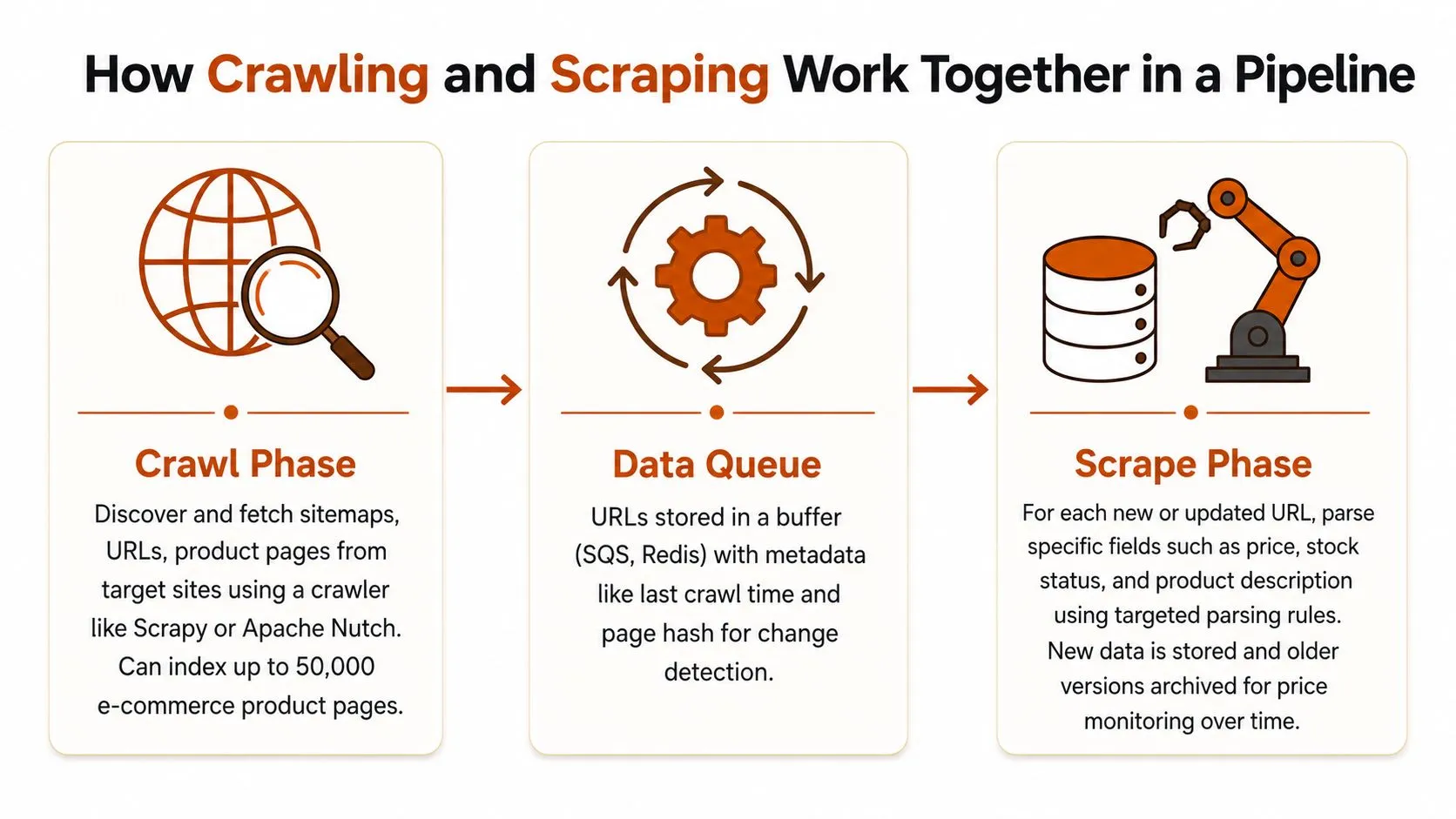
A simple pipeline looks like this:
- Seed URLs enter the crawl phase.
- The frontier queues new or changed pages.
- The scrape phase extracts fields and sends them downstream.
That pattern holds even if the team uses one word for the whole system. A scraped page can also feed the crawl layer when it reveals new internal links, new category paths, or updated navigation patterns. In that case, the scraper is part of discovery as well as extraction.
For pipeline orchestration, building scalable data pipelines with Scrapy is a relevant reference because it mirrors the split between queue management and field extraction. The framework matters less than the workflow. The useful design is separating page discovery, scheduling, and parsing so each layer can fail and scale on its own terms.
Practical rule: when the source set changes over time, the crawler handles freshness while the scraper handles fidelity.
That division keeps teams from overengineering the wrong layer. A full scrape is unnecessary if the crawler can tell you which pages changed. An aggressive crawl is also unnecessary if the URLs are already known and stable. Most production pain comes from reversing that order and trying to solve extraction before discovery is under control.
Legal Compliance and Bot Defense Realities
Legal and technical friction decides whether a pipeline is usable. Public crawling, authenticated scraping, and personal-data collection sit in different risk zones, and the compliance posture shifts again if the target site’s terms of service restrict automated access or reuse.
The conservative approach is straightforward. Check the site rules, respect robots.txt where it matters to your policy posture, avoid collecting personal data you do not need, and treat copyrighted or paywalled content as an explicit review item before extraction begins. Authenticated scraping and sensitive data collection require a higher compliance bar than crawling public pages for discovery, because the access conditions and downstream uses are different.
The operating environment is harsher now. Bot traffic makes up a large share of web requests, so anti-bot systems are tuned more aggressively than they were a decade ago. A script that works on a small sample may fail once volume rises or the target site changes its defenses.
If your organization already uses formal governance checks, the risk assessment for AI systems framework is a useful analogy for collection risk, data handling, and model-adjacent workflows. The same logic applies here. Classify the data, the access path, and the downstream use before the job starts.
Legal and bot-defense work belongs in design, not cleanup. Once a crawler is blocked or a scraper starts pulling sensitive fields, the fix is rarely a single selector update. It usually involves policy review, access tuning, and better observability. The piece on legal risks in web scraping and how to mitigate them is worth reading early if the target set includes consumer sites, logged-in pages, or anything that may touch regulated data.
Compliance is cheaper before the first request than after the first block.
The core lesson is clear. Crawling and scraping share technical similarities, but legal and defensive constraints apply to both. As the internet grows more automated, data collection systems need to anticipate scrutiny from the start.
Choosing Between Crawling and Scraping by Business Goal
A product team asking for “web data” usually has a vague brief. The decision sharpens fast once output is defined. Some jobs need coverage first, some need freshness, and some need field-level accuracy. In practice, that choice points to the workflow more clearly than the terminology does.
| Business goal | Better fit | Why it fits |
|---|---|---|
| Search engine style indexing | Crawl | The job is to discover URLs, map structure, and keep the index current |
| Price and stock monitoring | Scrape | The job is to pull exact values from known product pages |
| Change detection | Crawl first, then scrape | Discovery identifies what changed, extraction captures the change |
| Lead sourcing | Usually scrape, sometimes crawl first | Scraping captures the firmographic or contact fields, crawling helps find unknown pages |
| Competitive SERP tracking | Crawl and scrape together | Crawling finds the targets, scraping captures the ranking or page fields |
| AI training corpora | Crawl first, then scrape or extract | Discovery builds coverage, extraction turns pages into usable records |
The cleanest rule is straightforward. Unknown or incomplete site lists point to crawling. Known URLs with a fixed schema point to scraping. If the job needs both broad discovery and exact fields, a pipeline does better than forcing one tool to cover both steps.
Competitive intelligence shows the split clearly. A crawler surfaces new competitors, new categories, and newly published pages. A scraper then collects pricing, titles, and other structured fields from those pages. The same pattern shows up in workflows for intelligence monitoring, where discovery and extraction have different jobs and should be designed that way.
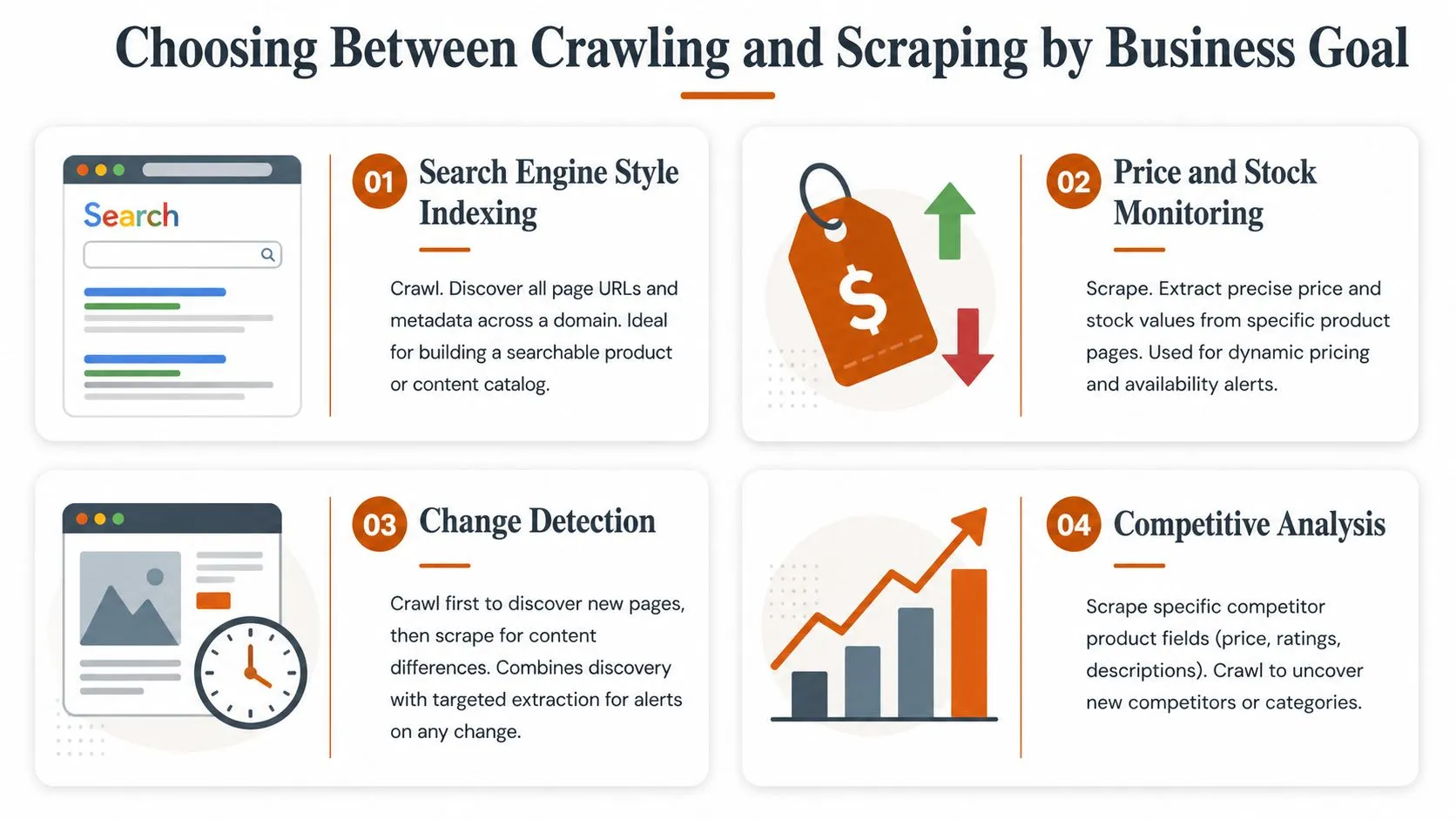
The business goal drives the choice more than the vocabulary used to describe it. A team that needs fresh page maps should start with crawling, not selectors. A team that needs exact prices should not spend time building a deep crawler before it knows which URLs matter. The crawl-then-scrape pipeline keeps coverage and extraction separate, which usually lowers rework and keeps operating cost tied to the actual goal.
Build or Buy and When Managed Services Pay Off
In-house systems look cheaper until the maintenance starts. You pay for engineering time, proxy spend, anti-bot mitigation, monitoring, alert handling, and the constant re-tuning that follows every site change. That burden compounds when the same team also has to own schema changes, delivery guarantees, and downstream quality checks.
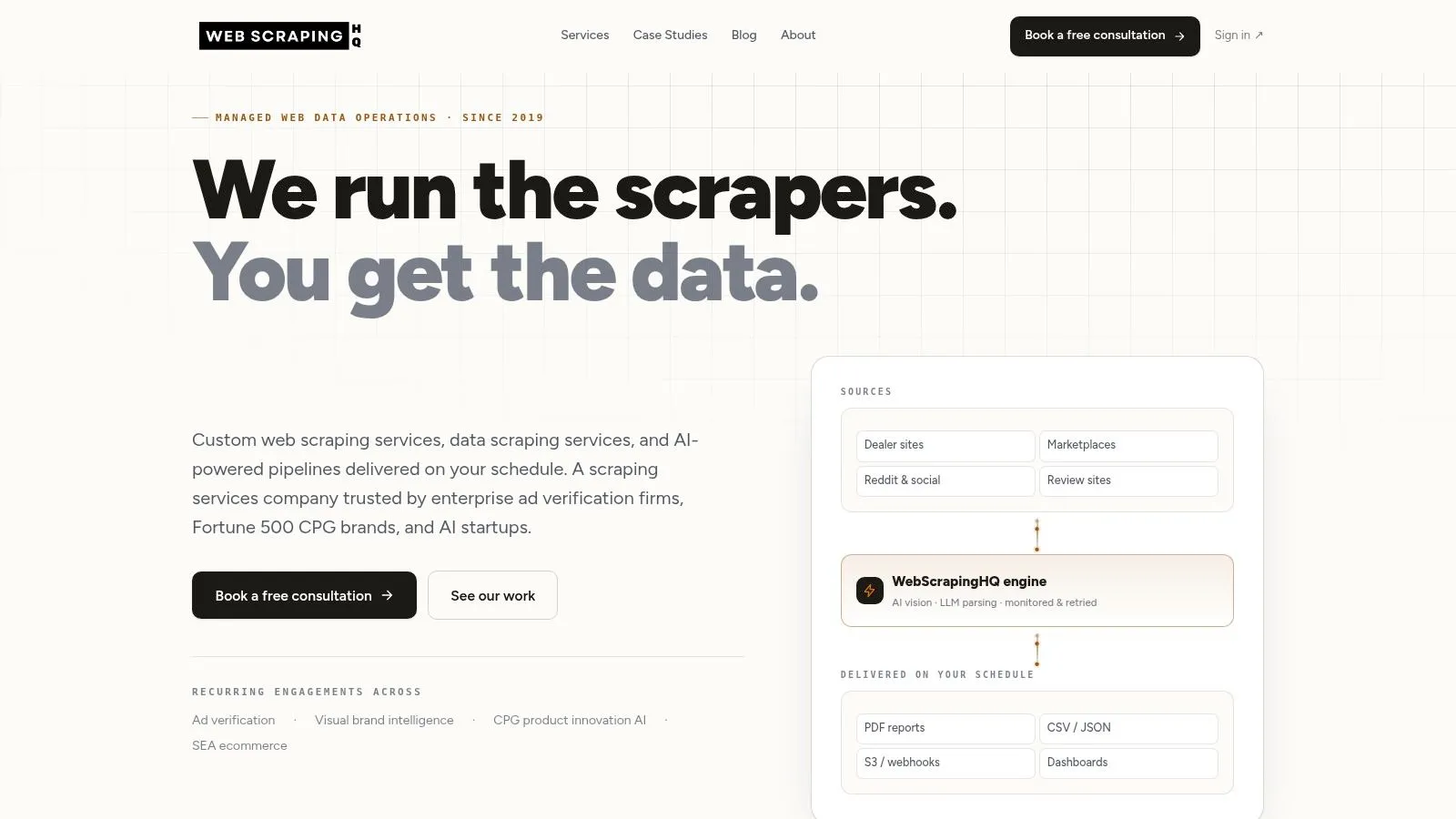
Managed operations make sense when the collection problem is recurring and business-critical. WebscrapingHQ runs production-grade pipelines and covers use cases such as Amazon, Walmart, Zillow, Indeed, and multi-geo consumer signal collection. It also supports scoped feasibility, custom extraction with LLM and computer vision parsing, SLA-backed delivery, and outputs such as CSV, JSON, webhooks, S3 drops, and PDF compliance reports.
That does not mean everyone should outsource. A small experiment, a one-off dataset, or a narrow internal prototype may be better served by lighter tools and a few scripts. But once the work shifts into recurring delivery, site volatility, and downstream reliance, the total cost of ownership changes fast.
The image handling and compliance reporting angle matters too. Some teams need visual inspection, deduplication, format conversion, or monthly exception reports rather than just raw rows. In those cases, the question is not whether the team can build a scraper. It’s whether engineering should spend its time maintaining collection infrastructure or on the product that uses the data.
A practical middle ground is to start small, measure how often targets change, and then decide whether the recurring ops burden justifies a managed delivery model. For lighter experiments, free Reddit data extractors can be enough to test a workflow without committing to a full platform.
Frequently Asked Questions About Crawling and Scraping
Is Google a crawler? Yes. Google uses crawlers to discover and revisit pages, then indexing systems turn that discovered content into searchable results. Crawling is the discovery layer, not the search product itself.
Is scraping legal in general? There’s no universal yes or no. It depends on the site’s terms, the type of data, the access method, and whether the collection touches personal, copyrighted, or authenticated content. That’s why compliance review belongs before production use, not after a block or complaint.
How do teams measure freshness in crawling pipelines? They usually track when a page was last seen, whether the content hash changed, and how recently important URLs were revisited. Freshness is a pipeline property, not just a timestamp.
When is an API a better option than either approach? Use an API when the data owner already provides the field set you need, the schema is stable, and you want to avoid crawler or scraper maintenance. If the API doesn’t cover the source or the fields, crawling and scraping stay relevant.
The short version is still the same. Start with the business goal, then decide whether you need discovery, extraction, or both. That keeps the choice practical instead of semantic.
If you need this kind of pipeline built and operated, WebscrapingHQ can scope the source set, handle extraction, and run recurring delivery without forcing your team to maintain the crawler and scraper stack themselves. Visit WebscrapingHQ to review managed web data operations and see whether your use case fits a crawl-first, scrape-later workflow.
Want this done for you?
Send us the URLs. We'll quote it in 24 hours.
Paste the URL(s) you want scraped. We'll reply within 24 hours with a feasibility check and a ballpark quote.