Jump to section
- Table of Contents
- Why Businesses Need Eventbrite Data
- Core Architecture of an Eventbrite Scraper
- Search pages versus event pages
- What the request cycle should do
- What Data You Can Scrape from Eventbrite
- Event details and discovery fields
- Venue, organizer, and ticket data
- The output should stay machine-friendly
- Overcoming Common Scraping Challenges
- Anti-bot handling is not optional
- Freshness and layout drift break DIY tools
- Recurring and online events need continuous monitoring
- Turning Eventbrite Data into Business Intelligence
- Lead generation and organizer discovery
- Competitive monitoring and market analysis
- Local discovery platforms and SEO content
- From Script to Scalable Data Pipeline
Your team already has the spreadsheet, the pitch deck, and a long list of Eventbrite URLs. The hard part is turning that list into a feed you can trust on Monday morning, not just a one-off export that breaks after the next site change. That’s where a production-ready Eventbrite scraper matters, because the difference between a script and a governed pipeline shows up when sales, marketing, and research all depend on the same data.
Table of Contents
Open Table of Contents
Why Businesses Need Eventbrite Data
A marketing team doesn’t usually start with a scraping project. It starts with a practical question, like which organizers are launching events in a new city, which categories are crowded, or whether a competitor is changing ticketing patterns before a campaign goes live. Manual collection works for a week, then it becomes a time sink that nobody wants to own.
Eventbrite is useful because it already exposes structured operational signals inside its own product. Event organizers can review Sales and Attendees data in the Event Dashboard through Reporting → Analytics, choose a custom date range, group and filter results, and export data to a spreadsheet, which shows that Eventbrite itself treats event activity as structured, queryable information rather than a static page view, as documented in Eventbrite’s help center. That’s the same kind of data shape a scraper targets when it needs event-level records for analysis, enrichment, or downstream automation.
Practical rule: if a business team needs the same Eventbrite fields every week, a one-time script is the wrong tool. You need a feed that can survive layout changes, missing fields, and new event pages without someone babysitting it.
A reliable pipeline gives operations teams something different from a hacked-together export. It gives them repeatable data, controlled schema, and an output that can be audited later. That matters for teams doing lead generation, market research, or competitive monitoring, because the business decision depends on continuity, not just access.
For a broader view of why this category keeps showing up in company workflows, the WebscrapingHQ guide on why web scraping is essential for companies is a useful companion.
Core Architecture of an Eventbrite Scraper
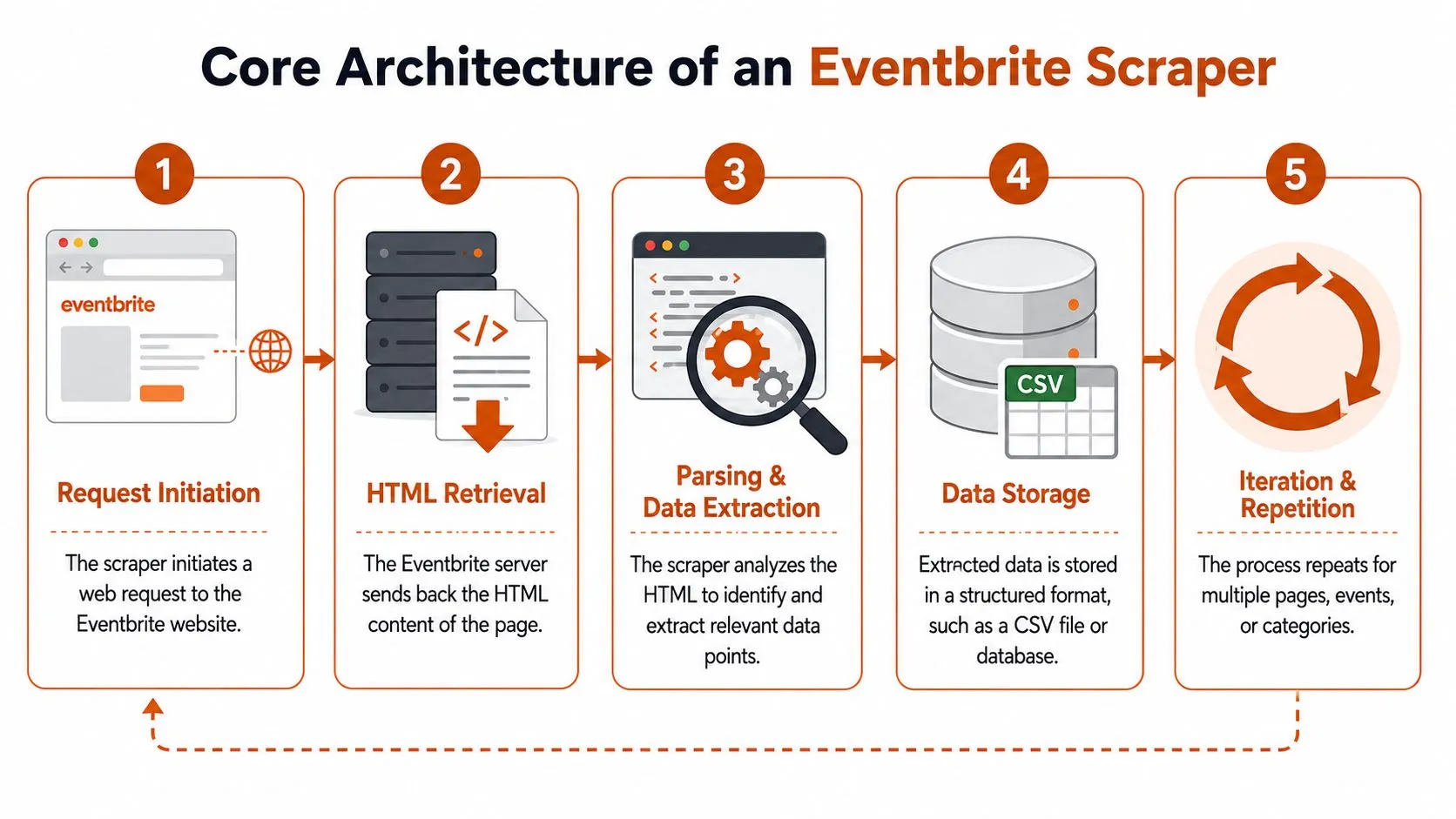
A production Eventbrite scraper starts with a simple loop, then has to survive real-world conditions. It requests a page, receives HTML or rendered content, parses the fields, stores normalized records, and repeats across a defined target set. Those mechanics are straightforward. The hard part is making the pipeline keep working when pages shift, inputs fail, or the source returns partial data.
The choice of input shape determines how stable the rest of the system will be. Search result pages behave like a discovery layer, useful for finding many events quickly. Event pages carry the fuller record, which is what you need for normalization, enrichment, and matching against other datasets.
Search pages versus event pages
A technically sound Eventbrite scraper should be built around search-result or event-page inputs, because Eventbrite extraction usually centers on direct event URLs and page-level fields such as event name, date/time, venue, and organizer details as noted by WebScraper.io. That choice reduces brittle traversal through category paths and makes the output easier to shape into consistent rows.
Search pages work better for coverage. They let you inventory events by city, category, or date window without first knowing every listing. Event pages work better for completeness on a known event, especially when downstream systems need organizer identity, image links, or venue details.
Direct event URLs are easier to keep stable than broad navigation paths. When the input is explicit, field mapping stays simpler and failures are easier to isolate.
What the request cycle should do
The request layer does more than fetch HTML. It has to manage retries, detect blocks, and keep the job moving when a page is unavailable. After retrieval, the parser should extract fields from the page structure, then the storage layer should write normalized records into a system analysts can query later.
That is where many DIY builds fall apart. They collect data, but they do not define how records are stored, how schema changes are handled, or how failures are represented. A pipeline that supports business reporting cannot end at extraction, it has to feed a controlled data flow.
For teams standardizing extraction jobs across sources, the WebscrapingHQ piece on building scalable data pipelines with Scrapy is a practical reference point. The same engineering pattern applies here, even when the target site and field set are different.
Managed services are the logical next step when the feed has to stay governed and stable without constant maintenance. A senior team can build and operate the scraper in-house, but that approach usually trades flexibility for ongoing work on retries, schema control, and monitoring. The devPulse case study on AI platforms reflects the same pattern, production data extraction works best when the pipeline is treated as a service, not a one-off script.
What Data You Can Scrape from Eventbrite
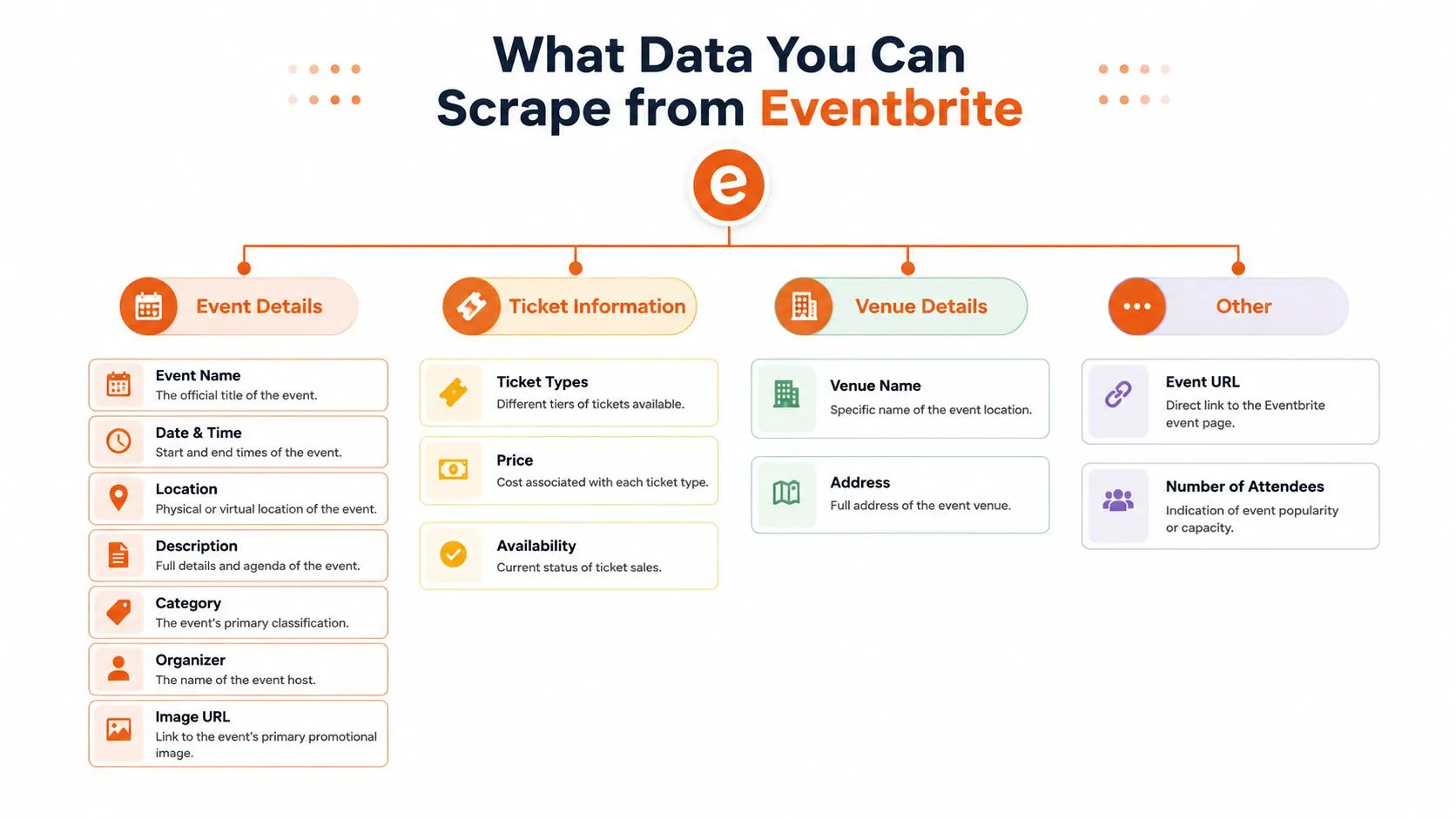
Eventbrite data is valuable because it’s not just a title and a URL. Modern scraper tools target a broad schema that includes ticket prices, venue GPS coordinates, organizer profiles, and gallery images, and they can export that data to CSV, Excel, or JSON, which shows how structured the output can be when the extraction is set up correctly as shown by Apify’s Eventbrite scraper listing. That structured shape is what makes the data useful for reporting and enrichment.
Event details and discovery fields
The core fields usually start with the basics, event name, date and time, location, venue name, address, organizer name, and main image. These are the records typically needed first, because they let analysts group events by time, city, organizer, or topic without manual cleanup.
A separate event-page workflow can also capture pagination references and other page-level metadata, which helps when a source contains more than one listing surface. That’s especially useful if you’re building recurring jobs and need to know what was newly added versus what was already present in the previous run.
Venue, organizer, and ticket data
Venue information is where many business use cases become more specific. Venue name, address, and GPS coordinates can support local market analysis, location matching, and deduplication against other datasets. Organizer profiles add another layer, because a business development team can treat the organizer as a lead entity, not just an event label.
Good extraction should keep the raw page fields intact long enough to normalize them later. If you flatten too early, you lose context that may matter for deduplication or joins.
For teams using the data in market research workflows, the WebscrapingHQ market research use-case page is a relevant example of how extracted fields often get reused across analysis layers.
The output should stay machine-friendly
The strongest schema is one that downstream tools can consume. That means stable field names, predictable types, and export formats that fit the next system in the chain. When an Eventbrite scraper produces repeatable structured rows, the data can move into BI tools, databases, or automation workflows without a handoff step that reintroduces error.
Overcoming Common Scraping Challenges

A scraper usually fails for a practical reason, not because the code looked clean in a notebook. Eventbrite can rate limit requests, challenge traffic, or change how pages render, and each of those shifts turns a simple script into a maintenance burden. If the feed matters to the business, the response plan has to be part of the design from day one.
Anti-bot handling is not optional
One implementation recommends rotating a datacenter proxy on every request, impersonating a Chrome 131 TLS fingerprint, and using exponential backoff with 5s, 10s, and 20s waits plus randomized 1-3 second delays between requests to lower the block rate when defenses are encountered according to Scraperly’s Eventbrite tutorial. The exact values matter less than the operating rule, which is to slow traffic, vary request patterns, and recover cleanly instead of pushing harder after a block.
Managed services make that easier to run in production. Someone still has to own proxy rotation, retry policy, and failure logging, but those controls no longer sit on a product team’s lap. That matters when the scraper is feeding a reporting pipeline, not just a one-off export.
Freshness and layout drift break DIY tools
Event pages change. Search paths shift. Fields move. A selector that works today can fail after a layout update, and the first sign is often a drop in row counts or missing columns.
That creates a trust problem, not just a parsing problem. The dataset may still exist, but analysts cannot rely on it if the source structure is drifting and nobody is checking for it.
For teams handling blocked responses and challenge pages, the WebscrapingHQ guide to CAPTCHA handling in web scraping is a useful operational reference. The practical lesson is simple, scrape jobs need recovery logic, alerts, and retry rules that fit the failure mode.
Recurring and online events need continuous monitoring
Coverage gets harder when event discovery is split across markets. Public examples show that Eventbrite collection often depends on location-specific search URLs, category filters, and repeated pagination, which means completeness can vary by geography and by how often the pipeline runs as noted by Olostep. That matters for recurring and online events, where sold-out status, date changes, and new dates can appear after the first crawl.
Practical rule: if your use case depends on freshness, a one-time scrape is a snapshot, not a data product.
Production pipelines need drift checks, failure recovery, and consistent records. Without those controls, the feed turns into a brittle script that works until the next change, which is fine for a demo and weak for business use.
Turning Eventbrite Data into Business Intelligence
Eventbrite data becomes useful when it is tied to a business decision. A list of events is only raw material, but the same feed can support lead lists, market scans, category tracking, and content planning once the team defines what field matters and how often the data needs to be refreshed. The right use case depends on which attributes are consistent enough to trust and which ones need validation before they reach reporting.
Lead generation and organizer discovery
Sales teams can use organizer names, profile URLs, venue information, and event topics to build a list of companies or hosts active in a target market. That list gets stronger when it is filtered by event category or geography, because reps can reach out with context instead of sending generic messages that ignore the event history.
A local partnership team can use the same feed differently. When an organizer keeps hosting events in a niche, that pattern is often more useful than any single listing. A scraper gives the team a way to surface those repeat signals without checking event pages one by one.
Competitive monitoring and market analysis
Ticket pricing, event frequency, and venue choices show how competitors are positioning themselves. A business that keeps publishing similar events in the same neighborhoods is signaling where it sees demand. Looking across date ranges can also show which categories stay active and which ones are seasonal.
The WebscrapingHQ market trend analysis resource is a useful companion if your team wants to turn structured event data into category tracking. The analysis starts with repeatable fields, not with screenshots or manual copying.
Local discovery platforms and SEO content
Publishers and local guides can use Eventbrite data to populate event calendars, surface new listings, or support topic clusters around high-interest event categories. Freshness matters here, especially when event pages change often and the same category behaves differently across markets. Continuous monitoring usually matters more than a one-time dump.
Raw event data is most useful when it lands in the same place every run. Once the feed is stable, content, sales, and research teams can build on top of it without re-validating the source each time.
For companies that would rather not operate the pipeline themselves, managed extraction is a sensible option. WebscrapingHQ provides managed web data operations, including custom scraper development, monitoring, retries, proxy handling, and scheduled delivery, which makes it a practical fit when the business needs governed output rather than another script to maintain. For teams that also care about downstream storage choices, it helps to review secure data storage solutions before deciding where the feed should land and who should be able to access it.
From Script to Scalable Data Pipeline
A production pipeline starts with scheduling, not just extraction. The job has to run on a predictable cadence, write outputs into a defined store, and keep enough metadata to show when a row was collected and whether it passed validation. Without that discipline, the data may be technically present but operationally useless.
Storage matters too. Teams often pair scraper output with object storage or a database, then serve it onward as an API feed, a CSV export, or a direct warehouse load. If the destination is important enough for reporting, it’s worth reading about secure data storage solutions before you decide where the feed should land and who should be able to access it.
Decision point: if the pipeline needs proxy handling, retries, monitoring, schema control, and regular upkeep, the real question isn’t whether you can build it. It’s whether your team wants to own it.
The build-versus-buy decision is usually about total cost of ownership. Building gives you control, but it also gives you selector maintenance, anti-bot work, reruns, alerting, and QA. Buying a managed service shifts that burden to a team whose job is operating extraction pipelines, which is often the better fit for businesses that care more about the data than the machinery.
If you need a dependable Eventbrite feed for sales, research, or market monitoring, WebscrapingHQ can build and run it as a managed pipeline. Visit WebscrapingHQ to discuss a governed extraction setup that fits your reporting cadence and reduces the maintenance load on your team.
Want this done for you?
Send us the URLs. We'll quote it in 24 hours.
Paste the URL(s) you want scraped. We'll reply within 24 hours with a feasibility check and a ballpark quote.