Jump to section
- Table of Contents
- Why Monitoring Website Changes Is Harder Than It Looks
- Choosing the Right Detection Approach for Each Page
- Transport checks for cheap first-pass detection
- DOM and structural diffs for content
- Visual diffs for presentation and rendering
- Semantic parsing for business meaning
- Designing a Tiered Polling and Scheduling Pipeline
- Give likely changes a path through the queue
- Reducing Noise So Alerts Actually Get Read
- Separate change detection from relevance detection
- Make every alert reviewable
- Handling Anti-Bot Defenses and Protected Pages
- Match the runtime to the page
- Detect pages that didn’t exist yesterday
- Alerting, Delivery Formats, and Governance at Scale
- Treat monitoring data as an auditable artifact
- Templates, Runbooks, and a Pre-Launch Checklist
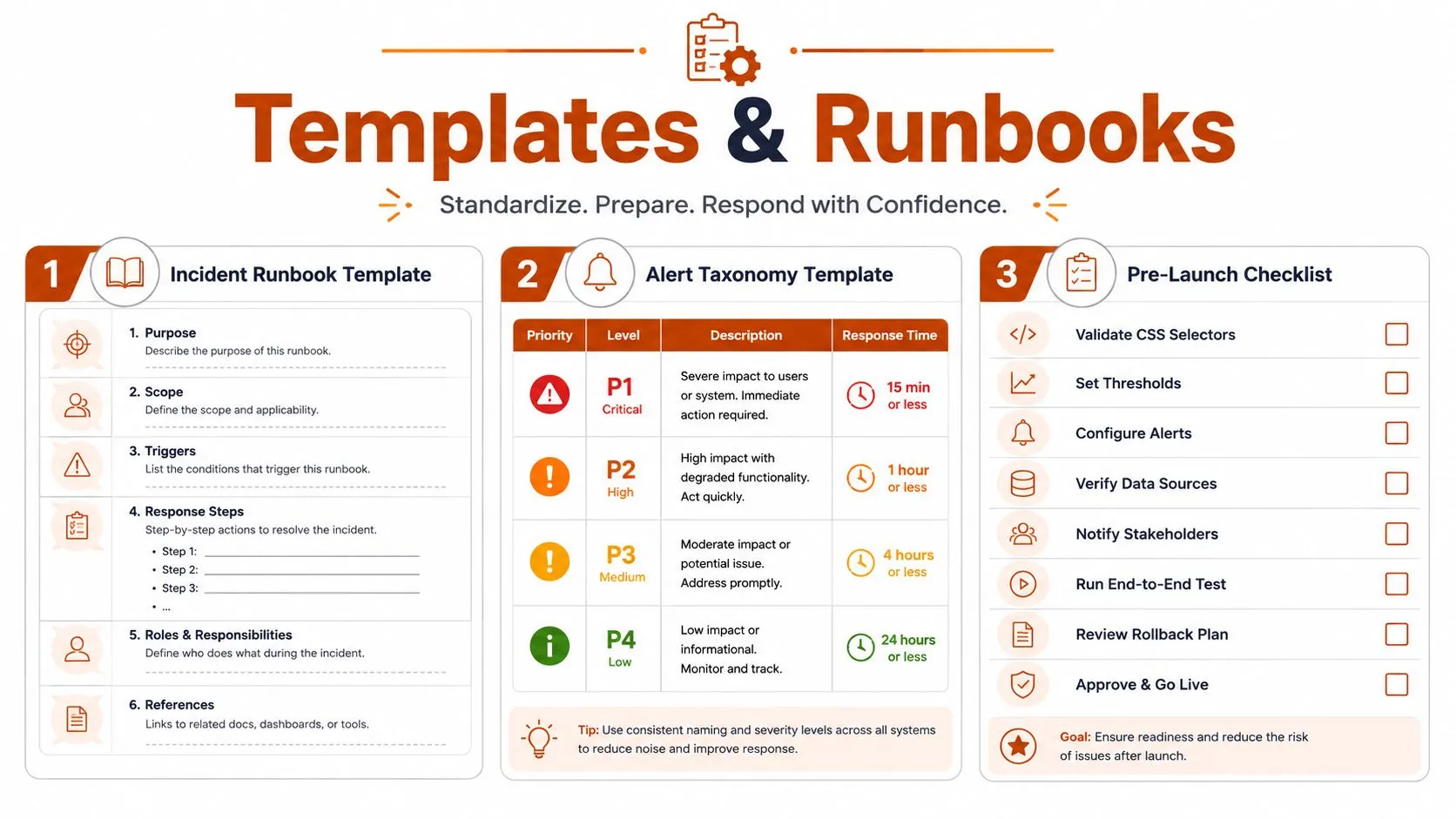
- Incident runbook skeleton
- Alert taxonomy template
- Pre-launch checklist
You’ve probably already seen how a monitoring project fails. Someone adds a handful of competitor pages, regulatory portals, or product listings to a checker. For a while, the alerts look useful. Then a layout update changes a shared CSS class, a rotating banner creates a new screenshot every time, or an authentication challenge returns the same empty response on every check. The inbox fills with noise, while a newly published regional page goes unnoticed.
That’s why how to monitor website changes isn’t mainly a question of pasting URLs into a tool. It’s an operations problem involving detection methods, polling priorities, browser behavior, alert routing, and evidence retention. The reliable approach uses several detection layers and clear ownership, so the system produces fewer alerts that people can act on.
Table of Contents
Open Table of Contents
- Why Monitoring Website Changes Is Harder Than It Looks
- Choosing the Right Detection Approach for Each Page
- Designing a Tiered Polling and Scheduling Pipeline
- Reducing Noise So Alerts Actually Get Read
- Handling Anti-Bot Defenses and Protected Pages
- Alerting, Delivery Formats, and Governance at Scale
- Templates, Runbooks, and a Pre-Launch Checklist
Why Monitoring Website Changes Is Harder Than It Looks
A retail team once built a straightforward price-monitoring job around full-page HTML. The page’s actual price barely changed, but the site’s promotional module did. Every request returned a different campaign label, tracking value, or recommendation block. The pipeline treated each variation as a meaningful update and sent alerts across the entire product set.
The team’s first response was to reduce the polling frequency. That helped the inbox, but it also delayed legitimate changes. The fix was more targeted: isolate the price element, normalize unstable content, retain the raw capture for review, and route only confirmed price changes to the commercial team. The problem wasn’t that the checker failed to detect differences. It detected too many differences without understanding their relevance.
Operational rule: A monitoring system succeeds when the right person receives a defensible signal, not when the system reports every byte that moved.
Protected pages create a different failure mode. A login wall, JavaScript challenge, consent prompt, or rate limit can make a monitor appear healthy while it’s no longer seeing the intended content. Newly appearing pages create another blind spot. A fixed list of URLs can continue checking the same sources while a site publishes a new job, product, policy, or regional page outside that list.
The historical pattern is well established. Website change monitoring grew from manual revisits into automated polling, comparison, and notification, with early services including Mind-it in 1996, ChangeDetection in 1999, ChangeDetect in 2002, Google Alerts in 2003, and Versionista in 2007, as summarized by Wikipedia’s history of change detection and notification. Modern systems still use that basic loop, but production workloads add rendering, retries, filtering, prioritization, and audit controls.
Teams evaluating infrastructure for these workflows can also explore Beam’s infrastructure, particularly when browser execution and recurring operational workloads need a managed runtime. For a broader treatment of failures that affect extraction reliability, see WebscrapingHQ’s guide to web scraping challenges.
The practical objective is simple: monitor business-relevant changes, not page activity. The rest of the design follows from that distinction.
Choosing the Right Detection Approach for Each Page
Start by classifying the page before choosing a detector. A compliance document, a product price, a visual brand surface, and a logged-in dashboard don’t expose useful changes in the same way. A single method across all four will either miss important updates or create unnecessary work.
Transport checks for cheap first-pass detection
The lightest layer checks whether the resource appears different before downloading and parsing the full document. An HTTP HEAD request can inspect metadata, while hashes can compare a normalized response or extracted payload. Research on incremental web search describes using metadata to identify likely changes, then applying a fuller detector only to candidate pages, which reduces unnecessary fetching and parsing overhead. The approach is useful for stable files, feeds, and endpoints where metadata changes reliably.
It’s a poor default for JavaScript-heavy pages. A page can return the same shell while the browser later loads a new price or status value. Treat transport checks as a filter, not proof that the user-visible page is unchanged.
DOM and structural diffs for content
A DOM diff compares meaningful page structure or extracted text rather than raw source. This works well for documentation, policy pages, release notes, and product detail areas where the content matters more than styling. Hashing and comparing structurally plausible nodes can reduce computation, especially when the system restricts similarity work to matching HTML tag types, as described in the research on efficient incremental web change detection.
The failure mode is unstable markup. Ad slots, timestamps, navigation fragments, and personalization can still generate changes. Use reader-mode extraction, CSS selectors, XPath, or explicit exclusions when the business requirement concerns one element.
Visual diffs for presentation and rendering
Screenshot comparison catches changes that text extraction may ignore, including layout shifts, image swaps, missing components, and styling failures. It suits brand protection, visual QA, campaign pages, and pages where the presentation itself is the monitored artifact.
Pixel comparison costs more than a metadata check and can be sensitive to viewport size, fonts, animations, cookie banners, and dynamic content. Freeze the rendering environment where possible, mask known moving regions, and require a meaningful visual region rather than comparing every pixel on a busy page.
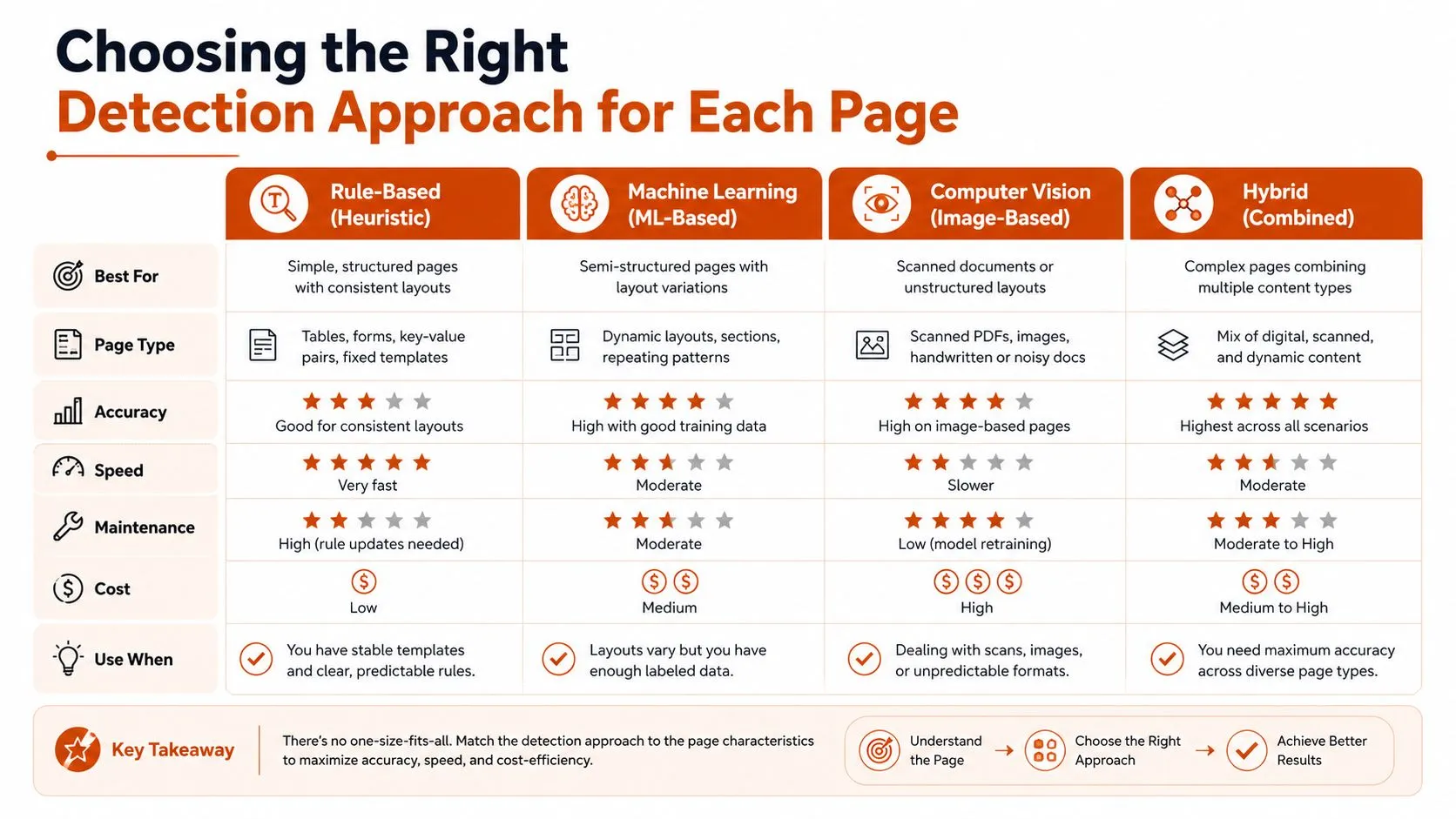
Semantic parsing for business meaning
Semantic or LLM-based parsing extracts the fields and events people care about. Instead of reporting that a block changed, it can represent a price, availability state, policy clause, product feature, or job title as structured data. This is valuable when layout changes frequently but the business question remains stable.
Semantic parsing introduces model cost, schema drift, and validation risk. Store the source capture and extracted output together, validate required fields, and send uncertain results to review rather than treating every model response as fact. If an API exposes the needed data reliably, compare that route with browser extraction using WebscrapingHQ’s discussion of web scraping versus APIs.
A sensible mapping looks like this:
- Retail price page: element extraction or semantic field parsing, with DOM comparison as a fallback.
- Compliance PDF: file hash first, then text extraction and a document diff.
- Logged-in dashboard: browser rendering, targeted DOM extraction, and visual validation for critical widgets.
- Brand landing page: visual diff plus selected text or element checks.
Designing a Tiered Polling and Scheduling Pipeline
Polling frequency should follow business value and expected change behavior, not convenience. A page that controls a time-sensitive commercial decision deserves more attention than an archive page that changes rarely. Fixed cadence across every URL wastes resources on quiet pages and still leaves high-value pages stale when queue depth grows.
Use a tier model that can be explained in a review:
| Page Profile | Detection Approach | Polling Tier | Notes |
|---|---|---|---|
| High-value, actively changing page | Targeted DOM or semantic extraction | Frequent | Prioritize commercial, operational, or compliance impact |
| Stable page with meaningful text updates | Structural diff | Regular | Normalize navigation, timestamps, and dynamic modules |
| Visual brand or campaign surface | Screenshot comparison | Regular | Mask animation and rotating content |
| Archive or low-priority reference page | Metadata and periodic content pass | Infrequent | Preserve history without spending peak capacity |
The exact boundaries depend on the workload. The important design choice is to make tiers explicit and assign every monitor a reason. A useful priority score can combine business criticality, observed change behavior, source reliability, and the cost of a missed update. Keep the score interpretable. Operators should understand why a page moved into a more frequent queue.
Give likely changes a path through the queue
A scheduler should maintain more than a timer. Record a change signature for each page, such as the last meaningful change, the type of change, the response status, and the current extraction health. A page that changes repeatedly can receive more attention, while a quiet page can move to a lower-cost tier until activity resumes.
Notification queues need similar treatment. Don’t let a large batch of low-priority captures occupy all workers while critical pages wait. Reserve capacity for high-priority monitors, apply retries with backoff, and separate fetch failures from confirmed content changes. A retry caused by a timeout shouldn’t become a business alert.
Research on collaborative web change detection found that timeliness varies with revisit strategy and page importance. Its reported benchmarks include almost real-time best-case detection, about 12 minutes for low-PageRank sites, about 1 minute for high-PageRank sites, and more than a day for search engines to notice the same modifications. These figures come from the distributed web change detection study, and they reinforce a practical point: revisit policy is a performance lever.
For implementation details such as queue isolation, retries, and worker coordination, WebscrapingHQ’s guide to scalable data pipelines with Scrapy provides relevant engineering context.
Reducing Noise So Alerts Actually Get Read
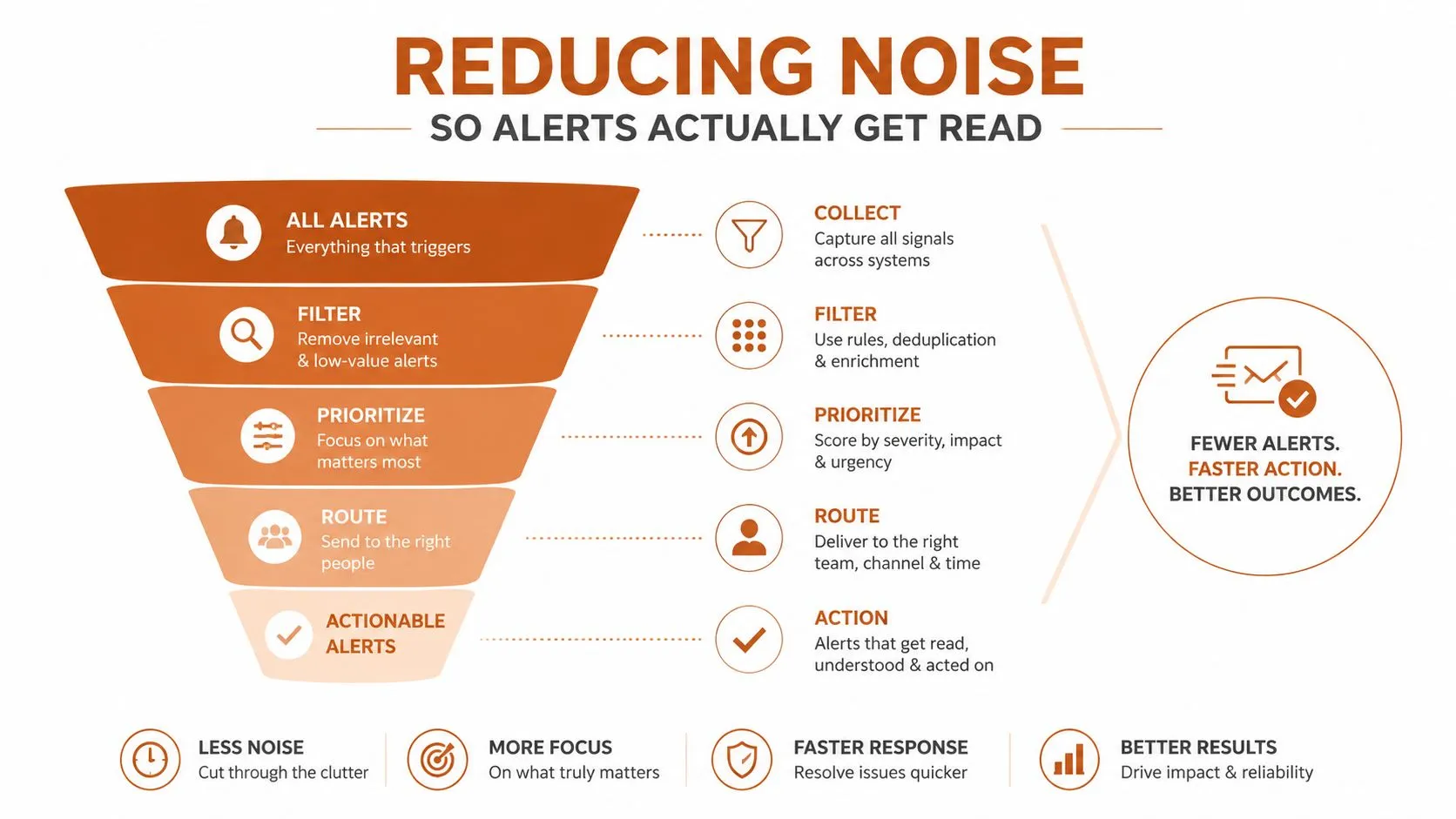
Raw diffs answer the question, “What changed in the document?” Operations teams need a narrower answer: “What changed that requires action?” Those questions diverge whenever pages contain advertising, personalization, timestamps, tracking code, reordered markup, or layout experiments.
Build filtering into the pipeline before delivery. First capture the response or rendered page. Then remove known noise, extract the monitored region, compare the normalized representation, classify the change, and only afterward create a human alert. Keep the unfiltered artifact separately so reviewers can investigate disputed results without rerunning an old page state.
Separate change detection from relevance detection
The WWW 2014 Delta framework used fuzzy tree differencing and machine learning to model relevant website changes, because a raw page diff can over-report layout, advertising, and template changes. That distinction is central to production design. A structural difference can be real while still being operationally irrelevant.
Use narrow rules where the business requirement is narrow:
- Price monitoring: watch the price node and currency, not the recommendation carousel.
- Policy monitoring: extract the main document body and preserve the full previous version.
- Job monitoring: compare posting identifiers, titles, locations, and status.
- Visual monitoring: exclude animations, consent banners, and rotating promotional regions.
- Security monitoring: retain broader page coverage, but route cosmetic changes separately from content or script changes.
A threshold can help with noisy pages, but it shouldn’t replace field-level logic. A small change to a legal clause may matter more than a large rearrangement of navigation.
Make every alert reviewable
An alert should include the source, capture time, monitor identity, changed region, before-and-after representation, detector used, and confidence or rule outcome. A side-by-side screenshot helps a reviewer scan visual changes quickly. A text diff or structured field comparison helps them verify exact wording and values.
Archive history matters just as much. Without prior captures, a recipient can’t tell whether a change is new, recurring, or the result of a failed render. Route alerts by ownership, send low-priority updates as digests, and reserve immediate delivery for changes with a defined response path. If nobody knows what to do with an alert, the filter is incomplete.
Handling Anti-Bot Defenses and Protected Pages
A monitor can fail before it reaches the page content. Sites may enforce rate limits, fingerprint browsers, require JavaScript execution, present CAPTCHA challenges, or serve different content by geography. A basic HTTP client may receive an interstitial or partial shell and report it as the current version. That creates a dangerous false negative because the pipeline appears successful.
Start with diagnosis, not escalation. Compare status codes, response size, title, canonical URL, expected selectors, and rendered content. A successful request that lacks the expected product, policy, or dashboard element should be marked extraction failure, not “no change.” Store a reason code that operators can query.
Match the runtime to the page
Static pages can often use direct requests, but dynamic applications need a browser capable of executing JavaScript. Logged-in pages require a controlled session, pre-check actions, and careful secret handling. A browser workflow may need to accept consent, authenticate, wait for a target element, scroll to trigger lazy loading, and capture the result only after the page reaches a known state.
Anti-bot handling should remain proportionate and authorized. Respect site terms, robots guidance where applicable, access controls, and reasonable request rates. Avoid treating evasion as the default engineering answer. If a publisher offers an API, feed, export, or notification mechanism, that route may be more stable and easier to govern. For browser-specific defensive patterns, consult WebscrapingHQ’s guide to anti-bot measures in Playwright.
When access is permitted but the site remains difficult, managed infrastructure can provide browser rendering, proxy management, retry logic, and operational tuning. Residential or geographically distributed access may be relevant for localized content, but it adds cost, compliance considerations, and provider dependency. Don’t introduce those layers until logs show which failure you’re solving.
Detect pages that didn’t exist yesterday
A URL list only monitors known pages. Add discovery through sitemaps, category indexes, feeds, internal search results, or controlled crawling when the use case includes newly published content. Normalize discovered URLs, remove duplicates, and apply inclusion rules before creating monitors. Otherwise, discovery itself becomes a source of noise.
Scheduling still matters under anti-bot constraints. The literature’s detection-time benchmarks show why high-value pages warrant shorter revisits, while broad low-value crawling should remain restrained. Use tiered queues, randomized but bounded timing where appropriate, retries with backoff, and a circuit breaker when a source begins rejecting requests. A monitor that repeatedly hammers a blocked page won’t recover through persistence alone.
Alerting, Delivery Formats, and Governance at Scale
A notification is only one output of a monitoring system. The durable asset is a record that explains what the system observed, how it interpreted the observation, and who received the result. That record may feed a webhook, a data warehouse, a compliance review, or an incident process.
Choose delivery formats according to downstream use:
- Webhooks suit event-driven workflows, provided the payload includes an event identifier, schema version, source, capture time, change type, and retry-safe key.
- CSV and JSON feeds work for analysts and scheduled ingestion. Keep field names stable and document nullable values.
- S3 drops support batch processing and archival, especially when teams need raw captures alongside normalized records.
- PDF reports fit human review, such as recurring dealer compliance checks or policy-change packs.
- Dashboards help operators inspect monitor health, failed captures, unresolved alerts, and historical diffs.
The output contract should distinguish at least three states: no meaningful change, meaningful change, and unable to verify. Collapsing the last state into “unchanged” hides outages and protected-page failures.
Treat monitoring data as an auditable artifact
Governance starts with ownership. Every monitor needs a business owner, technical owner, priority, approved purpose, expected source behavior, delivery destination, and escalation route. Store the configuration that produced each result, including selector versions, detector type, rendering settings, and rule changes.
Schema versioning protects downstream consumers when a source changes or the extraction model evolves. Don’t rename a field or change a value’s meaning. Publish a new schema version, validate it against representative captures, and retain the prior interpretation when historical comparability matters.
Retention should match the review requirement. Keep snapshots, diffs, delivery records, and exception decisions long enough to support an audit or dispute. WebscrapingHQ’s guidance on ethical data collection is useful context for defining permitted collection, purpose limitation, and responsible handling before a monitoring program expands.
A quarterly review should answer practical questions: Which monitors still have an owner? Which alerts produced action? Which sources repeatedly failed? Which selectors changed? Which records were delivered late or rejected? If the team can’t answer those questions from its own records, the program isn’t governed yet.
Templates, Runbooks, and a Pre-Launch Checklist
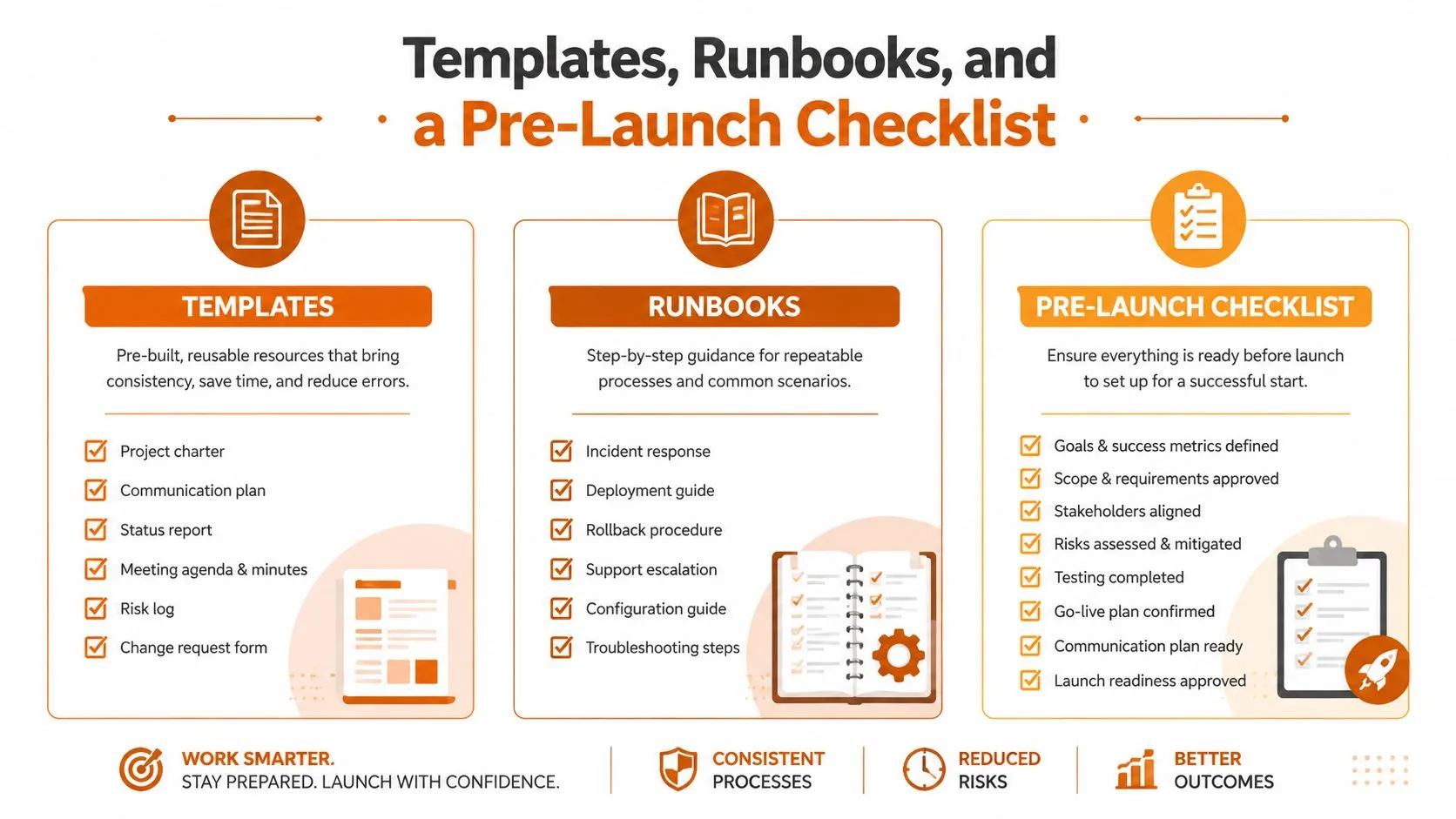
A monitoring program becomes maintainable when its operating knowledge lives in artifacts rather than in one engineer’s memory. Keep the templates short enough to use, but specific enough to guide a response during an outage or source redesign.
Incident runbook skeleton
Use a runbook with these fields:
- Monitor identity: source, URL or discovery rule, business owner, technical owner, and priority.
- Observed failure: timestamp, detector, response status, expected selector, and actual result.
- Initial classification: source outage, access challenge, layout change, selector failure, parser error, or genuine content change.
- Containment: pause noisy delivery, preserve the latest valid capture, and prevent repeated retries from overwhelming the source.
- Validation: compare the current page with the last valid version and test the extraction against a fresh sample.
- Resolution: update selectors, rendering actions, schema, or scheduling policy, then replay the failed case.
- Closure: record the cause, affected outputs, reviewer, and follow-up prevention work.
Alert taxonomy template
Define severity by business consequence, not by how dramatic the diff looks.
- Critical: a verified change can trigger an immediate operational, legal, or security response.
- High: a verified change needs same-day review by a named team.
- Routine: the change belongs in a digest or scheduled report.
- Informational: the system observed activity without an action requirement.
- Unverified: the monitor couldn’t establish a trustworthy comparison.
The unverified category is essential. It keeps technical failures visible without pretending they’re business events.
Pre-launch checklist
Before enabling delivery, confirm:
- The selector or extraction rule targets the intended content.
- Dynamic, rotating, and consent elements are normalized or excluded.
- The page renders correctly in the chosen runtime.
- Login and session actions work without exposing credentials in logs.
- Anti-bot behavior has a documented response path.
- Discovery rules cover newly appearing pages where required.
- The schema has a version and a test payload.
- Archive captures and diffs are retained in an approved location.
- Each alert has an owner and escalation destination.
- A reviewer has validated sample alerts for both meaningful changes and expected noise.
- Retry, backoff, and circuit-breaker behavior has been tested.
- The team knows how to pause, reconfigure, and resume a monitor.
Ship a narrow pilot first. In the first week, monitor a small set of pages and tune selectors, normalization, and routing. During the first month, add tiered scheduling, discovery, archive retention, and failure classification. By the first quarter, review alert usefulness, source reliability, ownership, and schema stability, then decide which parts your team should continue operating directly and which need managed capacity.
WebscrapingHQ provides managed web data operations, custom extraction pipelines, monitoring, retries, anti-bot mitigation, and structured delivery through formats such as PDF, CSV, JSON, webhooks, and S3 drops. If your team needs reliable website change monitoring without carrying every browser, selector, proxy, and governance task in-house, visit WebscrapingHQ to discuss the sources and outputs you need.
Want this done for you?
Send us the URLs. We'll quote it in 24 hours.
Paste the URL(s) you want scraped. We'll reply within 24 hours with a feasibility check and a ballpark quote.