Jump to section
- Table of Contents
- Why Scraping Lidl Products Data Is Harder Than It Looks
- The real problem is not scraping, it’s normalization
- Three things that usually kill naive scrapers
- What Lidl Product Data Contains
- Pricing and identity fields deserve separate handling
- What a useful record usually needs
- Schema drift shows up in the small things
- Building a Lidl Scraping Pipeline That Survives Production
- Entry points and controls need to stay configurable
- The core challenge is normalization, not extraction
- Anti-bot handling is part of the pipeline, not a patch
- Why Change Detection Matters More Than the Catalog Itself
- Weekly offers make freshness a real problem
- Not every change is a price change
- Build, Buy, or Outsource Your Lidl Scraping
- Compare the operating model, not just the price tag
- Use the operating model that matches your scale
- A Practical Vendor and Implementation Checklist
- Verify the coverage and the delivery shape
- Ask the questions that expose real operational maturity
- Compliance and Data Governance for Lidl Scraping
- Start with data minimization and auditability
- Use a governance posture that survives reviews
- Putting It All Together and What to Watch Next
- Roll out in phases, not all at once
- Keep the monitoring simple and visible
You’re trying to scrape Lidl products data because the business question is straightforward, but the site isn’t. A pricing team wants clean product feeds, a retail analyst wants weekly offer deltas, and someone else just needs a reliable export that won’t fall apart the next time Lidl changes a page layout. The hard part isn’t getting a product title off the page, it’s building something that still works when the catalog spans multiple countries, languages, and merchandising rules.
Table of Contents
Open Table of Contents
- Why Scraping Lidl Products Data Is Harder Than It Looks
- What Lidl Product Data Contains
- Building a Lidl Scraping Pipeline That Survives Production
- Why Change Detection Matters More Than the Catalog Itself
- Build, Buy, or Outsource Your Lidl Scraping
- A Practical Vendor and Implementation Checklist
- Compliance and Data Governance for Lidl Scraping
- Putting It All Together and What to Watch Next
Why Scraping Lidl Products Data Is Harder Than It Looks
The first mistake teams make is treating Lidl like a single grocery site. In practice, Lidl’s e-commerce footprint is pan-European, and one Apify-based scraper advertises coverage across 28 European markets, including Germany, France, the UK, Poland, and Italy, with fields that can be tagged by country and exported to JSON, CSV, or Excel for normalized workflows Apify Lidl scraper. That alone changes the job from “extract pages” to “reconcile markets.”
The real problem is not scraping, it’s normalization
Every market can carry its own currency, language, category tree, and weekly offer rhythm. If you only capture the visible page text, you’ll end up with a pile of records that look usable until somebody asks which price is baseline, which one is a promotion, and how to compare a German pack size against an Italian one. The site also doesn’t stay still, because Lidl’s front end changes often enough to break selectors and force maintenance work Web Data Crawler Lidl scraping challenges.
That’s why a thoughtful pipeline matters more than a clever one-off script. A quick extractor can survive a demo. It usually fails when the business wants repeatable country coverage, stable pricing history, and enough metadata to compare assortment across markets.
Three things that usually kill naive scrapers
Practical rule: if a scraper only works when the page looks exactly like your test sample, it’s already too fragile for production.
The first failure mode is CAPTCHAs and IP blocking, which stop collection before anyone notices. The second is front-end layout churn, where a page still loads but key selectors no longer point to the right fields. The third is country-specific merchandising, where the same item class appears under different taxonomy, badges, or availability states.
A good starting point is to read a broader map of common scraping pitfalls, then design around them instead of reacting after the pipeline breaks. The patterns in Web Scraping Challenges apply directly here, especially the parts about blocked requests, brittle selectors, and changing page structure.
What Lidl Product Data Contains
A serious Lidl feed is not just name, price, and image. The useful record usually starts with pricing primitives, then expands into identifiers, merchandising signals, and media. If you don’t model those separately, you flatten meaning into a single blob and make downstream analytics much harder than it needs to be.
Pricing and identity fields deserve separate handling
At minimum, a production Lidl record should distinguish current price, recommended or normal price, strikethrough price, and per-unit pricing. That matters because the same page may show a discount badge, a reference price, and unit-based pricing at the same time, and those are not interchangeable. For identifiers, you want product ID, brand, canonical URL, category path, and any available SKU or EAN-like identifier so the same item can be compared across markets and over time.
The example structure exposed by a Lidl.de scraper includes fields such as productId, erpNumber, brand, canonicalPath, category, price, discount, and stockAvailability, which is a strong hint that a usable schema has to separate commerce semantics from page cosmetics epctex Lidl scraper README.
What a useful record usually needs
| Field Group | Example Fields | Why It Matters |
|---|---|---|
| Pricing | current price, strikethrough price, recommended price, per-unit price | Needed for price tracking, promo detection, and comparison across markets |
| Identity | product ID, brand, canonical URL, EAN or equivalent | Needed to deduplicate and match the same item over time |
| Merchandising | category path, weekly offer flag, badges, ribbons | Needed to tell catalog items from temporary promotions |
| Availability | in stock, online available, store-only, region-restricted | Needed for stock monitoring and market-specific reporting |
| Media | primary image, image list, accessibility text, hi-res variants | Needed for image intelligence, deduplication, and QA |
| Delivery and timing | expected delivery date, rendered timestamp, offer state | Needed for freshness tracking and snapshot versioning |
Schema drift shows up in the small things
The hardest part is that the structure is rarely uniform across countries. One market may expose a rich image list, another may expose fewer merchandising flags, and another may use different category language even for similar products. That’s why a flat table looks convenient at first and then collapses under real-world variation.
A better approach is to keep a stable core schema and attach a country-specific extension layer for fields that don’t travel cleanly. That way your dashboard still works when Lidl changes a badge, adds a local pack size, or renames a taxonomy branch. For a production-oriented pattern that keeps the pipeline maintainable, the building scalable data pipelines with Scrapy approach is a useful reference point.
Building a Lidl Scraping Pipeline That Survives Production
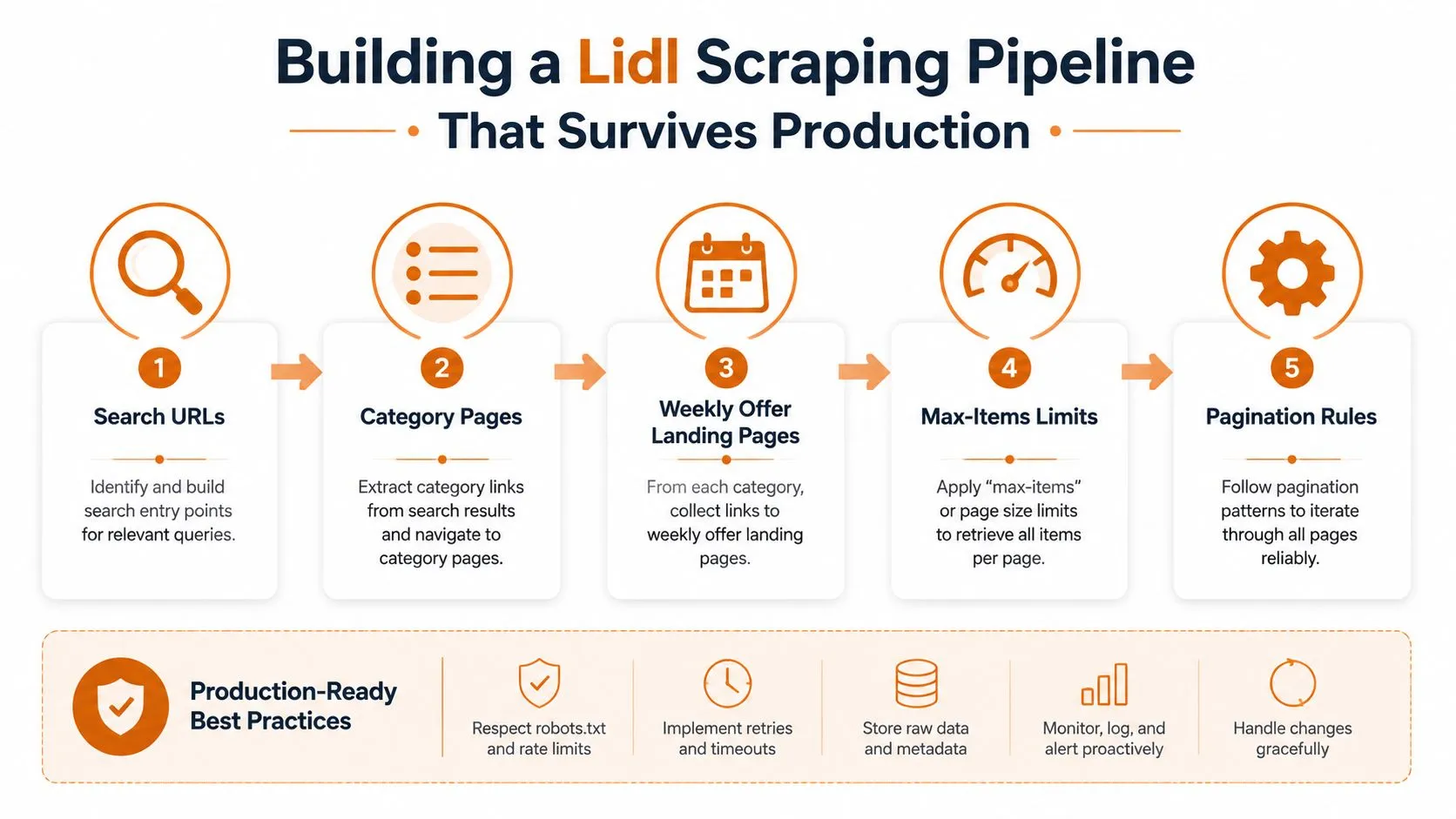
A production pipeline should start from search URLs, category pages, and weekly offer landing pages, not from a single product URL. That matches how Lidl changes content and how downstream teams use the data, by category, offer family, or keyword. It also makes it easier to configure max-items limits, pagination depth, and country-specific entry points without rewriting the crawler every time.
Entry points and controls need to stay configurable
The documented scraper patterns for Lidl commonly use search/category URLs, a max-items limit, and proxy settings, and some tools report collecting 54+ fields per product with outputs in JSON, CSV, or Excel Getodata Lidl product scraper. That combination points to what a pipeline needs, a way to start from structured lists, a hard stop for runaway runs, and a schema that can carry richer product detail than a plain page scrape.
The input examples in public Lidl scraper docs also show how practical this becomes in production. You want to parameterize the crawler by country, page range, and query type rather than baking those rules into code. A pipeline built this way is easier to reuse across markets, and easier to troubleshoot when one country starts returning a different page shape.
The core challenge is normalization, not extraction
A crawl that works in one market can still fail in another because the field names, nesting, and merchandising flags do not line up cleanly. One country may expose a richer image list, another may expose fewer promotional markers, and another may use different category language for the same type of product. A flat table looks convenient at first, then breaks once those differences show up in production.
The practical fix is a stable core schema with a country-specific extension layer for fields that do not travel cleanly. That keeps dashboards usable when Lidl changes a badge, adds a local pack size, or renames a taxonomy branch. For a production-oriented pattern that keeps the crawler maintainable, the building scalable data pipelines with Scrapy approach is a useful reference point.
Anti-bot handling is part of the pipeline, not a patch
Rotating proxies, headless browsers, and continuous change monitoring keep a Lidl scraper alive when the site starts rejecting traffic or ships a new layout Web Data Crawler Lidl scraping challenges. If the crawler only gets hardened after it fails, you have already lost time and probably a few snapshots.
Operational note: the best signal that a pipeline is healthy is not whether it runs, it is whether field coverage stays stable when Lidl changes the page.
The most common engineering failures are stale selectors, exhausted IP pools, and undetected CAPTCHAs. Stale selectors usually show up as missing pricing or empty product titles. Exhausted IP pools look like partial runs that fail in the middle. Undetected CAPTCHAs are more dangerous, because the job can appear successful while returning nonsense.
Schema versioning pays off here. Once the output feeds dashboards or downstream data products, changes to a field name or nested shape should be tracked deliberately, not discovered from broken joins. That discipline also matters when you compare results across markets and need to separate a real content change from a parser side effect.
Why Change Detection Matters More Than the Catalog Itself
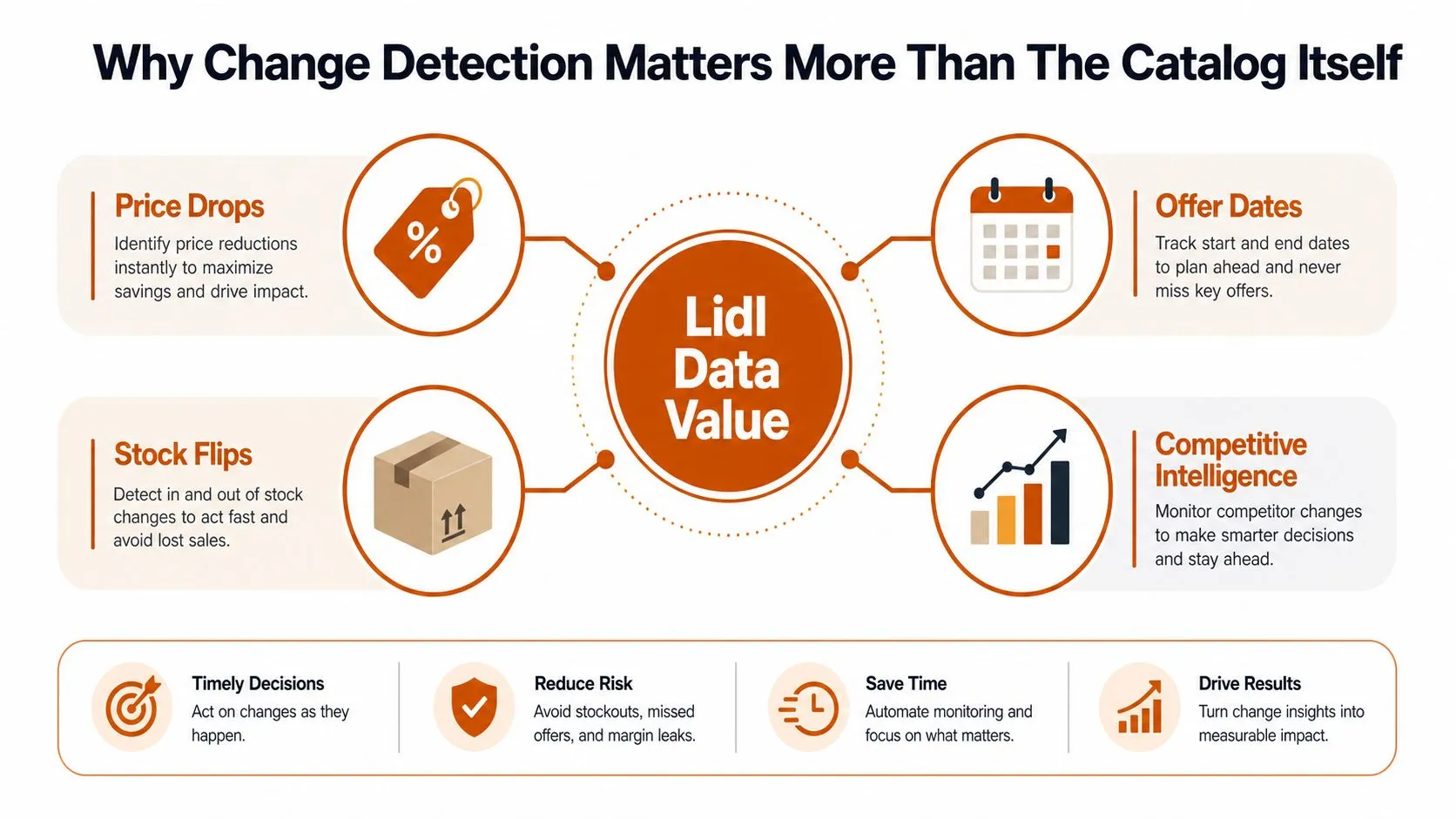
The catalog matters, but the money is usually in the difference between snapshots. A Lidl feed becomes commercially useful when it can tell you what changed, not just what exists. That means capturing price drops, offer start and end dates, stock flips, and category reshuffles as first-class events.
Weekly offers make freshness a real problem
Lidl’s promotional flow creates a moving target. Public content around Lidl scraping consistently points toward product data, weekly offers, prices, and stock status, but the gap is in how teams operationalize that into timing decisions. If you only scrape once a day, you may miss temporary promotions, offer transitions, or short-lived inventory states that disappear before the next run.
That’s why versioned snapshots matter more than a current-state table. A record of what the page says today is useful. A record of how today differs from yesterday is what lets an analyst separate baseline pricing from a temporary deal.
For a practical framing of this mindset, the change-monitoring patterns in Metrivant change detection tips map well to retail pages that shift in small but important ways. The point is to track deltas, not just pages.
Not every change is a price change
The tricky part is filtering the noise. A homepage badge, seasonal banner, or rewritten marketing line can look like a promotion when it isn’t. A serious pipeline should treat the product price object, offer dates, and stock state as authoritative, then treat decorative text as secondary.
WebscrapingHQ’s eCommerce price monitoring guidance is relevant here because the same discipline applies, store structured snapshots, compare them on a schedule, and alert only when the actual commerce fields move. That’s how you keep analysts from chasing cosmetic changes.
Promotion pages are useful only when you can tell whether the deal started, expired, or was quietly replaced by a new badge.
A good alerting layer should flag expired promotions, unexpected stock reversals, and category movement. That lets a merchandiser or analyst see whether Lidl is changing assortment strategy or just refreshing the front end.
Build, Buy, or Outsource Your Lidl Scraping
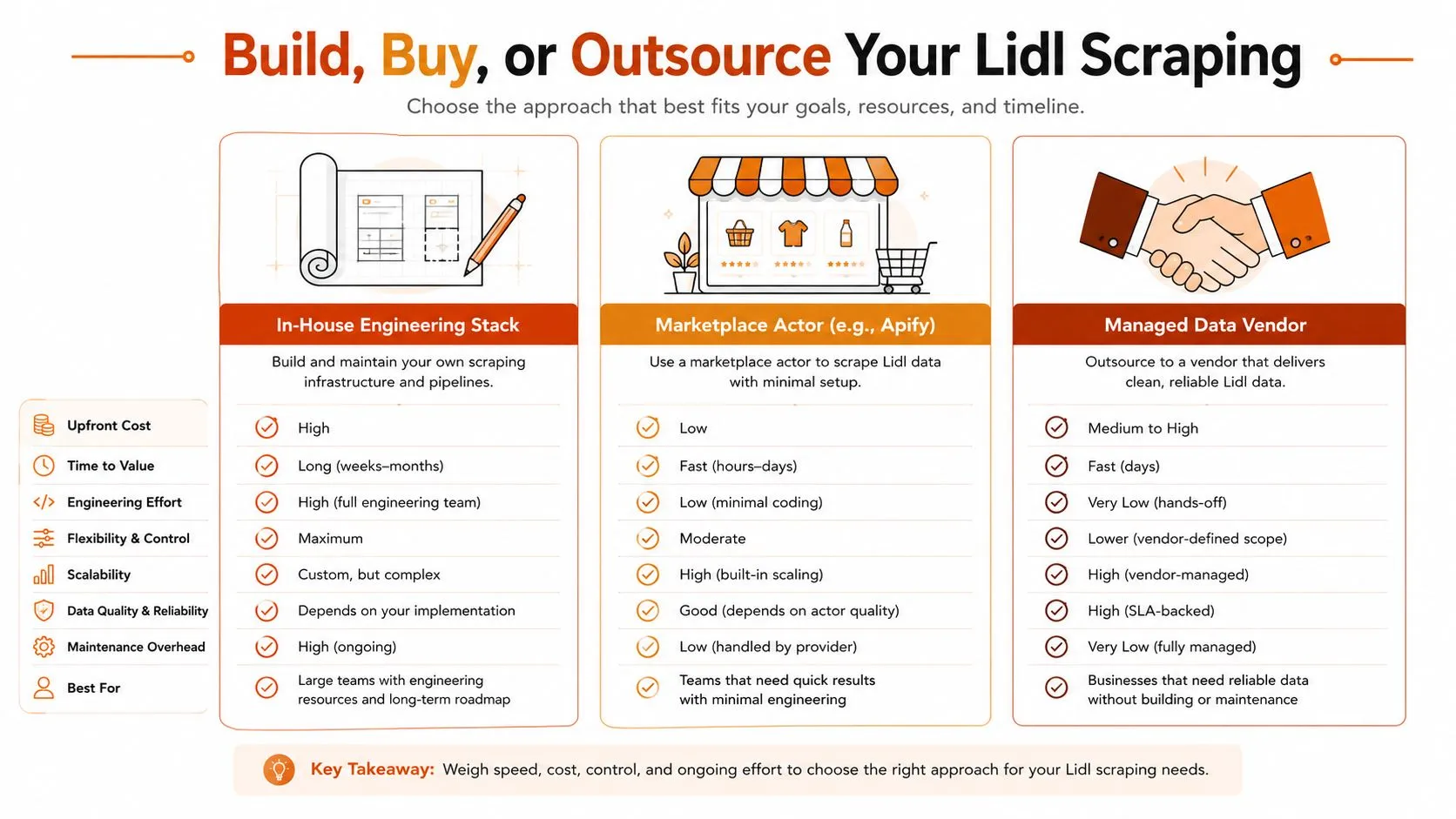
There are three realistic ways to run a Lidl data operation. You can build the stack yourself, use a marketplace actor, or hand the job to a managed vendor. The right choice depends less on ideology and more on whether your team wants to own anti-bot handling, schema maintenance, and multi-country support every week.
Compare the operating model, not just the price tag
| Path | Good Fit For | Strengths | Trade-offs |
|---|---|---|---|
| In-house engineering stack | Teams with scraping engineers and strict control needs | Full schema control, deep customization, direct integration | Highest maintenance burden, anti-bot upkeep stays internal |
| Marketplace actor, such as Apify | Teams that want a faster start and can manage some ops work | Quick launch, structured output, configurable entry points | Still needs monitoring, site changes can require retuning |
| Managed data vendor | Teams that need recurring delivery and less maintenance overhead | Monitoring, retries, proxy management, schema versioning, delivery workflows | Less direct control, vendor dependency, contract review required |
The right pattern depends on how much patience your team has for maintenance. A DIY stack can look cheaper until layout churn, country coverage, and proxy rotation start consuming engineer time. Marketplace actors reduce time to first run, but they don’t eliminate the work of keeping outputs stable.
Use the operating model that matches your scale
An Apify-based Lidl scraper is a good example of the marketplace route because it already advertises broad multi-market coverage and normalized exports Apify Lidl scraper. That’s a practical choice when the team needs structured data quickly and can accept some tuning. A managed service fits better when the data needs to feed dashboards, reports, or downstream systems on a schedule and the team doesn’t want to babysit proxies.
For teams evaluating broader automation, the grocery AI implementation roadmap is a useful adjacent reference because it forces the same decision, build the capability, buy it, or integrate a managed layer. The point is to match the operational burden to the business need.
WebscrapingHQ’s services overview is relevant as one point on that spectrum because it’s framed around managed extraction, monitoring, and re-tuning rather than a one-time scraper build. That matters when your use case is recurring and multi-country.
A Practical Vendor and Implementation Checklist
A vendor can demo a Lidl extractor in minutes. The harder question is whether it will still work after the next layout change, across multiple country shops, and with the exact fields your analysts need. A good checklist should force the conversation away from slideware and toward operational proof.
Verify the coverage and the delivery shape
Before signing anything, confirm that the vendor can name the target Lidl country shops and show how each one is handled. Ask what happens when one market has a different category tree, different language, or a unique offer page structure. If the answer stays generic, the implementation will probably be generic too.
Then ask for the delivery mechanics in plain terms. You want to know whether they can provide JSON, CSV, or Excel, whether they support API delivery, scheduled feeds, S3 drops, or webhooks, and how schema changes are versioned. Those are not nice-to-haves, they’re what keeps downstream systems from breaking.
Ask the questions that expose real operational maturity
- Proxy Management Transparency: Ask who owns proxy rotation, how failures are detected, and whether IP issues are part of the service or your problem.
- Change Detection Capabilities: Ask how the system reacts when Lidl rewrites markup, changes badges, or moves fields between containers.
- Schema Flexibility: Ask how they handle new product fields, country-specific attributes, and versioned record shapes.
- Retuning Commitments: Ask what happens when selectors break, and how quickly the pipeline is adjusted.
- Evidence of Delivery: Ask for documented case studies, image extraction capability, and examples of structured feeds that match the format you need.
Procurement rule: if a vendor can’t explain how they’ll keep the feed stable after a site change, they’re selling a scrape, not an operation.
This is also where image intelligence can matter. If your use case includes product QA, enrichment, or deduplication, ask whether the pipeline preserves high-quality image variants and accessibility text, not just a single thumbnail.
A practical implementation review should also include the team’s own internal process. If your analysts need to reconcile records across markets, your RFP should ask for field mapping help, not just raw output. That keeps the conversation focused on business usefulness instead of isolated extraction.
Compliance and Data Governance for Lidl Scraping
The legal and policy questions are easier when teams stay specific. Publicly accessible product data is not the same thing as personal data, and neither is the same as copyrighted creative content or private account information. The core governance task is to define what you collect, how often you keep it, and who can use it.
Start with data minimization and auditability
If the use case is pricing or assortment intelligence, there’s no reason to retain more data than the workflow needs. Keep a clear retention window, log what was collected, and document the lawful basis your organization relies on. That’s especially important when the pipeline spans several European markets and internal reviewers expect an audit trail.
Keep the feed lean, keep the logs complete, and make it easy to explain why each field is there.
Contract terms, robots.txt, and rate limiting all matter, but they don’t answer the same question. Robots and rate limits guide respectful access. Contract terms tell you what the site owner permits. Internal policy tells you whether your team is willing to carry the residual risk.
Use a governance posture that survives reviews
One useful pattern is to separate the raw crawl, the normalized feed, and the compliance record. The raw layer can be short-lived, the normalized layer can power analytics, and the compliance record can preserve what was collected, when, and under which policy. That separation makes reviews easier and keeps the operation defensible over time.
For teams that need recurring documentation, Matil’s compliance reporting guidance is a good adjacent reference because it reinforces the value of structured reporting and traceable workflows. It fits especially well for organizations that need to show internal stakeholders how data collection is controlled.
WebscrapingHQ’s GDPR-oriented scraping guide is the right kind of internal reference if your team needs a practical starting point for policy review. The main idea is simple, collect only what you need, document the basis for collection, and keep enough metadata to prove the process is controlled.
Putting It All Together and What to Watch Next
A strong Lidl program usually starts narrow. Pick one or two priority markets, lock a stable schema, and validate the outputs against the fields that matter most to pricing or merchandising. Once that’s reliable, layer in weekly-offer delta detection and only then expand into additional countries with localization rules.
Roll out in phases, not all at once
The first phase should prove three things, the crawler can reach the right pages, the schema can hold the useful fields, and the outputs can be compared over time. The second phase should focus on alerting, especially for promotions that start, end, or disappear between snapshots. The third phase is country expansion, where schema drift and market-specific taxonomies become the main workload.
A pipeline usually drifts before it breaks. The warning signs are rising 4xx or 5xx rates, shrinking field coverage, and stale offers that no longer match the live site. Those are the metrics to instrument from day one, because they tell you whether collection quality is slipping before stakeholders notice.
Keep the monitoring simple and visible
Track the number of records collected per market, the share of records with a complete pricing block, and the age of the latest successful snapshot. If the site shifts and a field disappears, you want that to show up as a drop in coverage, not as a quiet blank column in a dashboard.
The teams that do this well treat Lidl scraping like a data product, not a script. They watch for change, version the schema, and assign ownership for maintenance before the first run goes live.
If you want a managed path that handles extraction, monitoring, retries, and re-tuning for changing ecommerce pages, WebscrapingHQ can build the Lidl pipeline around your target markets and delivery format. Visit WebscrapingHQ to discuss a structured feed for pricing, weekly offers, and multi-country product intelligence.
Want this done for you?
Send us the URLs. We'll quote it in 24 hours.
Paste the URL(s) you want scraped. We'll reply within 24 hours with a feasibility check and a ballpark quote.