
Jump to section
- Why YouTube Autocomplete Behaves Like a Recommendation System
- Treat every response as a sample
- Build locale isolation into the design
- Endpoint Scraping Versus Headless Browser Rendering
- Pick the surface based on the deliverable
- Recursive Expansion and Deduplication That Actually Works
- Expand beyond an alphabet walk
- Deduplicate similarity, not just spelling
- Choosing Between Puppeteer, Playwright, and Direct Chromium
- Match the tool to failure ownership
- Capturing Snapshots, Lazy Content, and Scheduling Delivery
- Make the capture deterministic
- Deliver files as an idempotent job
- Verification, Compliance, and Pipeline Governance
- Test the data before publishing it
- Use a maturity ladder
You type a promising phrase into YouTube, watch the suggestion list change, and copy the results into a spreadsheet. A few hours later, another teammate repeats the same search and gets a different set of phrases. The problem isn’t necessarily a broken scraper. YouTube autocomplete is a moving, personalized output from a recommendation system, and a production pipeline must account for that behavior.
A reliable YouTube autocomplete keyword scraper therefore needs more than an endpoint URL. It needs locale controls, identity isolation, recursive discovery, deduplication, rate budgeting, rendered verification, snapshot storage, and governance. The practical question isn’t only how to collect suggestions. It’s whether the resulting dataset is reproducible enough to support SEO, market research, content planning, or monitoring.
Why YouTube Autocomplete Behaves Like a Recommendation System
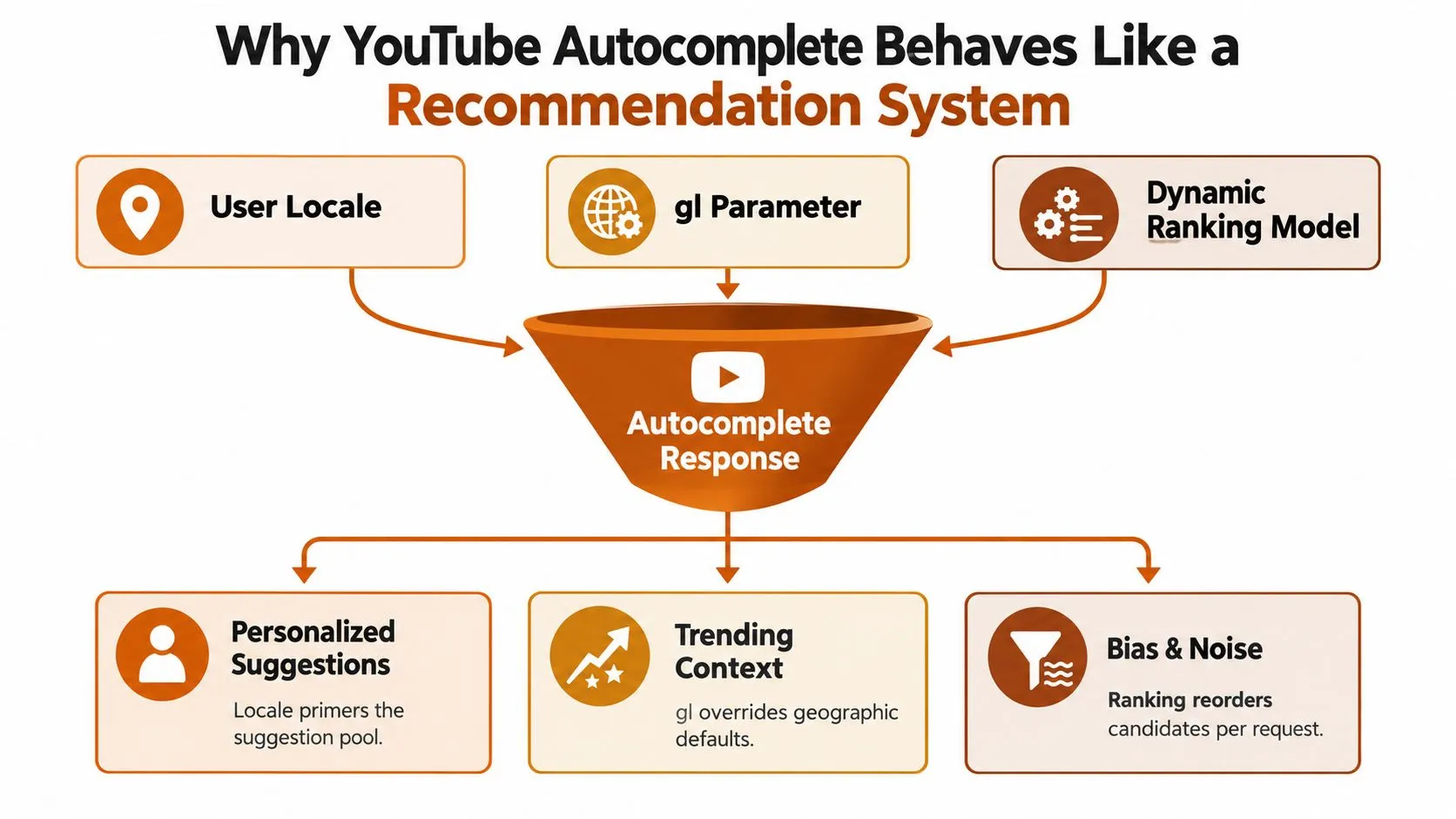
YouTube autocomplete behaves more like a sampling interface than a keyword database. The platform says its predictions are influenced by the words typed so far, a viewer’s YouTube search history, watch history, and what other people are searching for, including trending searches. YouTube’s official autocomplete documentation also explains that deleted search entries stop influencing recommendations, while search history can be automatically deleted after 3, 18, or 36 months.
That gives every request several hidden inputs. A query sent with an en-US locale can expose different vocabulary from one sent with en-GB. Region settings, language preferences, the gl country parameter, cookies, account state, and current demand all influence the candidate pool or its ordering. Even before the user finishes typing, the selected prefix has already constrained what the system can return.
Treat every response as a sample
A useful pipeline records the conditions surrounding each response, not just the suggestion text. Store the seed, typed prefix, language, country, timestamp, client context, response status, and whether an authenticated cookie was present. Without those fields, you can’t tell whether a change reflects demand, localization, personalization, or a request failure.
The same client identity used across a large crawl can also narrow your observations. A stable cookie may repeatedly expose one behavioral profile rather than a broad market view, while an unauthenticated request may omit signals that matter to actual viewers. Neither output should be treated as universal demand.
The endpoint itself has a long scraping history. A visible YouTube-specific Google Suggest request pattern using ds=yt was publicly documented as early as April 24, 2008, making autocomplete one of the earlier major consumer suggestion surfaces available for programmatic querying. The implementation details have changed, but the underlying lesson remains: the interface is queryable, not static.
Build locale isolation into the design
Run each market as a separate experiment. Keep country and language parameters explicit, avoid mixing cookies between markets, and compare result sets using normalized phrases rather than raw list positions. A phrase appearing in one locale and not another is useful only when the capture conditions are known.
Trending demand adds another time dimension. A suggestion can reflect aggregate interest that is active now, while account history can preserve older personal intent. Your storage layer should preserve capture time and distinguish a newly observed phrase from a phrase that merely remains visible for a particular client.
Practical rule: If you can’t reproduce the request context, you can’t confidently explain why the suggestion set changed.
Endpoint Scraping Versus Headless Browser Rendering
Direct endpoint scraping is the sensible default for bulk collection. An HTTP client can request structured responses without paying the startup and rendering cost of a browser, and workers can parallelize seeds efficiently. The weakness is fidelity. The response inherits cookies and client parameters, can change when YouTube rotates internal details, and doesn’t prove what a human saw in the search interface.
A headless browser provides a different kind of evidence. Puppeteer or Playwright can type into the actual search box, capture the suggestion drawer, preserve a DOM snapshot, record network activity, and save a screenshot. That matters when you need to validate consent behavior, document a compliance review, or investigate whether a parser extracted the intended panel rather than an unrelated response.
| Dimension | Endpoint Scraping | Headless Browser Rendering |
|---|---|---|
| Collection cost | Lower request overhead and compact responses | Higher CPU, memory, and session overhead |
| Bulk keyword discovery | Well suited to large seed sets | Slower and more expensive for broad expansion |
| Personalization | Explicitly affected by cookies and client context | Mirrors a browser session, including storage state |
| Visual evidence | None unless paired with another capture method | DOM, screenshot, PDF, and network artifacts |
| Single-page behavior | Requires handling request and parameter changes | Browser executes navigation and client-side hydration |
| Consent overlays | Must detect response or access behavior indirectly | Visible and testable in the rendered page |
| Failure diagnosis | Logs and payloads can be difficult to interpret | Trace, console, DOM, and screenshot evidence help isolate failures |
Pick the surface based on the deliverable
Use the endpoint when the output is a normalized keyword feed and you can tolerate sampling uncertainty. Use rendering when the output must support an audit, show the exact interface state, or explain a disputed capture. A hybrid pipeline often works best, with endpoint collection for discovery and a smaller browser sample for verification.
Single-page navigation creates a practical trap. Loading YouTube once and changing the input value may not trigger the same sequence as a real navigation, particularly when the suggestion drawer hydrates lazily. A browser worker should wait for the panel and inspect its state after input, rather than assuming that a page load event means suggestions are ready.
Consent overlays require their own branch. In some European locales, an overlay can block interaction before the search field is usable. Treat consent state as an explicit capture outcome, not as an empty keyword result.
For broader context on choosing browser-driven approaches, website automation tools compared offers a useful survey of the trade-offs between automation stacks. For JavaScript-heavy pages, the Puppeteer extraction workflow is also relevant, especially when the visible result depends on client-side execution rather than server HTML.
Recursive Expansion and Deduplication That Actually Works
The basic collection loop is simple: type, read, copy. Start with a seed such as seo tools, submit the prefix, read every returned suggestion, and copy the phrases into a queue. Each newly discovered phrase can then become another seed, allowing one starting query to open long-tail branches.
The method is useful because autocomplete often exposes intent modifiers that a seed alone doesn’t reveal. A first response might contain phrases resembling seo tools free, seo tools for beginners, or seo tools list. Those tails become new inputs, and the next round can uncover narrower combinations.
Expand beyond an alphabet walk
A common implementation appends letters or numbers to the end of the seed. That finds obvious branches, but it misses useful completions inside longer phrases. Add prefix and suffix variants, then apply a sliding trigram strategy across the normalized query so the crawler can test meaningful windows rather than only the original beginning.
For seo tools free, the queue might include:
- Suffix branch:
seo tools free tutorial - Modifier branch:
seo tools free for beginners - Window branch:
tools free - Question branch:
how to use seo tools free
The queue needs boundaries. Stop expanding a branch when it returns no new normalized phrases, when repeated results dominate the response, or when its yield falls below the threshold your project defines. A saturated prefix can otherwise consume requests without improving intent coverage.
Deduplicate similarity, not just spelling
Exact-string deduplication is necessary but insufficient. Normalize case, whitespace, punctuation, and Unicode variants first. Then compare token n-grams, using trigram similarity to identify near-duplicates such as singular and plural forms or phrases that differ only by a weak modifier.
Don’t discard the evidence when you merge records. Keep the canonical phrase, its observed variants, the number of times it appeared, the locales where it appeared, and the recursion depth. Frequency isn’t search volume, but repeated observation can help rank candidates for review.
A durable suggestion record should include the seed path that produced it. That lineage lets a strategist trace seo tools free for beginners back to the original seed and distinguish a direct suggestion from a deeper recursive discovery. For broader extraction design principles, the guide to scraping keywords from websites provides useful context on turning discovered phrases into structured records.
Choosing Between Puppeteer, Playwright, and Direct Chromium
The browser stack affects maintenance more than the first successful run suggests. Puppeteer is a practical choice for a small Node.js scraper that only needs Chromium, a search interaction, and a compact operational surface. Its Node-native API is straightforward, but teams must be deliberate about waits, dialogs, retries, and browser lifecycle management.
Playwright adds a heavier dependency footprint, yet it gives production teams stronger diagnostics through traces and strict locators. Its browser coverage across Chromium, Firefox, and WebKit can help when a workflow must be cross-checked across engines, although browser diversity doesn’t remove YouTube-specific variability.
Direct Chromium through the Chrome DevTools Protocol gives the engineer the most control over network interception, storage, pages, and browser processes. It also transfers more responsibility to the team. You write the retry policy, dialog handling, navigation logic, cleanup, and much of the observability yourself.
| Dimension | Puppeteer | Playwright | Direct Chromium (CDP) |
|---|---|---|---|
| Installation footprint | Focused and relatively simple for Chromium | Broader package and browser setup | Minimal client layer, browser managed separately |
| Browser coverage | Primarily Chromium-oriented | Chromium, Firefox, and WebKit options | Chromium only |
| Waiting behavior | Requires explicit synchronization discipline | Strong locator and auto-wait patterns | Fully manual |
| Diagnostics | Useful logs and screenshots | Traces, screenshots, console, and network tooling | Raw protocol events and custom instrumentation |
| Concurrency model | Browser and page workers | Context isolation and worker-friendly architecture | Low-level process and session control |
| Anti-bot exposure | Browser fingerprint and behavior still matter | Same fundamental exposure, with richer controls | Maximum control, but easy to misconfigure |
| Scaling ceiling | Suitable for focused collection | Strong fit for multi-tenant workloads | Efficient for cost-sensitive, high-throughput harnesses |
| Engineering burden | Moderate | Moderate to high | High |
Match the tool to failure ownership
Choose Puppeteer when the team wants a small, understandable service and doesn’t need cross-browser validation. Choose Playwright when separate tenants, locales, traces, and testable session contexts matter. Choose CDP when infrastructure engineers are prepared to own protocol-level behavior and need to trim overhead from a large worker fleet.
The anti-bot question isn’t solved by changing libraries. YouTube can observe request cadence, browser behavior, cookies, navigation patterns, and other signals. A more advanced framework can improve diagnostics and isolation, but it won’t make aggressive collection safe or reliable.
For a wider view of browser automation choices, the 2026 automation tools roundup is a useful comparison point. Teams deciding between Selenium and Playwright can also review this Playwright and Selenium performance comparison, while keeping in mind that benchmark results don’t replace a workload-specific failure analysis.
My default is conservative: direct HTTP for discovery, Playwright for a verification lane, and CDP only when the team has a clear reason to accept the additional operational ownership.
Capturing Snapshots, Lazy Content, and Scheduling Delivery
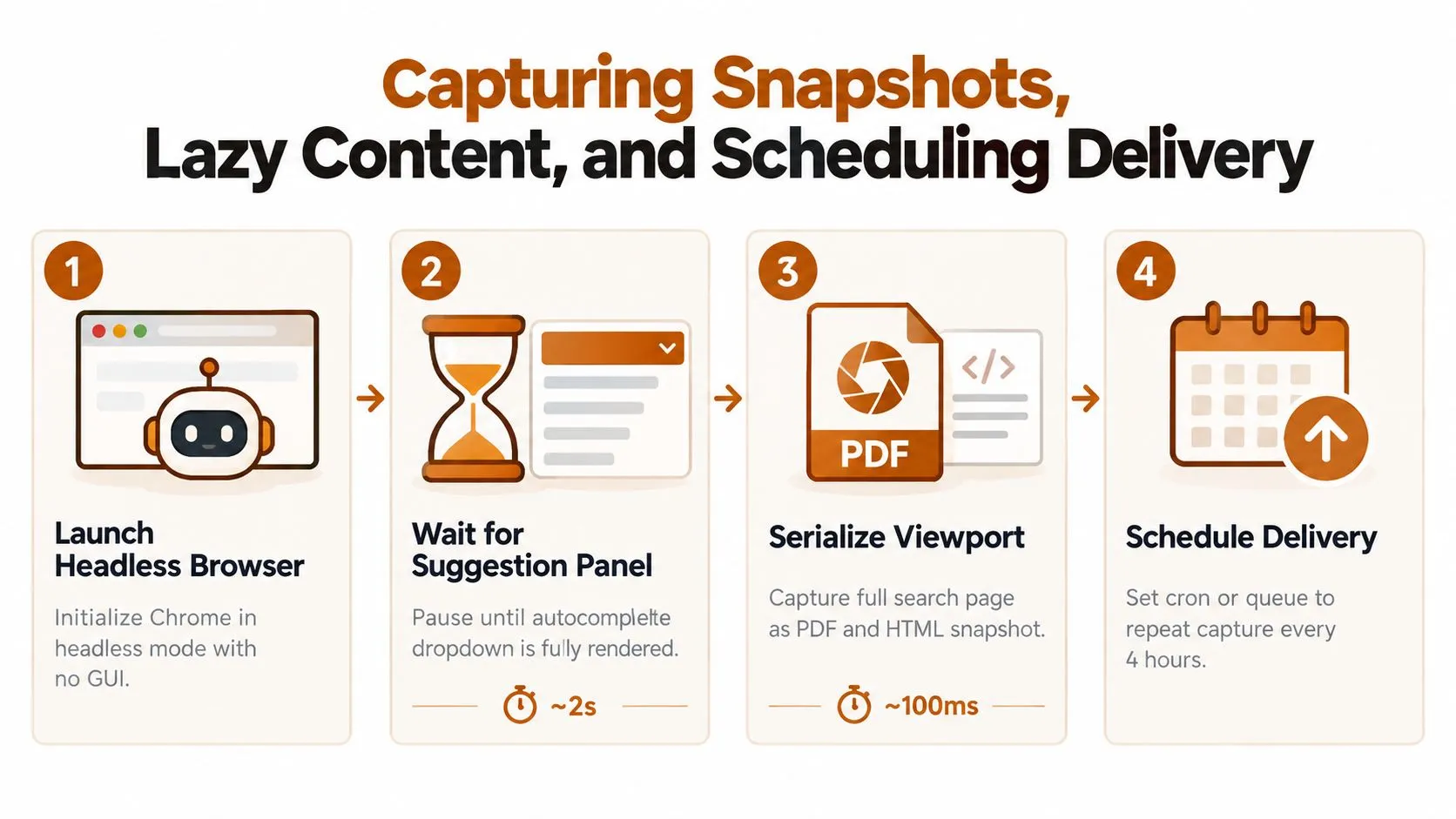
A rendered capture should be treated as an artifact, not a disposable screenshot. Launch the browser with a fixed viewport, locale, timezone policy, and storage state. Type the query, wait for the suggestion panel to appear, and record the page only after the client has hydrated the relevant elements.
Make the capture deterministic
Save the same set of artifacts for each run:
- Viewport image: A PNG with fixed dimensions for visual comparison.
- Document output: A PDF when a human-readable review record is required.
- DOM snapshot: The post-hydration HTML, including the suggestion panel.
- Network evidence: Selected requests, response metadata, and a HAR file when feasible.
- Manifest: Query, locale, timestamp, browser version, status, and content hashes.
Lazy content can invalidate an early snapshot. Scroll the suggestion container when it supports scrolling, trigger intersection observers where your harness permits it, and wait for the panel’s own state rather than relying only on global network idle. Network idle can be misleading because analytics or background requests may continue after the useful content is ready.
A practical completion condition combines signals: the input contains the intended query, the dropdown exists, its text is non-empty, and the DOM remains stable for a short controlled interval. If any condition fails, store the failure artifact instead of converting it into an empty result.
Deliver files as an idempotent job
Partition object storage by market and capture time, with names derived from a normalized query and a run identifier. The same job should be safe to retry. Write to a temporary key, validate the manifest and hashes, then promote the object to its final location.
A scheduler can invoke the worker through cron or a queue. Downstream systems can receive a lightweight webhook containing the object key, status, and manifest reference rather than the full payload. The batch data processing guidance is useful when many locale and seed combinations must be processed as independent, retryable units.
Retry only transient failures. A consent block, schema mismatch, or changed selector needs investigation, not blind repetition. Keep an audit trail for every attempt, and include browser version changes in the manifest so a sudden result shift can be correlated with the runtime.
Verification, Compliance, and Pipeline Governance
Autocomplete suggestions aren’t neutral observations of demand. YouTube’s own description identifies personal history and aggregate searches as inputs, and independent research has shown that autocomplete can surface stereotyped completions for race-related queries. The 2025 audit of race-related autocomplete suggestions is a useful reminder that the output is a shaped dataset, not an unbiased transcript of public intent.
Verification should start with market controls. Compare suggestion sets across explicitly configured locales, preserve timestamps, and investigate sudden changes rather than treating every new phrase as a trend. Cross-check promising themes against independent sources, such as YouTube Trends or Google Trends, but don’t assume that agreement proves causality.
Test the data before publishing it
A production quality gate can include:
- Schema validation: Require fields for seed, suggestion, locale, capture time, source context, and lineage.
- Content sampling: Review samples for spam, irrelevant completions, and adult or prohibited vocabulary before distributing them.
- Completeness checks: Alert when a normally populated response becomes empty, truncated, or structurally different.
- Drift monitoring: Compare normalized sets across runs, locales, and client contexts.
- Provenance records: Store the request conditions and artifact hashes with every published dataset.
A keyword scraper also needs a legal and operational boundary. Review YouTube’s terms and applicable laws before collection, define a reasonable rate budget, and avoid handling account history or other personal data unless the use is justified and governed. Robots directives, consent requirements, data minimization, retention, and access controls belong in the project review, not in a post-launch checklist.
Governance principle: A suggestion can be useful for discovery without being suitable as a fact, forecast, or targeting decision.
Use a maturity ladder
An ad hoc script may be enough for internal exploration. A repeatable team workflow adds locale configuration, normalization, logs, and stored raw responses. A reviewed service adds schema contracts, lineage, alerting, retention controls, access permissions, and a kill switch.
The kill switch matters because platform behavior can change, access can be restricted, and a cease notice must produce an immediate operational response. Teams building broader data policies can use these data governance policy examples as a reference while adapting controls to their own legal review and risk profile.
WebscrapingHQ provides managed web data operations and custom scraping services for teams that need scheduled, structured collection rather than a script that breaks. If you need localized YouTube extraction, snapshot evidence, retries, monitoring, or delivery through CSV, JSON, webhooks, or S3, visit WebscrapingHQ to discuss a pipeline built around your seeds, markets, and governance requirements.
Want this done for you?
Send us the URLs. We'll quote it in 24 hours.
Paste the URL(s) you want scraped. We'll reply within 24 hours with a feasibility check and a ballpark quote.