Jump to section
- Table of Contents
- What an Alexa Scraper Means Today
- The Two Eras of Alexa Scraping
- Why the modern meaning is harder
- Core Techniques for Modern Web Scraping
- Rendering comes before reliability
- Parsing strategy should match the source
- AI helps after the extraction layer, not before it
- Scraping vs APIs for Data Acquisition
- Decision criteria that hold up in practice
- Enterprise Use Cases and Business Impact
- Where the data becomes business leverage
- Navigating Anti-Bot, Legal, and Ethical Hurdles
- The technical side is an arms race
- Choosing Between In-House and Managed Scraping
- What managed scraping changes
What does an Alexa scraper mean in 2026, a tool for pulling old web rankings, or a pipeline for extracting data from Amazon’s fast-changing ecosystem? That ambiguity matters because the engineering choices are completely different. One version is historical and mostly about archived popularity lists, the other is a live data problem that sits inside modern e-commerce, localization, and anti-bot pressure.
Table of Contents
Open Table of Contents
What an Alexa Scraper Means Today
The phrase Alexa scraper now carries two distinct meanings, and teams waste time when they blur them together. The first meaning is historical, tied to Alexa Internet’s ranking system, which became a widely used traffic reference in the late 1990s and early 2000s. Public “Alexa Top 500” lists were popular enough that hobbyist scrapers were built to extract them without an API, including open-source tooling that pulled top-500 sets globally and by country, category, and subcategory from the ranking surface GitHub project on Alexa Top 500 scraping.
The second meaning is modern, and it points at data extraction around the Amazon ecosystem or related Alexa-branded surfaces. That includes product pages, search results, pricing, seller offers, and account-specific content. In practice, the technical question isn’t whether scraping exists, it’s whether the target is static enough for simple parsing or dynamic enough to require browser rendering and stronger governance.
Practical rule: if the target is a ranked list, you’re usually solving a classification problem. If the target is a marketplace or account surface, you’re solving a pipeline problem.
A useful way to think about the term is this. The historical Alexa use case turned a public popularity ranking into structured data for SEO research and market mapping. The modern use case is closer to enterprise data engineering, where freshness, schema stability, localization, and anti-detection measures matter more than raw extraction speed. If you’re still mapping the terrain, a solid primer on the broader category is what a web scraping workflow looks like, because the “Alexa” label by itself doesn’t tell you enough.
The Two Eras of Alexa Scraping
What does Alexa scraper mean now? The answer depends on which era you mean, and that matters for how teams should build around it. The classic era focused on Alexa.com rankings, where the value was in turning a public popularity list into something analysts could sort, compare, and feed into internal reporting. Alexa’s traffic interpretation also grouped sites into broad buckets, and marketers often used those categories as a quick way to segment audiences, with published labels such as Outstanding, Excellent, Pretty good, Medium, Poor, and Invisible Sitesell explanation of Alexa traffic buckets. That rough grouping was useful because it gave teams a way to work with ranking data even when precise numbers were not available.
The open-source tooling from that period shows how people used the output. One repository described scraping the Alexa Top 500 across global and country views, plus category and subcategory slices, which points to a workflow built for competitive analysis and SEO research GitHub project on Alexa Top 500 scraping. The scraper was not just collecting pages. It was turning popularity signals into a structured dataset that other systems could reuse.
Why the modern meaning is harder
The modern meaning is broader and more operationally demanding because Amazon and Alexa-related surfaces are not one data type. Product pages, seller offers, search results, and voice-assistant history each behave differently, and they change for different reasons. Amazon pages often load important fields dynamically, so a scraper that only fetches HTML can miss JavaScript-rendered content, while browser-based rendering adds completeness at the cost of latency and more compute Amazon scraping workflow and render trade-offs.
The gap is even wider for Alexa assistant history. A 2018 forensic workflow described using the Alexa app’s History screen, scrolling to the bottom, then copying entries into a spreadsheet for preservation preserving Alexa history in a 2018 workflow. That approach preserves records, but it is not a maintained extraction pipeline. It also leaves region-specific differences, mobile redesigns, and account surface changes unresolved. For a technical manager, that is the practical distinction. Historical Alexa scraping was about public rankings. Modern Alexa-adjacent scraping is about keeping extraction reliable across dynamic pages, account-specific views, and changing site behavior.
For teams working on complex modern platforms, the build-vs-buy decision matters as much as the parsing logic. In-house engineering can work well when the target is narrow and the crawl rules are stable. Managed platforms are often a better fit when rendering, proxy rotation, localization, and bot handling need to be controlled as part of the system. If the goal is to analyze competitor search results, a practical starting point is this search scraping API guide, because search data often exposes the same reliability problems seen in other large-scale scraping jobs. When JavaScript-heavy pages are involved, advanced scraping techniques for JavaScript and Node.js become relevant quickly, since the browser layer changes both cost and failure modes.
Core Techniques for Modern Web Scraping
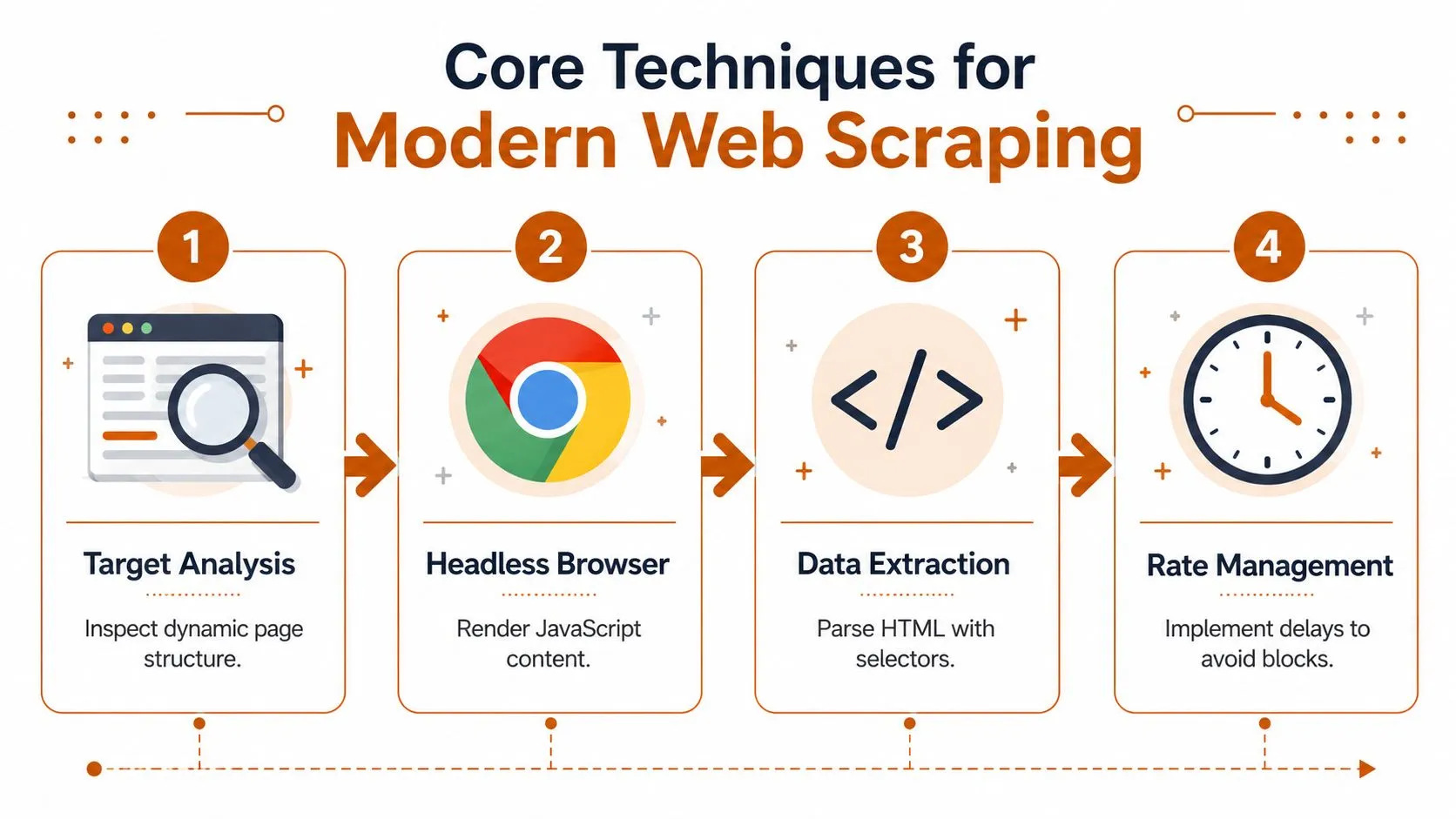
What does a scraper need to do when the page is no longer just HTML? On modern targets, the answer usually depends on where the data lives, how the page renders, and how much variation your team can tolerate in production.
Simple HTML parsing is still the cheapest starting point, but it breaks down quickly on modern targets. If the page source already contains the fields you need, selector-based extraction is fast and easy to maintain. The problem is that many e-commerce and marketplace pages push important fields into JavaScript, lazy-loaded components, or JSON blobs that never appear in the first response.
Rendering comes before reliability
That is why headless browsers matter. Playwright and Puppeteer let you render JavaScript, wait for the page to settle, and inspect the final DOM instead of the initial shell. For Amazon-style targets, that often makes the difference between partial data and a usable record set. The trade-off is clear, browser automation costs more CPU, adds latency, and widens the surface area for anti-bot detection.
Operational takeaway: use raw requests when the target is stable, use browser rendering when completeness matters more than speed.
Parsing strategy should match the source
For modern Amazon marketplace work, specialized APIs are often the cleaner option because they return structured JSON for product pages, pricing, seller offers, and search results across international marketplaces, while also handling localization and anti-detection concerns. That does not remove engineering work, it shifts the effort downstream into validation, deduplication, and schema management.
If you are comparing extraction paths for search-heavy workflows, it helps to analyze competitor search results before you commit to a method. SERPs and marketplace pages fail in different ways, and teams that treat them the same usually end up with brittle selectors.
JavaScript-heavy sites usually need a different toolchain. A practical reference is advanced web scraping techniques for JavaScript and Node.js, because browser execution changes both cost and failure modes, and the extraction plan has to account for that from the start.
AI helps after the extraction layer, not before it
Computer vision and LLMs are useful when layout drift, image capture, or messy text make pure selector logic too fragile. They do not replace deterministic parsing. They sit beside it, usually as fallback layers for fields that are hard to normalize or visually embedded. For teams standardizing extraction tooling, this guide to choosing data extraction tools is useful because it frames the buy, build, and hybrid decisions in operational terms.
Scraping vs APIs for Data Acquisition
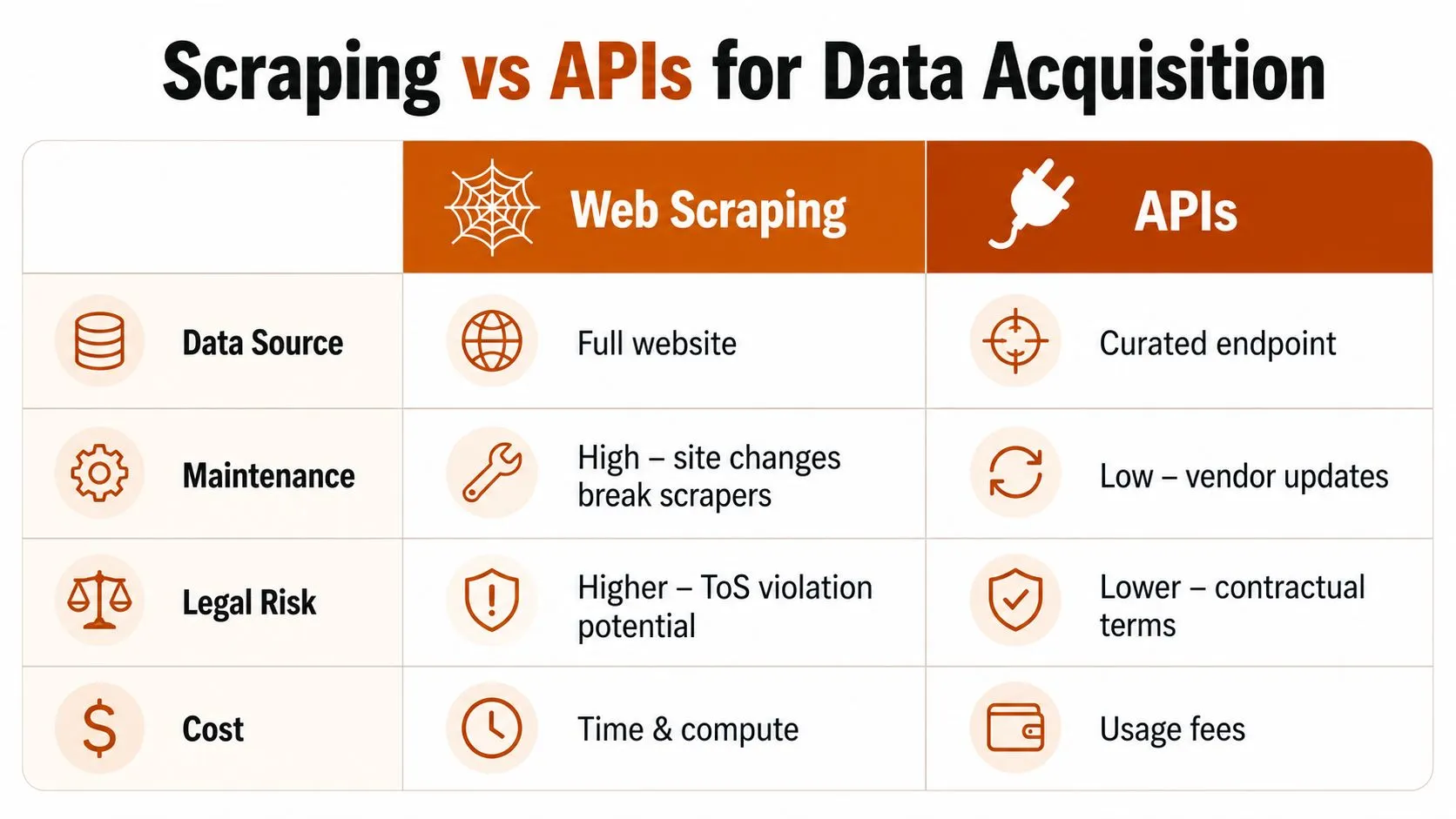
The first question is usually not whether you can scrape a target, but whether scraping is the right operating model for that source. A commercial API, a managed feed, or direct scraping can all work, and the better choice depends on how structured the data is, how often the source changes, and how much upkeep your team can realistically own. If the source shifts often and your schema is strict, scraping may look flexible at the start and become expensive in maintenance later.
A custom scraper gives you the widest reach because the extraction logic can be built around the exact page elements you need. That matters when vendors do not expose the right fields, when the use case includes unusual edge cases, region-specific attributes, or report layouts that do not fit standard endpoints. The trade-off is straightforward. Every site change becomes your team’s problem, and production support starts to look like application support, not a one-time data task.
Commercial APIs trade some of that flexibility for stability. They usually return structured JSON, absorb vendor-side layout drift more gracefully, and reduce the selector maintenance your engineers have to own. Managed data feeds go one step further, since they are designed for recurring delivery and downstream consumption. The team buying the data spends less time on plumbing and more time on analysis. For a practical way to frame the buy, build, and hybrid decision, How to choose data extraction tools is a useful reference.
The same build-vs-buy logic shows up in proxy-heavy workflows. Once retries, rotation, and delivery controls become part of the service, you are operating a data pipeline rather than running a few scripts, which is why a YouTube Download API proxy guide can be relevant even outside its original use case.
Decision criteria that hold up in practice
A technical manager can usually make the call with four questions.
- Is the source stable enough for selectors? If not, browser rendering or an API will usually hold up better.
- Do you need a strict schema? If yes, structured endpoints or a managed feed reduce rework.
- Can your team own maintenance? If no, the hidden cost of a scraper rises quickly.
- Is the data recurring or one-off? Recurring jobs justify more automation and stronger support terms.
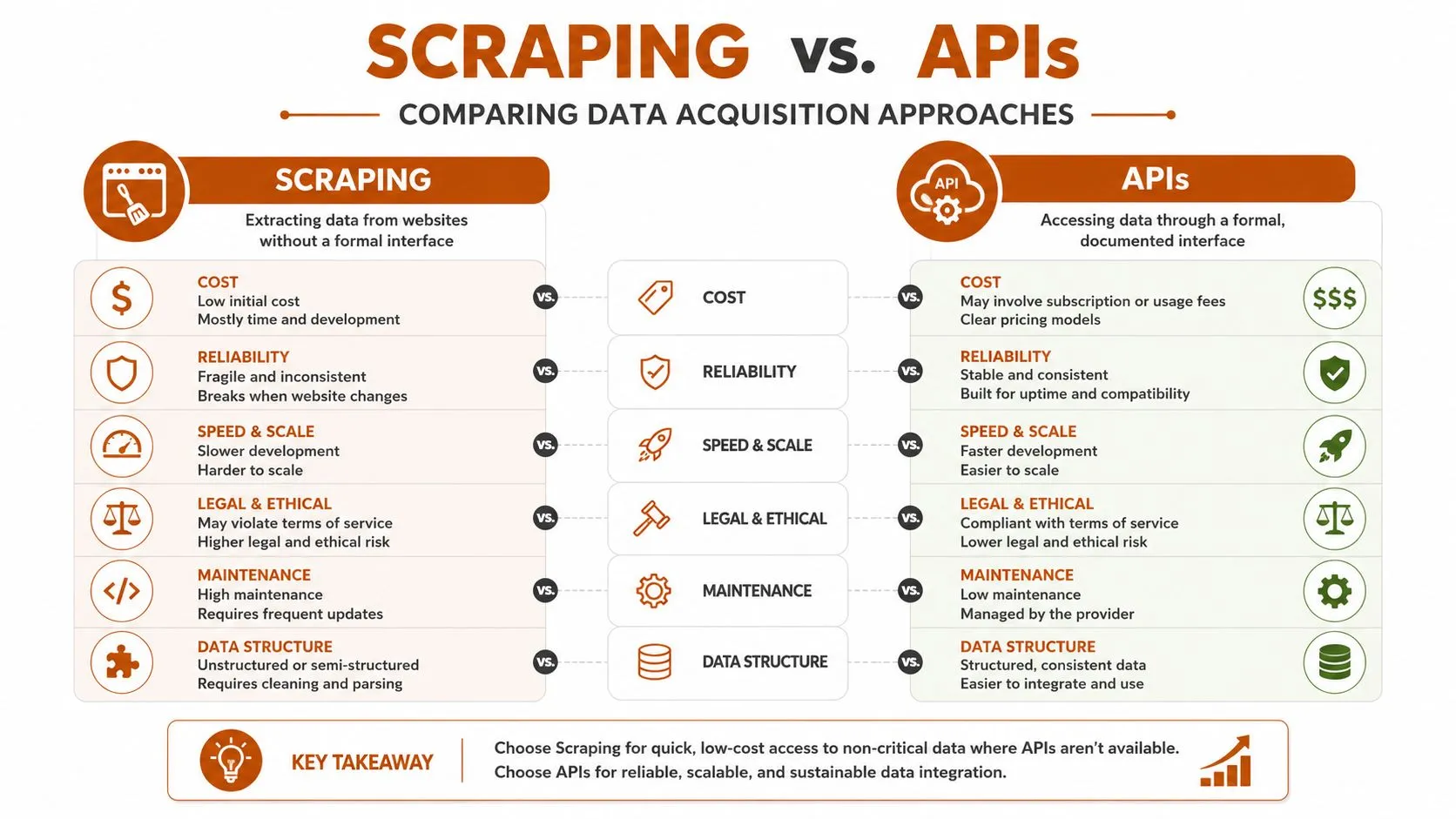
The rule that tends to hold up is simple. Build when the source is unique and the schema is unusual. Buy when reliability, localization, and repeat delivery matter more than full control. The wrong choice usually shows up later as a maintenance backlog, not as an immediate failure.
Enterprise Use Cases and Business Impact
A reliable scraping pipeline pays off when the business problem is repetitive and the source is messy. Competitive price monitoring is the most obvious example. Retail teams need fresh snapshots from marketplaces and brand sites, and the value comes from consistent structure, not just raw capture. That’s why scheduled extraction pipelines are useful for catalog intelligence, pricing decisions, and category tracking.
The same logic applies to ad verification and dealer compliance. A bureau or brand team that needs monthly evidence packs can use extraction plus computer vision to assemble structured PDF reports, highlight exceptions, and keep an audit trail. WebscrapingHQ’s own service model reflects that kind of workflow, with managed web data operations, custom extraction, and delivery formats such as PDF, CSV, JSON, webhooks, and S3 drops. It also supports recurring use cases like Amazon, e-commerce marketplaces, search engines, news, jobs, real estate, and company data.
Where the data becomes business leverage
In practice, the advantage isn’t just getting more pages. It’s turning scattered signals into inputs that other teams can trust. ML teams use localized pipelines to collect multi-geo consumer signals and normalize them into training data. Growth and SEO teams use recurring search and category snapshots to understand visibility patterns. Retail innovation teams use image intelligence and deduplicated captures to monitor how products are presented across channels.
Business rule: if a report is manually rebuilt every cycle, the data system is probably under-designed.
That matters because the deliverable changes the internal conversation. A one-off scrape is an engineering task. A recurring feed with quality controls becomes part of planning, forecasting, and compliance. The enterprise value comes from reducing ambiguity for the people who have to make decisions on deadlines.
For technical managers, the useful test is simple. Ask whether the target data can support a repeatable operational decision, not just a dashboard. If the answer is yes, the extraction pipeline deserves the same discipline you’d apply to any other production system.
Navigating Anti-Bot, Legal, and Ethical Hurdles
Scraping rarely breaks for one reason. It fails through a stack of controls and site changes, including CAPTCHAs, IP throttling, browser fingerprinting, account-region differences, and shifting page logic. If a system only handles one of those, it is not a durable pipeline, it is a fragile demo.
The technical side is an arms race
The practical response is layered. Use request-based fetches where possible, switch to browser rendering when the page depends on JavaScript, and add rate management so the source does not get hammered. For modern collection work, specialized APIs can also reduce selector churn by returning structured data and handling localization parameters directly. The goal is not to beat protection, it is to build a collection process that is predictable, respectful, and maintainable.
The legal and ethical side needs the same discipline. Public data is not automatically free to collect for every purpose, and account-specific data is an even higher-risk category. The 2018 Alexa history workflow shows how manual preservation sometimes became the only practical method people discussed, which is a reminder that many surfaces were never designed as export feeds preserving Alexa history in a 2018 workflow. That makes governance important, especially when the target may include personal or account-linked content.
Compliance rule: if the dataset can touch personal information, treat access, retention, and downstream use as separate decisions.
There is also a broader ethical line around scraping biometric or sensitive personal data. The EU AI Act discussion around untargeted scraping of facial images is a good example of how regulators are drawing sharper boundaries around intrusive collection practices analysis of the EU AI Act and untargeted facial scraping. The same discipline applies more broadly, even when the target is nowhere near facial recognition. Enterprise scraping needs schema versioning, quality checks, clear retention rules, and a documented policy for ethical data collection, because the cost of bad collection does not stay inside engineering.
Choosing Between In-House and Managed Scraping
An in-house team gives you full control. You own the code, the proxies, the retries, the alerting, the schema changes, and the site-specific weirdness. That model works when extraction is a core competency or when the target is so specialized that no outside service can reasonably generalize it.
The downside is maintenance gravity. Every source change creates work, every edge case needs triage, and every new geo or language adds more operational surface area. Teams often underestimate that burden because the first version of a scraper is the easy part. The hard part is keeping it alive while product roadmaps, compliance requirements, and target sites all keep moving.
What managed scraping changes
A managed service shifts those operational responsibilities off your internal backlog. That includes scoping, feasibility, extraction design, retries, proxy management, anti-bot handling, and re-tuning when pages change. WebscrapingHQ publishes that model directly, with managed web data operations, custom scraper development, and recurring delivery options for enterprise teams. The value is not abstract, it’s the removal of maintenance work from your engineers’ plates.
Why managed scraping beats self-hosted maintenance for many teams is worth reading if your team is already spending too much time on scrapers instead of analysis. The decision usually comes down to whether the scraper is a sidecar or a product dependency. If it’s a dependency, managed operations are easier to defend internally because they align cost with uptime, coverage, and delivery reliability.
The strongest build-vs-buy answer is pragmatic. Build in-house when the target is strategic and the team can support production operations. Buy or outsource when you need stable delivery, complex targets, and less drag on your core roadmap. That’s the difference between owning a dataset and owning a maintenance job.
If you need reliable extraction from Amazon, search engines, or other difficult targets, WebscrapingHQ can design and run the pipeline, not just hand over code. Visit WebscrapingHQ to discuss managed data delivery, custom scraping, and recurring feeds built for enterprise use.
Want this done for you?
Send us the URLs. We'll quote it in 24 hours.
Paste the URL(s) you want scraped. We'll reply within 24 hours with a feasibility check and a ballpark quote.