Jump to section
- Table of Contents
- What Apple Music Scraping Actually Means in 2026
- The scope boundary that keeps projects sane
- API-First vs Browser-Rendered Extraction
- What each path is good at
- Building the Extraction Core
- A practical request pattern
- When Browser-Rendered Scraping Becomes Necessary
- Schema Design and Validation Across Storefronts
- What belongs in the schema
- Pipeline Integration and Delivery
- Monitoring, Re-Tuning, and Governance
- The rule set that keeps pipelines defensible
If you’re trying to turn Apple Music into a dependable data source, the hard part usually isn’t finding a script that returns rows. The hard part is deciding whether you’re building a catalog monitoring pipeline, a geo-aware metadata feed, or something that crosses into private, restricted, or audio-related territory. That boundary matters, because the wrong choice creates compliance risk, brittle selectors, and a pipeline that looks fine in a demo but falls apart when storefronts differ or markup changes.
Table of Contents
Open Table of Contents
What Apple Music Scraping Actually Means in 2026
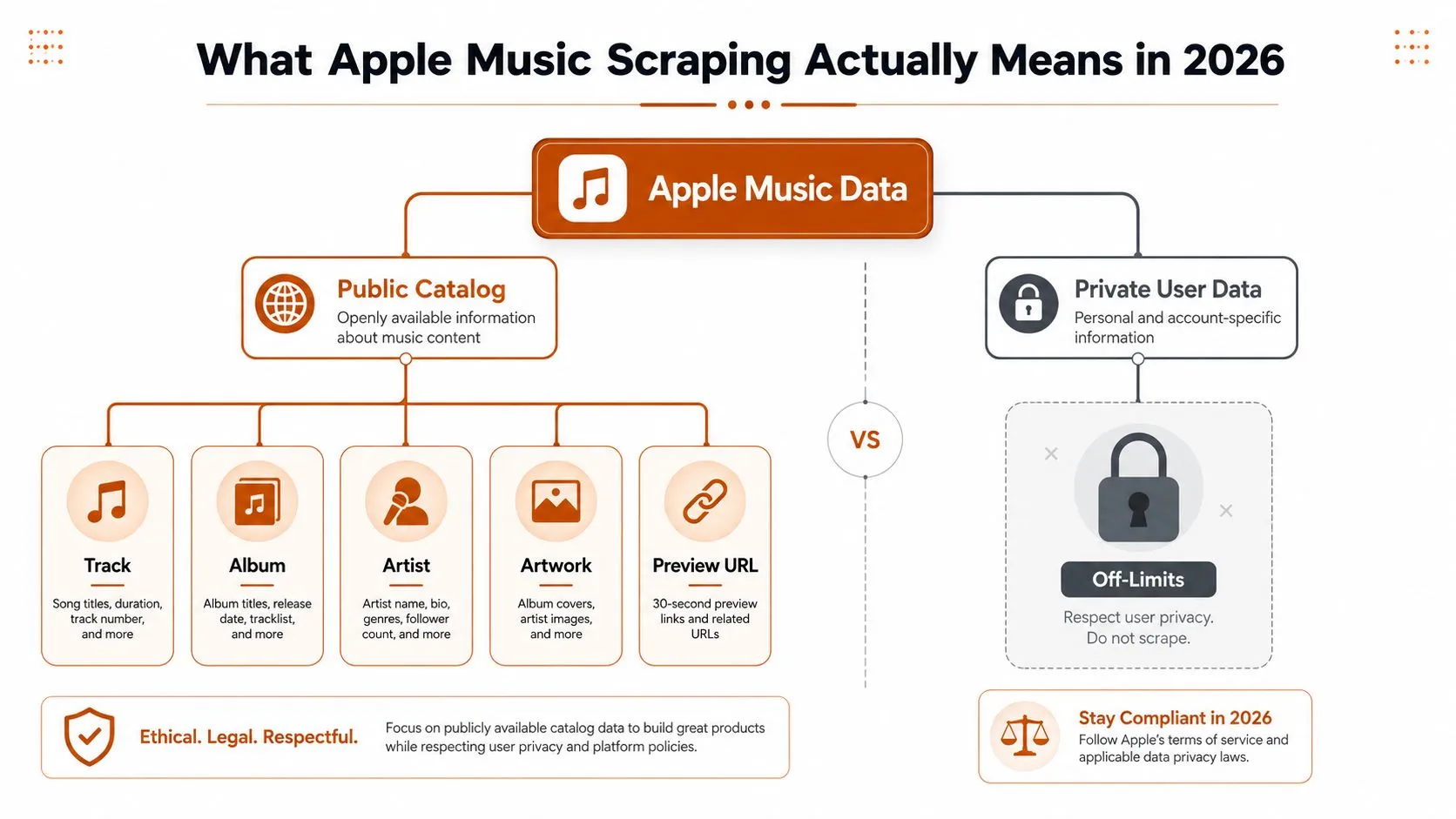
Teams usually start with the same request, they want an apple music scraper that can collect track, album, artist, artwork, preview URL, and storefront availability data without a long engineering project. That’s a legitimate use case. It is not the same thing as downloading audio, accessing account data, or trying to harvest anything that Apple keeps behind authenticated user boundaries.
Apple’s own analytics model makes the same kind of distinction between public, measurable events and restricted behavior. Its reporting centers on Plays, which Apple defines as playback initiated in Apple Music for more than 30 seconds, and also includes Average Daily Listeners, Purchases, Shazam Count, Radio Spins, Milestones, and Video Views. Apple says Radio Spins are tracked across more than 40,000 terrestrial and digital radio stations worldwide, which is a good reminder that Apple Music data exists across multiple surfaces, not just one consumer page. The platform is built for multi-channel measurement, not a simplistic stream counter. See Apple’s analytics documentation for the exact definitions and reporting surfaces in the Apple Music analytics guide.
The scope boundary that keeps projects sane
The cleanest way to think about an Apple Music extraction job is to separate public catalog metadata from everything else. Public catalog metadata is the material you can reasonably monitor at scale, things like titles, artists, artwork, storefront-specific availability, and preview links. Anything involving user accounts, personal listening history, or audio access needs a different conversation and a stricter review process.
That distinction is also why source selection matters. If the need is recurring catalog monitoring, a data-sourcing process that favors clearly defined public fields is easier to govern than a scrape-first approach that tries to infer too much from rendered pages. The 2026 data sourcing complete guide is useful here because it frames sourcing as a workflow problem, not just a tooling choice.
Practical rule: if you can get the field from Apple’s public catalog surface or sanctioned analytics surface, start there before you reach for a browser.
Apple’s public tooling supports that mindset. The internal Apple Music analytics API returns aggregated, anonymized counts of listeners and plays, and Apple Music Replay builds yearly summaries from listening history, play counts, and listening time. That’s useful context even for scraper design, because it shows Apple already differentiates between measurement, aggregation, and user-level history. For a related contrast between API access and scraping, this web scraping vs API guide is a solid reference point.
API-First vs Browser-Rendered Extraction
The first architectural decision usually decides the rest of the stack. If the data you need lives in Apple’s public catalog APIs, use those APIs. If the data only appears in the consumer-facing site, then browser-rendered extraction becomes the fallback, not the default.
The API path is straightforward. Apple’s iTunes Search and Lookup endpoints return normalized catalog fields such as track, album, artist, genre, price, preview URL, and storefront country in a machine-friendly format. That makes it a natural fit for bulk catalog collection, monitoring, and repeatable lookups. The browser path can reveal more of the front-end experience, including layouts and localized merchandising, but it also introduces proxy rotation, fingerprint handling, JavaScript execution, and selector breakage. For teams trying to keep costs and failures under control, the API should be the default.
What each path is good at
| Criterion | API-First (iTunes Search/Lookup) | Browser-Rendered Site Scraping |
|---|---|---|
| Stability | High, because the response is normalized | Lower, because markup and selectors change |
| Cost to run | Usually lower | Usually higher, because of rendering and anti-bot overhead |
| Geo handling | Explicit storefront selection | Requires country targeting and browser orchestration |
| Data shape | Clean catalog fields | More flexible page-level context |
| Operational burden | Simpler to monitor | Heavier on proxies, stealth, and retries |
| Best use case | Catalog monitoring and bulk lookup | Page-only content and localized front-end details |
The API-first collaboration playbook is a useful mindset shift if your team still treats scraping as the default. The point isn’t ideological purity. It’s reducing moving parts when a public endpoint already gives you the normalized data you need.
API-first is boring in the best possible way. It’s easier to audit, cheaper to scale, and much less likely to collapse because a CSS class changed.
Browser rendering still has its place, but it should be a deliberate escalation. If the requirement includes editorial placements, region-specific merchandising, or other page-only elements, then a browser can earn its keep. For practical front-end extraction patterns, this Puppeteer guide for JavaScript pages is a good technical reference.
Building the Extraction Core
A reliable Apple Music scraper starts with a small set of controlled request inputs, not a pile of ad hoc selectors. On the API side, the core variables are the mode parameter, the query or id field, the country storefront, and a max_results cap. In practice, that means every job should know whether it is searching by artist, album, track, or free-text query before it ever hits the endpoint.
The most important design choice is to keep the request shape explicit. The betterfetch implementation guide describes a typical parameter set of mode for artist, album, track, or search, plus query or id, country, and max_results, with US as the default storefront and 10 as the default result cap. It also notes that storefront variance is a real production issue, because the same query can resolve differently across countries, so the pipeline should pin country codes and persist the source endpoint for auditability. The same guide also flags field sparsity, which means downstream schemas need to tolerate missing prices, ratings, or preview URLs instead of treating them as failures. See the implementation notes in the Apple Music scraper workflow guide.
A practical request pattern
A bulk artist lookup and a keyword search are not the same operation, even if both return JSON. A lookup by ID is precise and repeatable, while a keyword search can expand or contract depending on storefront and catalog coverage. That difference matters when you’re building monitoring jobs or trying to reconcile records across regions.
A simple operational pattern looks like this:
- Choose the mode based on the business question, not convenience.
- Set the storefront explicitly so the same job doesn’t drift across regions.
- Store the raw response before transformation, because that makes later debugging far easier.
- Parse only the fields you need, then keep the rest in a raw payload for traceability.
- Treat empty fields as missing data, not as a failed scrape.
The parsing layer should normalize obvious variants early. Artwork URLs should be preserved as delivered, preview links should be stored separately from metadata fields, and any storefront-specific record should carry the country code used to fetch it. That keeps the record useful when the same title appears in multiple markets.
For teams building out the field extraction layer, this CSS selector guide is relevant if the pipeline ever expands beyond the API and into rendered DOM work.
Keep the raw response, even if you only need four fields today. The day you need to explain a mismatch across storefronts, that payload becomes your best audit artifact.
When Browser-Rendered Scraping Becomes Necessary
The first question is usually simple, even if the answer is not. If the API gives you the catalog fields you need, stay there. Browser-rendered scraping enters the workflow only when the business requirement depends on content that never shows up in the API surface, such as editorial playlists, localized merchandising, or artwork and layout details that live on the consumer site. At that point, the job stops being plain catalog extraction and becomes front-end observation, with all the version drift and compliance pressure that comes with it.
That shift changes the operating model. A browser job is closer to a governed automation run than a normal request-response scrape, because storefront variance, anti-bot friction, and front-end releases can break it without touching the underlying catalog. ScrapingBee’s Apple Music scraper overview covers the browser-rendered path through options such as render_js, stealth_proxy, and country_code, and the practical point is clear. Cache-first or API-first retrieval is easier to keep stable than repeated full-page navigation, because every fresh render reopens you to dynamic selectors and bot checks. See the browser-scraping discussion in ScrapingBee’s Apple Music scraper overview.
A browser job needs tighter controls than an API pull. I usually want JavaScript rendering because Apple Music pages are not static HTML, proxy rotation so one route does not absorb all the traffic, fingerprint handling to reduce obvious automation signatures, country targeting because storefront content changes by region, and caching rules so the same page is not rendered again and again.
Full-page navigation is expensive in every sense. It costs more to run, it creates more selector risk, and it is more sensitive to markup changes than an API call.
The harder trade-off is governance. A rendered workflow creates a larger operational surface, so the pipeline needs strong logging around request type, storefront, render mode, and fallback behavior. That log trail is what lets you separate anti-bot friction from normal catalog variance when a region starts failing or a layout shifts. It also makes the boundary clearer between catalog metadata extraction and anything that touches audio or other restricted surfaces, which is the line teams need to respect rather than blur.
For a related view on front-end validation workflows, the Faberwork LLC success stories page is a useful adjacent read.
Schema Design and Validation Across Storefronts
A scraper that returns a row is not the same as a scraper that returns the right row. Apple Music often exposes different shapes of catalog data by storefront, by endpoint, and sometimes by the exact page flow you hit. A schema that assumes uniformity will pass bad records downstream and hide the difference between a missing optional field and a broken extraction run.
The cleanest design uses two layers. One layer holds the required fields that identify the record, and the other layer holds optional fields that can disappear by storefront or endpoint. That separation makes validation more honest. If a preview URL is missing, the pipeline should treat it as a known gap. If a track ID or artist name is missing, the record should fail because identity is no longer intact.
What belongs in the schema
A practical Apple Music schema usually includes the pieces you need to trust the record later, even after it has moved through several systems.
- Required fields like track ID, track name, artist name, and artwork URL.
- Optional fields like collection name, release date, and preview URL.
- Derived fields such as storefront code, extraction timestamp, and source endpoint.
That split keeps the pipeline readable under failure. Required fields anchor identity. Optional fields add context when Apple Music exposes them. Derived fields make the run auditable, which matters when one storefront returns a slightly different catalog view than another and you need to explain why.
Field sparsity is normal in this work. Catalog extraction across storefronts rarely produces a perfectly filled record every time, and that is not a reason to discard otherwise valid data. The safer pattern is to validate against the schema, flag missing optional values, and keep the raw payload available for troubleshooting. A record with no price or no preview link can still be useful. A record with no identity cannot.
Storefront variance needs to be carried inside the record, not left in the job config. If the same query resolves differently by country, the country code should travel with the data so analysts can compare runs later without guessing which region produced which row. Persist the source endpoint too, because it gives you a cleaner audit trail when one region starts returning a different catalog slice than the others.
For the validation rules themselves, the data validation guide is a useful reference because the check belongs at ingestion time, before bad structure spreads to every consumer.
If a field is optional, the pipeline should accept its absence. If a field is required, the job should fail loudly enough that someone sees it.
Pipeline Integration and Delivery
The hard part is not extracting Apple Music records. It is getting those records into a system that can use them without creating duplicate events, broken mappings, or a pile of partial files. In practice, that means deciding whether the downstream consumer wants CSV, JSON, webhooks, or S3 drops, then shaping delivery around that consumer instead of around whatever is easiest to print in a local test.
Batch jobs usually want CSV or JSON because they can pick up files on a schedule and process them in a controlled way. Event-driven systems want webhooks because they react as soon as a run completes. Data teams often want S3 because it gives them a stable landing zone for warehouse loads, notebooks, and ML pipelines. Each path has trade-offs. File drops are easy to replay, webhooks are faster to consume, and both can create trouble if a retry produces the same business event twice.
A scraper that runs on a schedule should behave like a service. That means per-storefront execution, schema versioning, retries with backoff, and clear rules for what gets overwritten. If Apple changes markup or a storefront starts rate limiting more aggressively, the delivery layer should hold onto the last good output instead of replacing it with partial garbage.
The operating pattern needs to stay boring.
- Scheduled runs keep monitoring on a predictable cadence.
- Per-storefront execution keeps regional differences visible.
- Schema versioning lets older consumers keep working during changes.
- Retries with backoff reduce pressure on the source when failures are transient.
- Alerting thresholds surface broken runs before they spread downstream.
Raw and transformed data should stay separate. Raw records are the recovery path, especially when storefront variance or a selector change creates a bad pull. Transformed records are the product that downstream systems consume. That split makes it possible to reprocess historical runs without asking Apple Music to serve the same view again, which is safer and easier to defend operationally.
The ethical data collection guide is worth reading alongside this because delivery governance only works when collection boundaries are clear from the start.
A scraper is only finished when a downstream consumer can receive the output, trust the schema, and recover cleanly after a failure.
Monitoring, Re-Tuning, and Governance
The first successful Apple Music run is the easiest part. The hard part is keeping the pipeline accurate when storefronts diverge, selectors shift, or an endpoint starts returning incomplete records. A production scraper needs monitoring that watches for success-rate drops, field-completeness regressions, and storefront divergence as separate signals, because each one points to a different class of failure.
Governance is the other half of the job. Every run should leave an audit trail showing which endpoint was used, which storefront was targeted, which schema version processed the record, and which timestamp generated the output. That makes it possible to explain why one pull differs from another without relying on memory or guesswork. It also gives regulated teams a cleaner way to prove that the pipeline stayed inside the agreed scope.
The rule set that keeps pipelines defensible
The compliance boundary is still the same one from the opening section. Public catalog metadata is one thing. Anything that touches audio, account data, or other restricted content is another. If the business need changes, the extraction method should change with it, instead of stretching the old pipeline beyond what it was designed to do.
A sensible governance checklist includes:
- Run-level logging for source, storefront, and schema version.
- Alerting on drift when a field starts disappearing or diverging by region.
- Re-tuning triggers when markup changes or rate limits become visible.
- Retention of raw payloads so bad transformations can be replayed.
- Explicit scope reviews before expanding beyond public catalog data.
The goal is not to make scraping bureaucratic. It’s to make it reliable enough that another team can depend on it without reverse-engineering the code every time an output looks off. That’s what separates a fragile script from a production pipeline.
If you need an Apple Music pipeline that stays dependable after the first run, WebscrapingHQ builds and operates managed extraction systems that handle storefront variance, schema controls, monitoring, and delivery formats like CSV, JSON, webhooks, and S3 drops. Visit WebscrapingHQ to discuss a production-grade workflow for Apple Music catalog monitoring and recurring data delivery.
Want this done for you?
Send us the URLs. We'll quote it in 24 hours.
Paste the URL(s) you want scraped. We'll reply within 24 hours with a feasibility check and a ballpark quote.